
You can use a match table in your Data Model to replace short codes in your links with the readable names that appear in your reports. Users who see your tracking URLs then see only the code, not the plaintext name of your campaign.
With Piano Analytics, there is no longer a system of IDs and declarations, which keeps the setup of campaigns simple. Your tracking URLs now look like this:
https://www.site.com/?at_medium=sourcename&at_campaign=campaignname
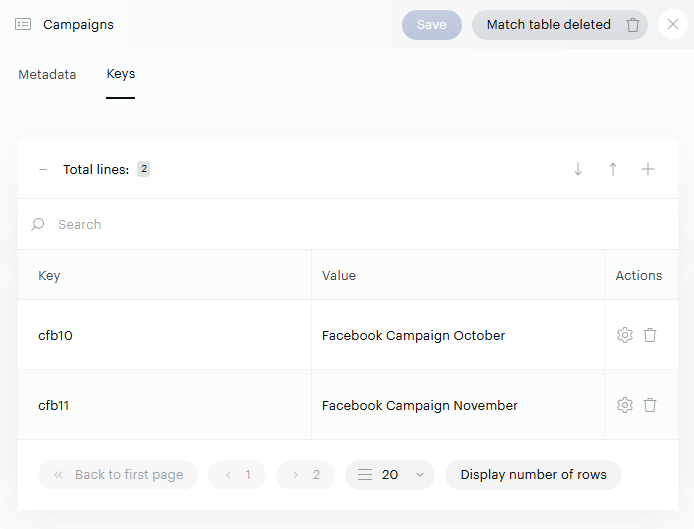
If you don't want users to see the plaintext of your campaigns, replace the name with a code in the link. A match table converts the code into a label in the interfaces:
|
In the tracking URL |
Label in the interfaces |
|---|---|
|
|
Facebook Campaign October |
Warning: Match tables aren't retroactive: they only apply to data collected after you create them. Use this method only if you can update the match table before your campaigns are released. You also need to maintain the match table for each new campaign.
Set up a match table
-
In your Data Model, create a match table. Add one row per campaign, with the code as the key and the label as the value.
-
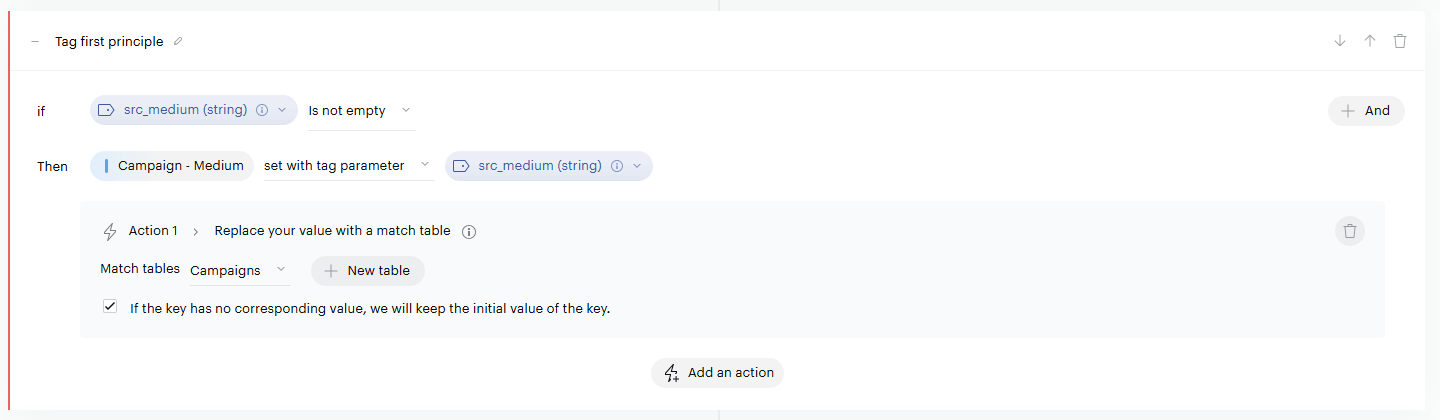
Open the Campaign - Name property and go to its Processing.
-
Click Add an action > Replace: Match tables to the Tag first principle, then select the match table you created.
-
Save and deploy your rule.