
Currently, the dashboard tab and this ad ops functionality is only available to users with CPM products available to them. This will soon be expanded to include all products and campaign types.
Our ad-ops screens make managing campaigns easier. From these screens, it's only a few quick clicks to keep track of campaigns and adjust them wherever necessary to achieve a better overall advertising performance, whether that be in terms of CTR, impressions or just advertising spend.
What we've done is split up your campaigns into three screens based on their contracts:
-
Running: all the CPM campaigns that are currently contracted to be live
-
Pending: all the CPM campaigns that are contracted to go live in the future or have no contracts
-
Past: all the CPM campaigns that have ended in the last 30 days.
A single campaign can be represented multiple times on these pages. That's because each campaign can have multiple contracts, one of which might be running and another pending, for example.
These views have also been designed to show different data based on what you'll want to see for campaigns that are running, pending or past. But viewing data isn't the only thing you'll be able to do from these screens: you'll also be able to update contract information directly in the page.
Running Campaigns

This lists all the CPM campaigns that are contracted to be live. Here's a summary of the example above:
-
The Wall Street Journal campaign is currently paused, which is probably because it has been greatly over-delivering – something that the velocity column lets you know. Either reducing the contract's priority or applying some smoothing would reduce the contract's velocity and get things back to normal.
-
The Atlantic Montly campaign is not delivering at the moment despite being contracted. This will be due to an ad or creative having been deleted on the campaign. That's not too big of a problem, though: the campaign had been over-delivering and its lack of delivery now is probably helping matters return back to normal. Nonetheless, it's probably wiser to add the missing creative or advertisement to the campaign and then pause the contract. Alternatively, you could reduce the priority of the contract or apply smoothing.
-
The Age campaign is currently live and is also over-delivering. Either reducing the contract's priority or applying some smoothing would probably reduce your velocity and help matters along.
-
The New York Times campaign is currently live and under-delivering, but not as much as the other campaigns are over-delivering. Increasing the priority on the contract should help to make up for the shortfall.
More information about the column data is available. More specific information about what the velocity and status represents is also available.
Editing a Running Campaign's Contract
Let's say you want to lower the priority of The Age campaign. That's super easy and can be done in the page. Just hover your mouse over the row and click to expand the details, as shown here:
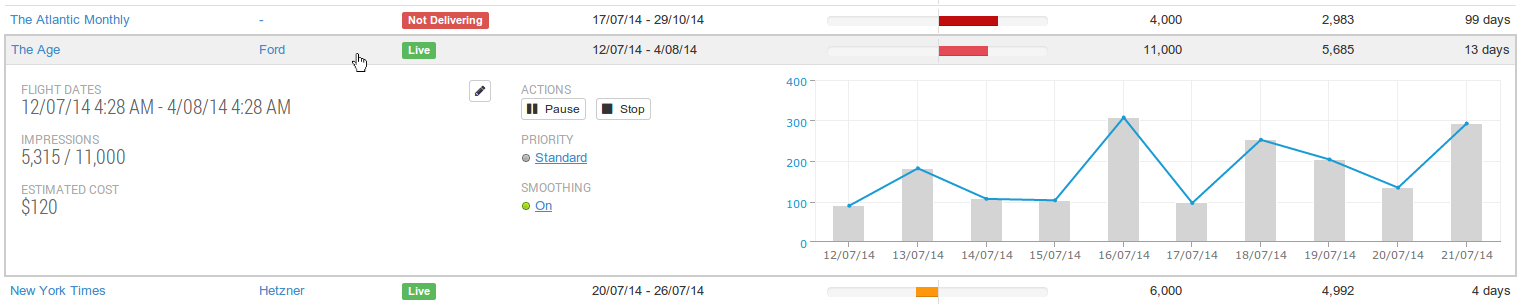
Once the entry is expanded, you can click on the priority field and update that instantly.
Alternatively, you could pause or stop the contract. Turning smoothing off is also an option.
But maybe you're better off taking advantage of The Age campaign's over-delivery, so it might be worthwhile to just increase its booked impressions. You can increase the booked impressions, as well as update the contract's flight dates and running cost, by clicking on the pencil icon. Here's what you'll be presented with if you do click on the pencil icon:
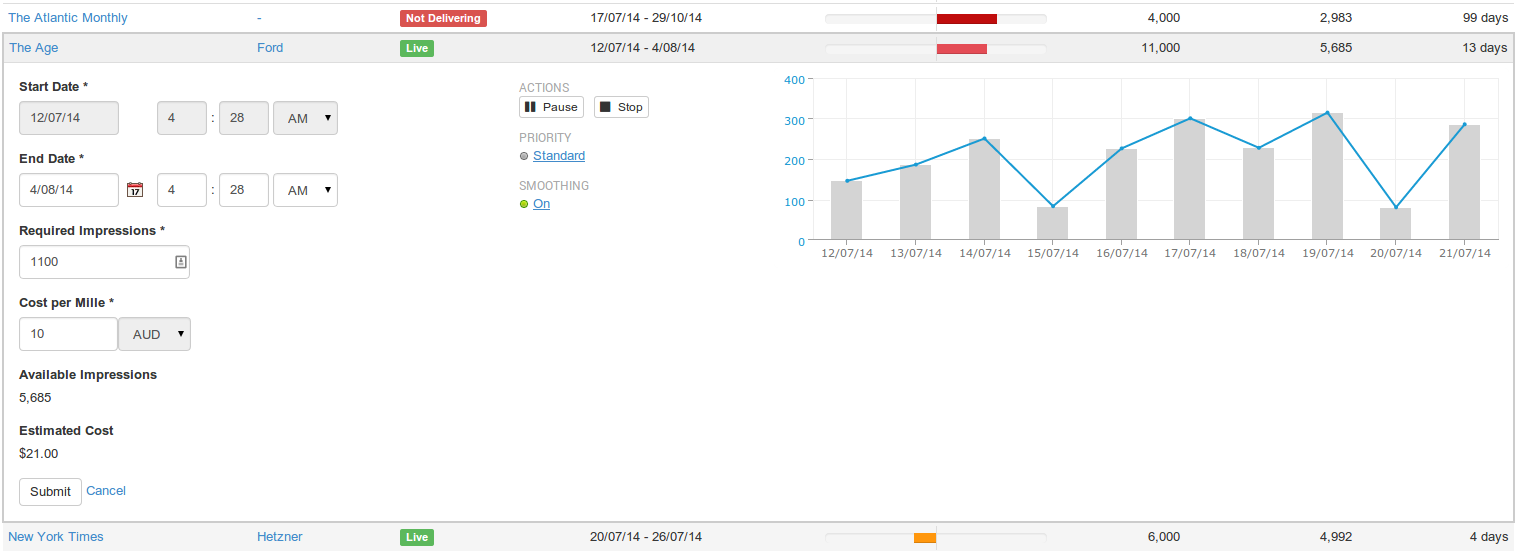
From the screen above, you can update the figures as you see fit, hit submit, and you will have updated your contract as neatly as that.
Pending Campaigns
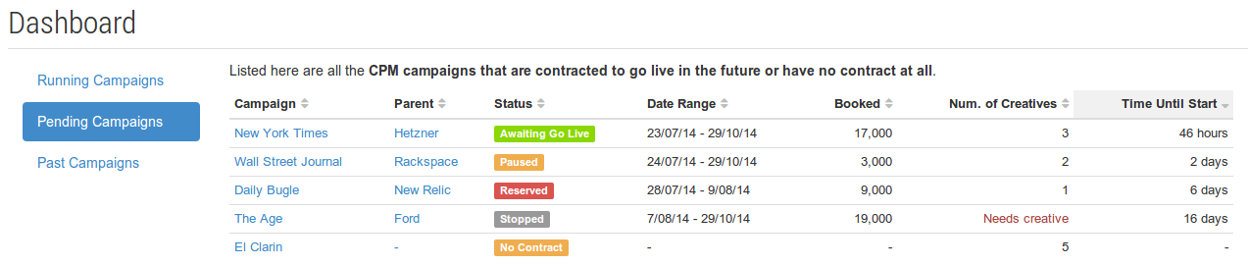
This view lists all the CPM campaigns that are contracted to go live in the future or have no contract at all. Here's a summary of the example above:
-
The New York Times campaign is awaiting to go live, meaning everything is ready to go and the campaign will start delivering from the 23/7/2014.
-
The Wall Street Journal campaign is paused, which means that when the 24/7/2014 comes around, it won't be delivering any ads.
-
The Daily Bugle campaign is reserved, which means that the campaign won't be delivering from the 28/7/2014 as the contract stipulates, and something is not right – generally a required advertisement has been deleted – with the campaign.
-
The Age campaign has been stopped, and the campaign needs a creative if it's to go live and deliver impressions on the 7/8/2014.
-
The El Clarin campaign has no contract at all despite 5 creatives having been uploaded.
More information about the column data is available. More specific information about what the velocity and status represents is also available.
Editing a Pending Campaign's Contract, or Adding a New Contract Entirely
Editing a contract or adding a new one can be initiated in exactly the same way: by clicking on a row in the table.
An example of editing a contract is displayed in the Running Campaigns section above.
To add a contract to an already existing campaign, you'll need to find a campaign that doesn't already have a contract. In the example above, that's the El Clarin campaign. Here's what happens when you click on the El Clarin row:
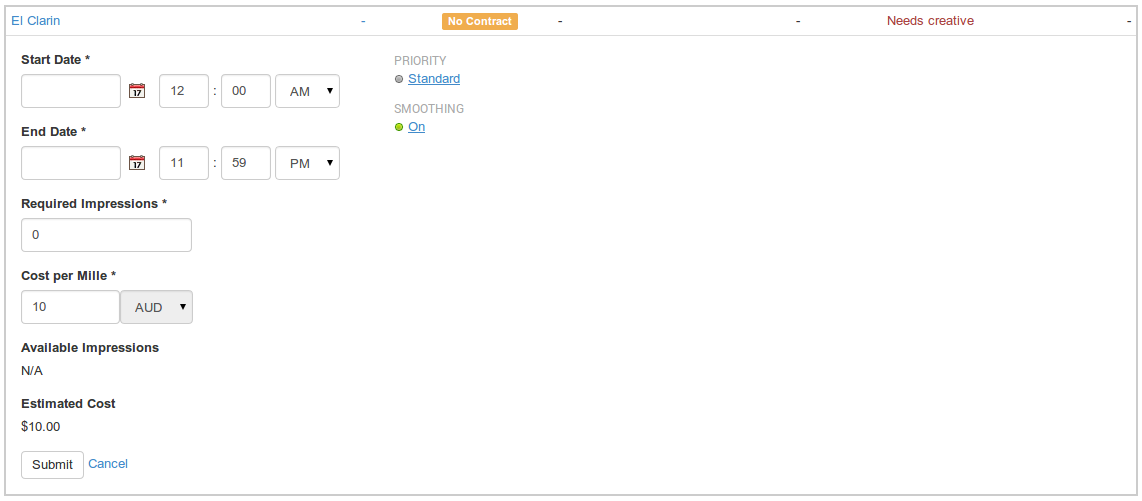
Submit the form with some appropriate values and you will have created a contract for the El Clarin campaign, which will end up looking something like the following:
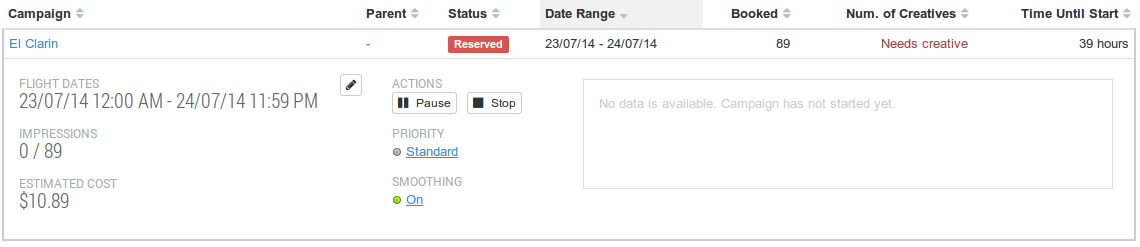
To add a creative, which the campaign is now missing, you'll need to click directly on the text link populated with the campaign's name, "El Clarin". This will take you to the standard Campaign page.
Past Campaigns

The view of past campaigns lists all the CPM campaigns whose contracts have ended in the last 30 days. Here's a summary of the example above:
-
The Daily Bugle campaign was paused, which probably explains its under-delivery, falling 6,021 impressions short of the 9,000 that were booked.
-
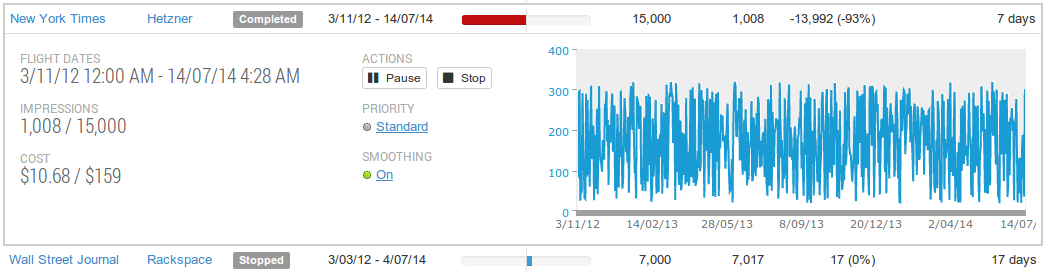
The New York Times campaign was delivering until its contracted end date. Nonetheless, it greatly under-delivered, falling 12,514 impressions short of the 15,000 goal.
-
The Wall Street Journal campaign was stopped, and that was a good thing to do. The campaign over-delivered, but only by 17 impressions. The campaign would have probably over-delivered to a greater degree if it hadn't been stopped.
More information about the column data is available. More specific information about what the velocity and status represents is also available.
Viewing More Detail on a Past Campaign's Contract
To see more detail on a past campaign's contract, just click on the row. Once you do that, you'll be presented with the following:
Additional Ad-Ops Documentation
Statuses on the Ad-Ops Screens
The statuses on the ad-ops screens act as a quick snapshot of the current state of the campaign or contract.
The Table Columns on the Ad-Ops Screens
Here's a breakdown of what all the data means in the tables on the ad-ops screens.
Velocity on the Ad-Ops Screens
Velocity is a measure of the degree to which a campaign is delivering its contracted impressions to schedule.