The purpose of this page is to clarify how the cXense Javascript ad-tags can be implemented to web pages, so that ads booked with Cxense Advertising can be displayed in an adspace.
Three alternatives
There are three alternatives to how a publisher can implement the ad tags. All have their pros and cons, and below is a short presentation on each of them.
|
Alternative |
Description |
Pros |
Cons |
|---|---|---|---|
|
Cxense Advertising with 3rd party templates |
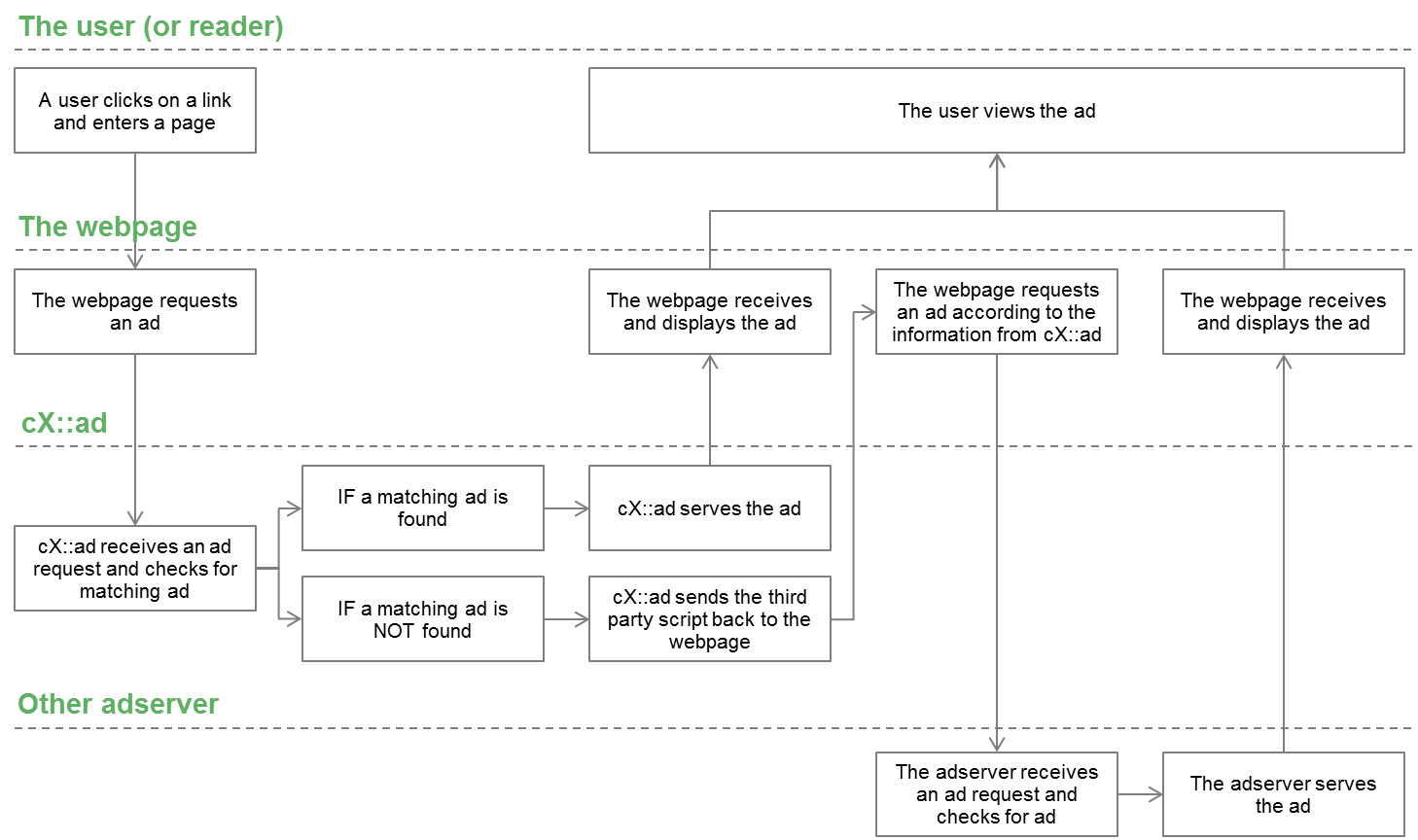
Our recommended solution. Only the cXense ad-tag is inserted onto the page (i.e. It replaces any existing tags). When a request is sent to Cxense Advertising, Cxense Advertising will return an ad directly if a matching ad exists in Cxense Advertising. If there is no ad that matches the request, Cxense Advertising sends back the third party ad-tag, so that the same request can be forwarded to the other adserver. If we currently do not support the third party ad-tag, this can easily be added. |
|
|
Tag-in-tag |
Our back-up solution. Two ad-tags (javascript) are inserted onto every page, one inside the other with an "onImpressionResult(event)" handler. This means that the current adscript should be inserted inside the cXense tag, and everytime a request is sent and Cxense Advertising returns no ads, the same request will be forwarded to the other adserver. See here for detailed information (see "Backfill with ads from a different ad system"). |
|
|
Current adserver with cX 3rd party creatives |
The least beneficial solution. The current ad-tag is kept on the page. When a request is sent to the ad-tag, and there is no ad matching in the current adserver, then the request is sent to Cxense Advertising. |
|
|
A customer blueprint using our recommended solution