

Third-Party Templates are used to define which third-party ad systems are able to be added against a Campaign or Advertisement. For a list of our currently supported Third-Party systems please refer to the Third-Party Creative page.
Editing template details
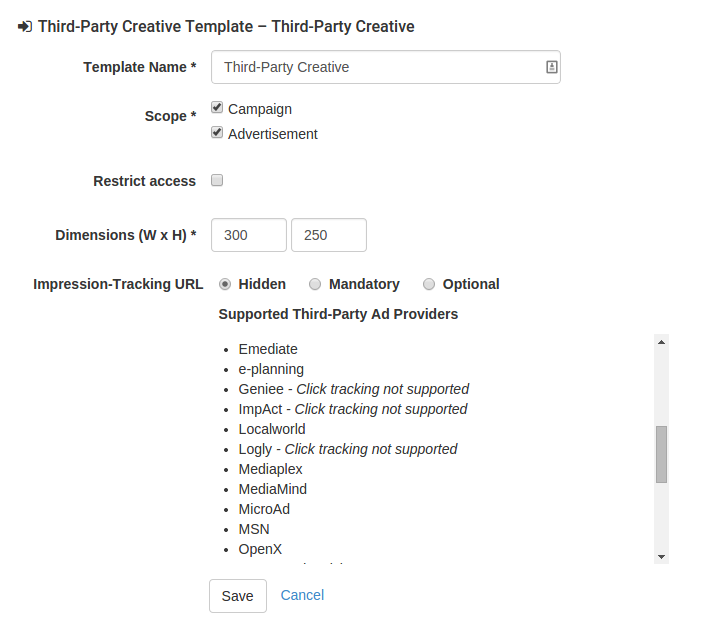
When adding a new template for a Third-Party Creative a form similar to the one above will be displayed. Each field available is described in the table below.
For fields that show options for Hidden, Mandatory, Optional the effect of selection is the same and is described below:
-
Hidden: This will not present the field for collection.
-
Mandatory: The field will be presented and must be filled in for the creative to be saved.
-
Optional: The field will be presented, but does not have to be entered.
|
Template Name |
When multiple templates are added against the one product this name will be displayed in the tab shown to the person adding a Third-Party Creative feature. |
|---|---|
|
Scope |
Check whether to allow collection at a Campaign and/or Advertisement level. |
|
Dimensions (W x H) |
It will be used by the AdServer to determine suitability for presentation against an AdSpace. This will indicate the size of the eventual creative that is linked to through the third-party system. It is important to ensure that all creatives will be rendered at the same dimension. |
|
Third Parties |
This is the list of third parties that this template will be restricted to. If the dimensions of each of the creatives linked to are different then add multiple templates to the product. |
|
Impression-Tracking URL |
For more details please see the impression-tracking URL page. Do note, however, that it shouldn't be necessary for there to be a separate impression-tracking URL for an ad that comes from the same third-party service, i.e. if there's an ad from DoubleClick being used, a separate impression-tracking URL from DoubleClick should not be necessary. |
Updating existing templates
At any time you are able to update existing templates. When saving we check existing Third-Party Creative features that are saved against this template. If the changes cause any existing features to become invalid the action is prevented.
Types of changes that generally succeed
-
Making a mandatory field optional
-
Changing the template name
Types of changes that usually fail
In some cases the following changes will save correctly depending on what is already in the system.
-
Decreasing the length maximum or increasing the minimum
-
Making a mandatory field hidden. There will be features in the system that have the detail populated so we can not ignore this data.