
There are currently 2 available email service providers for notifications that are being sent via Email Manager.
Amazon SES (Simple Email Service) verification
In order for Piano to send emails that appear to originate from your domain, you will need to set up SPF and DKIM email authentication mechanisms by going to Manage → Email manager → Verify.
In addition, you will be prompted to verify your email address or add a TXT record to your DNS.
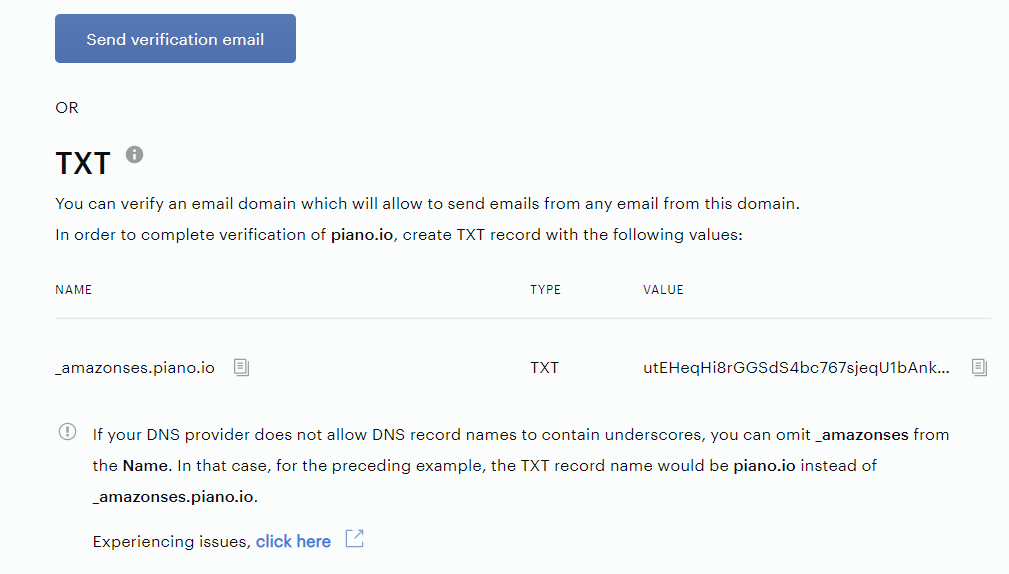
Using the option Send verification email we can verify only a specific email address. If you change your Support Email, you need to complete the verification of this email address again.
The email should be sent with the subject "Amazon Web Services – Email Address Verification Request <CLIENT'S_AWS_REGION>".
The verification by TXT means, that you can send emails via any email address with the verified domain. For the TXT verification, you should add a TXT record with the value from the form on your DNS. The TXT entry must be set at domain level.
Please note, that some DNS providers automatically append the domain name to DNS record names. To avoid duplication of the domain name, you can add a period (.) to the end of the domain name in the DNS record, or omit the domain from the record name.
To complete the DKIM verification, you need to create all three records for CNAME with the value from the Email Manager form in your DNS.
Please note, that the DKIM record needs to contain the text _domainkey in its hostname. A small number of DNS providers don't allow you to include underscores (_) in record names. If your DNS provider doesn't allow you to enter an underscore in the record name, contact the DNS provider's support team for assistance.
Please also make sure to also validate your TXT, SPF, or DKIM records for proper syntax using one of the online tools available in case any syntax or validation errors are shown.
To complete the SPF setup, the publisher should add a TXT record with the SPF information, if such a record doesn’t exist yet. If such a record already exists, you should add include:amazonses.com before the ~all statement.
Please note, that it may take up to 20 minutes before the SES verification or a test of the DKIM record is successful if you've updated your DNS records as per the above.
We will use your application's business name (configured under Edit Business) as the sender name when sending emails using Amazon SES. If you'd like to change your sender name, please reach out to support@piano.io and we will update this for you.
When you use a CNAME-d domain for emails, you will need to set the TXT and DKIM records to the CNAME-d domain (e.g. https://website.com/), and the SPF record must be set to the canonical domain (e.g. https://123456.proxy.com/).
Piano also supports BIMI (Brand Indicators for Message Identification) which is a new technology that allows email domains to display a verified logo next to emails sent from their domain in the recipient's inbox. The aim is to enhance the deliverability and authenticity of emails, as well as improve the overall sender's reputation by using a trusted logo for the email sender. How to implement this is described here. There is no further setup for BIMI on Piano's end needed, the configuration needs to be updated on your DNS records directly and you're responsible for registering the appropriate logo.
Mandrill verification
In order for Piano to send emails that appear to originate from your domain, you will need to verify your sending domain and configure SPF and DKIM email authentication in DNS. This helps receivers trust your mail, improves deliverability, and reduces the likelihood of messages being flagged as spam.
Domain enablement typically involves:
-
Domain verification via email (Mandrill confirms you control the domain)
-
DNS authentication records (SPF and DKIM) added to your domain's DNS
-
Waiting for DNS propagation, then confirming status in Email Manager
When you first attempt to send emails from an address on your domain, Mandrill sends a verification email containing a Verify Your Domain link. Navigate to Manage → Email Manager and click Verify to begin.
-
Click Send verification email. You should receive an email at the configured email address on your domain.
-
Forward the verification link in the email to support@piano.io to confirm ownership and complete the verification process.
-
If you did not request this verification, you can safely ignore the email.
DKIM (DomainKeys Identified Mail) allows receiving mail servers to validate that messages were authorized by your domain and not altered in transit.
To enable DKIM, which increases email deliverability, create a TXT record for mandrill._domainkey.YOUR.DOMAIN (e.g. mandrill._domainkey.example.com) with the following value:
v=DKIM1; k=rsa; p=MIGfMA0GCSqGSIb3DQEBAQUAA4GNADCBiQKBgQCrLHiExVd55zd/IQ/J/mRwSRMAocV/hMB3jXwaHH36d9NaVynQFYV8NaWi69c1veUtRzGt7yAioXqLj7Z4TeEUoOLgrKsn8YnckGs9i3B3tVFB+Ch/4mPhXWiNfNdynHWBcPcbJ8kjEQ2U8y78dHZj1YeRXXVvWob2OaKynO8/lQIDAQAB;
Please note, that the DKIM record needs to contain the text _domainkey in its hostname. A small number of DNS providers don't allow you to include underscores (_) in record names. If your DNS provider doesn't allow you to enter an underscore in the record name, contact the DNS provider's support team for assistance.
SPF (Sender Policy Framework) declares which systems are allowed to send mail for your domain. Add or update a TXT record for your domain (root/apex, depending on your DNS provider).
If you don't yet have a TXT record for SPF yet, a minimal one should state:
v=spf1 include:spf.mandrillapp.com ?all
If you already have a TXT record with SPF information, just update that record by adding include:spf.mandrillapp.com token before the last operator, which is usually ?all, ~all, or -all.
If your domain already has an SPF record, you should merge requirements into a single SPF record. Having multiple SPF TXT records can cause SPF to fail.
SPF lookup limit (common issue): SPF evaluation is limited to 10 DNS lookups. If your SPF includes many include: mechanisms, you may exceed this limit and cause authentication failures. If you hit the lookup limit:
-
Remove unnecessary
include:entries, or -
Flatten SPF (replace includes with the underlying IP ranges) to reduce DNS lookups
DNS updates are not instantaneous. After adding or updating SPF/DKIM records, allow time for changes to propagate (often 20 minutes or longer, depending on TTL and provider).
Note that if DKIM or SPF records are not configured, emails can still be sent, but their deliverability may be affected. As a result, they may be more likely to land in the Spam folder.
Please also make sure to validate your SPF and DKIM records using one of the available online validation tools to ensure there are no syntax or configuration errors.
Once the verification email step is completed and the SPF/DKIM records are correctly published in DNS, your domain should be fully verified for sending emails through Mandrill with Piano Email Manager.
If the domain itself does not change, there is no need to repeat the verification process after it has been successfully completed.
For example, changing the sender address from support@news.com to help@news.com can be done directly in the Edit Business section without requiring any additional action on your or our side.