
Term Types
Payment
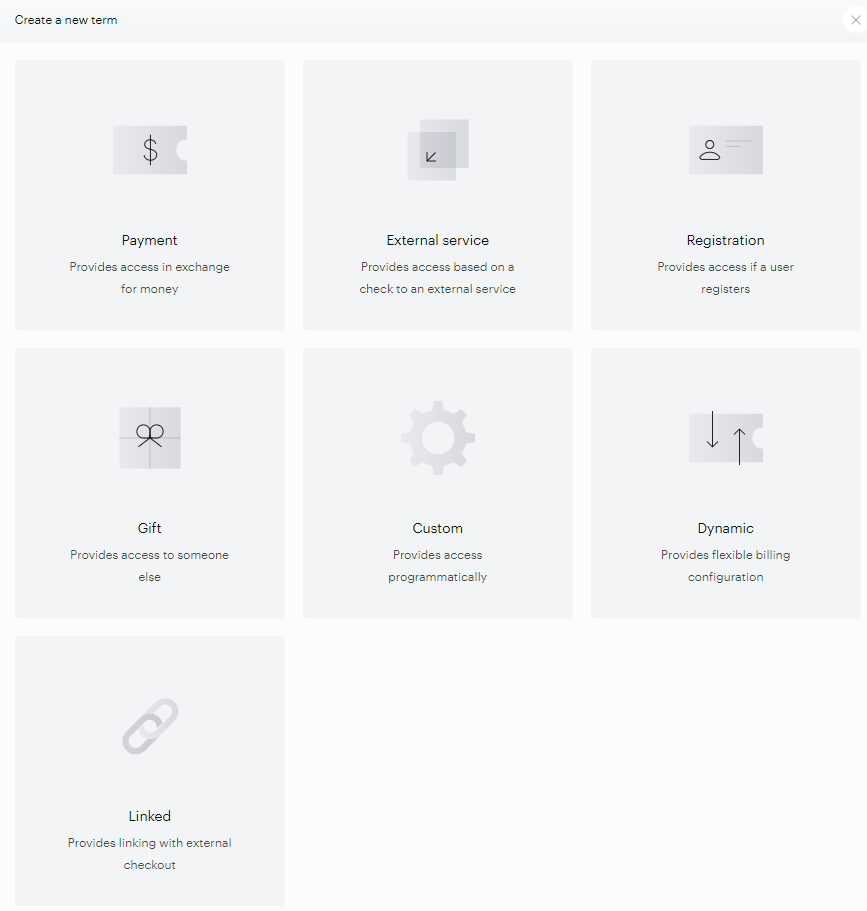
If you’re asking visitors to pay, the payment term page will allow you to set pricing details and the access duration. It can be set up as a recurring, subscription-style payment or for a single fixed period. Recurring configurations support trial periods, free trial periods, and grace periods. It even allows, if you so decide, for customers to pay above your asking price — a useful feature for NPR-style fundraising drives.
Please note, that any single billing period — a billing plan, trial, access period — can run for up to 3 years. For more details, see Billing periods and the 3-year guideline.
Dynamic
The dynamic term empowers clients to create tailored subscription experiences, offering unprecedented control over access periods and billing schedules. With its user-friendly interface and comprehensive features, the dynamic term is a game-changer in subscription management.
Please note, that any single billing period — a billing plan, trial, access period — can run for up to 3 years. For more details, see Billing periods and the 3-year guideline.
Registration
Trading access to content for registrations is a great way to collect valuable intelligence on your audience. A registration term provides users with definable limited content/features access in exchange for users’ personal data (email address, name, etc…) with no payment. Registration terms are used for converting users and collecting analytics.
Registration terms are most often used to grant unlimited access, but they can also be used to give time-limited access to specific resources.
Gift
Gift terms let your customers promote your content by gifting it to others. Recipients get a personalized message from the purchaser and a link to a redemption page where they claim access instantly. This generates organic subscriber growth, particularly during the holidays. See here for a step-by-step guide to creating a gifting offer.
Gift terms are Piano's voucher-based gifting mechanism, and they are time-limited and non-renewing by design
For gifts that renew on the gifter's payment method, see Renewable gifting, or compare the two approaches.
External Service
The externally verified term allows you to check entitlements in an external system (such as a database of your current broadcast or print customers) in order to grant access inside of Piano. For this type of term, you’ll need to ask a Piano representative to enable your account for a third-party API of your choosing.
Custom
Custom terms can be used to grant access when a user completes an event outside of Piano. Say you have a conference where you hand out fliers with QR codes granting trial access to your site. If you have a system for recognizing those QR codes validity, you could use a custom term to grant access within Piano. To do so, you would use the /publisher/conversion/custom/create API endpoint.
Access Granted
A special type of term, that can't be created manually but is created automatically for each Resouce if at least one user has been given free access to this resource via the Grant Access feature.
This term type is available in the Term type filter of the Access Report or in the Mine User search criteria.
Subscription Linking
Subscription linking (formerly known as Linked terms) seamlessly integrates third-party subscription management systems or checkouts with Piano's robust functionality. Tailored to meet the diverse needs of clients seeking alternative solutions beyond Management + Billing's capabilities, subscription linking offers a bridge between external systems and Piano's core features.
Subscription linking is a paid add-on feature. Please reach out to our Piano Account representative for more information about pricing for this solution.
Creating Terms
Terms can be created via the dashboard menu under Manage → Terms.
Term names can contain up to 100 characters. If you enter a name longer than 100 characters, the term is still created, but the name is automatically truncated to the first 100 characters.
Or, after you've created a resource, you can hit the "Terms" tab from the resource page to automatically bind a term to that resource. At that point, you will be able to select which type of term suits your needs. From there on, the options available depend on which of the terms above you’ve chosen.
The maximum number of terms that can be created is 2,000. This limit exists because terms are not designed for very large-scale use.
For example, in cases where a client wants to sell access to individual articles (a pay-per-view model), a separate term may be needed for each article, which can quickly increase the total number of terms.
Exceeding the intended scale can lead to issues such as slower system performance, reduced responsiveness, and terms above the limit not displaying correctly in the Composer interface.
Keep in mind that, if you are doing a promotion, you will have to enable promotions on the selected terms in order to connect your promotion to that term. Also, keep in mind that term-specific emails can be configured from within the term interface. Each term-specific notification needs to be localized separately, even if the main email notification under the Email Manager was already translated.
Note that Specific email addresses and Email domain contract term types can be created via the Piano dashboard menu under Manage → Site Licenses. More information about this is available under the following link.