
Each social account has its own settings page in Socialflow where you can customize Publishing Limits.
Navigate to Settings → Application → Social Accounts and click on the blue pencil icon next to the social account.
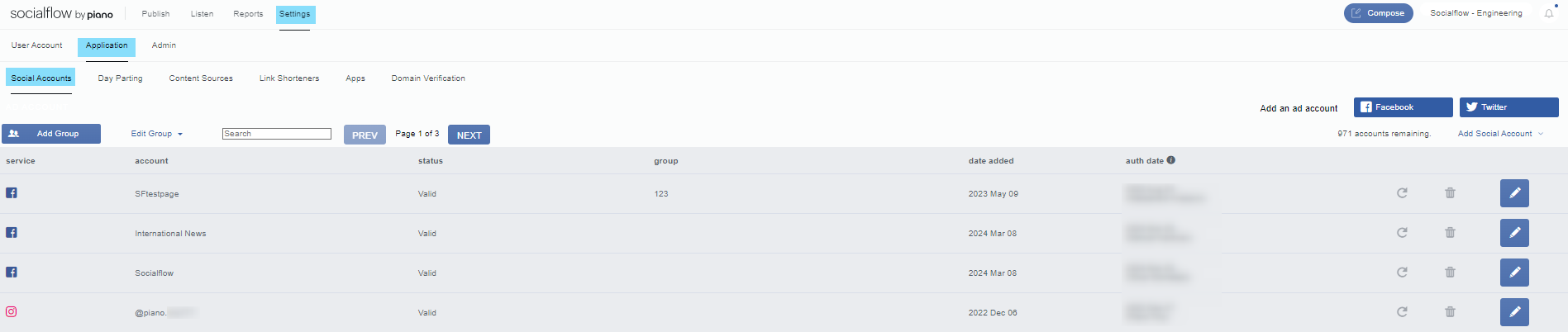
Once you land on the Settings page, scroll halfway down to find the Publishing Limits section.
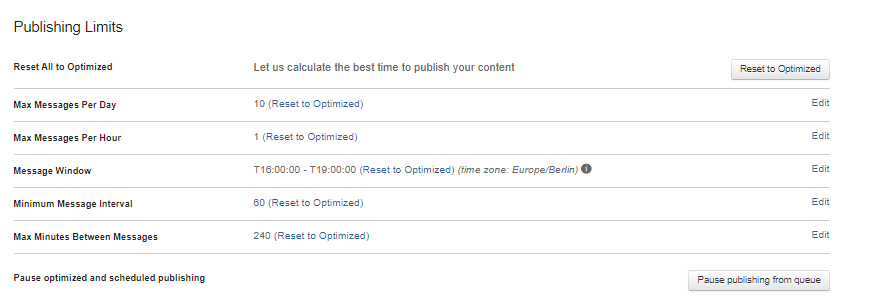
Publishing limits allow each social account to have its own rules and cadence for publishing content. Here are the settings defined:
-
Reset All to Optimized - This option allows you to set publishing limits back to the general Optimized setting, and lets our algorithm calculate the best time to publish your content.
-
Max Messages Per Day - A limit on the total number of messages allowed to publish via Socialflow in one day (optimize defaults to 100 messages / day). This total will include your scheduled content and publish now content as well as what is optimized.
-
Max Messages Per Hour - A limit on the total number of messages allowed to publish via Socialflow in one hour (optimize defaults to 5 messages / hour) This total will include your scheduled content and publish now content as well as what is optimized.
-
Message Window - The overall window of time during which messages can publish (leave on default if the account publishes 24 hours a day).
-
Minimum Message Interval - The minimum number of minutes that must elapse between messages (optimize defaults to 20 minutes). The timer will start from the last message published.
-
Max Minutes Between Messages - The maximum number of minutes before a potential optimized message publishes (optimize defaults to 720 minutes) The timer will start from the last message published.
-
Pause optimized and scheduled publishing - This Pause Publishing button at the bottom of the settings will pause all messages from being published from the queue. This is an emergency feature to stop anything from going live during breaking news or other similar event.
Note: While these settings take into account all messages, a Scheduled post will always publish at the scheduled time, a Publish Now message will never be prevented from publishing, and a 'Must Send’ message can override the rules if needed.
Here's an example use case:
Max Messages per Day set to 20
If you have in the queue-
-
10 scheduled items for the day
-
2 posts sent as publish now that day
-
5 optimized must sends for the day
-
5 optimized can sends for the week
The 10 scheduled items will publish at their set times.
The 2 publish now messages will go out immediately.
The 5 optimized Must Sends will publish during or by the end of their windows (make sure the end times are not matching!)
Only 3 Optimized Can Sends will publish to meet the limit of 20 posts per day. The remaining 2 Optimized Can Sends will wait until the next day.
This is why we recommend using all publishing types, including Optimized Can Send for low priority content that can help you reach a full volume of publishing and not go over. It gives you room for breaking news and other unexpected events on busy days, and fills in the gaps on slower days.