
Configuring existing application templates to receive the latest address collection flows for gifts
*For existing applications - to update your templates to reflect both address collection options for gifting after July 28, 2022, you will have one of two options:*
1. ONLY if you have default templates, you will need to revert the following templates (please note these are not instructions for custom templates)
-
Checkout Components
-
Print address collect screen
-
Redemption Components
How to revert templates:
-
In Publisher Dashboard, within the Manage dropdown menu, click on Templates
-
Click on the “Revert templates” icon in the right top corner (to the left of the "Add Template" button)
-
In the modal, check “Checkout Components”, “Print address collect screen” and “Redemption Components”
-
Click on the “Revert” button
-
Confirm reverting by clicking on the “Revert” button
2. Custom templates have to be edited manually as reverting them back to the default state will delete all custom code.
How to edit custom templates for gift address collection:
-
Within the manage dropdown menu, click on Templates
-
Click on the “System” tab in the left sidebar
-
In the “System” section click on the template you are going to edit
-
In the “Template manager” click on the “Edit code” icon. You will see the editor with the current template’s code version
-
Paste needed changes (below are all the necessary code changes for the appropriate templates). After changes are made, you will see “You have unsaved changes” with the “DISCARD” and “SAVE” buttons at the top of the screen.
-
Click on the “Save” button to automatically save and publish your changes, or click on the arrow icon on the right side of the button to “Save as new version”
-
In the modal, click “Save” again.
-
If you selected the “Save as new version” option on step 6, you need to click on the “Publish” button to publish your new version with the latest changes.
Code changes in Checkout Components
Replace
<ul class="errors">
            <li ng-repeat="error in errors" ng-class="{'one-error': hasOneError(), 'bullet-item': !hasOneError()}">
                {{error.fieldTitle}}
                {{error.message}}
            </li>
</ul>
With the below
<ul class="errors">
            <li ng-repeat="error in errors" ng-class="{'one-error': hasOneError(), 'bullet-item': !hasOneError()}">
              {{error.fieldTitle | tc:"checkout.platform"}}
              {{error.message | tc:"checkout.platform"}}
            </li>
        </ul>
Also replace (optional)
<script type="text/ng-template" id="/widget/checkout/component/partials/gift-redemption-receipt-component.html">
    <h1 class="you-already-have-access">
        <t>You now have access to <span class="bold resource-name">{{app.name}} - {{voucher.resource.name}}</span></t>
        <span ng-show="input.sharedAccounts.length > 0">
            <t>for you and up to {{input.sharedAccounts.length}} others.</t>
        </span>
        <div ng-show="input.sharedAccounts.length > 0">
            <t context="checkout.platform">You can modify your shared subscription membership at any time.</t>
        </div>
    </h1>
</script>
With the below
<script type="text/ng-template" id="/widget/checkout/component/partials/gift-redemption-receipt-component.html">
<div class="you-already-have-access">
<h1 class="success-redeem-header">
<t>Thanks for redeeming your gift!</t>
</h1>
<div class="success-redeem-description-container">
<span class="access-to-description">
<t>You now have access to</t>
</span>
<span class="term-and-resource-name">
{{ selectedTerm.name }}
<span> - </span>
{{ voucher.resource.name }}
</span>
</div>
</div>
</script>
Changes in Redemption Components
Remove
<span ng-show="redeemCodeIsInvalid()" class="redeem-code-input-error">
            {{redeemCodeErrorMessage()}}
</span>
From the below
<script type="text/ng-template" id="/widget/checkout/component/partials/redeem-code-input.html">
    <div class="redeem-code-input-wrapper">
        <input type="text"
               id="redeem-code-input"
               ng-model="form.redeemCode"
               on-enter="applyCode()"
               placeholder="{{'Enter voucher code' | t}}"
               ng-class="{'invalid': redeemCodeIsInvalid()}"
        />
        <span ng-show="redeemCodeIsInvalid()" class="redeem-code-input-error">
            {{redeemCodeErrorMessage()}}
        </span>
    </div>
</script>
It should now look something like this
<script type="text/ng-template" id="/widget/checkout/component/partials/redeem-code-input.html">
    <div class="redeem-code-input-wrapper">
        <input type="text"
               id="redeem-code-input"
               ng-model="form.redeemCode"
               on-enter="applyCode()"
               placeholder="{{'Enter voucher code' | t}}"
               ng-class="{'invalid': redeemCodeIsInvalid()}"
        />
    </div>
</script>
Changes in Print address collect screen
Replace "Country" select element
<div class="floating-table-cell field-country">
<div class="shake-element">
                        <label for="country">
                            <t>Country</t>
                        </label>
                        <div>
                            <select id="country"
                                    required
                                    ng-model="model.country"
                                    ng-options="country.countryName for country in countryList() track by country.countryName">
                            </select>
                        </div>
</div>
</div>
With the below
<div class="floating-table-cell field-country">
                    <div class="shake-element shake-select">
                        <label for="country">
                            <t>Country</t>
                        </label>
                        <div>
                            <select id="country"
                                    required
                                    ng-model="model.selectedCountryPubId"
                                    name="country"
                                    ng-init="onCountrySelectInit()"
                                    ng-change="onCountrySelect()">
                              <option ng-selected="country.pubId === model.selectedCountryPubId" ng-repeat="country in countryList()" value={{country.pubId}}>{{country.countryName | tc:"country"}}</option>
                            </select>
                        </div>
                    </div>
 </div>
For each div element with class “field-wrapper” add class “simple-input-container”
Before
<div class="field-wrapper">
After
<div class="field-wrapper simple-input-container">
Add attribute name=”[fieldName]” for each input element inside form’s element
FirstName input before
<input id="firstName" class="flat" ng-model="form.firstName" type="text" required/>
FirstName input after
<input id="firstName" class="flat" ng-model="form.firstName" type="text" required name="firstName"/>
LastName input before
<input id="lastName" class="flat" ng-model="form.lastName" type="text" required/>
LastName input after
<input id="lastName" class="flat" ng-model="form.lastName" type="text" required name="lastName"/>
Address1 input before
<input id="address1" class="flat" ng-model="form.address1" type="text" required/>
Address1 input after
<input id="address1" class="flat" ng-model="form.address1" type="text" required name="address1"/>
Address2 input before
<input id="address1" class="flat" ng-model="form.address1" type="text" required name="address1"/>
Address2 input after
<input id="address2" class="flat" ng-model="form.address2" type="text" name="address2"/>
City input before
<input id="city" class="flat" ng-model="form.city" type="text" required/>
City input after
<input id="city" class="flat" ng-model="form.city" type="text" required name="city"/>
ZipCode input before
<input id="zipCode" class="flat" ng-model="form.zipCode" type="text" required/>
ZipCode input after
<input id="zipCode" class="flat" ng-model="form.zipCode" type="text" required name="zipCode"/>
Phone input before
<input id="phone" class="flat" ng-model="form.phone" type="text"/>
Phone input after
<input id="phone" class="flat" ng-model="form.phone" type="text" name="phone"/>
Replace region-select element
<div class="floating-table-cell field-region">
                    <div class="shake-element">
                        <label for="region">
                            <t>State/Provinces</t>
                        </label>
                        <div>
                            <region-select input-class="flat" wrapper-input-class="field-wrapper"
                                           id="region"
                                           region="model.region"
                                           country="model.country"
                                           countries="countryList()">
                            </region-select>
                        </div>
                    </div>
</div>
With the below
<div class="floating-table-cell field-region">
                    <div class="shake-element shake-select">
                        <label for="region">
                            <t>State/Provinces</t>
                        </label>
                        <div>
                            <region-select input-class="flat" wrapper-input-class="field-wrapper simple-input-container"
                                           id="region"
                                           region="model.region"
                                           country="model.country"
                                           countries="countryList()"
                                           clear-on-init="true"
                                           name="region">
                            </region-select>
                        </div>
                    </div>
</div>
Add argument “printAddressForm” to the “save” button layout
Before
<a class="button access-check-apply" ng-click="save()"><t>Save</t></a>
After
<a class="button access-check-apply" ng-click="save(printAddressForm)"><t>Save</t></a>
Update My Account templates for shipping address support
To apply new shipping address’s flow for existing apps you need to complete the next steps depending on your cases:
#1. You have default templates (the easiest way):
-
My Account layout
-
My Account common components templates
-
My Account Library Components
-
My Account Voucher Components
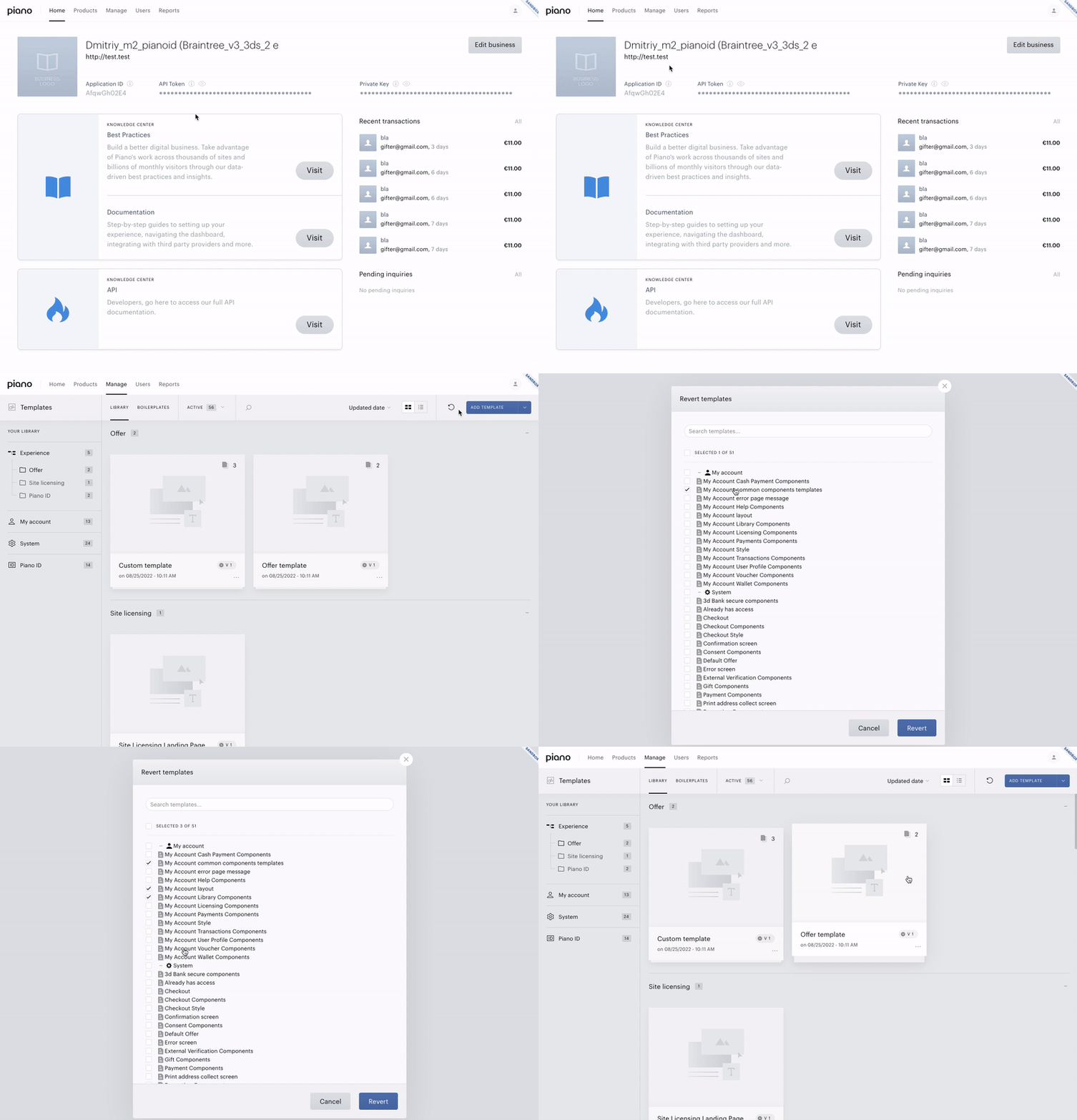
In this case, all you need to do is to reset only these templates in your apps (see gif below).
-
Within the Manage dropdown menu, click on Templates
-
Click on the Revert templates icon in the right top corner
-
In the appearing modal window check “My Account layout”, “My Account common components templates”, “My Account Library Components” and “My Account Voucher Components”
-
Click on the Revert button
-
Confirm reverting by clicking on the Revert button
#2. You have custom templates:
-
My Account layout
-
My Account common components templates
-
My Account Library Components
-
My Account Voucher Components
If the templates have been customized, you should not revert them to default as per the instructions from #1, you will need to edit them manually:
-
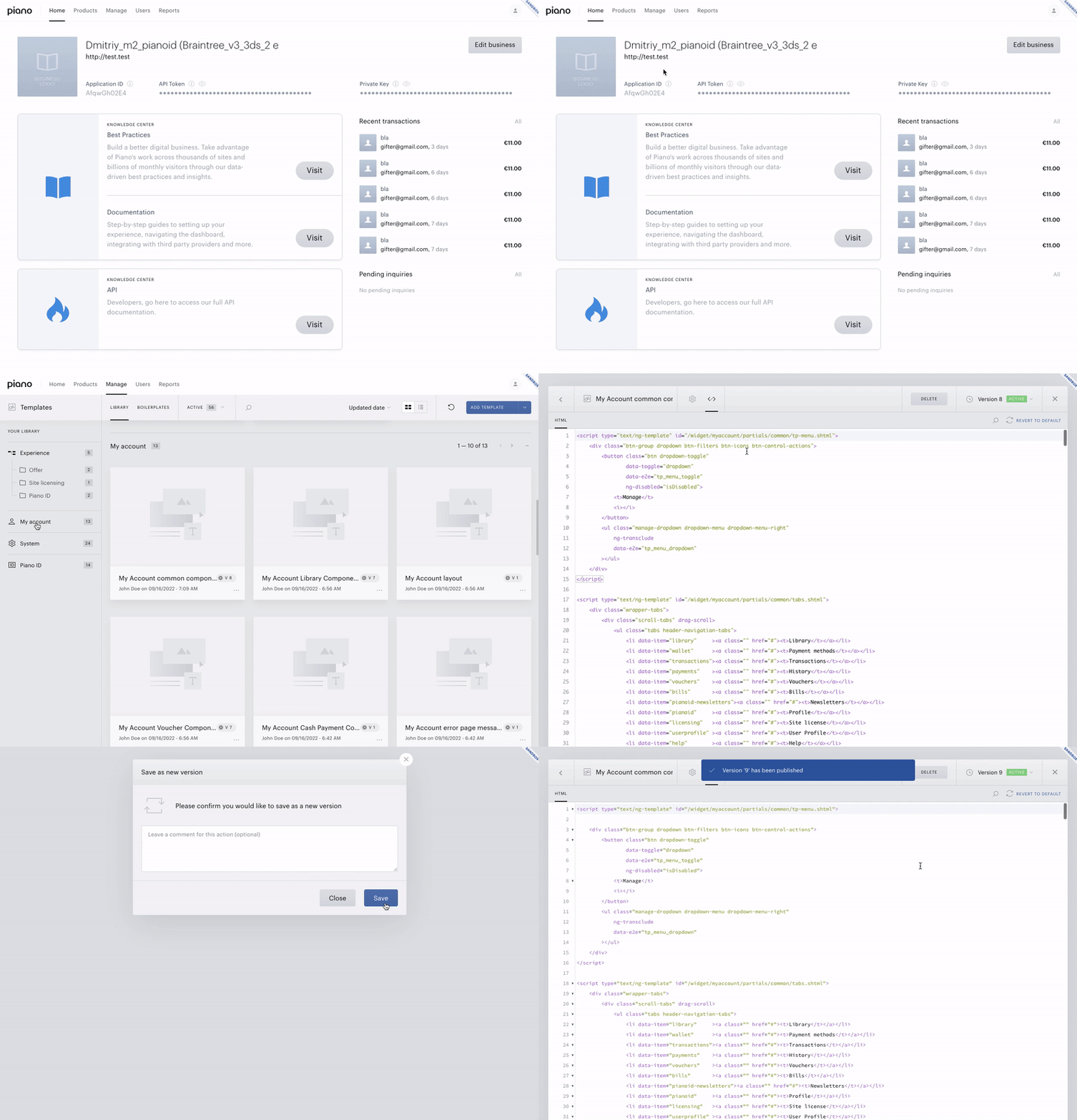
Within the Manage dropdown menu, click on Templates
-
Click on the “My account” tab in the left sidebar “YOUR LIBRARY”. Your screen will be scrolled to this section.
-
In the “My account” section find the needed template, which you are going to edit
-
Click on it
-
In the “Template manager” click on the Edit code icon. You will see the editor with the current template’s code version
-
Paste needed changes (You will see below the necessary code changes for the appropriate templates). After changes the block “You have unsaved changes” with the “DISCARD” and “SAVE” buttons will appear.
-
Click on the Save button to automatically save and publish your changes, or click on its arrow icon in the button’s right part. In the appeared context menu click on the Save as new version option.
-
In the appeared modal window click Save again.
-
If you earlier (on step 8) selected the “Save as new version” option, you need to click on the Publish button to publish your new version with the latest changes.
Please note that your real template code may not exactly match the given examples. So in this case you need to edit your code attentively based on the examples below.
Changes in My Account layout
Please replace
<div class="ma-main-controller" ng-class="{ 'mobile-user-agent': isMobileUserAgent() }">
By next one
<div class="ma-main-controller my-account-container" ng-class="{ 'mobile-user-agent': isMobileUserAgent() }">
Changes in My Account common components templates
Please add the next code to the end of the template:
<script type="text/ng-template" id="/widget/myaccount/partials/common/my-account-print-address-component.html">

 <div class="screen--print-component">
   <div class="scrollable-content without-border">
     <h1 class="header-title-information">
       <t context="checkout.platform">{{heading}}</t>
     </h1>

     <div class="error-section-v2 ma-address-errors-container"
          error-section
          heading="{{ errors.length ? 'We found a few errors:' : '' | t }}"
          ng-if="errors.length > 0"
          errors="errors">
     </div>

     <form name="printAddressForm" class="print-address-form" ng-class="{'validated': validated}" novalidate>
       <div class="floating-table" ng-class="{'grayed': activeItem === 'add_new', 'field-country-half-width': isPSC}">

         <div class="floating-table-cell field-country">
           <div class="shake-element">
             <label for="country">
               <t context="checkout.platform">Country</t>
             </label>
             <div>
               <select ng-if="!isSearchSelects"
                       id="country"
                       required
                       ng-model="userAddress.selectedCountryPubId"
                       name="country"
                       ng-init="onCountrySelectInit()"
                       ng-change="onCountrySelect()">
                 <option
                   ng-repeat="country in countries"
                   ng-selected="country.pubId === userAddress.selectedCountryPubId || country.countryId === userAddress.selectedCountryPubId"
                   value={{getCountryOptionValue(country)}}
                 >
                   {{country.countryName | tc:"country"}}
                 </option>
               </select>
               <search-select
                 ng-if="isSearchSelects"
                 id="country"
                 ng-model="userAddress.country"
                 ui-value-key="'countryName'"
                 option-t-context="'country'"
                 options="countries"
               ></search-select>
             </div>
           </div>
         </div>

         <div ng-if="isPSC" class="floating-table-cell field-companyName">
           <div class="shake-element">
             <label htmlFor="company-name">
               <t context="checkout.platform">Company name</t>
             </label>
             <div class="field-wrapper">
               <div class="input">
                 <input id="company-name"
                        class="flat"
                        name="companyName"
                        ng-model="userAddress.companyName"
                        type="text"
                        placeholder="{{'Company name' | tc:'checkout.platform'}}"/>
               </div>
             </div>
           </div>
         </div>

         <div class="floating-table-cell field-firstName">
           <div class="shake-element">
             <label htmlFor="firstName">
               <t context="checkout.platform">First name</t>
             </label>
             <div class="field-wrapper">
               <div class="input">
                 <input id="firstName"
                        class="flat"
                        name="firstName"
                        ng-model="userAddress.firstName"
                        type="text"
                        placeholder="{{'First name' | tc:'checkout.platform'}}"
                        ng-required="isPAC"/>
               </div>
             </div>
           </div>
         </div>

         <div class="floating-table-cell field-lastName">
           <div class="shake-element">
             <label htmlFor="lastName">
               <t context="checkout.platform">Last name</t>
             </label>
             <div class="field-wrapper">
               <div class="input">
                 <input id="lastName"
                        class="flat"
                        name="lastName"
                        ng-model="userAddress.lastName"
                        type="text"
                        placeholder="{{'Last name' | tc:'checkout.platform'}}"
                        ng-required="isPAC"/>
               </div>
             </div>
           </div>
         </div>

         <div class="floating-table-cell field-address1">
           <div class="shake-element">
             <label htmlFor="address1">
               <t context="checkout.platform">Address 1</t>
             </label>
             <div class="field-wrapper">
               <div class="input">
                 <input id="address1"
                        class="flat"
                        name="address1"
                        ng-model="userAddress.address1"
                        type="text"
                        placeholder="{{'Address 1' | tc:'checkout.platform'}}"
                        required/>
               </div>
             </div>
           </div>
         </div>

         <div class="floating-table-cell field-address2">
           <div class="shake-element">
             <label htmlFor="address2">
               <t context="checkout.platform">Address 2</t>
             </label>
             <div class="field-wrapper">
               <div class="input">
                 <input id="address2"
                        class="flat"
                        name="address2"
                        ng-model="userAddress.address2"
                        type="text"
                        placeholder="{{'Address 2' | tc:'checkout.platform'}}"/>
               </div>
             </div>
           </div>
         </div>

         <div class="floating-table-cell field-city">
           <div class="shake-element">
             <label htmlFor="city">
               <t context="checkout.platform">City</t>
             </label>
             <div class="field-wrapper">
               <div class="input">
                 <input id="city"
                        class="flat"
                        name="city"
                        ng-model="userAddress.city"
                        type="text"
                        placeholder="{{'City' | tc:'checkout.platform'}}"
                        required/>
               </div>
             </div>
           </div>
         </div>

         <div class="floating-table-cell field-region">
           <div class="shake-element">
             <label htmlFor="region-dynamic">
               <t context="checkout.platform">State/Provinces</t>
             </label>

             <div>
               <region-select input-class="flat"
                              wrapper-input-class="field-wrapper"
                              id="region"
                              name="region"
                              input-id="region-dynamic"
                              region="userAddress.region"
                              country="userAddress.country"
                              clear-on-init="true"
                              select-required="true"
                              countries="countries"
                              is-search-select="isSearchSelects"
                              address="userAddress">
               </region-select>
             </div>
           </div>
         </div>

         <div class="floating-table-cell field-zipCode">
           <div class="shake-element">
             <label htmlFor="zipCode">
               <t context="checkout.platform">Postal Code</t>
             </label>
             <div class="field-wrapper">
               <div class="input">
                 <input id="zipCode"
                        class="flat"
                        name="postalCode"
                        ng-model="userAddress.zipCode"
                        type="text"
                        placeholder="{{'Postal code' | tc:'checkout.platform'}}"
                        required/>
               </div>
             </div>
           </div>
         </div>

         <div class="floating-table-cell field-phone">
           <div class="shake-element">
             <label htmlFor="phone">
               <t context="checkout.platform">Phone number</t>
             </label>
             <div class="field-wrapper">
               <div class="input">
                 <input id="phone"
                        class="flat"
                        name="phoneNumber"
                        ng-model="userAddress.phone"
                        type="text"
                        placeholder="{{'Phone number' | tc:'checkout.platform'}}"
                        ng-required="isPSC"
                 />
               </div>
             </div>
           </div>
         </div>
       </div>
     </form>
     <div class="print-address-form-footer">
       <button id="cancel-saving-address-collection" class="btn btn-gray" ng-click="cancel()">
         <t>Cancel</t>
       </button>
       <button id="save-address-collection" class="btn btn-green" ng-click="updateUserAddress(userAddress, printAddressForm)">
         <t>Save</t>
       </button>
     </div>
   </div>
 </div>
</script>

<script type="text/ng-template" id="/widget/myaccount/partials/common/search-select.html">
 <div class="search-select-container">
   <input type="text" name="{{name}}" ng-value="bindModel" class="visually-hidden" ng-required="required" />
   <button class="search-select-button" ng-class="{'opened': isPopoverVisible()}" ng-click="togglePopover($event)">
     {{ bindModel[uiValueKey] | tc: optionTContext }}
   </button>
   <div class="select-popover" ng-show="isPopoverVisible()" ng-click="onPopoverClick($event)">
     <input class="search-select-input" type="text" ng-model="model.searchValue" placeholder="{{'Search' | t}}" />
     <button
       class="search-select-option"
       ng-class="{'selected': bindModel[uiValueKey] === option[uiValueKey] }"
       ng-repeat="option in options | filter:model.searchValue:false:uiValueKey"
       ng-click="select(option)"
     >
       {{option[uiValueKey] | tc: optionTContext }}
     </button>
   </div>
 </div>
</script>
Changes in My Account Library Components
Please replace
<tp-menu-item class="mobile-show"
                                      ng-click="toggleRenew(libraryItem);"
                                      ng-show="libraryItem.autoRenewChangeEnabled">
By next one
<tp-menu-item class="mobile-show"
                                      ng-click="toggleRenew(libraryItem);"
                                      ng-if="libraryItem.autoRenewChangeEnabled">
Please replace
<tp-menu-item ng-click="renewNow(libraryItem)"
                                      ng-show="libraryItem.renewNowEnabled">
By next one
<tp-menu-item ng-click="renewNow(libraryItem)"
                                      ng-if="libraryItem.renewNowEnabled">
Please replace
<tp-menu-item ng-click="cancelSubscription(libraryItem)" ng-show="libraryItem.cancelEnabled">
By next one
<tp-menu-item ng-click="cancelSubscription(libraryItem)" ng-if="libraryItem.cancelEnabled">
Please replace
<tp-menu-item ng-click="refundPayment(libraryItem)" ng-show="libraryItem.cancelAndRefundEnabled">
By next one
<tp-menu-item ng-click="refundPayment(libraryItem)" ng-if="libraryItem.cancelAndRefundEnabled">
Please replace
<tp-menu-item ng-click="updatePaymentMethod(libraryItem)" ng-show="libraryItem.updatePaymentMethodEnabled">
By next one
<tp-menu-item ng-click="updatePaymentMethod(libraryItem)" ng-if="libraryItem.updatePaymentMethodEnabled">
Please replace
<tp-menu-item ng-click="leaveFromParentSubscription(libraryItem)" ng-show="libraryItem.sharedSubscription">
By next one
<tp-menu-item ng-click="leaveFromParentSubscription(libraryItem)" ng-if="libraryItem.sharedSubscription">
Please replace
<span class="section-text">
                <t context="checkout.platform">My subscriptions</t> ({{ active ? activeLibrary.length : inactiveLibrary.length }})
            </span>
By next one
<span class="section-text my-subscriptions-header">
                <t context="checkout.platform">My subscriptions</t> ({{ active ? activeLibrary.length : inactiveLibrary.length }})
            </span>
Please replace
<div class="screen--print-component" ng-if="isScreen(SCREEN_PRINT_COMPONENT)">
<div class="scrollable-content without-border">
<h1 class="header-title-information">
<t>Edit subscription address</t>
</h1>
<div class="error-section-v2"
error-section
ng-if="addressColectionFormErrors.length > 0"
errors="addressColectionFormErrors">
</div>
<form name="printAddressForm" class="print-address-form" ng-class="{'validated': validated}">
<div class="floating-table" ng-class="{'grayed': model.activeItem === 'add_new', 'field-country-half-width': isPSC()}">
<div class="floating-table-cell field-country">
<div class="shake-element">
<label for="country">
<t context="checkout.platform">Country</t>
</label>
<div>
<select id="country"
required
name="country"
ng-model="userAddress.country"
ng-options="country.countryName for country in countryList() track by country.countryName">
</select>
</div>
</div>
</div>
<div ng-if="isPSC()" class="floating-table-cell field-companyName">
<div class="shake-element">
<label for="company-name">
<t context="checkout.platform">Company name</t>
</label>
<div class="field-wrapper">
<div class="input">
<input id="company-name"
class="flat"
name="companyName"
ng-model="userAddress.companyName"
type="text"
placeholder="{{'Company name' | tc:'checkout.platform'}}" />
</div>
</div>
</div>
</div>
<div class="floating-table-cell field-firstName">
<div class="shake-element">
<label for="firstName">
<t context="checkout.platform">First name</t>
</label>
<div class="field-wrapper">
<div class="input">
<input id="firstName"
class="flat"
name="firstName"
ng-model="userAddress.firstName"
type="text"
placeholder="{{'First name' | tc:'checkout.platform'}}"
ng-required="isPAC()"/>
</div>
</div>
</div>
</div>
<div class="floating-table-cell field-lastName">
<div class="shake-element">
<label for="lastName">
<t context="checkout.platform">Last name</t>
</label>
<div class="field-wrapper">
<div class="input">
<input id="lastName"
class="flat"
name="lastName"
ng-model="userAddress.lastName"
type="text"
placeholder="{{'Last name' | tc:'checkout.platform'}}"
ng-required="isPAC()"/>
</div>
</div>
</div>
</div>
<div class="floating-table-cell field-address1">
<div class="shake-element">
<label for="address1">
<t context="checkout.platform">Address 1</t>
</label>
<div class="field-wrapper">
<div class="input">
<input id="address1"
class="flat"
name="address1"
ng-model="userAddress.address1"
type="text"
placeholder="{{'Address 1' | tc:'checkout.platform'}}"
required/>
</div>
</div>
</div>
</div>
<div class="floating-table-cell field-address2">
<div class="shake-element">
<label for="address2">
<t context="checkout.platform">Address 2</t>
</label>
<div class="field-wrapper">
<div class="input">
<input id="address2"
class="flat"
name="address2"
ng-model="userAddress.address2"
type="text"
placeholder="{{'Address 2' | tc:'checkout.platform'}}"/>
</div>
</div>
</div>
</div>
<div class="floating-table-cell field-city">
<div class="shake-element">
<label for="city">
<t context="checkout.platform">City</t>
</label>
<div class="field-wrapper">
<div class="input">
<input id="city"
class="flat"
name="city"
ng-model="userAddress.city"
type="text"
placeholder="{{'City' | tc:'checkout.platform'}}"
required/>
</div>
</div>
</div>
</div>
<div class="floating-table-cell field-region">
<div class="shake-element">
<label for="region-dynamic">
<t context="checkout.platform">State/Provinces</t>
</label>
<div>
<region-select input-class="flat"
wrapper-input-class="field-wrapper"
id="region"
name="region"
input-id="region-dynamic"
region="userAddress.region"
country="userAddress.country"
clear-on-init="true"
select-required="true"
countries="countryList()">
</region-select>
</div>
</div>
</div>
<div class="floating-table-cell field-zipCode">
<div class="shake-element">
<label for="zipCode">
<t context="checkout.platform">Postal Code</t>
</label>
<div class="field-wrapper">
<div class="input">
<input id="zipCode"
class="flat"
name="postalCode"
ng-model="userAddress.postalCode"
type="text"
placeholder="{{'Postal code' | tc:'checkout.platform'}}"
required/>
</div>
</div>
</div>
</div>
<div class="floating-table-cell field-phone">
<div class="shake-element">
<label for="phone">
<t context="checkout.platform">Phone number</t>
</label>
<div class="field-wrapper">
<div class="input">
<input id="phone"
class="flat"
name="phoneNumber"
ng-model="userAddress.phone"
type="text"
placeholder="{{'Phone number' | tc:'checkout.platform'}}"
ng-required="isPSC()"
/>
</div>
</div>
</div>
</div>
</div>
</form>
<div class="print-address-form-footer">
<button id="cancel-saving-address-collection" class="btn btn-gray" ng-click="goBackToLibrary()"><t>Cancel</t></button>
<button id="save-address-collection" class="btn btn-green" ng-click="updateUserAddress(userAddress, printAddressForm)"><t>Save</t></button>
</div>
</div>
</div>
By next one
<my-account-print-address-form
          ng-if="isScreen(SCREEN_PRINT_COMPONENT)"
          heading="'Edit subscription address'"
          is-search-selects="true"
          address="userAddress"
          countries="countryList()"
          is-p-a-c="isPAC()"
          is-p-s-c="isPSC()"
          activeItem="model.activeItem"
          on-save="onPrintAddressSave"
          on-cancel="goBackToLibrary()">
</my-account-print-address-form>
Changes in My Account Voucher Components
Please replace
<div class="voucher-name mb6">
                            <span>{{voucher.termName}}</span>
                            <span ng-if="voucher.period">, {{voucher.period}}</span>
                            <span>, {{voucher.stateLabel}}</span>
                        </div>
By next one
<div class="voucher-name mb6">
                            <span>{{voucher.termName}}</span>
                            <span ng-if="voucher.period">, {{voucher.period}}</span>
                            <span>, <t context="checkout.platform">{{voucher.stateLabel}}</t></span>
                        </div>
Please replace
(<t context="checkout.platform">expires on {{voucher.expires}}</t>)
By next one
(<t context="default">expires on</t> <t context="checkout.platform">{{voucher.expires}}</t>)
Please replace
<span ng-if="voucher.state === states.redeemed"><t context="checkout.platform">Redeemed at {{voucher.redeemed | tpDate:'MMM d, y h:mm a'}}</t></span>
By next one
<span ng-if="voucher.state === states.redeemed"><t context="checkout.platform">Redeemed at</t> <t context="checkout.platform">{{voucher.redeemed | tpDate:'MMM d, y h:mm a'}}</t></span>
Please replace
<div class="controls">
                    {{voucher.stateLabel}}
                </div>
By next one
<div class="controls">
                  <t context="checkout.platform">
                    {{voucher.stateLabel}}
                  </t>
                </div>
Please replace
<div class="message-block">
                <div class="error" ng-show="errors.length>0">
By next one
<div class="message-block" ng-show="errors.length > 0">
                <div class="error">
Please replace
<label class="control-label">
                        <t context="checkout.platform">Status</t>
                    </label>
                    <div class="controls">
                        <span ng-if="voucher.state === states.assigned">
                            <t arg0="{{voucher.sendDate * 1000 | date: 'MMM dd, yyyy'}}">Will be sent on {0}</t>
                        </span>
                        <span ng-if="voucher.state === states.sending">
                            <t arg0="{{voucher.sendDate * 1000 | date: 'MMM dd, yyyy'}}">Will be sent on {0}</t>
                        </span>
                        <span ng-if="voucher.state === states.delivered">
                            <t arg0="{{voucher.sendDate * 1000 | date: 'MMM dd, yyyy'}}">Sent on {0}</t>
                        </span>
                        <span ng-if="voucher.state === states.failed">
                            <t arg0="{{voucher.sendDate * 1000 | date: 'MMM dd, yyyy'}}">Tried to be sent on {0}</t>
                        </span>
                        <span ng-if="voucher.state === states.redeeming">
                            <t arg0="{{voucher.sendDate * 1000 | date: 'MMM dd, yyyy'}}">Sent on {0}</t>
                        </span>
                        <span ng-if="voucher.state === states.redeemed">
                            <t arg0="{{voucher.redeemed * 1000 | date: 'MMM dd, yyyy - h:mm a'}}">Redeemed on {0}</t>
                        </span>
                        <span ng-if="voucher.state === states.revoked">
                            <t arg0="{{voucher.revokeDate * 1000 | date: 'MMM dd, yyyy - h:mm a'}}">Revoked on {0}</t>
                        </span>
                    </div>
By next one
<div class="control-group">
                      <label class="control-label">
                        <t context="checkout.platform">Status</t>
                      </label>
                      <div class="controls">
                        <span ng-if="voucher.state === states.assigned">
                            <t arg0="{{voucher.sendDate * 1000 | date: 'MMM dd, yyyy'}}">Will be sent on {0}</t>
                        </span>
                        <span ng-if="voucher.state === states.sending">
                            <t arg0="{{voucher.sendDate * 1000 | date: 'MMM dd, yyyy'}}">Will be sent on {0}</t>
                        </span>
                        <span ng-if="voucher.state === states.delivered">
                            <t arg0="{{voucher.sendDate * 1000 | date: 'MMM dd, yyyy'}}">Sent on {0}</t>
                        </span>
                        <span ng-if="voucher.state === states.failed">
                            <t arg0="{{voucher.sendDate * 1000 | date: 'MMM dd, yyyy'}}">Tried to be sent on {0}</t>
                        </span>
                        <span ng-if="voucher.state === states.redeeming">
                            <t arg0="{{voucher.sendDate * 1000 | date: 'MMM dd, yyyy'}}">Sent on {0}</t>
                        </span>
                        <span ng-if="voucher.state === states.redeemed">
                            <t arg0="{{voucher.redeemed * 1000 | date: 'MMM dd, yyyy - h:mm a'}}">Redeemed on {0}</t>
                        </span>
                        <span ng-if="voucher.state === states.revoked">
                            <t arg0="{{voucher.revokeDate * 1000 | date: 'MMM dd, yyyy - h:mm a'}}">Revoked on {0}</t>
                        </span>
                      </div>
                    </div>
Please add this code below
<div class="voucher-shipping-address-container" ng-if="voucher.shippingAddress">
                  <div class="subheader">
                    <h4><t context="checkout.platform">Shipping address</t></h4>
                  </div>
                  <div ng-if="canUpdateShippingAddress()" class="control-group">
                    <button id="update-shipping-address-button"
                            class="btn btn-green"
                            ng-disabled="confirmedRevokeAndRefund"
                            ng-click="updateAddress()">
                      <t context="checkout.platform">Update</t>
                    </button>
                  </div>
                  <div class="control-group">
                    <label class="control-label">
                      <t context="checkout.platform">Shipping address</t>
                    </label>
                    <div class="controls">
                      <span>
                        {{voucher.shippingAddress.line1}},
                        <span ng-if="voucher.shippingAddress.line2">
                          {{voucher.shippingAddress.line2}},
                        </span>
                        {{voucher.shippingAddress.city}},
                        <span ng-if="voucher.shippingAddress.regionName">
                          {{voucher.shippingAddress.regionName}}
                        </span>
                        {{voucher.shippingAddress.postal}},
                        {{voucher.shippingAddress.countryName}}
                      </span>
                    </div>
                  </div>
                  <div class="control-group">
                    <label class="control-label">
                      <t context="checkout.platform">Name</t>
                    </label>
                    <div class="controls">
                      {{voucher.shippingAddress.firstName + ' ' + voucher.shippingAddress.lastName}}
                    </div>
                  </div>
                  <div ng-if="voucher.shippingAddress.phone" class="control-group">
                    <label class="control-label">
                      <t context="checkout.platform">Phone number</t>
                    </label>
                    <div class="controls">
                      {{voucher.shippingAddress.phone}}
                    </div>
                  </div>
                </div>
After this code (do not remove it)
<div class="voucher-recipient-additional-info">
                    <div class="control-group">
                        <label class="control-label">
                            <t context="checkout.platform">Personalized message</t>
                        </label>
                        <div class="controls" ng-bind-html="voucher.recipientMessage"></div>
                    </div>

                    <label class="control-label">
                        <t context="checkout.platform">Status</t>
                    </label>
                    <div class="controls">
                        <span ng-if="voucher.state === states.assigned">
                            <t arg0="{{voucher.sendDate * 1000 | date: 'MMM dd, yyyy'}}">Will be sent on {0}</t>
                        </span>
                        <span ng-if="voucher.state === states.sending">
                            <t arg0="{{voucher.sendDate * 1000 | date: 'MMM dd, yyyy'}}">Will be sent on {0}</t>
                        </span>
                        <span ng-if="voucher.state === states.delivered">
                            <t arg0="{{voucher.sendDate * 1000 | date: 'MMM dd, yyyy'}}">Sent on {0}</t>
                        </span>
                        <span ng-if="voucher.state === states.failed">
                            <t arg0="{{voucher.sendDate * 1000 | date: 'MMM dd, yyyy'}}">Tried to be sent on {0}</t>
                        </span>
                        <span ng-if="voucher.state === states.redeeming">
                            <t arg0="{{voucher.sendDate * 1000 | date: 'MMM dd, yyyy'}}">Sent on {0}</t>
                        </span>
                        <span ng-if="voucher.state === states.redeemed">
                            <t arg0="{{voucher.redeemed * 1000 | date: 'MMM dd, yyyy - h:mm a'}}">Redeemed on {0}</t>
                        </span>
                        <span ng-if="voucher.state === states.revoked">
                            <t arg0="{{voucher.revokeDate * 1000 | date: 'MMM dd, yyyy - h:mm a'}}">Revoked on {0}</t>
                        </span>
                    </div>
                </div>