
New renewable gifting feature enables Piano clients to offer gift subscriptions that will be renewing as regular subscriptions using gifters' payment methods. Feature enables the option to gift any payment or dynamic term that Piano clients are already offering to their clients, keeping all benefits of existing terms like advanced billing plans, future subscription start date, address collection and others.
The step-by-step guide below describes how to set up gifting. Steps include:
1. Gift term configuration
It is possible to configure any payment or dynamic term as gift in Piano. You need enable gifting option for a term and configure redemption URL parameter. All other parameters are no different from payment and dynamic terms. The only restriction is:
Renewable gifting can't be combined with shared access feature.
You can find more details on how to configure payment terms and dynamic terms in proper sections of the documentation.
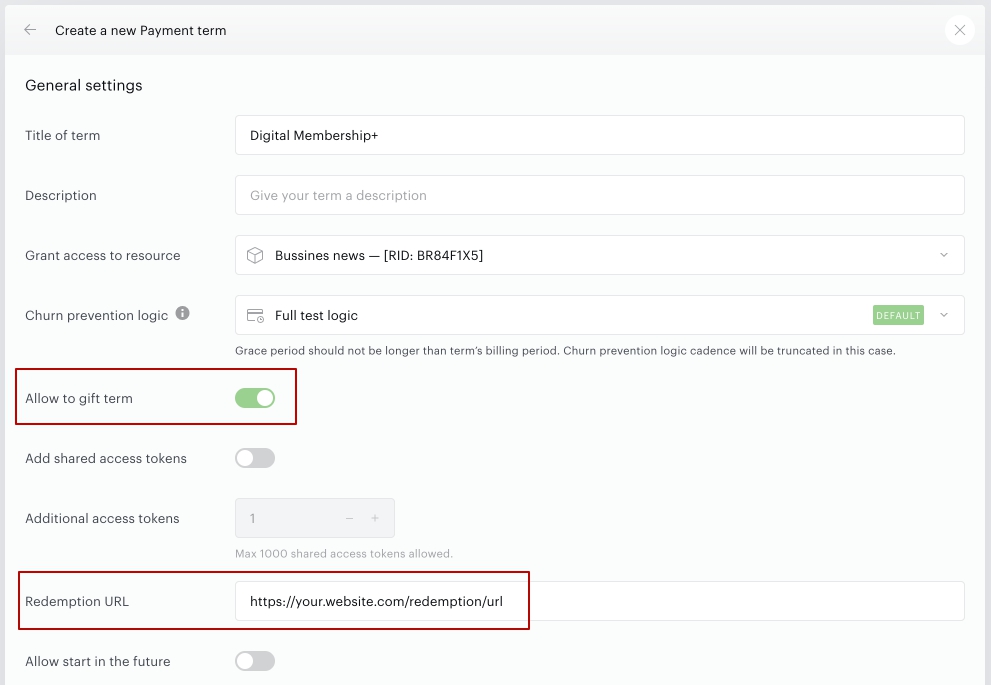
Now you can move further and add your term with gifting option to any existing or new offer of your choice.
2. Gift offer configuration
In order to sell a term as a gift you will need to adjust your offer templates to show 'Buy as a gift' option that triggers a gift checkout. The best option would be to start fresh template from the 'Offer grid modal' boilerplate as all necessary directives will already be included in the template.
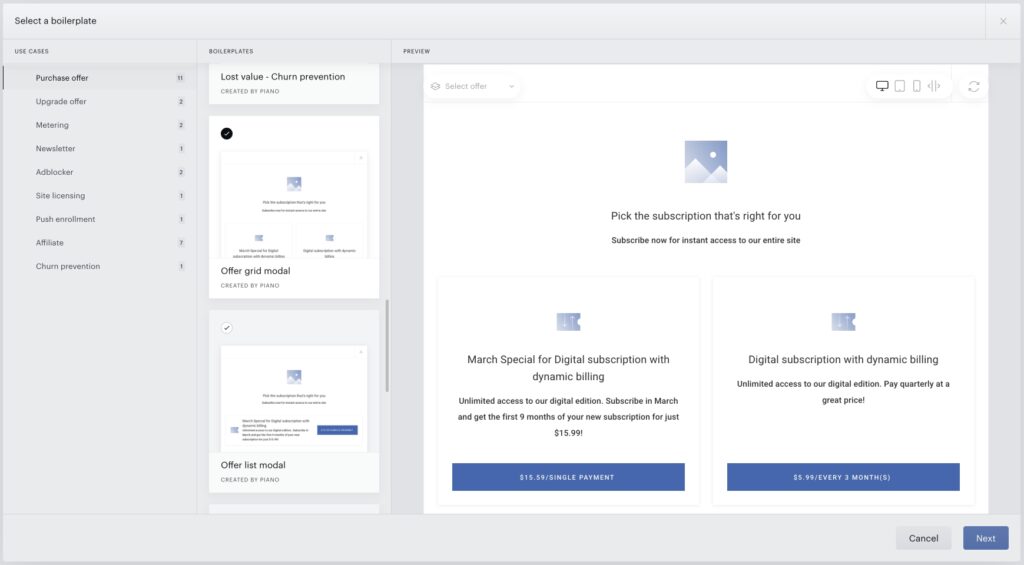
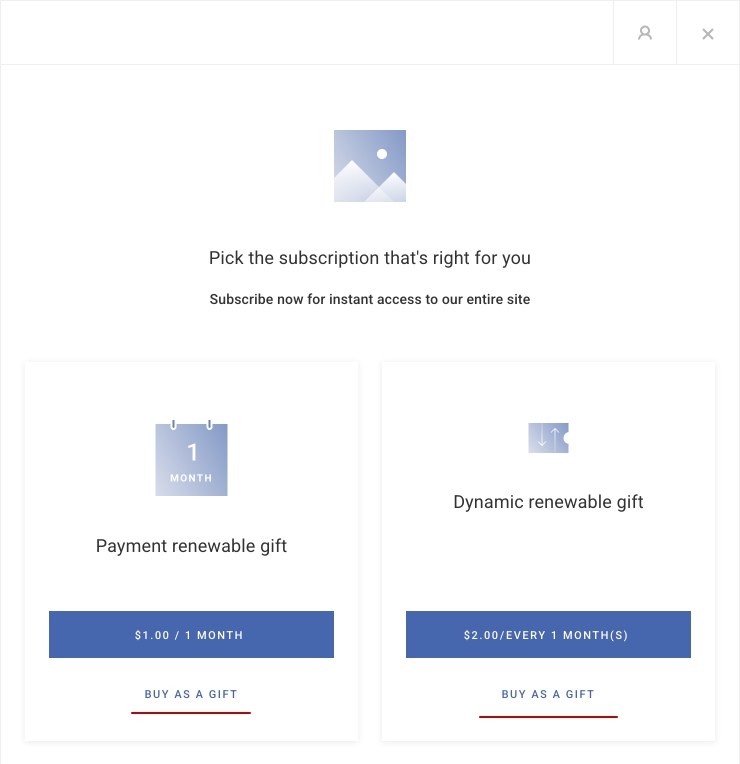
If you want to use any of your existing offer templates you can add 'Buy as a gift' button by adding this code snippet
<button ng-if="term.allowPurchaseAsGift"
        ng-click="startRenewableGift(term.termId)"
        class="pn-offer-grid__subscribe pn-offer-grid__subscribe--margin-top pn-boilerplate__button--transparent unbutton">
  <t>Buy as a gift</t>
</button>
Important! Don't forget to update system templates to support new gifting flow in the checkout and my account widget.
3. System templates configuration
If you already have live templates and offers and would like to add a gift option to your current checkout flow - you will need to adjust a number of system templates.
Checkout components
Following directive can be added anywhere in the template.
<script type="text/ng-template" id="/widget/checkout/component/partials/renewable-gift-receipt-component.html">
  <h1 class="success-gift-purchase-header">
    <t>Thanks for your purchase!</t>
  </h1>

  <div class="success-gift-purchase-result-information" role="region" aria-label="{{'Gift Purchase Details' | tc:'checkout.platform'}}">
    <span ng-show="isChargingTerm(selectedTerm)">
        <t>You just purchased</t>
    </span>

    <span ng-show="!isChargingTerm(selectedTerm)">
       <t>You just got access to</t>
    </span>

    <t>
      <span class="bold resource-name">{{selectedTerm.resource.name | tc:'resource.name'}}</span>
      for {{ getGifteeDisplayName() }} as a gift.
    </t>
    <br/>
    <t>Instructions to redeem it have been sent to {{ renewableGiftEmailParams.email }}.</t>
    <br/>
    <span>
     <span ng-if="isChargingTerm(selectedTerm)">
       <t>Your <span class="bold payment-method">{{getSelectedPaymentMethodName()}}<span ng-if="isApplePayPaymentMethod()"> account</span></span> has been charged.</t>
     </span>
     <span ng-if="user.email">
       <t>An email confirmation has been sent to <a class="mail" href="mailto:{{user.email}}">{{user.email}}</a></t>
     </span>
     <span ng-if="!user.email">
       <t>You can find the receipt in Transactions tab of My Account.</t>
     </span>
    </span>
  </div>
</script>
Gift components
This is a new gift details collection screen for checkout, should be added at the beginning of the template.
<script type="text/ng-template" id="/widget/checkout/component/partials/renewable-gift-form-component.html">
    <div class="renewable-gift-container">
      <div class="renewable-gift-container__header header">
        <div class="header__main">
          <t>Add gift recipient details below</t>
        </div>
        <div class="header__secondary">
          <t>You can also edit these details at any time via <span class="header__secondary--highlighted">My Account</span></t>
        </div>
      </div>
      <div class="renewable-gift-container__main main">
        <div class="main__giftee-details main__flex-container">
          <input type="text"
                 placeholder="{{'Enter email address' | t}}"
                 required
                 class="main__input main__flex-item"
                 name="email"
                 ng-focus="onInputFocus('email')"
                 ng-class="{'invalid': isControlInvalid('email')}"
                 ng-model="gifteeDetailsForm.email.value">
          <input type="text"
                 placeholder="{{'First name (required)' | t}}"
                 required
                 class="main__input main__input--short main__flex-item"
                 name="firstName"
                 ng-focus="onInputFocus('firstName')"
                 ng-class="{'invalid': isControlInvalid('firstName')}"
                 ng-model="gifteeDetailsForm.firstName.value">
          <input type="text"
                 placeholder="{{'Last name (required)' | t}}"
                 required
                 class="main__input main__input--short main__flex-item"
                 name="lastName"
                 ng-focus="onInputFocus('lastName')"
                 ng-class="{'invalid': isControlInvalid('lastName')}"
                 ng-model="gifteeDetailsForm.lastName.value">
          <textarea placeholder="{{'Add welcome message for the gift recipient' | t}}"
                    class="main__input main__textarea main__flex-item"
                    ng-class="{'invalid': isControlInvalid('welcomeMessage')}"
                    ng-focus="onInputFocus('welcomeMessage')"
                    name="welcomeMessage"
                    ng-model="gifteeDetailsForm.welcomeMessage.value"></textarea>
        </div>
        <div ng-if="isAddressCollectionEnabledInTerm">
          <div class="container-margin header__main">
            <t>Delivery address</t>
          </div>
          <div ng-if="availableAddresses.length" class="main__address-options" role="radiogroup" aria-labelledby="address-heading" aria-describedby="address-instructions">
            <div ng-repeat="address in availableAddresses"
                 class="address-option">
              <input type="radio"
                     class="address-option__input"
                     ng-model="selectedAddress"
                     ng-value="address.pubId"
                     ng-click="selectAddress(false, address.pubId)"
                     name="addressSelection"
                     id="address-{{$index}}"
                     aria-labelledby="label-address-{{$index}}"
                     aria-describedby="desc-address-{{$index}}">
              <label for="address-{{$index}}"
                     id="label-address-{{$index}}"
                     class="address-option__label">
                <span class="label-text label-text--main" ng-if="getAddressInfo(address).mainInfo">{{getAddressInfo(address).mainInfo}}</span>
                <span class="label-text label-text--secondary" ng-if="getAddressInfo(address).secondaryInfo">{{getAddressInfo(address).secondaryInfo}}</span>
              </label>
            </div>
            <div class="address-option">
              <input type="radio"
                     class="address-option__input"
                     ng-model="selectedAddress"
                     ng-value="'new'"
                     ng-click="selectAddress(true, 'new')"
                     name="addressSelection"
                     id="new-address"
                     aria-labelledby="label-new-address"
                     aria-describedby="desc-new-address">
              <label for="new-address"
                     id="label-new-address"
                     class="address-option__label">
                <t>New address</t>
              </label>
            </div>
          </div>
          <div ng-if="showAddressForm()" class="main__flex-container" ng-class="{'new-address-form': availableAddresses.length}">
            <select id="countryId"
                    class="main__input main__flex-item"
                    required
                    ng-model="gifteeDetailsForm.countryId.value"
                    name="countryId"
                    ng-init="onCountrySelectInit()"
                    ng-focus="onInputFocus('countryId')"
                    ng-class="{'invalid': isControlInvalid('countryId')}"
                    ng-change="onCountrySelect()">
              <option ng-selected="country.pubId === gifteeDetailsForm.countryId.value"
                      ng-repeat="country in countryList()"
                      value={{country.pubId}}>{{country.countryName | tc:"country"}}</option>
            </select>
            <input type="text"
                   placeholder="{{'Address 1' | t}}"
                   required
                   class="main__input main__input--short main__flex-item"
                   name="address1"
                   ng-focus="onInputFocus('address1')"
                   ng-class="{'invalid': isControlInvalid('address1')}"
                   ng-model="gifteeDetailsForm.address1.value">
            <input type="text"
                   placeholder="{{'Address 2' | t}}"
                   class="main__input main__input--short main__flex-item"
                   ng-class="{'invalid': isControlInvalid('address2')}"
                   ng-focus="onInputFocus('address2')"
                   name="address2"
                   ng-model="gifteeDetailsForm.address2.value">
            <input type="text"
                   placeholder="{{'City' | t}}"
                   required
                   class="main__input main__input--short main__flex-item"
                   name="city"
                   ng-focus="onInputFocus('city')"
                   ng-class="{'invalid': isControlInvalid('city')}"
                   ng-model="gifteeDetailsForm.city.value">
            <select ng-if="regionList.length > 0"
                    id="regionId"
                    class="main__input main__input--short main__flex-item"
                    name="regionId"
                    required
                    ng-focus="onInputFocus('regionId')"
                    ng-class="{'invalid': isControlInvalid('regionId')}"
                    ng-model="gifteeDetailsForm.regionId.value"
                    name="regionId">
              <option ng-selected="region.pubId === gifteeDetailsForm.regionId.value"
                      ng-repeat="region in regionList"
                      value={{region.pubId}}>{{region.regionName | tc:"region"}}</option>
            </select>
            <input type="text"
                   placeholder="{{'Postal code' | t}}"
                   required
                   name="postalCode"
                   class="main__input main__input--short main__flex-item"
                   ng-focus="onInputFocus('postalCode')"
                   ng-class="{'invalid': isControlInvalid('postalCode')}"
                   ng-model="gifteeDetailsForm.postalCode.value">
            <input type="text"
                   placeholder="{{'Phone' | t}}"
                   class="main__input main__input--short main__flex-item"
                   name="phone"
                   ng-class="{'invalid': isControlInvalid('phone')}"
                   ng-focus="onInputFocus('phone')"
                   ng-model="gifteeDetailsForm.phone.value">
          </div>
        </div>
      </div>
      <div class="renewable-gift-container__footer">
        <button type="button"
                class="button big"
                ng-click="onConfirm()">
          <t>Confirm</t>
        </button>
      </div>
    </div>
</script>
Receipt
This is a new state for receipt screen in gift checkout flow, should be added among other states closer to the end of the template.
<div ng-switch-when="RenewableGiftPurchase">
  <div renewable-gift-receipt></div>
</div>
Checkout
This is a new checkout state, should be added among other states closer to the end of the template.
<div view="renewableGiftParams">
  <div account-header-component></div>
  <div renewable-gift-form-component></div>
</div>
My account library components
This is a new gift management button, should be added to the context menu dropdown opened by clicking on 3 dots icon available for every item in the library.
<tp-menu-item ng-if="libraryItem.purchasedAsGift && libraryItem.manageGiftRecipientEnabled"
ng-click="manageGiftRecipient(libraryItem)"
role="menuitem">
<t context="checkout.platform">Manage gift recipient</t>
</tp-menu-item>
This is a notification in my account widget for users who received gift access but hadn't redeemed it yet.
<ul
ng-if="giftInfoList.length"
class="renewable-gifts-list">
<li ng-repeat="giftInfo in giftInfoList" class="renewable-gifts-list__item">
<span>
<t context="checkout.platform" arg0="{{ giftInfo.gifterEmail }}">You received a gift from <b>{0}</b>.</t> <t context="checkout.platform">Click the ‘Redeem’ button to obtain your access.</t>
</span>
<button id="redeem-renewable-gift-button"
type="button"
ng-click="redeemRenewableGift(giftInfo)"
class="btn btn--blue btn--medium renewable-gifts-list__button"><t context="checkout.platform">Redeem</t></button>
</li>
</ul>
This is new modal for editing gift details in my account widget. Should be added at the end of the template.
<script type="text/ng-template" id="/widget/myaccount/partials/library/_library_item_gift_recipient.shtml">
<div gift-recipient-component gift-recipient-config="giftRecipientConfig"></div>
<button type="button" ng-click="close()" class="tp-close tp-close--last" aria-label="{{'Close' | tc:'checkout.platform'}}"></button>
</script>
<script type="text/ng-template" id="/widget/myaccount/partials/library/gift-recipient-component.html">
<h1 class="gift-recipient-title"><t context="checkout.platform">Manage gift recipient details</t></h1>
<div ng-if="giftInfo" class="modal-content gift-recipient-modal-content" data-e2e="gift-recipient-details">
<div ng-if="!isEditMode()" class="gift-recipient-row">
<div class="gift-recipient-row--left-column giftee-details" data-e2e="giftee">
<div class="giftee-details__email">
<span class="giftee-details__icon" aria-hidden="true"></span>
<span>{{giftInfo.email}}</span>
</div>
<div ng-if="giftInfo.isRedeemed || getDisplayedName()" class="giftee-details__info">
<span ng-if="getDisplayedName()">{{getDisplayedName()}}</span>
<span class="giftee-details__dot-icon" ng-if="getDisplayedName() && giftInfo.redeemed"></span>
<span ng-if="giftInfo.isRedeemed">
<t context="checkout.platform" arg0="{{giftInfo.redeemed | date: 'mediumDate'}} {{giftInfo.redeemed | date: 'shortTime'}}">Redeemed on {0}</t>
</span>
</div>
</div>
<div desktop>
<div class="gift-recipient-row--right-column gift-recipient-row--desktop-actions giftee-actions">
<button type="button" class="giftee-actions__button giftee-actions__button--send" ng-click="resendGiftInfo()" ng-hide="giftInfo.redeemed" ng-disabled="isResendEmailInProcess" tooltip-component tooltip-title="{{'Resend email' | tc:'checkout.platform'}}" tooltip-css-class="gift-recipient-tooltip"><t context="checkout.platform">Resend email</t></button>
<button type="button" class="giftee-actions__button giftee-actions__button--edit" ng-click="editGiftInfo()" ng-hide="giftInfo.redeemed" tooltip-component tooltip-title="{{'Edit' | tc:'checkout.platform'}}" tooltip-css-class="gift-recipient-tooltip"><t context="checkout.platform">Edit</t></button>
</div>
</div>
<div mobile>
<div class=gift-recipient-row--right-column" ng-hide="giftInfo.isRedeemed">
<div tp-dropdown alignment="left" ng-disabled="giftInfo.isRedeemed" class="giftee-actions-dropdown giftee-actions dropdown">
<button type="button" data-toggle="dropdown" ng-disabled="giftInfo.isRedeemed" class="giftee-actions__button giftee-actions__button--actions-menu tp-drop-down-button" aria-label="{{ 'Giftee actions' | tc:'checkout.platform' }}" aria-haspopup="true" aria-expanded="false"></button>
<div class="dropdown-menu giftee-actions-dropdown-menu" tabindex="0" role="menu">
<button type="button" class="giftee-actions-dropdown-menu__item" ng-click="resendGiftInfo()" ng-disabled="isResendEmailInProcess">
<t context="checkout.platform">Resend email</t>
</button>
<button type="button" class="giftee-actions-dropdown-menu__item" ng-click="editGiftInfo()">
<t context="checkout.platform">Edit</t>
</button>
</div>
</div>
</div>
</div>
</div>
<div class="gift-recipient-details__address-form" ng-if="isEditMode()">
<gift-recipient-form-component gift-info="giftInfo" countries="countries"></gift-recipient-form-component>
</div>
</div>
<div class="action-panel gift-recipient-action-panel">
<button ng-if="!isEditMode()" type="button" class="button green" ng-click="close()"><t context="checkout.platform">Close</t></button>
<button ng-if="isEditMode()" type="button" class="button green" ng-click="updateAddress()"><t context="checkout.platform">Save</t></button>
</div>
</script>
<script type="text/ng-template" id="/widget/myaccount/partials/library/gift-recipient-form-component.html">
<div ma-error-section errors="errors"></div>
<div class="renewable-gift-container">
<div class="renewable-gift-container__main main">
<div class="main__giftee-details main__flex-container">
<input
type="text"
placeholder="{{'Enter email address' | tc:'checkout.platform'}}"
required
class="main__input main__flex-item"
name="email"
ng-focus="onInputFocus('email')"
ng-class="{'invalid': isControlInvalid('email')}"
ng-model="gifteeDetailsForm.email.value">
<input
type="text"
placeholder="{{'First name' | tc:'checkout.platform'}}"
required
class="main__input main__input--short main__flex-item"
name="firstName"
ng-focus="onInputFocus('firstName')"
ng-class="{'invalid': isControlInvalid('firstName')}"
ng-model="gifteeDetailsForm.firstName.value">
<input
type="text"
placeholder="{{'Last name' | tc:'checkout.platform'}}"
required
class="main__input main__input--short main__flex-item"
name="lastName"
ng-focus="onInputFocus('lastName')"
ng-class="{'invalid': isControlInvalid('lastName')}"
ng-model="gifteeDetailsForm.lastName.value">
</div>
<div ng-if="giftInfo.address">
<div class="container-margin header__main">
<t>Delivery address</t>
</div>
<div class="main__flex-container">
<search-select
required
class="main__flex-item main-select"
id="countryId"
name="countryId"
title="countryId"
ng-model="address.country"
ui-value-key="'countryName'"
option-t-context="'countryCode'"
options="countryList()">
</search-select>
<input
type="text"
placeholder="{{'Address 1' | tc:'checkout.platform'}}"
required
class="main__input main__input--short main__flex-item"
name="address1"
ng-focus="onInputFocus('address1')"
ng-class="{'invalid': isControlInvalid('address1')}"
ng-model="gifteeDetailsForm.address1.value">
<input
type="text"
placeholder="{{'Address 2' | t}}"
class="main__input main__input--short main__flex-item"
ng-class="{'invalid': isControlInvalid('address2')}"
ng-focus="onInputFocus('address2')"
name="address2"
ng-model="gifteeDetailsForm.address2.value">
<input
type="text"
placeholder="{{'City' | tc:'checkout.platform'}}"
required
class="main__input main__input--short main__flex-item"
name="city"
ng-focus="onInputFocus('city')"
ng-class="{'invalid': isControlInvalid('city')}"
ng-model="gifteeDetailsForm.city.value">
<region-select
required
class="main__flex-item main-select--short"
input-class="flat"
wrapper-input-class="field-wrapper"
id="regionId"
name="regionId"
title="regionId"
input-id="region-dynamic"
country="address.country"
clear-on-init="true"
countries="countryList()"
region="address.region"
address="address"
is-search-select="true"
pre-select-first="true">
</region-select>
<input
type="text"
placeholder="{{'Postal code' | tc:'checkout.platform'}}"
required
name="zipCode"
class="main__input main__input--short main__flex-item"
ng-focus="onInputFocus('zipCode')"
ng-class="{'invalid': isControlInvalid('zipCode')}"
ng-model="gifteeDetailsForm.zipCode.value">
<input
<input
type="text"
placeholder="{{'Phone' | tc:'checkout.platform'}}"
class="main__input main__input--short main__flex-item"
name="phone"
ng-class="{'invalid': isControlInvalid('phone')}"
ng-focus="onInputFocus('phone')"
ng-model="gifteeDetailsForm.phone.value">
</div>
</div>
</div>
</div>
</script>
gift-info-list="giftInfoList"
redeem-renewable-gift-callback="redeemRenewableGift"
4. Gift-related email templates
Keeping in mind that new gift subscriptions are basically regular subscriptions - all related subscription emails will also work for gift subscriptions. The only important thing to remember is that user who purchased the subscription (gifter) is actually a subscription owner in this case, and person who received a gift (giftee) only has an access for the paid content. This means that for all standard use cases email recipient will be gifter, not giftee. But there are few new emails that cover some specific use cases and communication with giftee:
-
Renewable gift purchase confirmation - specific email for gift subscription purchase confirmation sent to a gifter.
-
Renewable gift delivery - gift email that is sent to a giftee, that is not registered as a user in Piano, immediately after the purchase.
-
Gift subscription activated - gift email that is sent to a giftee, that is not registered as a user in Piano, at a given date in case of deferred subscription start.
-
Renewable gift subscription activated automatically - gift email that is sent to a giftee immediately after the purchase in case giftee is already registered as a user in Piano.
-
Gift access extended - automatic gift subscription renew confirmation that is sent to a giftee.
-
Giftee access cancellation confirmation - gift subscription cancellation confirmation that is sent to a giftee.
5. Gift purchase flow
To start gift checkout click on the 'Buy as a gift' button in the offer template.
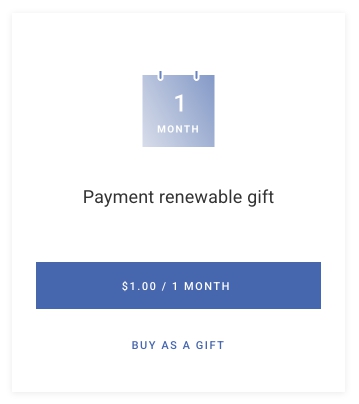
You will be presented with the giftee details collection form. Depending on whether address collection is enabled for the term or not you will either be presented with address form or not.
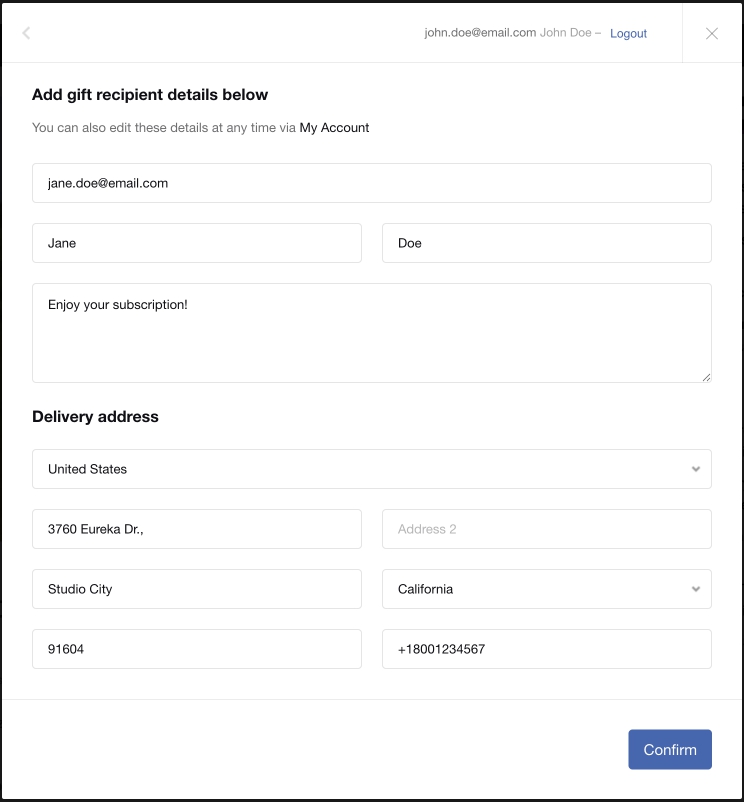
Once finished with the giftee details you will be presented with the standard checkout payment form where additional features may be present depending on the term configuration.
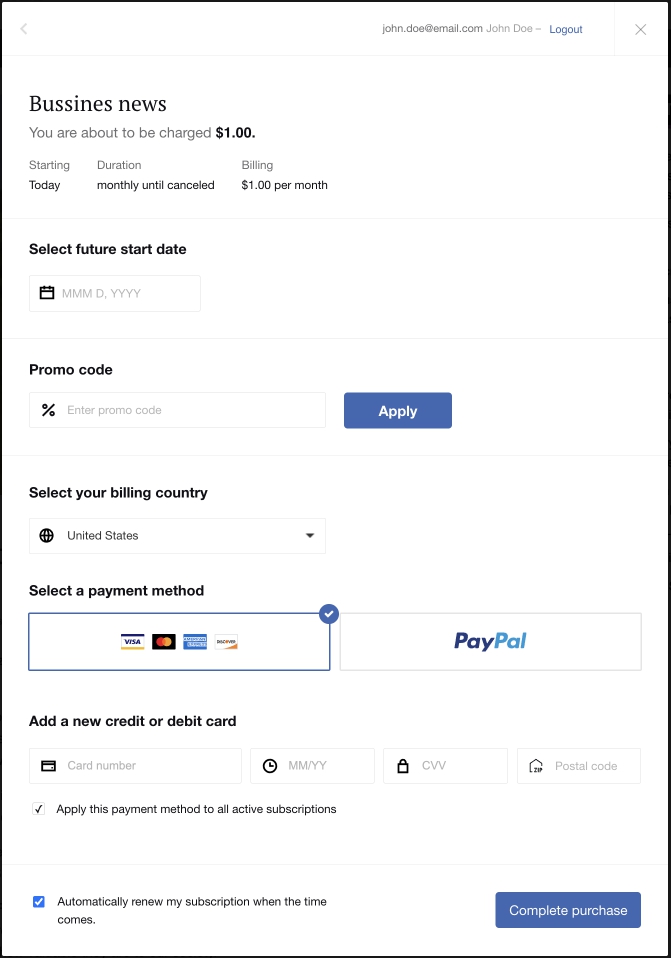
Future start date, if enabled for the term, can be:
-
Blank. In this case gift subscription will start immediately irrelevant from whether giftee is registered in the system or redeemed the gift. System will start subscription and send gift delivery email.
-
Filled with a specific date. In this case system will send a gift delivery email at the given date and start the subscription irrelevant from whether giftee is registered in the system or redeemed the gift.
6. Gift redemption flows
Redemption flow for unregistered users
In most cases regular unregistered giftees will receive gift delivery email and start their redemption flow from this email.
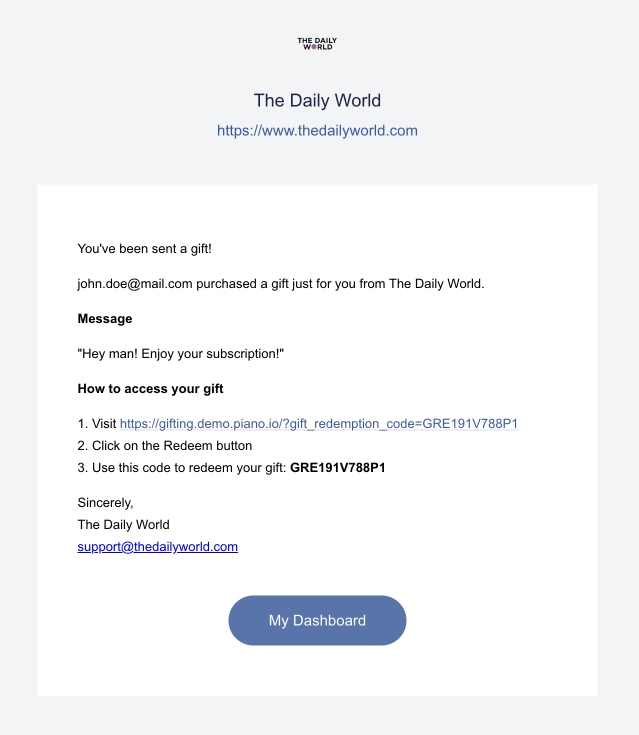
By clicking on the link in the email giftee will be forwarded to the gift redemption page, where the system will either ask user to log in, or just ask to proceed with the gift redemption.
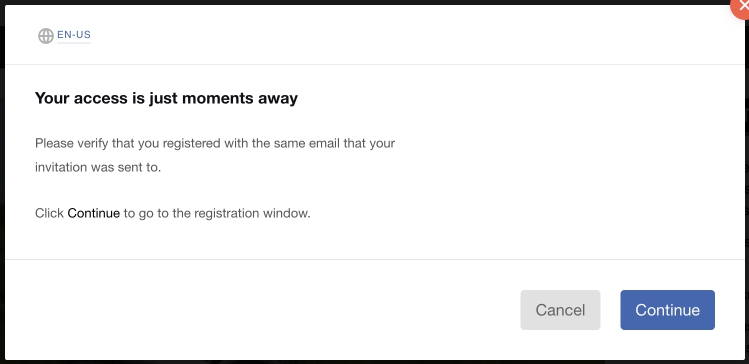
After clicking on 'Continue' button giftee will redeem the gift access to a gated resource.
Redemption flow for users registered between gift purchase and delivery
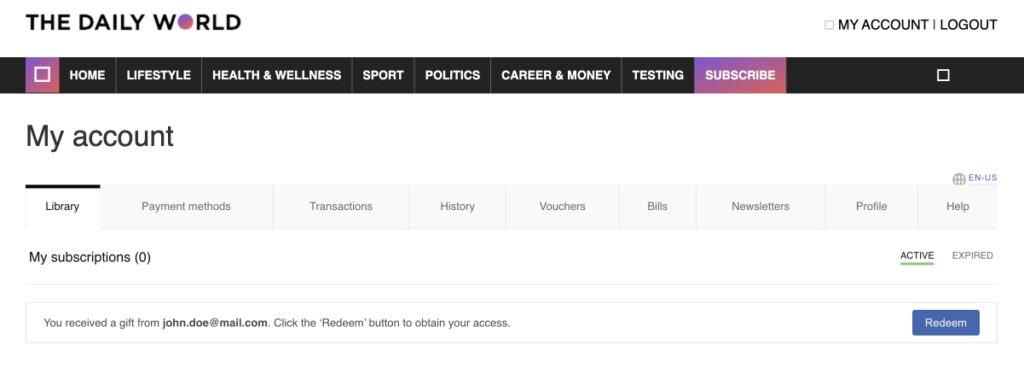
Giftees who registered in Piano themselves starting their flow not from the gift email have an additional option for redeeming the gift access. Once logged into the my account widget they will see a notification that they were granted a gift access and they can redeem it from my account.
Automatic redemption flow for registered users
Giftees who were already registered in Piano upon the gift purchase will redeem their access automatically and receive gift delivery email.
7. Gift subscription management
Gifter management abilities
Gifter has few management abilities in relation to gift subscription.
-
Gifter can manage gift subscription lifecycle (toggle auto-renew on and off, renew ahead of schedule, cancel subscription, update payment method and all other abilities, as gifter is the owner of the subscription).
-
Gifter can update gift details until the gift was redeemed.
-
Gifter can cancel gift subscription with deferred start date before the activation without notifying giftee about the gift.
Giftee management abilities
Giftee can only update address information in case of a print + digital subscription.
Client customer service management abilities
Client's customer service representative can manage gift subscription the same as any other payment of dynamic subscription (with or without address collection). For further flexibility client user can now navigate from gift subscription to gift access and back directly from these windows.
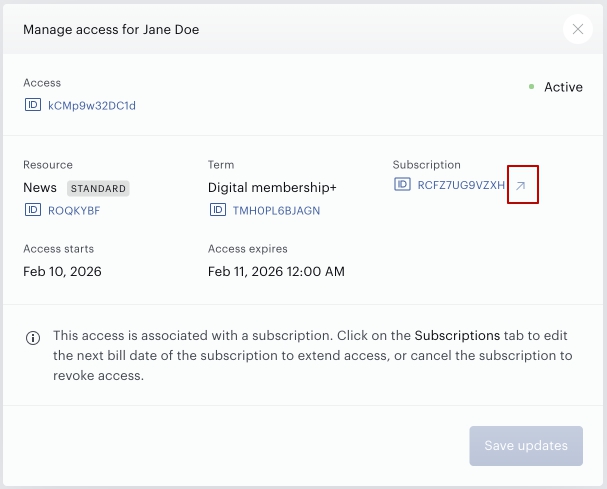
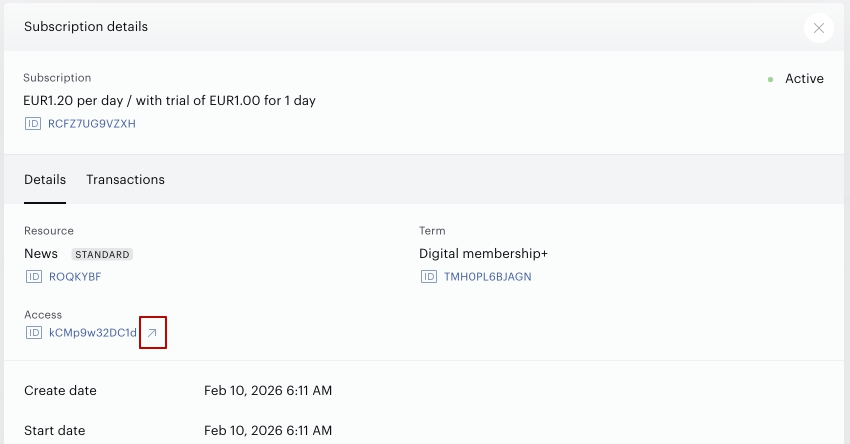
This navigation will also redirect client service representative between contexts of gifter and giftee users.