
Flights, Contracts and Bookings are the terms used to describe the publishing of Campaigns with respect to CPM/CPC/Tenancy respectively.
This page describes:
-
The various contract types
-
Status
-
Setup and ongoing costs
-
Campaign Priority
Getting There
Within the Advertising Tab, browse to a campaign and then click the menu option on the left of the page titled "Flights".
Campaign Contract Types
CPC Campaign Contracts
Cost Per Click Campaigns employ a 'pay per user click' cost model. They may also include a setup and/or ongoing costs per day/week/month.

|
Item Name |
Description |
|---|---|
|
Campaign Flight Dates |
The Dates for which the Campaign will be live. Start date may not be historic, but can be future dated. End Date must be after the Start Date. Dates are Inclusive, so selecting 1/1/2020 - 1/1/2020, the resultant campaign flight will run for 24h. By Default CPC Campaigns do not have an end date. Without editing this field, the campaign will run indefinitely. If an end date is required, select 'add specific flight date' and enter the specific flight dates for your Campaign. |
|
Priority |
Flight Priority is an delivery tool available to advanced Advertisers. It enables an Advertising Account Manager to balance delivyer across all Campaigns in an Advertising Folder. For more information, please refer to 'Campaign Priority' heading further down this page. |
|
Status |
The Status of the Flight. When booking a flight, the status reference indicates the validity of your Flight specification. For further information, please refer to the flight statuses table below. |
The amount of the click cost can be calculated in many ways, described in detail within the Cost Models page. Generally speaking CPC Campaigns incorporate the ability to bid against Keywords and/or Retargeting Values.
Bids and creatives can be edited at any stage.
CPC contracts can be published and run continuously until user intervention. They may be paused and/or stopped at any stage. When an End USEr clicks on a CPC Advertisement, the platform will charge the click cost to the relevant Campaign.
For further information regarding Audience Targeting, refer to Targeting.
CPM Campaign Flights (formerly Contracts)
CPM (Cost Per Thousand) Campaigns purchase ad impressions for a set price. They may also include a setup and/or ongoing costs per day, week or month. Contracts purchased against CPM Products are paid in arreas once the Flight is either manually stopped or runs to completion (i.e. reaches it's end date) .
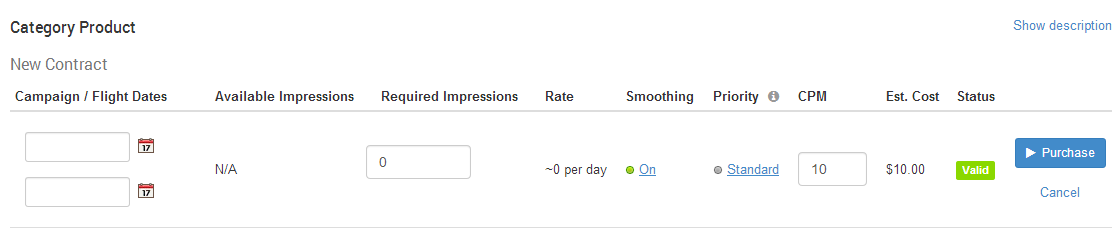
|
Item Name |
Description |
|---|---|
|
Flight Dates |
The Dates for which the Campaign will be live. Start date may not be historic, but can be future dated. End Date must be after the Start Date. Dates are Inclusive, so selecting 1/1/2020 - 1/1/2020, the resultant campaign flight will run for 24h |
|
Available impressions |
The maximum impressions the platform has for sale based on your Flight Dates. |
|
Required Impressions |
The amount of impressions you require for the flight. In most cases, required Impressions must be less than the Available Impressions. (to simplify setup of new platforms, when there is little or no data to forecast, the platform enables you to purchase above the Available amount) |
|
Rate |
An indicative amount of impressions to expect per day if the flight is always configured with 'smoothed' priority. When purchasing a flight, this figure is the average number of impressions per day to reach your required impression amount. Once live, this field is updated to also include the current imps per day / indicative imps per day (e.g. a Rate of 980 / 1,000 indicates within the last few days, the flight has served around 980 of the indicative 1,000 imps each day) |
|
Smoothing |
Flight Smoothing ensures a mostly consistent delivery throughout the flight. generally speaking, smoothing helps ensure the platform reaches the intended goal of impressions over time. Turning smoothing off will in effect try to show all impressions as quickly as possible. When smoothing is off, the Rate indicator no longer applies. |
|
Priority |
Flight Priority is an delivery tool available to advanced Advertisers. It enables an Advertising Account Manager to balance delivyer across all Campaigns in an Advertising Folder. For more information, please refer to 'Campaign Priority' heading further down this page. |
|
CPM |
Cost Per Mille - the cost per thousand Impressions. Some roles have the ability to edit the price of every Flight when booked. Conversly, without these advanced permissions, the default CPM price will be presented, and non-editable |
|
Est Cost |
The Estimated cost of the flight, generated by the (number of impressions x CPM Amount) The cost is estimated, as the billable cost (finalised cost once delivery is complete) may vary due to many factors such as pausing/priority/smoothing/ targeting modification. |
|
Status |
The Status of the Flight. When booking a flight, the status reference indicates the validity of your Flight specification. For further information, please refer to the flight statuses table below. |
Smoothing a CPM Campaign
To ensure that the number of Ads being shown is spread evenly over the duration of the campaign period, an Advertiser can select the 'Smoothing on' option. This will put a cap on the amount of Ads it will allow to be shown each day, ensuring there will be Ads left to show at the tail end of the campaign.
If the smoothing is turned off, then the Campaign is free to deliver as many Ads as is asked for, without having to save any for later in the Campaign.
Pausing a CPM Campaign Flight
An Advertiser may pause their campaign at any stage. The Advertiser can restart (i.e. re-publish) the contract at any stage, however pausing and restarting will render void the contractual obligation with regard to the amount of impressions to be presented.
Stopping a CPM Campaign Flight
If a Campaign flight is stopped at any stage, the flight is forfeited. The Advertiser maintains full control over the campaign, but has chosen to forfeit all contracted impressions and costs for the stopped or cancelled campaign flight.
Editing Audience Targeting criteria for a CPM Campaign Flight
Audience Targeting criteria can be edited at any stage.
Editing Creative content (Creatives)
Creative content can be edited at any stage, However if a campaign is Live or Awaiting go Live, a campaign must have at least one valid creative - to this end, the last creative will not be able to be deleted until the campaign contract is either complete or has been stopped.
Basically, CPM Campaign flights can be purchased for a specific time and a specific number of impressions. The user sets campaign flight dates and sets a required amount of impressions within the specified date range. Pausing the flight is possible, but this can impact the amount of impressions live for a large percentage of the original date range. Stopping the campaign's flight completely stops all ads from showing. This process is not reversible. A new flight is required before the Campaign is live again.
Tenancy Campaign Bookings (formerly Contracts)
Tenancy Campaigns involve the purchase of slots for a particular website or group of sites. They may also include a setup and/or ongoing costs per day/week/month.
Contracts purchased against Tenancy Products are paid for in full before commencement of the Campaign.

|
Item Name |
Description |
|---|---|
|
Start Date & End Date |
The Dates for which the Campaign will be live. Start date may not be historic, but can be future dated. End Date must be after the Start Date. Dates are Inclusive, so selecting 1/1/2020 - 1/1/2020, the resultant campaign booking will run for 24h. The Tenancy Product selected determines how the Bookings can be made - one of Daily/Weekly/Monthly bookings. |
|
Days / Weeks / Months |
The total amount of Purchase-able units of time selected via the Start and End Date selection. The selection of dates is restricted to the smallest unit of time, for example, a product sold by week can only be booked using 7 day blocks of time, and cannot be booked for 2 days only. |
|
Priority |
Flight Priority is an delivery tool available to advanced Advertisers. It enables an Advertising Account Manager to balance delivyer across all Campaigns in an Advertising Folder. For more information, please refer to 'Campaign Priority' heading further down this page. |
|
Unit Cost |
The cost of booking the smallest amount of time available on the product (one of day/week/month) |
|
Estimated Cost |
The estimated amount that will be charged for the Booking if no modifications are made during it;s lifecycle. |
|
Billed Cost |
The actual Cost of the Booking - if no midifications are made to the booking it will be close if not identical to the Estimated Cost. If modifications are made, the billed cost will usually differ from the Estimated Cost |
|
Status |
The Status of the Flight. When booking a flight, the status reference indicates the validity of your Flight specification. For further information, please refer to the flight statuses table below. |
Pausing a Campaign contract
An Advertiser may pause their campaign at any stage. The Advertiser can un-pause (ie. re-publish) the contract at any stage, however pausing and unpausing may reduce the impression rates (if any) stipulated in the product description.
Stopping a Campaign contract
If a Campaign contract is stopped at any stage, the contract is forfeited. The Advertiser maintains full control over the campaign, but has chosen to forfeit all contracted impressions and costs for the stopped/cancelled campaign.
Editing Audience Targeting criteria
Audience Targeting criteria can be edited at any stage - note adding targeting criteria may reduce the amount of impressions on a tenancy contract.
Editing Creative content (Creatives)
Creative content can be edited at any stage, However if a campaign is Live or Awaiting go Live, a campaign must have at least one valid creative - to this end, the last creative will not be able to be deleted until the campaign contract is either complete or has been stopped.
Basically, Tenancy Campaign contracts rely on a date range which specifies the amount of saleable units required in days, weeks or months. The Advertiser must make selections of available time units before purchase. On purchase, the contract is valid and the campaign will go live as specified in the contract. The Advertiser can pause or stop a campaign that is live or awaiting to go live (i.e. the contract specifies that ads will be shown in the future), however this may reduce the number of Ads that are presented within the campaign's contracted dates.
Contract Status
Campaign Contracts have similar status states that differ slightly between Ad Product types;
|
Contract Status |
CPC |
CPM |
Tenancy |
Description |
|---|---|---|---|---|
|
Awaiting Go Live |
n/a |
yes |
yes |
Contract has been purchased for some time in the future, it will automatically be presented as set in the contract. |
|
Canceled |
n/a |
yes |
yes |
Campaign Contract has been canceled by the Advertiser |
|
Complete |
n/a |
yes |
yes |
Contract is complete, campaign is no longer live |
|
Invalid |
yes |
yes |
yes |
Contract does not meet all required criteria |
|
Live |
yes |
yes |
yes |
Contract has been purchased, Campaign is live / published |
|
Live^ |
yes |
yes |
n/a |
Budget has momentarily paused the campaign, it will automatically unpaused once the budget is reset |
|
Paused |
yes |
yes |
yes |
Campaign has been paused by the Advertiser |
|
Valid |
yes |
yes |
yes |
Contract meets criteria and is available for purchase / publishing |
Setup and Ongoing costs
Setup costs are charges associated with purchasing a campaign contract for the first time. Ongoing charges are charged on an ongoing basis (day/week/month). Both setup and ongoing costs are stipulated within the Ad Product's description and detail.
Campaign Priority
Contracts for all product types have a "Priority" field. This priority is used by the ad server when ranking matching ads for an ad request. Ads with higher priority will have a higher rank and hence are more likely to be displayed.
For example: Campaign A has a default priority of 0.5. Campaign B has a high priority of 1. An ad request comes in and the ad server finds that the ads from campaign A and B are both valid candidates to be returned. As campaign B has a higher priority it will have a greater chance of being returned than campaign A's ad.
There are a number of ranking models used and a lot of other variables that influence ads final rank, but this priority setting allows the business owner to manually influence the ranking of campaigns. See Ranking Models for more details.