
Piano offers functionality to collect a user's physical address during checkout. This Print address collection can be enabled on a term basis.
If needed, this address can be edited either through the My Account section by the user themselves, in the publisher dashboard by a team member, or via API.
To change the address in the My Account section, the user needs to click on the Library tab where their active subscription is displayed and select the option Update delivery address from the Manage drop-down.
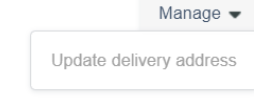
Please note, that in case this option does not appear in your My Account, you would need to update the My Account Library Components template and add the below code:
<tp-menu-item ng-if="libraryItem.address && !libraryItem.sharedSubscription" ng-click="getUserAddress(libraryItem)">
<t>Update delivery address</t>
</tp-menu-item>
A client's team member is able to edit the user's address via the Piano dashboard by looking up the user's account, going to the tab Addresses, and clicking on the pencil icon.

In addition, an existing address assigned to a subscription can also be updated via API through the endpoint publisher/subscription/address/assign. More information about the endpoints parameters is available here.
Please note, that this API endpoint is used to update a subscription's address, but the address record should already exist in Piano. The user_address_id field refers to the address record in our database. You can get it by calling the endpoint publisher/user/address/list as described here.