
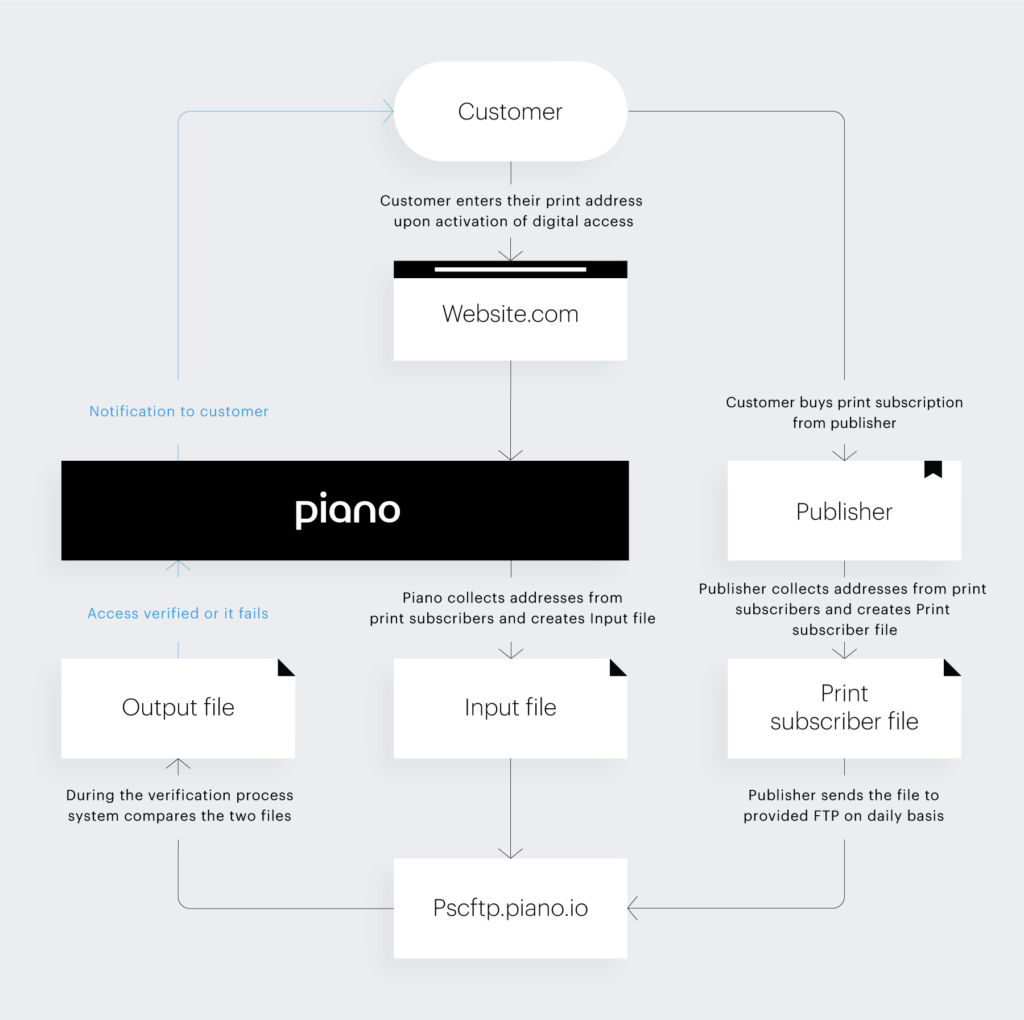
Process Overview
Note: A daily subscriber file sample must be delivered via email to Piano before the scheduled PSC launch date. Piano needs to confirm the file format before the first time submission to the FTP site.
PSC is currently only available for applications located on the US (https://dashboard.piano.io/) and EU dashboard (https://dashboard-eu.piano.io/). In case your application is located on any other dashboard, please contact your Piano representative for more information.
|
|
Actor
|
Task
|
|
1. |
Piano |
Adds PSC to the list of Available external API providers in Edit Business |
|
2. |
Piano |
Configures PSC settings in Application Settings (for detailed information, see PSC Configurations in Application Settings below) |
|
3. |
Client |
Adds a new External API Configuration for PSC under Manage > External APIs |
|
4. |
Client |
Creates an external PSC term and includes it in an offer |
|
5. |
Piano |
Creates and provides FTP credentials (if not available already) and server name for this connection |
|
6. |
Piano |
Adds a new record in our database for the client to start the PSC verification process |
|
7. |
Client |
Notifies Piano once they have created the PSC term and started to submit the daily files |
|
8. |
Client |
Posts the print subscriber file on a daily basis via FTP (for detailed information, see section Print Subscriber File Requirements) |
|
9. |
Piano |
Verifies that the format, name, etc. of the file is correct |
|
10. |
Piano |
Verifies that verification is running correctly Please note that although a client is able to set the verification period (i.e. how often verification runs), it is recommended by Piano that the verification remains at the default 1 day period |
|
11. |
End-user |
Comes to the website and selects the option to activate their free digital access for print subscribers through the PSC term in the offer by providing the same name and address that they have on their print subscription |
|
12. |
End-user |
Once the user fills out the form, they will receive the external API verification email to confirm their access and they will immediately get temporary access (at this point, no data validation or verification happens) |
|
13. |
Piano |
Performs data validation - a matching process between Piano’s input file, which is a file containing all users (and their information) that have activated their free digital access for print subscribers, and the print subscriber file (for more information, see Data Validation) |
|
14. |
Piano |
Performs an error calculation immediately after validation is complete Files with 15% or more errors will not run. The client can correct the errors and resubmit the file for processing on the same day prior to 8:50 EST Files with less than a 15% error rate will proceed to the next step, which is the verification (for more information, see Verification) |
|
15. |
Piano |
Performs verification. During the verification the system compares the data from print subscriber file with Piano input file (for more detail, see Verification) |
|
16. |
Piano |
If a customer from the Piano input file lines up with the data from the Print subscriber file, the user will keep their digital access, otherwise they will enter an 8 day grace period (this number of days is hardcoded) and will have to update their information to match the print subscriber information in order to keep access past 8 days |
|
17. |
Piano |
Results for each customer can be checked in the Output file |
PSC Configurations in Application Settings
The below settings can only be configured by a Piano admin:
Setting
|
Description and details
|
Default state for new clients
|
|
psc.use.and.logic |
Data validation logic. The original logic for PSC was “OR” logic, meaning that every field in a Piano record is checked independently across all users, so every field would get matched against the entire client file. This is an incorrect approach. “AND” logic is the newer logic where every record, as a whole, gets matched against every record in the client file. “OR” logic is legacy and should not be used for new clients. Note: Data validation rules for “OR” and “AND” logic are the same. |
Enabled |
|
psc.prevent.fraud |
If a user fails data validation without prior success (never had a match), they do not get a grace period. This does not apply to first-time users since they have not been through a prior validation. |
Disabled |
|
psc.acceptable_rate |
Error rate - If the amount of errors exceed this threshold, the daily subscriber verification process will not run. The default rate today is 15%. Leaving this field empty or with a ‘0’, will automatically set the error rate to 15%. |
15% Entering 0, by default, is 15%. Any other number entered, changes the percentage exactly to that number. |
|
psc.subscription_result_not_found_max_fails_per_day |
During verification, this setting allows the client to fail a limited number of users per day. This can be useful for the client’s customer service reps to deal with a reasonable number of inquiries when the client expects to have a high number of failures during a migration or initial launch. This setting applies to the verification step of the PSC process, whereas the error rate-setting applies to the validation step. Example: psc.subscription_result_not_found_max_fails_per_day is set t0 200, but there are 300 failures. This means that 200 users will fail verification and the remaining 100 users will pass verification the first day. The next day, those 100 users will fail, as expected. |
0 (0 turns this setting off) |
|
psc.never.fail |
Verification never fails. This setting is used when clients want all users in their subscriber file to pass PSC and get access. If this setting is enabled while users are in a grace period, they automatically get out of the grace period and receive access. Once this setting is disabled, those same users start the grace period from day 1. |
Disabled |
|
psc.emails.enabled |
Enables PSC notification emails. Emails that should be going to clients are: F1 - goes out approximately 24 hours after the grace period started F5 - goes out on 5th day of grace period Suspend - goes out on the 8th day of the grace period and is the final email before the access record is revoked if the address is not verified |
Enabled |
Print Subscriber File and Data Requirements
Piano keeps PSC subscriber files for 3 months only (and automatically deletes all older files).
📃 File Requirements
Naming Convention
-
Publication_Name_YYYYMMDD.txtorPUBLICATION_NAME_YYYYMMDD.txt, as long as it matches what is in Piano's database (Note there are no spaces) -
File name IS case sensitive
-
The listed date in the file name must be the date on which the file will be processed. If a client submits the file after 8:50 PM EST, the following day's date should be listed. Past dates will not be processed.
File Type
Raw text file
Daily Limit
Clients can post only one file per application per day. The only exception to this rule is when a file exceeds the error rate, does not run, and has to be corrected and re-posted.
Print Subscriber Record Requirements
-
Pipe-delimited fields in ONLY UTF-8:
LastName|FirstName|Phone|BuildingNumber|StreetName|PostalCode|AccountNumber -
Customer record must be separated via line breaks
-
Include subscribers from all delivery schedules and those on vacation stops
-
Field requirements
-
Field lengths are not fixed
-
Spaces are permitted
-
Exclude hyphens from every field
-
Include area code in the phone number
-
5 OR 9 alphanumeric postal codes are allowed
-
The account number is the customer subscription number and must be unique for each customer record per application. (Changing the user's
account_idat any later point after a successful PSC run won't cause any issues. The validation is going to run as expected.)
-
Data Validation (Matching) Process
Description
This process compares records in the Piano Input file (file which contains end-users who completed the PSC flow) against records in the Client Subscriber file. Validation updates rows in Piano database to have a match status of true or false. If validation does not run, then rows in the Piano database do not update.
Rules for Data Validation
Dry Run Process
The first step of this process is a dry run, to calculate the percentage of errors that exist. The dry run determines if the error rate threshold has been exceeded. In application settings, a Piano admin sets the error rate (the rate of match failure between the Print Subscriber file and Piano Input file) to the client’s desired amount.
-
The default error rate is 15%.
-
When the error rate is exceeded, internal Piano contacts are notified through email.
Validation Process
-
If the amount of errors does not exceed the set threshold, as a next step, validation runs and updates rows in the Piano database to have a match status of true or false.
-
If the amount of errors exceed this threshold, validation does not run, rows in the database do not update, and user subscription status is unaffected.
-
All users within a Client Subscriber file are validated together, once a day, based on the time the client posts their file in FTP
-
Data validation/the matching process is based on the following fields - LastName (or CompanyName), BuildingNumber, StreetName, Phone, and PostalCode.
-
For this process, LastName and CompanyName are interchangeable. The client can send CompanyName instead of LastName in the event that the end-user inputs their company name instead of first and last name.
-
It's possible for two or more users in Piano with different emails to match the same address in your PSC file.
-
Note that BuildingNumber and StreetName are matched as separate fields in the matching process
-
3 out of 5 fields must match for a record to pass data validation. The exceptions to this rule are as follows:
-
If LastName or CompanyName + StreetName match, PostalCode is automatically assumed to match, resulting in a record that passes data validation
-
If LastName or CompanyName + Phone match, PostalCode is automatically assumed to match, resulting in a record that passes data validation
-
The user should enter the BuildingNumber before the StreetName (as generally used for US addresses). So they should add their street address in the order: BuildingNumber + StreetName
How PSC Fields are Processed
-
Last name: removes everything except A-Z/a-z characters, digits 0-9, spaces, and then capitalizes it
-
Before:
Willard Carroll Smith Jr. -
After:
WILLARD CARROLL SMITH JR
-
-
Company name: removes everything except A-Z/a-z characters, digits 0-9, spaces, and then capitalizes it
-
Before:
alpha-Beta Гамма*12390 ++z Inc. Россия-Казахстан Девелопмент 24/66 -
After:
ALPHABETA 12390 Z INC 2466
-
-
Suffixes in names: does not ignore suffixes[image-zoomable][/image-zoomable]
-
Before:
Willard Carroll "Will" Smith Jr. -
After:
WILLARD CARROLL WILL SMITH JR
-
-
Dashes and parentheses in phone number: removes everything except A-Z/a-z characters and digits 0-9, and then capitalizes any alpha characters.
-
Before:
+9(123)456-789-0'12.BB A -
After:
9123456789012BBA
-
-
Postal code: removes everything except A-Z/a-z characters, digits 0-9, and then capitalizes it
-
Before:
k1a-0b1 -
After:
K1A0B1
-
-
Address:
-
Building number: removes everything except digits 0-9.
-
Street name
-
removes everything except A-Z/a-z characters, digits 0-9, spaces, and then capitalizes it.
-
The following suffixes are removed from the street name
-
-
|
SQ |
AVE |
PLACE |
CIR |
CRESCENT |
|
SQUARE |
AVENUE |
CRT |
CIRCULE |
LANE |
|
WAY |
ST |
COURT |
RD |
LN |
|
DR |
STREET |
HWY |
ROAD |
TERR |
|
DRIVE |
STR |
HWAY |
WYND |
TERRACE |
|
AV |
PL |
HIGHWAY |
CRES |
LOOP |
If you'd like to edit the look and feel of the input screen of these PSC fields you can do so in the External Verification Components template.
Run Times
See run times for Data Validation and Verification here.
Verification Process
Description
Verification is a process that runs separate from data validation where each user’s access is verified individually and is based on the most recent match status from the data validation process.
-
Verification period: The verification process runs as often as it is specified in the verification period field and if all criteria were met. It is recommended by Piano that the verification period is kept at 1 day.
-
There are two different types of terms that can be created with PSC logic
-
External Service Term - user redeems free digital access with an existing print subscription. In this case, the verification period is configurable but defaults to 1 day
-
Payment Subscription + External API - user redeems digital access as a part of a payment term. In this case, the verification period is ALWAYS 1 day.
-
-
Regardless of the verification period setting at the term, when a user is in a grace period, the verification period is ALWAYS 1 day
-
-
The next verification date is calculated as the date of PSC redemption or the previous verification date plus the verification period.
-
Verification checks if a subscription is marked as
match = true or match = false(by data validation). -
If subscription is marked as
match = true, then verification calculates a next verification date, keeps subscription and access active. -
If subscription is marked as
match = false, then verification starts grace period and sets next verification date to tomorrow. -
Verification sends the following emails:
-
External API verification success email - sent immediately after redemption (verification does not need to run for this email to be sent)
-
Verification rejection - when a user fails data validation
-
F1 - goes out approximately 24 hours after the grace period starts. This depends on when the verification job runs
-
F5 - day 5 of grace period
-
Suspend - day 8 of grace period - FINAL EMAIL and then access is revoked if the record is not verified
-
-
After verification runs, the Subscription Details Report Status field is updated to reflect access status
Grace Period
-
Grace period is hardcoded to be 8 days
-
Verification runs every day for a subscription in a grace period
Run Times
See run times for Data Validation and Verification here.
Run Times
Piano Input File Generation
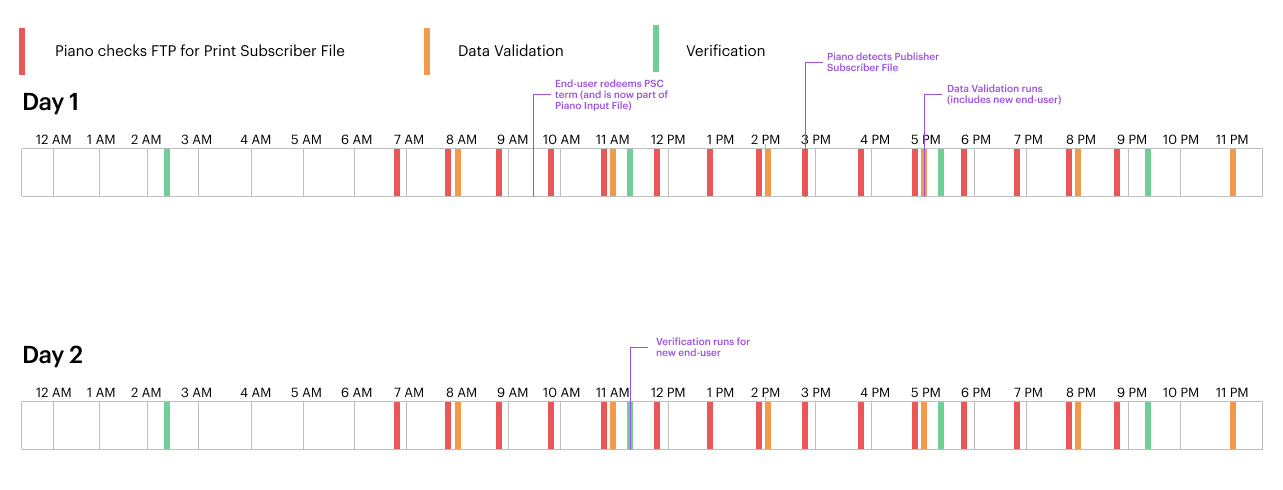
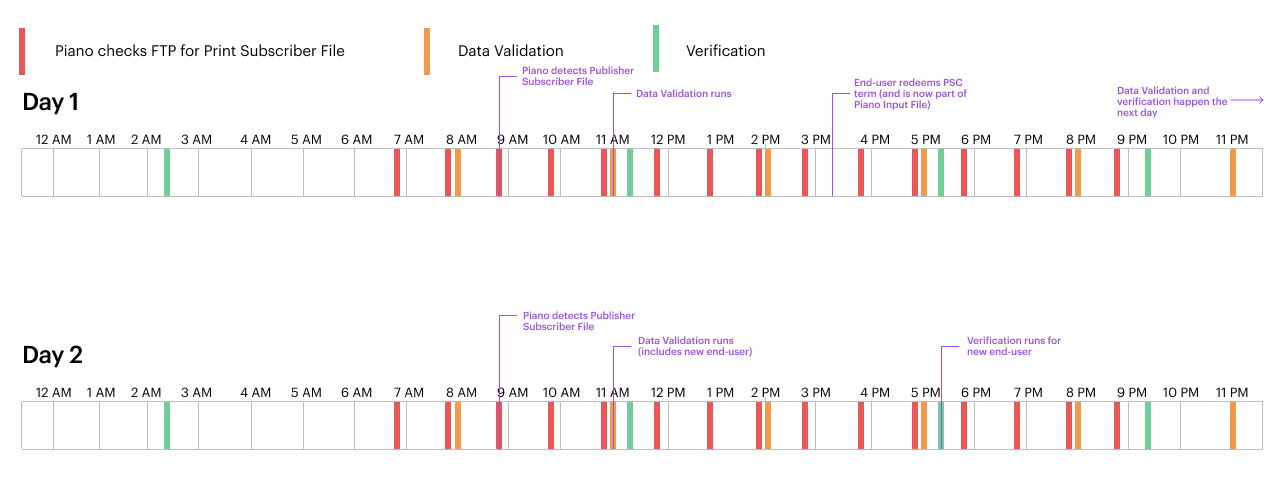
The Piano input file containing user addresses from our database is generated only once per day between 4:30 - 4:35 AM EST.
Any edits to user addresses after this time of the day will be applied in the input file of the following day.
Piano Subscriber File Detection
Piano checks the FTP for a Print Subscriber file every 60 minutes, from 6:50am to 8:50pm EST.
Data Validation
-
Data Validation runs 6 times a day: 8am, 11am, 2pm, 5pm, 8pm, 11pm EST
-
The time the client sends their Print Subscriber File will determine which time slot they will fall into for data validation.
-
Duration: this process can run on average between 2 - 4 hours, but it is possible for it to take longer depending on how many files have been uploaded
Verification
-
Verification runs 4 times a day: 2:20am, 11:20am, 5:20pm, and 9:20pm EST
-
For new users: 1st Verification = PSC redemption time + 24hrs + time until next verification run
* Please note - If a Print Subscriber file is sent between 8:01pm and 8:50pm, this means that data validation will occur at 11pm, and since the last verification run is at 9:20pm, subscription status will not change until 2:20am the next day when verification runs for the first time.
Below is a visual diagram displaying run times of the above three processes in EST:

Possible Redemption Scenarios
(with sample redemption times based on process run times)
|
|
|
|
You can use the following guide for updating a user's PSC address via API if needed.
The same goes for subscribing users to PSC terms in general. Currently, we support this only on the frontend, and it's not possible to subscribe a user to a PSC term via API.
Data Segregation and Security
-
Client subscriber records included in the daily subscriber file are held only by Piano.
-
Data in the daily subscriber file is used only for the print subscription confirmation process. Piano will not use this data for any other purpose.
Glossary
-
PSC Subscriber File - file from the client that contains records of customers that are print subscribers
-
Piano Input File - data from Piano that contains records of end-users who completed the PSC flow to redeem a digital access
-
Data Validation - a process that checks for error rate and marks records between the PSC Subscriber File and Piano Input File as matched or not matched if the error rate has not been exceeded
-
Dry Run - The dry run calculates the percentage of errors that exist and determines if the error rate threshold has been exceeded. The match status rows in the Piano database are only updated if the error rate does not exceed the set threshold and data validation runs again after the dry run
-
Verification - a process which checks for match status of records after data validation and determines if access is granted, revoked, or user enters/continues grace period