
Preparation
Before working with dynamic terms, please read the documentation and learn about feature availability in comparison with payment terms.
Also, keep in mind that there are still limitations for dynamic terms, which you can also observe in the documentation.
Email templates
Dynamic terms have a whole bunch of new email templates that have to be configured before the launch of dynamic subscriptions. Copies of these templates and variables are typically different from payment terms. Additionally, dynamic terms have email templates that were not previously available for payment terms. You can learn more about cases and templates in the documentation.
System templates
In order to get new features of dynamic subscriptions working for an existing setup, clients need to make system template updates.
Configure dynamic terms
You can learn more about the configuration of dynamic terms in the documentation. Also, examples of specific frequent use cases might be very helpful for a better understanding of configuration logic.
Test billing configurations
The most convenient way of testing dynamic terms will be to run a test in the Sandbox and use the green 'Run scheduler renewal' button for renewals.
Setup and Testing Steps
You will need to:
-
Configure dynamic terms in the dashboard and add them to the offer.
-
Set up an integration page where the offer will be shown for the purchase (basically integrate with Piano Sandbox).
-
Register in the system as an end user from an integration page and purchase a subscription using a test card (availability depends on the payment provider you're using for testing).
-
Switch to the dashboard and find the user's subscription. Click on the green 'Run scheduler renewal' button to emulate the subscription's renewal.
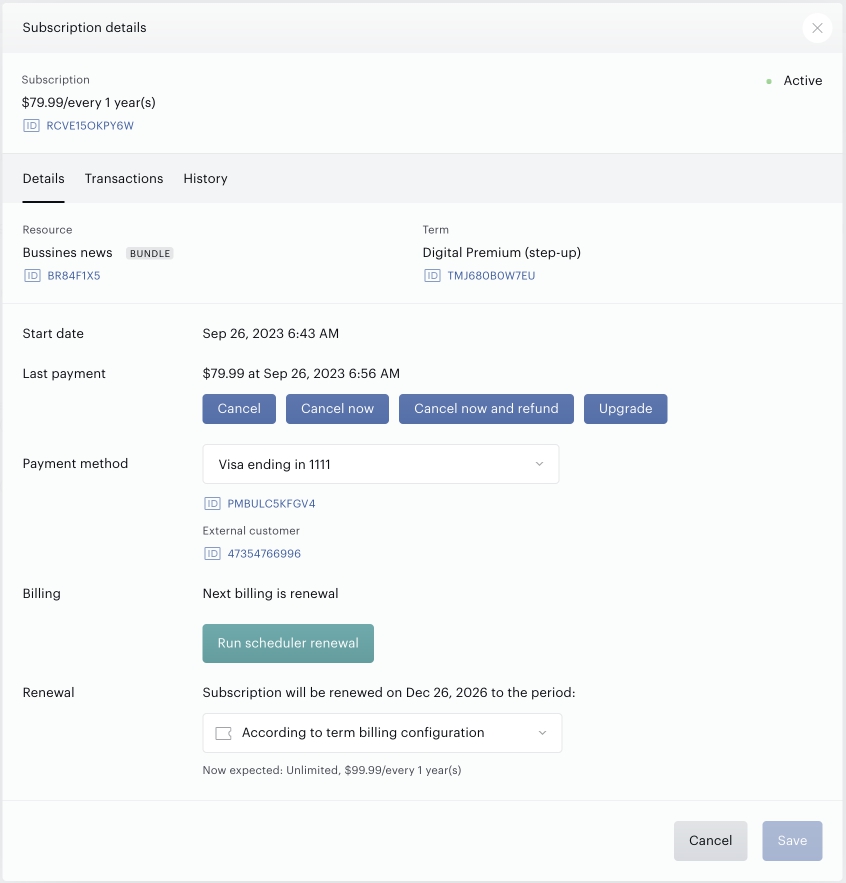
5. Now you should be able to see changes in the subscription billing plan according to the configuration of the billing plan in the dynamic term.
Production environment testing will have to be executed with a real card (real transactions) and a minimum delay between renewals of one day.
Subscription migration
Migration to dynamic terms can be performed in two ways:
-
For an existing pool of subscribers - use bulk upgrade action. End-users may be notified that they will be upgraded or not in case upgrade emails are disabled. But anyway, they will see the history in My Account and will understand that the subscription was changed. You can read more about bulk subscription upgrades in the documentation.
-
For the pool of new users, you can contact Piano support for bulk import of subscribers. Dynamic terms support the import of users on a specific access period, which means annual subscribers who are currently on month 5 of their subscriptions can be imported directly on the fifth month and continue the ongoing subscriptions. You can read more about import in the documentation.