
Introduction
Avalara Communications Tax (AFC) integrated in Piano Management + Billing supports communications tax calculations and committing of completed transactions in the connected AFC customer account for further tax filling purposes.
Piano integrates Avalara's REST v2 API for Communications tax. Although different transaction/service pairs are available and supported in the integration, it’s been purposefully built with more concise communications tax calculations for the Streaming category.
Enabling taxes
To enable the AFC tax engine in Subscription Management + Billing, navigate to Edit Business → Settings → Tax Support:

Then, select AFC from the Configuration dropdown to enable it.
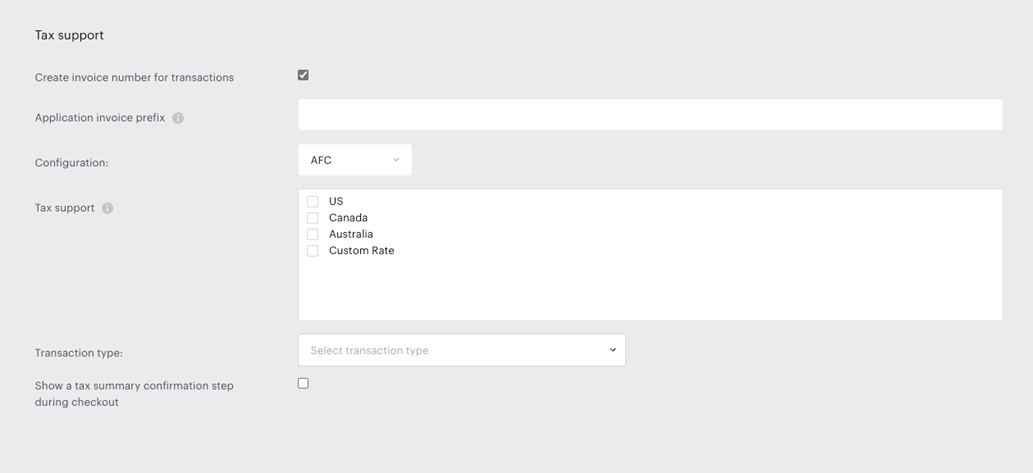
Before you make any further changes, once you select AFC in the configuration, an additional Integration tab will appear in your application to enable you to establish the connection to your AFC account:

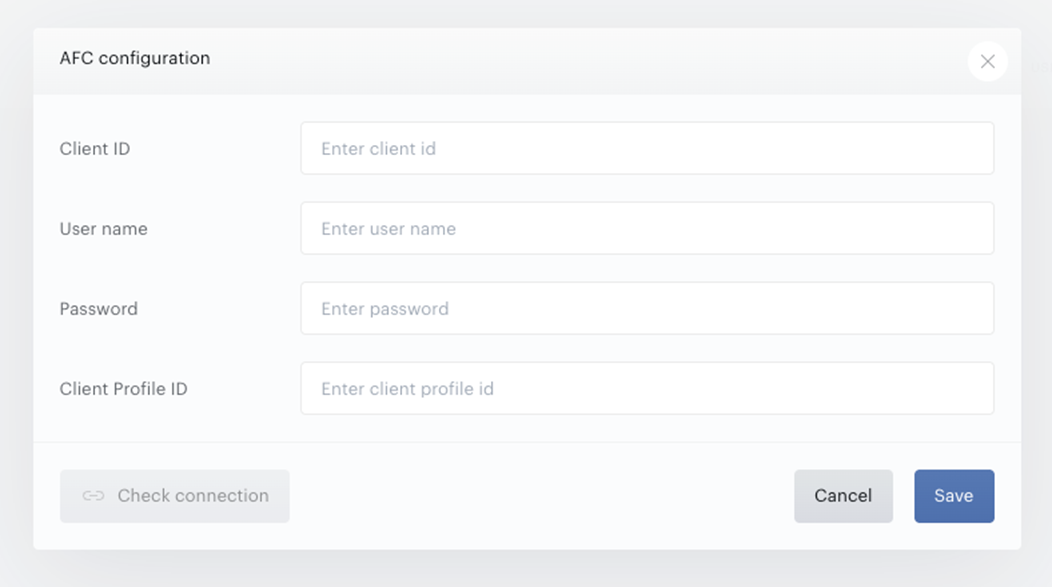
Enter your credentials as per the below:
|
Setting |
Description |
Type |
Required |
Default state |
Requirements |
|
Client ID |
ID of the Communication REST v2 client account. |
Text input |
R |
Empty |
Numbers only. MAX 64 characters. |
|
Username |
Username of the Avalara account. Will be used to authorize API calls. |
Text input |
R |
Empty |
Text field. MAX 128 characters. |
|
Password |
Password to Avalara account. Will be used to authorize API calls. |
Text input |
R |
Empty |
Text field. MAX 128 characters. |
|
Client profile ID |
Sub profile that will be used for making requests. Please ensure the client profile ID is correct. In case an incorrect value is added, tax calculation requests will fail. |
Text input |
O |
Empty |
Numbers only. MAX 3 characters. |
|
Check connection |
HealthCheck of the configuration - checks that Communications REST v2 API can be called with the provided parameters. |
Button |
Disabled |
Becomes available after all the required parameters are entered. |
Input your AFC account credentials and click Check connection to ensure your credentials are correct and a proper connection is established between your Piano application and your AFC account.
After you’ve established your connection, you can specify tax configuration further by selecting the applicable country, defining if you wish to handle the tax as inclusive or exclusive by using the toggle: Pass sales tax onto the end user. Additionally, you can specify your registrations in individual US states by listing out any applicable jurisdictions where you are required to collect sales and communications tax.
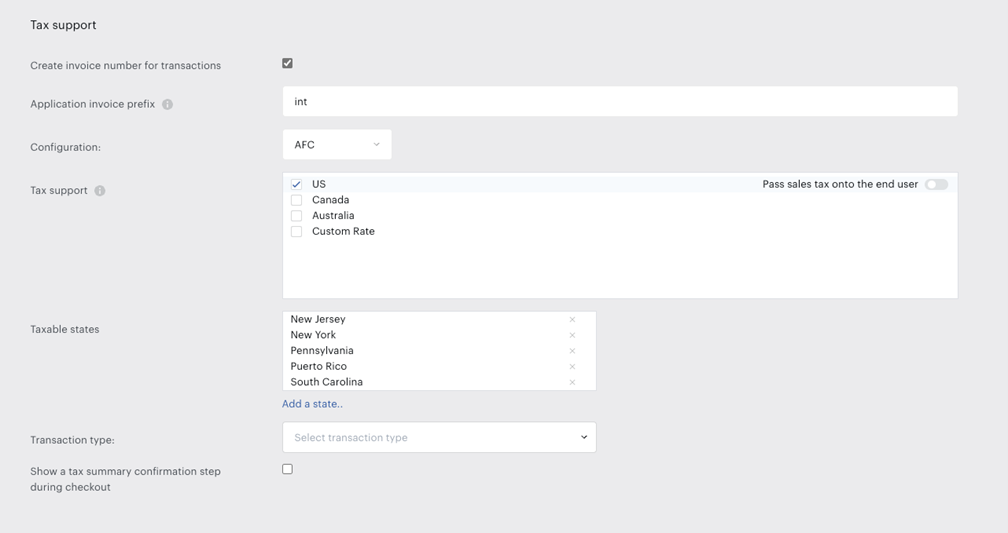
The transaction type allows selecting the transaction/service pair codes your application will use when making requests to calculate tax.
Finally, if you wish to show an extra tax summary during the checkout, you can decide to check this option. Further details about this feature are available under this link.
Feature Support
AFC integration supports single tax and service value pairs for single line-item (term) purchases in Piano.
Sales tax and communications tax calculation in the US, Canada, and Australia are supported, and the calculated tax amount is returned in the Checkout, Publisher dashboard, and transaction log, as follows:
-
Checkout purchases (released)
-
Renewal billing transactions (released)
-
Refunds (released)
-
Upgrades and downgrades scenarios (released)
Once AFC is enabled, country and zip code fields will be automatically enabled (for US and Canada) and collected in all Piano-applicable interfaces, enabling purchases or payment method management.
Transaction commitment with AFC tax calculation upon payment completion can be enabled, ensuring these transactions are included in Revenue reporting. To activate this feature, please contact Piano Support and request it for your specific application(s).
Handling Refunds for Committed Transactions
When a full refund is processed within the same accounting period as the original payment (via the Piano dashboard or by the user through My Account, if enabled), the committed transaction is removed from the AFC dashboard.
If the full refund is processed in a subsequent accounting period, a new transaction with a negative tax amount is created in the AFC dashboard to offset the original.
For any partial refund, regardless of the accounting period, a new transaction with a negative tax amount is generated in the AFC dashboard to reflect the refunded portion.
Piano <> Avalara AFC Entity Mapping
To enable understanding of which Piano data are available and how they are represented in AFC, the following entity mapping for single line-item Piano transaction data was developed. The AFC document object and its entities, as per the requirement to support streaming service type tax codes, are as follows:
Document / Invoice level
|
Avalara parameter |
Description |
Piano parameter |
|
Document Code |
Internal document code that should be used for commit transactions. |
trackingId |
|
Customer Type |
A type of customer. B2C only. |
0 |
|
Invoice Mode |
Indicates if all line items within an invoice should be processed individually or as one invoice. |
true |
|
Return Detail |
Indicates if individual line-item taxes should be included in response. |
true |
|
Account Reference |
Account reference for reporting. |
Broadcaster |
|
Customer Reference |
Internal customer reference for reporting. |
uid |
|
Invoice Number Reference |
Generated invoice number for the cases when it exists. |
invoiceNumber |
|
Bill Cycle Reference |
The billing period data. |
Month and year of the date when transaction performed in YYYYMM format. |
The Document Code serves as a tracking ID in our system and is generated after the purchase process - it is not created immediately.
When tax is calculated (e.g., when opening an offer or applying a promo code), the transaction has not yet been finalized, so the Document Code does not exist at that point. For this reason, the initial tax calculation request is sent without a Document Code.
The sequence is as follows:
-
Taxes are calculated.
-
The purchase is completed via the payment provider.
-
After that, a Document Code is created.
-
This Document Code can then be used to commit the transaction.
The Invoice Number Reference works similarly - it is tied to a specific external transaction entity and is not available during tax calculation.
In the reports, you can refer to the Is Committed column:
-
If the value is
false, both the Document Code and Invoice Number Reference will typically be missing. -
The only exception is in the case of a full refund, where an uncommit operation is performed. In that case, the Document Code may still appear even though the transaction is not committed.
To ensure the Invoice Number Reference is recorded in AFC, you need to enable the Create invoice number for transactions option under Edit Business → Settings → Tax Support.
Line item
|
Avalara parameter |
Description |
Piano parameter |
|
Sale type |
Indicates that the item was sold to an end user - a retail sale. |
1 |
|
Transaction type Id |
The first part of the T/S Pair defines the product to be taxed. |
The value is taken from the tax settings. |
|
Service type Id |
The second part of the T/S Pair defines the product to be taxed. |
The value taken from tax settings.
|
|
Reference Id |
Reference ID for line item. |
StreamingVideo_OnNetLive |
|
Inclusive |
Tax is included in the charge amount or excluded. |
The value taken from tax settings. |
The following parameters required for tax calculation calls were coded in the communication layer:
-
Configuration:
-
Return non-billable taxes: true
-
Return extended data in the response: true
-
Return reporting information in the response: true
-
-
Company:
-
Business Class: 1
-
Service Class: 0
-
Facilities (Carrier has company-owned facilities): false
-
Franchised (Company works upon franchise agreement -not required): false
-
Regulated (Company is regulated or not): false
-
The company identifier is not required but could be used in reporting. It is planned to be used as a company identification number.
-
Invoice:
-
Customer Type: 0
-
Invoice Mode: true
-
Return Detail Indicates: true
-
Return Summary: true
-
Account Reference: Broadcaster
-
-
LineItem:
-
Sale type: 1
-
Reference Id: StreamingVideo_OnNetLive
-
Quantity: 1
-
Discount type: 0
-
The following tax exemptions were identified as out of scope:
-
Tax category or tax type exemption;
-
Location exemption;
-
Jurisdiction level for tax exemptions (federal, state, county, city);
-
Tax level (federal, state, country, city).