
Subscription Billing
Once you have enabled Stripe Billing integration, all new purchases will result in subscription creation in Stripe, and renewals will be managed by Stripe going forward.
Revenue Recovery (Smart retries)
Clients using Stripe Payments and Billing benefit from AI/ML driven retry processing, which operates across cards, card-based methods, and direct debits. Stripe reports that businesses using Stripe recover on average 55% of failed payments, and that 92% of cards have been seen before on the Stripe network. These are Stripe's own published figures and are subject to change. Stripe achieves this because of the volume of payments it processes, storing and learning from global payment success and failure patterns.
Because Stripe uses AI/ML to power Smart Retries, retry patterns will differ from Piano’s Passive Churn Prevention or other preconfigured static retry methods. One result is that there is not a set grace period, and while next attempt dates are provided with every failure, these may change depending on the opportunity to retry and success signals Stripe sees for the card across the network.
You control how long retries can run. In your Stripe Revenue Recovery settings, choose a retry window of 1 week, 2 weeks, 3 weeks, 1 month, or 2 months. Piano keeps the subscriber's access active while Stripe has a retry scheduled, so your retry window sets how long a grace period can last. Stripe doesn't share the window with Piano, so Piano reports the billing period length instead. See Piano Changes Overview.
Passive Churn Prevention vs Revenue Recovery (Smart Retries) Differences
|
Passive Churn Prevention |
Smart Retries and Automations |
|
Supports charge retries with various cadences or on custom days of the grace period. |
Supports AI-driven charge retry schedule not visible to clients. |
|
Supports up to 10 retry attempts within a grace period of up to 60 days. |
Retries run on an AI-driven schedule. You choose the retry window (1 week, 2 weeks, 3 weeks, 1 month, or 2 months) and the number of attempts. Stripe's recommended setting is 8 attempts within 2 weeks. A fixed custom retry schedule is also available, limited to 3 attempts. |
|
Supports different customizable logics based on the initial charge failure code. |
Supports AI-driven charge retry logic, optimizing retry time, cadence and cost vs. recovery ratio. |
|
Supports sending customized email notifications for each charge retry attempt. |
Piano sends a different failed renewal email version for each failed attempt, selected by the attempt number and decline reason. For Stripe-billed subscriptions, these emails are triggered by each failed attempt Stripe reports. |
|
Supports different grace period length per logic. |
Supports single retry period length per application in general, multiple policies with Automations. |
|
Supports term-based configurations. |
Supports single configuration for the whole application that will be applied to all types of subscriptions (weekly, monthly, annual) or multiple automation configurations. |
|
Supports retries on manually defined cadence. |
Supports AI-driven charge retry times. |
|
Supports multiple payment providers with synchronous payment methods only. |
Supports card-based methods, with separate logic for ACH and SEPA payment methods. |
Email Notifications
Existing notifications will continue to be sent even for Smart retries. You can still keep multiple active renewal failure email variants; Piano selects the appropriate version based on the failed attempt. For setup details, see this article.
Renewal retries processing
Understanding the renewal and retry logic when using Stripe Revenue Recovery includes two key failed renewal processes:
Stripe-native synchronous payments (e.g. cards, Apple Pay, Google Pay):
-
The invoice is created. Piano extends access to the next billing date plus 3 days.
-
The renewal date arrives and the payment attempt is made immediately.
-
If it succeeds: the subscription is renewed and access continues.
-
If it fails and Stripe has scheduled a retry: Smart Retries begin and access is extended during the retry period. If Stripe has not scheduled a retry, the subscription is expired. See Hard decline and retry handling below.
Stripe-native asynchronous payments (e.g. SEPA, Bacs, and ACH direct debit):
-
The invoice is created, days ahead of the renewal date. Piano extends access to the next billing date plus 3 days.
-
The invoice is finalized on the renewal date. Piano initiates the renewal, advances the period counter, and sets the payment to Pending. Access continues.
-
Stripe initiates payment collection.
-
If the payment succeeds: Piano sets the payment to Paid and creates the renewal conversion.
-
If the payment fails: Smart Retries begin and Piano maintains access until the next billing date.
If a grace period started because an asynchronous payment failed, the subscriber can't end it by renewing manually in checkout. Stripe's retries continue as described above.
Invoice creation and invoice finalization are separate events that arrive at different times. The access extension happens on invoice creation, which can be several days before the renewal date.
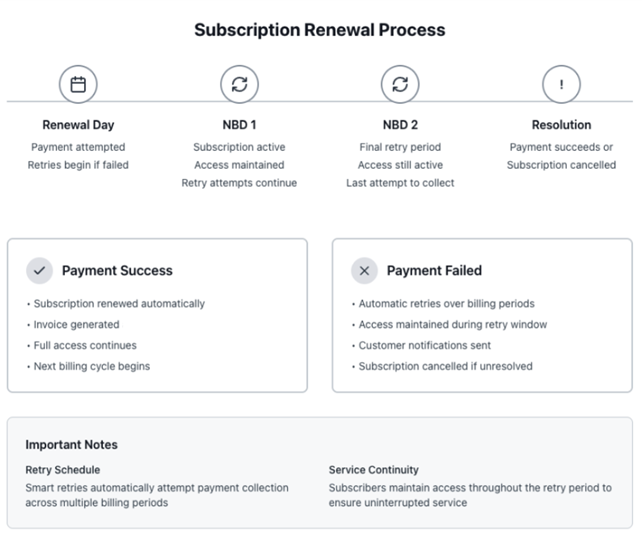
Hard decline and retry handling
Piano does not inspect the decline code. When Stripe sends invoice.payment_failed, Piano reads the next_payment_attempt field on the invoice:
-
A date is present. Stripe has scheduled another retry. Piano starts a grace period, keeps access active, and sends the renewal failure notification.
-
The field is null. Stripe has no further retry planned, either because the retry period is over or because the decline code is one Stripe does not retry. Piano expires the subscription and revokes access.
Stripe does not retry hard declines. Its non-retryable decline codes include lost_card, stolen_card, pickup_card, incorrect_number, revocation_of_authorization, highest_risk_level, and transaction_not_allowed. A renewal that fails with one of these ends the subscription at the first attempt.
While a grace period is running, the subscriber can add a new payment method in My Account. That updates the default payment method on the Stripe subscription, and Stripe then attempts the outstanding invoice. If that attempt fails, Smart Retries continue on the cadence configured in your Revenue Recovery settings until the payment succeeds or the retry period ends.
For the decline codes Stripe treats as non-retryable, see the Stripe docs.
3DS re-authentication is the exception. Stripe does not retry these either, but Piano applies a fixed 30-day grace period instead of expiring the subscription. See Payment Action Required below.
Payment Action Required
In some rare cases, additional authentication may be required during renewal payments, for example with 3DS re-authentication. If a renewal payment fails, the subscriber is directed to their account page to update their payment method and re-authorize the payment.
In these cases, Piano receives a Stripe payment_action_required error event, so Smart Retries do not start automatically. Instead, Piano initiates a fixed 30-day grace period and sends a Subscription Renewal Failure email every five days, up to six times, or until the payment method is updated in My Account. Once updated and re-authorized, Stripe attempts payment for the outstanding invoice, and the normal flow resumes, including Smart Retries if applicable.
Key Stripe Dashboard configurations
Revenue Recovery Settings

There are two options to configure your Revenue Recovery in Stripe Billing.
-
General Revenue Recovery settings enable configuring one global retry strategy for all subscriptions. You have the option to use Smart Retry or a fixed custom retry policy, and the option to turn on retries for Bank debits. Direct Debit retries have a preset duration and number of attempts following the bank guidelines. Piano recommends using both Smart Retry and Bank debit retries.
-
Automations settings enable configuring flexible retry strategies to be configured differently for two different subscription periods.
Recommended General Revenue Recovery settings
In the Stripe Dashboard, go to Billing → Revenue recovery → Retries → Cards. Direct link: dashboard.stripe.com/revenue_recovery/retries.
Recommended configuration:
-
Retry period: 2 weeks (to avoid overlapping periods on monthly subscriptions). Stripe lets you choose 1 week, 2 weeks, 3 weeks, 1 month, or 2 months, and set the number of attempts. Stripe's own recommended setting is 8 attempts within 2 weeks.
-
Subscription status: "Mark the subscription as unpaid"
-
Invoice status: "Mark the invoice as uncollectible"
This setting configures the same retry rules regardless of term length. To use different rules for monthly vs. annual subscriptions, use Automations to configure separate policies.
In the same section, navigate to Local Payment methods and click Manage to enable retries accordingly (e.g. if you use SEPA or other direct debit payment methods).
Overlapping period
If you set 2 months for the retries policy, overlapping periods may occur and affect the processing behavior of the subscription renewal and access.
Automations
If you wish to configure different retry strategies for Monthly vs Annual subscription types navigate to Automations.
Then set name and trigger, and in the conditions choose Subscription interval is, and set it to Yearly. Should you wish to treat Monthly subscriptions differently, repeat the setup for Monthly.
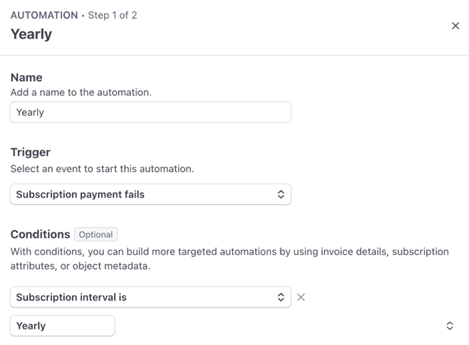
In the second step select or create the desired retry policy relevant for the subscription type and set the Subscription status and Invoice status as follows:
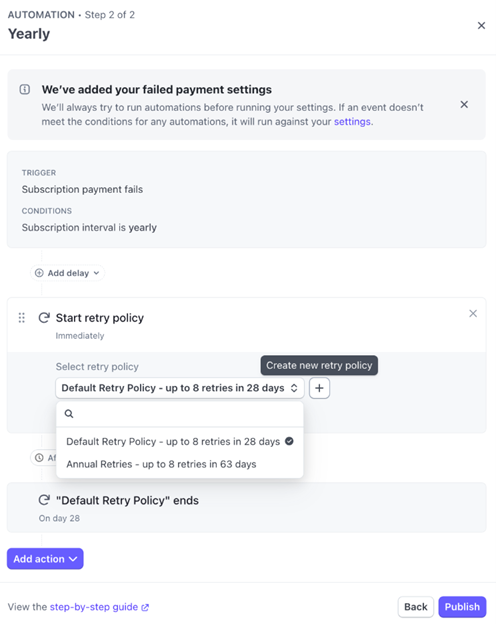
Then "Add action" to "Mark subscription unpaid", followed by another action to "Mark invoice uncollectable", then click Publish. Your final setup should appear as follows:
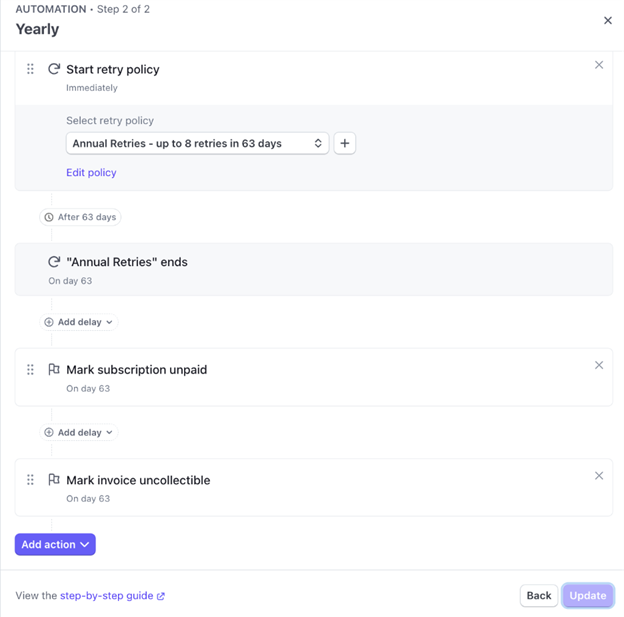
Non-Stripe Payment providers and Dual Retry run
Please note in case you are migrating from 3rd party provider to Stripe, and Dual Retry run is recommended, do not configure Automations, only use the general Revenue recovery as described above: Set the Subscription cancelation strategy to "Mark subscription unpaid" and Invoice status to "Mark invoice uncollectible" to ensure fallback retry logic in Piano can attempt retrying the legacy tokens for the optimal success on any migrated card retries.
For BYOP subscription retries, Passive Churn in Piano continues to be used. Any Smart Retry configurations will not affect subscription fail and retry logic managed by Piano.
Invoice Settings
Invoice event configuration
In the Stripe Dashboard, navigate to Settings → Billing → Subscriptions and emails → Prevent failed payments → Upcoming renewal events.
Required setting:
Configure events for upcoming renewals to ensure proper validation between Piano and Stripe. This is an important integration point between the systems. Change the "Upcoming renewal events" setting to be triggered 3 days before a subscription renews.
Stripe's dashboard default on a new account is 7 days, which is compatible. It does, however, widen the period within which changes may still happen before the renewal invoice is finalized. On an existing Stripe account, check that the setting is configured at all: if it is off, the pre-renewal sync does not run and subscriptions can go out of sync.
Invoice finalization grace period configuration
In the Stripe Dashboard, navigate to Settings → Billing → Invoices → Invoice finalization grace period and locate the Edit button next to the default rule. Direct link: dashboard.stripe.com/settings/billing/invoice.
Required setting:
-
Set the finalization grace period to 1 hour (default)
-
Do not add additional rules
This setting determines the time between invoice creation and when it's finalized and sent to subscribers. Piano uses this window to validate the invoice before payment is collected.
Disable invoice emails (if using non-Stripe payment provider)
In the Stripe Dashboard, navigate to Settings → Billing → Subscriptions and emails → Manage invoices sent to customers and disable the customer emails toggle for Send finalized invoices and credit notes to customers.
BYOP clients: this is required. It prevents customers from paying directly on Stripe when your own processor is collecting the charge. Also make sure no payment links are enabled on invoices, otherwise there may be double charges.
Stripe Payments clients: this is optional. You may leave the setting enabled if you prefer Stripe to send invoice emails. If you do, make sure Stripe email rules and Piano Email Manager do not conflict or send duplicate emails.
Manage invoices sent to customers settings (if using non-Stripe Payment provider)
In the Stripe Dashboard, navigate to Settings → Billing → Subscriptions and emails → Manage invoices sent to customers and update the Subscription status to Unpaid and the Invoice Status to Uncollectible.
These settings apply to BYOP invoices, because BYOP invoices use collection_method = send_invoice and Stripe's automatic dunning does not apply to them. Stripe Payments subscriptions use charge_automatically and are governed by the Manage failed payments section instead, so a pure Stripe Payments client does not need to set the statuses here.
This is important to ensure Piano can manage BYOP grace and retry logic and handle cancellation. In no case set the Subscription status to Cancel.