
Piano Changes Overview
Piano Webhook Changes
Access webhook will change the grace period length for Stripe-managed subscriptions using Stripe Payments because Smart Retries handle grace and retries differently than Passive Churn Prevention:
Three fields in access webhooks relate to grace period: is_in_grace, grace_period_start_date, grace_period_length.
-
In is_in_grace we send true if the Piano subscription is in grace (i.e., smart retried in Stripe).
-
In grace_period_start_date we send the current period start date.
-
In grace_period_length we send the current billing period length (for example, 1 month) for any Stripe-retried subscriptions, rather than the configured grace period in Passive Churn Prevention or the term settings.
Stripe doesn't share your configured retry window with Piano, sograce_period_lengthreflects the billing period length, not the length of your Stripe retry window. For example, a monthly subscription reports 1 month even if your retry window is 2 weeks. This is expected behavior.
For upgrades using asynchronous payment methods, Piano now separates term change initiation from payment confirmation. New term_change_initiated webhook events are sent when the upgrade takes effect while payment is pending, followed by completion or failure events once the payment outcome is known. More details can be found in Subscription Upgrades.
Access expiration date buffer
In Piano dashboard views and user access records, the Access Expiration Date is temporarily set 3–4 days after the subscription Next Billing Date.
This intentional technical buffer synchronizes subscription states between Stripe and Piano:
-
How it works: When Stripe initiates a renewal or upgrade and sends an
invoice.createdwebhook, Piano extends access to the Next Billing Date + 3 days. -
Why it is needed: The buffer prevents premature access interruption from network latency, time zone differences, webhook queues, or asynchronous payment confirmation.
-
Access termination on failure: The buffer does not grant unearned free access. If the final payment fails in Stripe, Piano immediately revokes access and expires the subscription to match Stripe.
Dashboard changes
Clients using Piano will notice no changes to their day-to-day operations in the dashboard. The main expected change applies to clients using Stripe Payments: they will no longer use Passive Churn Prevention to manage the payment retry sequence. Instead, retry configuration is managed in Stripe Billing, including Revenue Recovery or Automations, where clients can configure Smart Retries.
For subscriptions billed through Stripe Payments, Stripe runs the retry sequence. Stripe decides when each retry happens and when to cancel the subscription, so the retry cadence and grace period length configured in Passive Churn Prevention no longer apply.
Passive Churn Prevention email settings continue to work for these subscriptions. When Stripe reports a failed payment attempt, Piano selects the email version based on the decline reason and the attempt number, and sends it. Emails are therefore sent according to Stripe's retry schedule, not the schedule in your Piano churn prevention logic.
Additional information about the Billing owner was added to the Subscription Details view to enable seeing which subscription is managed by Stripe.
Asynchronous payment method retry changes
Smart Retries improve asynchronous payment processing by retrying failed direct-debit payments. Clients using Stripe SEPA, BACS, or ACH get better handling of failed renewals. Piano extends access management to run Smart Retries on these methods, recovering more revenue than immediately cancelling subscriptions after a direct-debit failure.
This improvement will introduce several changes related to async payment method processing, access management, conversion status, and payment status for these methods. For more information, see Subscription Billing & Revenue Recovery.
Email notifications changes
All notifications will continue to work after clients switch to Billing. The only change affects the Subscription renewal failure notification because of Smart Retry logic. The grace period duration parameter will no longer be provided: Smart Retries use signals across the network and user behavior to attempt retries at the most opportunistic times rather than on a preset schedule.
Subscription Renewal Failure Email Configuration
The Subscription renewal failure email is sent when a payment attempt fails during a renewal or an upgrade that includes a grace period.
The template version and the visibility of grace period details depend on two settings: whether Passive Churn Prevention is enabled on your application, and whether you use Stripe native renewal payment methods or BYOP (Bring Your Own Processor) renewal payment methods.
Scenario 1: Passive Churn is OFF
-
Template version: Email Manager uses a single active version of the Subscription renewal failure template.
-
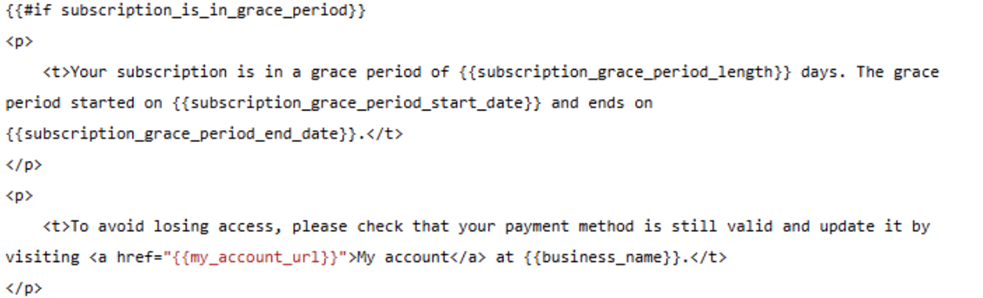
Grace period text: The default paragraph about the grace period length is hidden from the email sent to the end user.
Scenario 2: Passive Churn is ON
-
Template versions: When Passive Churn is enabled, Email Manager keeps multiple active Subscription renewal failure template versions mapped to specific decline reasons and retry sequence numbers. Emails trigger based on your Passive Churn rules.
-
Grace period text: Piano does not hide the grace period paragraph in these template versions.
-
BYOP renewal payment methods and grace period variables: Piano calculates grace period length and dates directly. The template variables behave the same as before the switch.
-
Stripe native renewal payment methods and grace period variables: Stripe defines the grace period dates and length, and may adjust them dynamically during Smart Retries. Piano receives information from Stripe only about the next retry attempt. As a result, the template parameters
{{subscription_grace_period_length}}and{{subscription_grace_period_end_date}}track the next retry date rather than the actual grace period length used before the switch.
Grace period information in the Subscription details and History events (Dashboard and My Account)
Given that the preset grace period isn't available with Smart retries, the information about grace will be provided as follows: "Subscription to RESOURCE has entered a grace period"
Reporting Changes
Stripe's retry policy length and retry count won't appear in Piano reports because Piano can't access them programmatically. The grace duration shown in Piano, including the Piano dashboard and access webhooks, reflects the billing period length instead. The exception is 3DS re-authentication: Smart Retries don't start automatically, so Piano applies a fixed 30-day grace period.
API Changes
No general API changes, unless specified below. Any Piano API actions are mapped and transferred to Stripe as necessary within the scope of the currently supported feature set.
-
API endpoint: POST
/publisher/term/change/do
Change: A successful API response (200 OK) confirms the plan change only. Payment is processed asynchronously. A grace period is possible even after a 200 OK response.
Upgrade Changes
Comparison across all upgrade flows and payment types:
|
Upgrade Scenario |
Piano billing |
Stripe Billing |
|---|---|---|
|
Immediate, MA/PD/API: sync Stripe payment fails |
Subscription rolled back |
Plan changed. Grace period starts. (Changed) |
|
Immediate, on-site: sync payment fails |
Grace period starts |
Grace period starts. (No change) |
|
Immediate: async Stripe payment fails |
Subscription cancelled |
Grace period starts. Smart Retries activated. (Changed) |
|
Immediate: BYOP sync payment fails |
Grace period starts |
Grace period starts. (No change, same behavior) |
|
Immediate: BYOP async payment fails |
Subscription cancelled |
Subscription cancelled (No change, same behavior) |
|
Deferred: any payment failure |
Grace period / cancel depending on type |
Consistent with failure rules above |