
Feature Overview
This page covers which Piano features are supported when Stripe Billing manages new purchases, including resources, payment terms, dynamic terms, tax support, and checkout.
For Stripe features that are not yet integrated with Piano, the Coming Soon roadmap, and Piano features that stay outside the integration's scope, see Feature Support and Roadmap.
New Purchases
Piano integrates existing features, including payment and checkout interfaces with Stripe Billing in addition to Stripe Payments. Overall, existing Piano dashboard and functionality will remain unchanged, unless specified.
Any new subscriptions created in Stripe Billing from a purchase in Piano Checkout or Subscribe User in the Piano Customer Service dashboard will show two transactions in the Stripe dashboard, one in 'Cancelled' state and one in 'Succeeded'.
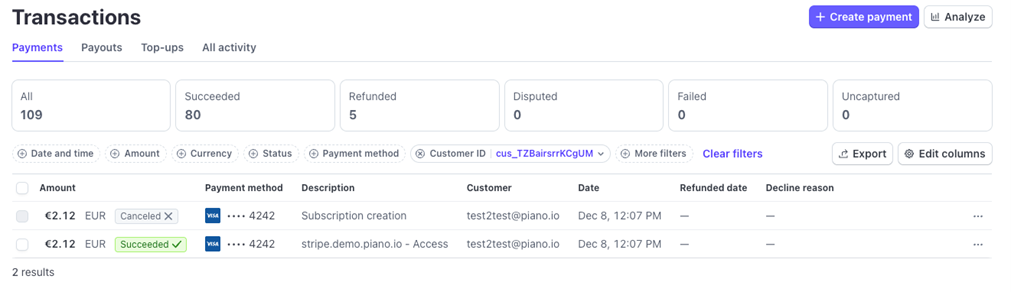
This is an expected behavior and a result of using Stripe API operations during subscription creation. At this time Stripe is not able to remove this record appearing in the dashboard, and Piano is not able to change it. This duplicated record listing is purely visual and has no impact on any subscription processing or billing. The correct payment is associated with the newly created subscription invoice. Subscribers will only see a single transaction in the Piano Dashboard and on their credit card or bank statement.
Resources
-
Resource creation (mapped to Product in Stripe)
-
Resources are mapped 1:1, but are not created in Stripe at the moment the Resource is created in Piano. When a new subscription conversion is passed from Piano to Stripe, the Resource is looked up. If it doesn't exist in the Stripe Product Catalog, a new Stripe Product is created and mapped to the Piano Resource.
Payment Terms
-
Single payment (one-offs, mapped to price_data) or Recurring payment (mapped to price_data and subscription schedule)
-
Support for shared access (buyer and subscription in Billing)
-
Allow users to pay more
-
Trials (Paid trial and free trial periods, presented as 0 amount schedule phases in Stripe for free trials)
-
Promotions (Paid and free promotions, presented as net amount schedule phases)
-
Apply trial period for new customers only
-
Force all new subscriptions to be auto-renewing subscriptions
-
Restrict to first-time customers only
-
Future start date for recurring payment terms (for more details see Subscriptions with a Future Start Date)
-
Gift purchase creates Stripe Invoice with purchase-date service period
-
Stripe recognizes gift revenue immediately based on invoice service period (purchase date)
-
Gift redemption remains fully handled by Piano
-
Every new one-time payment creates a Stripe Invoice
-
Upgrades immediate and deferred (for more details see Subscription Upgrades)
Dynamic Terms
Dynamic terms are Piano's most flexible subscription type, letting you build multi-phase billing structures that combine trials, paid periods, free periods, and upgrades into a single subscriber journey. As of mid-July 2026, all eligible dynamic term subscriptions are integrated with Stripe Billing.
Manual renewal of dynamic terms is supported in My Account, the Publisher Dashboard, and Checkout, including renewal during a grace period. It works with all Stripe-native (sync and async) and BYOP payment methods, and with promotions.
For the full picture, see the dedicated Dynamic Terms page. It covers how phases map to Stripe subscription schedules, supported capabilities, the 3-year billing guideline, and switching behavior.
Renewable Gifting
Piano's renewable gifting feature allows clients to offer gift subscriptions that automatically renew using the gifter's payment method. Gifting can be enabled on any payment or dynamic term, preserving features such as advanced billing plans and delivery address collection (the only restriction is that it cannot be combined with shared access). While the gifter retains subscription ownership and manages billing lifecycle events in My Account, the giftee receives access and redeems the gift via email links or My Account. For complete configuration steps and template setup, see the Renable gifting documentation.
Tax Support
Tax calculations made with Piano Checkout and Subscribe User tools will be used to automatically create unique manual tax rates in Stripe Billing and apply those rates to invoices and subscriptions. Likewise, any existing subscriptions will be created with manual tax rates, if you use Piano Tax support.
Rounding Rules: Generally, tax amounts calculated separately by 3rd party system may differ slightly from tax amounts applied to invoices with manual tax rates pre-created in Stripe (usually 0.01 in the smallest currency unit). Piano's tax providers, including TaxJar and Avalara, apply their own rounding rules, which may differ from Stripe's. That difference might take place in case of different rounding rules between the two systems applied to exclusive tax rates. For more details, see the Rounding Rules docs in Piano Metadata in Stripe.
You must configure the "Invoice level" rounding in case you use Piano tax support with any tax provider. Ensure that the Invoice level rounding rules are enabled in your Stripe account Invoice settings to prevent discrepancy.

Checkout
Once you've configured Stripe Payments and Billing in your Piano application, you will be able to see subscriptions and purchases represented in the Stripe Dashboard.
The initial purchase is processed in Piano and then a subscription and/or invoice (one-offs) is created in Stripe Billing. From this moment on, Stripe Billing manages the billing process.
Piano offers three Stripe integrations: Stripe Credit Cards, Stripe Elements, and Stripe Apple Pay. All three work with Stripe-native billing. Stripe Elements exposes the widest set of payment methods, including cards, Apple Pay, Google Pay, Link, SEPA and Bacs direct debit, ACH, iDEAL, and Bancontact. For the full list and which methods are enabled by default, see Part 1 of the Client Guide Series. Non-Stripe payment providers are supported through Piano's BYOP feature. See Non-Stripe Providers (BYOP) for details. No changes are required in the system templates.
Subscribe User (via Piano Dashboard)
Subscription purchases made within the scope of supported features for this phase automatically create subscriptions and associated invoices in Stripe Billing.
Subscription Operations
The dedicated Subscription Operations page covers day-to-day subscription management for Stripe-managed subscriptions: the auto-renew toggle, cancellation and refund behavior, changing a subscriber's next billing date, manual renewal, and payment-method management.