
As Piano moves subscription billing to Stripe, we’re aligning with a billing best practice that’s standard across the payments industry: a single billing period runs for up to 3 years. This is the maximum interval Stripe supports for recurring charges, and it’s there to protect your revenue, as explained below. This takes effect July 29, 2026.
For most clients, this changes nothing. More than 95% of Piano clients already use billing periods well within 3 years, so there’s nothing to do. This guide is mainly for the small number of clients with longer or open-ended periods, and it shows exactly how to adjust them.
The short version
-
The guideline: Any single billing period, whether a billing plan, a trial, an access period, a manual renewal, or a custom/imported billing plan, runs for up to 3 years.
-
Who needs to act: Only clients with terms set up for longer than 3 years, or dynamic terms with an unlimited or over-length access period. Everyone else is already aligned.
-
What it affects: A term that exceeds 3 years isn’t eligible to move to Stripe Billing.
-
What to do: Bring the term within 3 years (edit it), replace it, or move its subscribers to a compliant term. Step-by-step actions are below; most take only a few minutes.
-
When it takes effect: From July 29, 2026, the 3-year limit applies to all new term configurations and to billing operations on existing terms, and the dashboard begins flagging affected terms.
Why 3 years, and why it’s good for your business
This isn’t a Piano restriction; it’s an industry-standard safeguard, and Stripe applies it across its entire merchant base (Stripe’s documentation). Keeping billing periods within 3 years actually protects subscription revenue in two concrete ways:
-
Fewer disputed charges. The longer the gap between sign-up and renewal, the more likely a customer is to forget they subscribed; an unexpected charge is far more likely to be disputed. Renewing at least every 3 years keeps the relationship fresh and chargebacks low, which protects your dispute rate and your standing as a merchant.
-
Fewer failed payments. Credit cards typically expire within 3–5 years. A card saved today is likely to have expired before a renewal more than 3 years out, causing the charge to fail. Shorter intervals mean renewals land on valid cards, and revenue keeps flowing.
Stripe raised this ceiling to 3 years in 2024 (it was previously shorter) to give merchants more flexibility and continues to review it as its risk framework evolves. For now, 3 years is the supported maximum, and for the vast majority of subscription models, it’s comfortably more than enough.
What counts toward the 3-year limit
A term is within the limit when all of these are 3 years or shorter:
-
the billing plan length
-
the trial length
-
the manual renewal period you can set for customers
-
any custom or imported billing plan period
-
for dynamic terms, every access period (see below)
Promotions matter too: don’t combine promotions in a way that makes the total free phase of a subscription longer than 3 years.
Am I affected?
You’re affected if you have any of the following.
Recurring payment terms where the billing plan, the trial, or the manual renewal period is set longer than 3 years.
Dynamic terms that include an ineligible access period, meaning an access period set up in any of these ways:
|
Access period setup |
Why it’s ineligible |
|---|---|
|
Unlimited access with a free billing plan |
Unlimited periods can’t be free or single-payment |
|
Unlimited access with a single-payment billing plan |
Same as above |
|
Recurring access with a free/single-payment plan and access length over 3 years |
Exceeds the limit |
|
Ending on a specific date with a free/single-payment plan and a date more than 3 years out |
Exceeds the limit |
|
Any access type with a relative billing plan and a billing period over 3 years |
Exceeds the limit |
If none of these apply to your terms, you’re already compliant and can stop here.
How affected terms are flagged in the dashboard
From July 29, 2026, the 3-year limit is enforced across the dashboard, and affected terms are flagged automatically so they’re easy to find and change. The flags and the underlying enforcement go live together in a single release.
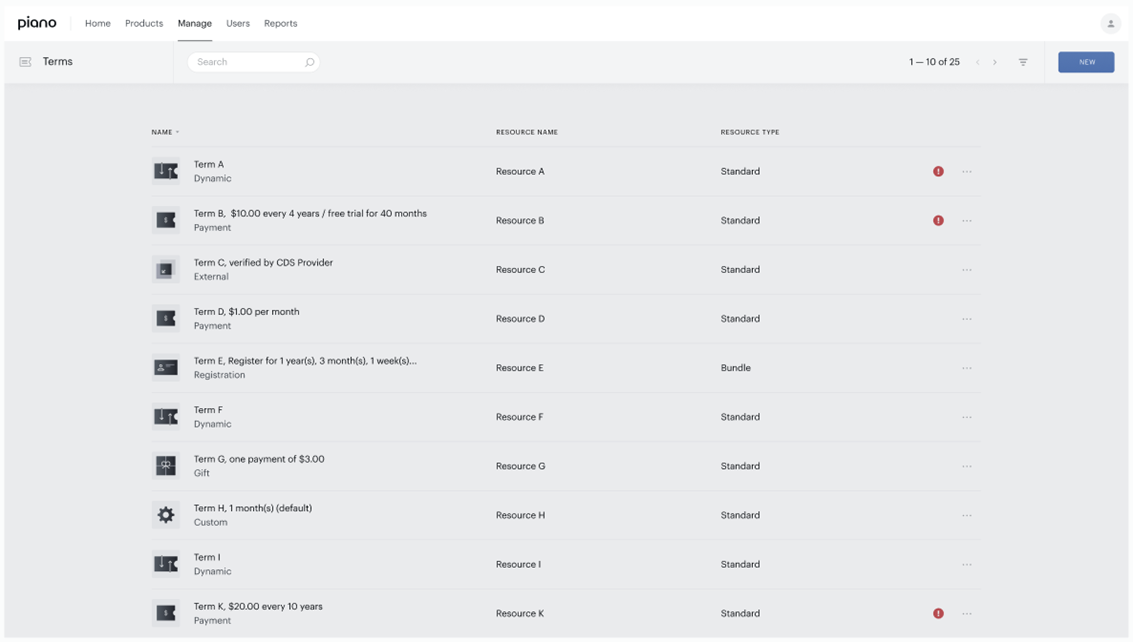
In the terms list
Affected terms show an information indicator beside them. It’s a prompt to open the term and see what needs changing; the details page explains the issue in full.
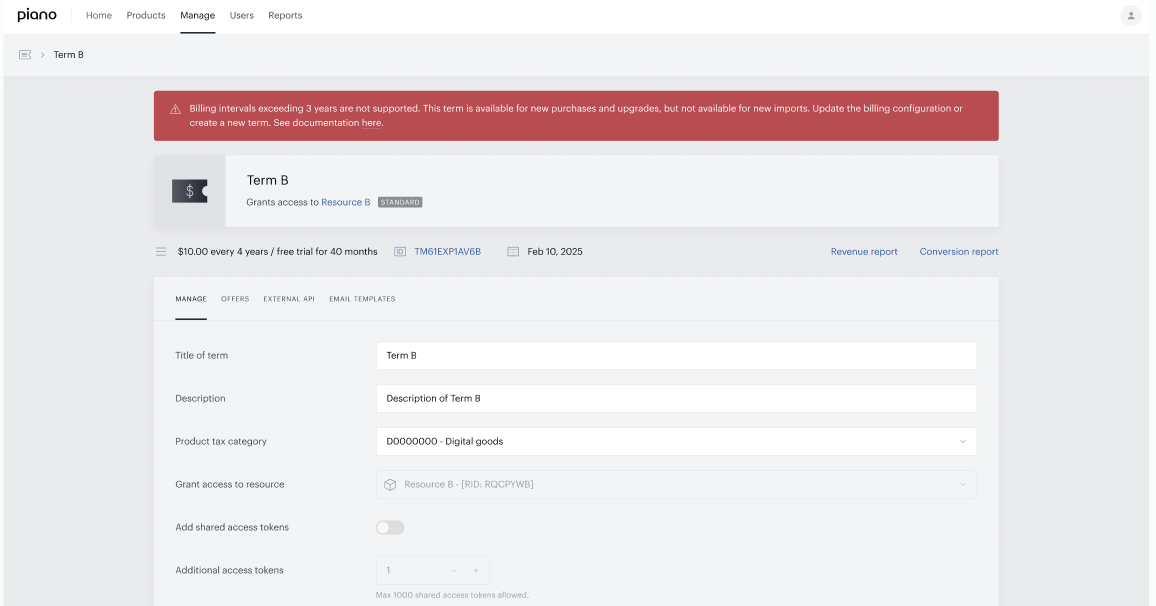
On the term’s detail page
A warning banner appears at the top of the term, noting that billing intervals over 3 years aren’t supported and provides a link to documentation with further guidance.
-
It’s a warning, not an error. It’s shown whenever a term is ineligible; not only when you try to save a change.
-
It can’t be dismissed. There’s no close button; the banner stays while the term remains ineligible. For payment terms with conversions, the key billing fields can’t be edited, so the warning remains in place. The way to resolve it is to move subscribers to a compliant term (or create a new term). For dynamic terms, you can mark the over-length periods for removal and add compliant ones. Once the term is updated, the warning clears.
What a term over 3 years means in practice
From July 29, 2026, a term that exceeds 3 years is paused in a few specific ways, so it doesn’t create the dispute and payment-failure risks described above:
-
New imports pause. The term ID can’t be used in future payment-subscription imports, even with an otherwise-eligible custom billing plan.
-
It’s not eligible for Stripe billing. Active subscriptions on the term stay on Piano billing until the term is brought in line or the subscribers are moved, causing no disruption to your business.
This isn’t a prerequisite for switching to Stripe. Your move to Stripe billing goes ahead as planned, and eligible subscriptions switch automatically. Anything ineligible simply won’t switch until it’s updated. You can make these adjustments on your own timeline, before or after your switch; the only thing that waits is the ineligible item itself.
Existing subscriptions keep renewing on Piano billing in the meantime, so there’s no disruption to your current subscribers.
What to do
Recurring payment terms
If the term has no conversions (no one has subscribed on it yet):
-
Option 1: Edit it. Set the billing plan and trial to 3 years or shorter. The term becomes available again.
-
Option 2: Delete it. Remove it from all purchase offers and upgrade options first, then delete.
If the term has conversions (it has subscribers, or has had them): the term can’t be edited or deleted, so:
-
Rename it to flag it as obsolete: append “(DELETED)” or “DO NOT USE” to the name.
-
Remove it from purchase offers, upgrade options, upgrade offers, and Composer experiences to avoid confusion. (New purchases and upgrades are not automatically blocked, but cleaning these up keeps your setup tidy and compliant)
-
Move active subscribers to a compliant term so their subscriptions can switch to Stripe. Use whichever upgrade path fits: a bulk upgrade in Action Manager, an individual upgrade per subscription via the public API or Publisher Dashboard, an upgrade option offered through My Account, or an upgrade offer presented on-site. Once a subscription is upgraded to a properly configured term, it can switch to and be managed in Stripe billing.
Dynamic terms
The goal is the same: remove or replace the ineligible access period so the term, and its subscribers, can move to Stripe.
If the ineligible access period has no conversions or scheduled upgrades, you can edit or delete it directly. Replace it with a compliant equivalent that preserves the same business value:
-
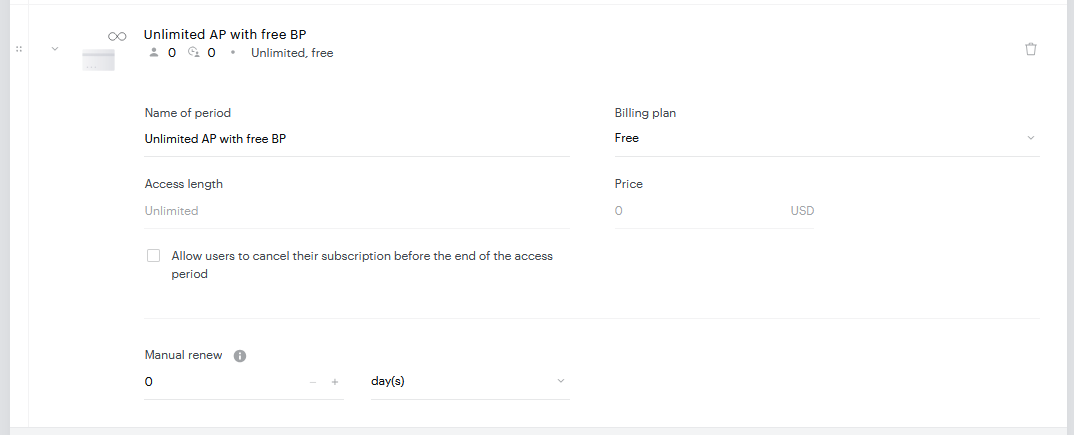
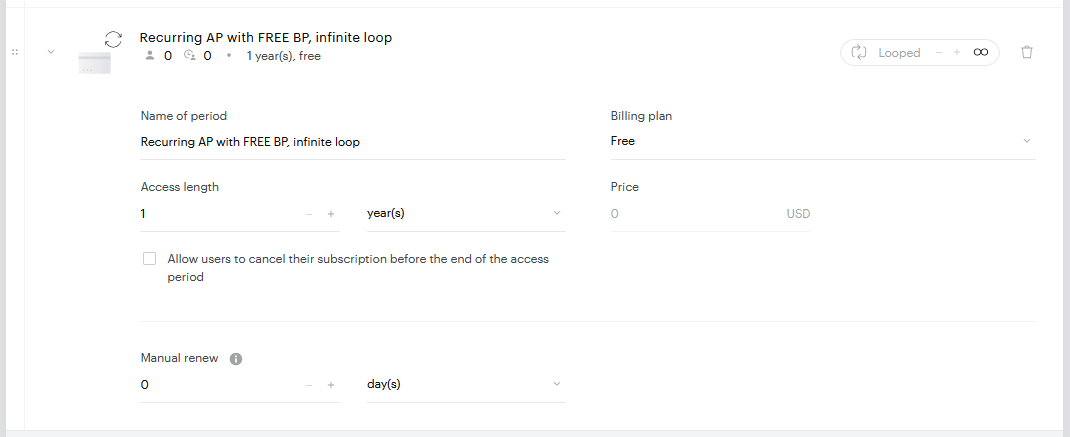
To replace an unlimited free period: delete it and add a recurring, free access period of 3 years or shorter, with an infinite loop turned on. Subscribers then get free access that renews automatically and indefinitely, in compliant cycles. (shown below)
-
To replace an unlimited single-payment period: delete it and add a recurring, single-payment period (3 years or shorter, same price, one iteration) followed by a recurring, free period with an infinite loop. Subscribers are charged once, then keep free access on renewing cycles. (shown below)
If the ineligible access period already has conversions or scheduled upgrades, you can’t edit or delete it, but you have two compliant paths:
-
Convert it to a recurring access period (keeping the same billing plan), then add a free recurring period with an infinite loop after it. Existing subscribers move onto the new rules automatically.
-
Mark it for removal and add the compliant recurring period(s) below it. New subscribers skip the old period; existing subscribers stay on their current unlimited access.
One thing to watch: subscribers who already hold an unlimited access period keep it indefinitely and won’t be switched to Stripe, because no further renewal is expected for them. To make those subscriptions eligible, move them to another term with an immediate upgrade (via API, My Account, Publisher Dashboard, or on-site).
Replacing an unlimited free access period
Recommendations: delete the ineligible unlimited access period; in its place create a new recurring access period with a free billing plan and access length of 3 years or shorter; turn on infinite loop.
Result: after renewing into this period, subscribers keep free access that’s extended an unlimited number of times, each cycle to the same limited (compliant) period, for free. A “Dynamic subscription automatic renewal confirmation” email is sent on each renewal.
BEFORE
AFTER
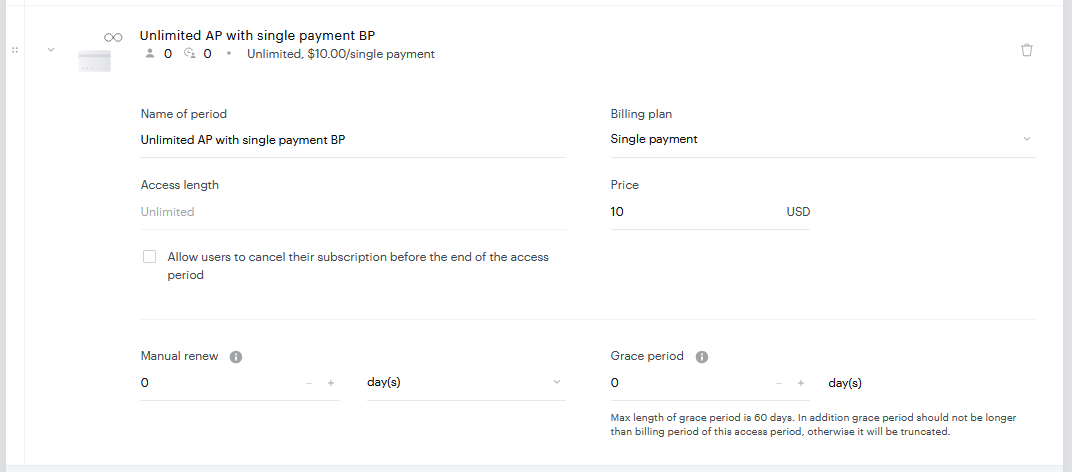
Replacing an unlimited single-payment access period
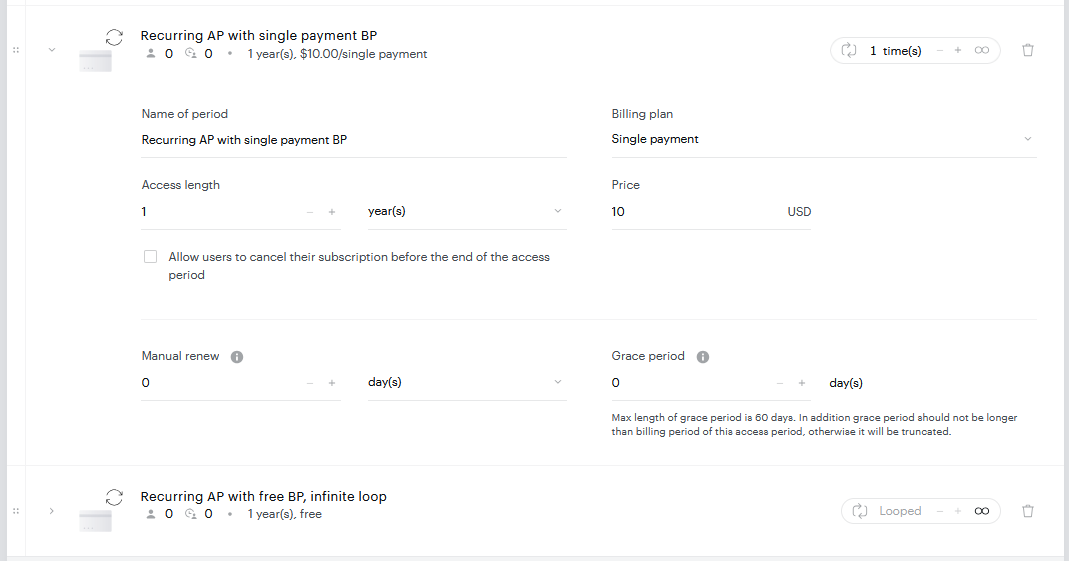
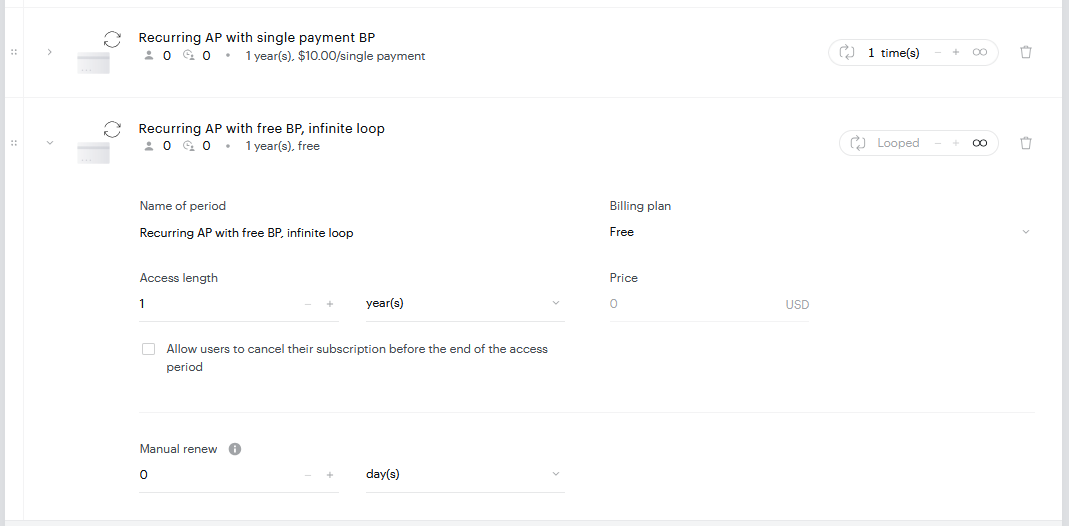
Recommendations: delete the ineligible unlimited access period; in its place create a first recurring access period with a single-payment billing plan, access length of 3 years or shorter, the same price as the deleted period, and only one iteration (revenue is distributed over that period); below it, create a second recurring access period with a free billing plan, 3 years or shorter, with infinite loop on.
Result: on renewing into the first period, subscribers are charged the set price for limited access; on the next renewal they move to the free period and keep access that’s extended indefinitely, each cycle for free.
BEFORE
AFTER
How the guideline applies to every active subscription
A few practical rules follow from the 3-year window and apply to all subscriptions, including those still on Piano billing:
-
Next billing date: you can’t manually set it more than 3 years from today. If you need a longer payment-free gap, extend within the 3-year window and repeat over time, or cancel the subscription and grant free access to the same resource instead.
-
Manual renewal: a manual renewal can’t push the next billing date beyond 3 years from today. Repeat within the limit if you need more.
-
Gift vouchers: applying a voucher to a resource that already has an active subscription can’t shift the next billing date more than 3 years out. For a voucher shorter than 3 years, the subscriber can wait and apply it closer to the next billing date; for a longer voucher, they can cancel the current subscription and redeem it when there’s no conflicting paid access. To avoid this, we recommend the renewable gifting feature for payment and dynamic terms rather than long-period gift terms.
Need a hand?
If you’re unsure which of your terms are affected or which remediation path fits your setup, reach out to your Piano support team.