
The Passive Churn Prevention report is available only for clients with an activated Passive Churn Prevention feature. For more details contact your Piano Account Manager.
The Passive Churn Prevention feature brings an opportunity to manage subscription renewal failures and increase the recovered revenues through customized messaging and smarter grace period management. The feature acts on transaction renewal failures and corresponding errors and terms defined by you. Thanks to the reporting you are able to evaluate the recovered subscriptions, and revenues and analyze the volumes in risk by the different levels of aggregation.
Not all payment providers are compatible with this feature (see the list of unsupported providers here). The data is only available since 1st October, 2023 due to data collection limitations. The report does support Dynamic and Payment terms and Pending upgrade failures as well.
Navigation
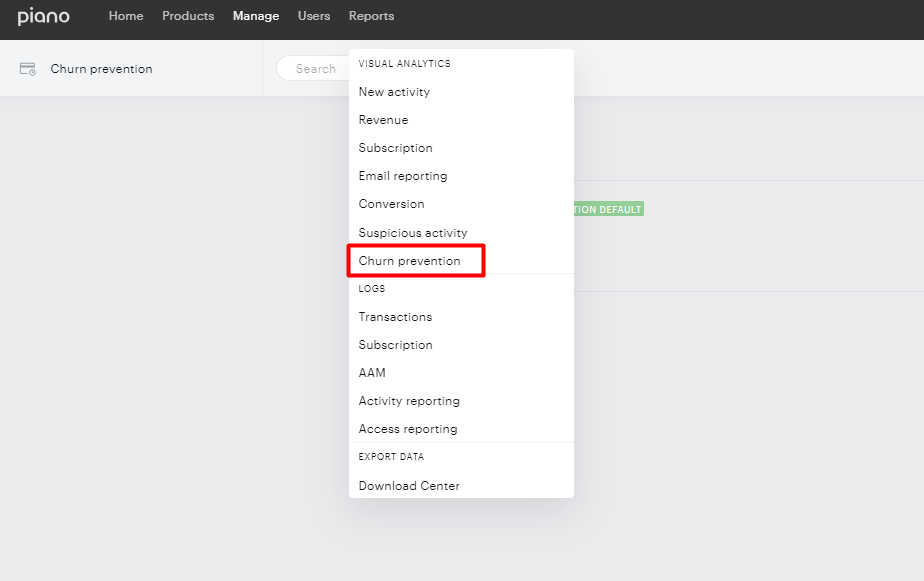
The navigation to the report lies within the Subscription Management + Billing reporting drop-down menu under Reports → Visual Analytics → Churn prevention:
Date Filter
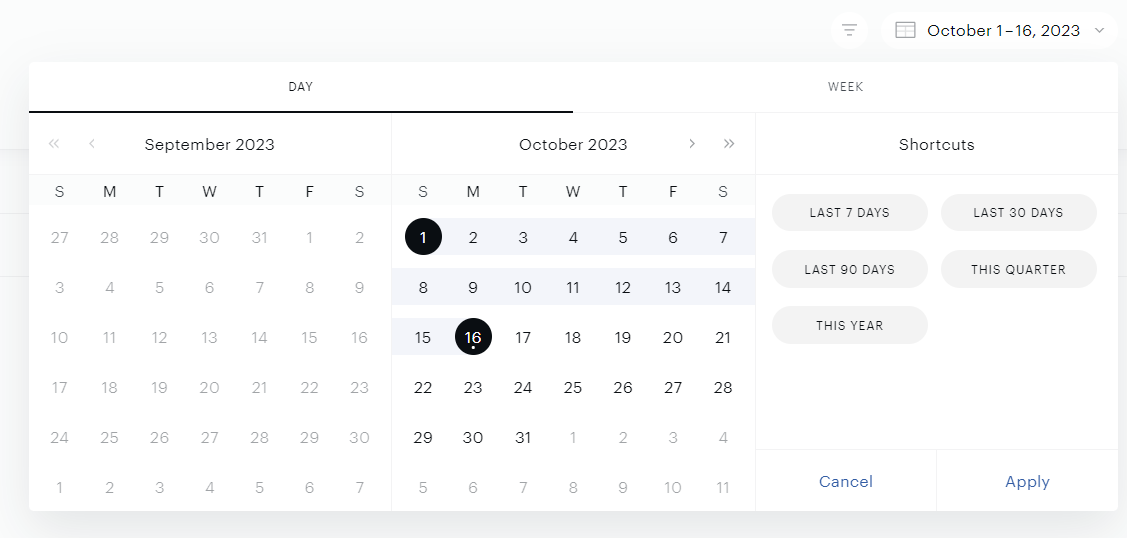
The date filter defines the period of failed renewal payments, successful renewal payments, and all subscriptions currently in grace periods that are attempted to be renewed. The date filter is available from October 1st, 2023 and data before this date is not available. For example:
If you filter for a date period from October 1st, 2023 until October 16th, 2023 then all subscriptions that had payment failure events within this time period or were renewed successfully will be included in the report. In addition to renewal events, the report includes subscriptions that have been in a grace period for at least one day during this timeframe. If there was a subscription that had a renewal failure on September 31st, 2023, and entered the grace period on that day, it would be included in this report.
Data Filter
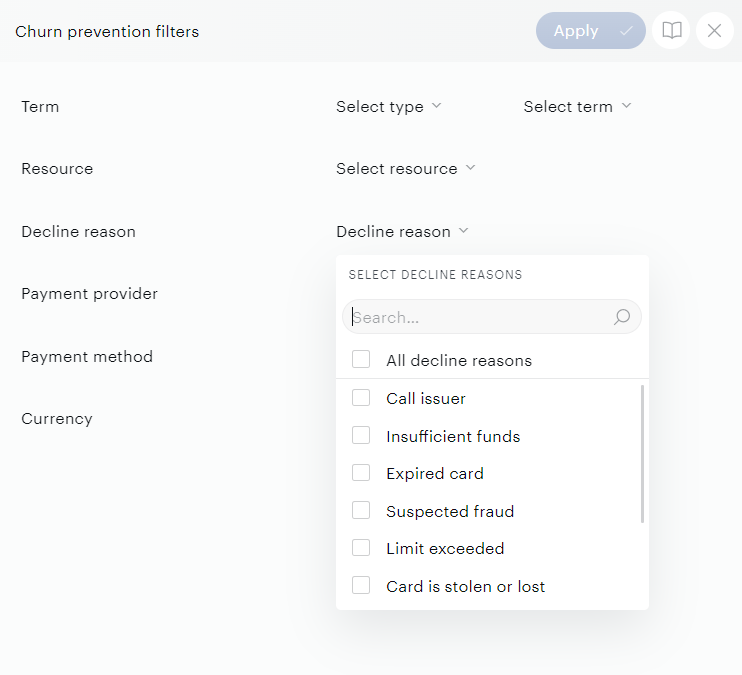
If you want to filter data in the UI and in the exported CSV files as well, click on the filter icon and select your preferred data filter:

Filter options:
|
Filter |
Description |
||||||||||||
|---|---|---|---|---|---|---|---|---|---|---|---|---|---|
|
Term type |
Churn prevention data based on this term type - in the initial release we support only Payment terms. |
||||||||||||
|
Term |
Churn prevention data based on an individual term or a group of terms. |
||||||||||||
|
Resource |
Churn prevention data filtered by specific terms using the selected resources. |
||||||||||||
|
Payment provider |
Churn prevention data only for selected payment providers. |
||||||||||||
|
Payment method |
Churn prevention data filtered by a specific payment method. |
||||||||||||
|
Decline reason |
Churn prevention data only for failed transactions with specific decline reasons. A list of supported decline reasons is available here. |
||||||||||||
|
Currency |
Currency of the transaction |
Once the filter is selected, click the "Apply" or "
UI Top Level KPI’s Report
This report provides a high-level performance evaluation of the subscriptions in the grace period, revenues at risk, and successful recoveries. The level of aggregation is represented by the parsed billing period of the term (monthly, annual, bi-annual, etc.) and the term currency.
Metrics
|
Field In Report |
Description |
||||||||||||
|---|---|---|---|---|---|---|---|---|---|---|---|---|---|
|
Term period |
Aggregation of data overall along with a breakdown by term current billing period (annual, monthly, quarterly, etc). This is a valuable aggregation because there can be major differences in the retry performance by term type. |
||||||||||||
|
Cohort grace status |
This indicates whether all subscriptions that had renewal attempts on a given date have now exited the grace period (making the overall recovery rates complete for that cohort). |
||||||||||||
|
Revenue recovery rate |
The percentage of revenue retained over the total revenue that initially had payment failure and entered a grace period. |
||||||||||||
|
Subscription recovery rate |
The percentage of subscriptions retained over the total subscriptions that initially had payment failure and entered a grace period. |
||||||||||||
|
Revenue retained |
Revenue associated with subscriptions that initially had a payment failure but were successfully charged upon retry. |
||||||||||||
|
Revenue in grace |
Revenue associated with subscriptions that had a payment failure and are currently in a grace period. |
||||||||||||
|
Revenue lost |
Revenue associated with subscriptions that had a payment failure, exited grace period, and have now churned. |
||||||||||||
|
Subscriptions retained |
The number of subscriptions that initially had a payment failure but were successfully charged upon retry. |
||||||||||||
|
Subscriptions in grace |
The number of subscriptions that had a payment failure and are currently in a grace period. |
||||||||||||
|
Subscriptions lost |
The number of subscriptions that had a payment failure, exited grace period, and have now churned. |
Downloadable CSVs
There are 3 CSV files to be downloaded if you want to analyze the churn prevention results more in-depth. The date selector and filter on different churn-related properties apply as well to the downloadable CSV files.
-
To understand how well the churn prevention feature is working and have a clear understanding of the recovered revenues we provide the Churn prevention KPIs CSV
-
To analyze different recovery rates and revenues by different decline reasons and retry attempts to optimize the scenario setups, we offer the Churn prevention KPIs by decline details CSV
-
To analyze the churn prevention data in detail or for a custom analysis use the Churn prevention log CSV
1. Metrics for the Churn Prevention KPIs (CSV)
|
Field In Report |
Description |
||||||||||||
|---|---|---|---|---|---|---|---|---|---|---|---|---|---|
|
Term period |
Aggregation of data overall along with a breakdown by term current billing period (annual, monthly, quarterly, etc). This is a valuable aggregation because there can be major differences in the retry performance by term type. |
||||||||||||
|
Currency |
Currency of the transaction. |
||||||||||||
|
Cohort grace status |
This indicates whether all subscriptions that had renewal attempts on a given date have now exited the grace period (making the overall recovery rates complete for that cohort). |
||||||||||||
|
Revenue recovery rate |
The percentage of revenue retained over the total revenue that initially had payment failure and entered a grace period. |
||||||||||||
|
Subscription recovery rate |
The percentage of subscriptions retained over the total subscriptions that initially had payment failure and entered a grace period. |
||||||||||||
|
Revenue retained |
Revenue associated with subscriptions that initially had a payment failure but were successfully charged upon retry. |
||||||||||||
|
Revenue in grace |
Revenue associated with subscriptions that had a payment failure and are currently in a grace period. |
||||||||||||
|
Revenue lost |
Revenue associated with subscriptions that had a payment failure, exited grace period, and have now churned. |
||||||||||||
|
Subscriptions retained |
The number of subscriptions that initially had a payment failure but were successfully charged upon retry. |
||||||||||||
|
Subscriptions in grace |
The number of subscriptions that had a payment failure and are currently in a grace period. |
||||||||||||
|
Subscriptions lost |
The number of subscriptions that had a payment failure, exited grace period, and have now churned. |
2. Metrics for the Churn Prevention KPIs by Decline Details (CSV)
|
Field In Report |
Description |
||||||||||||
|---|---|---|---|---|---|---|---|---|---|---|---|---|---|
|
Decline Reason |
Includes these values: Suspected fraud, Insufficient funds, Expired card, Card is stolen or lost, Limit exceeded, Network failure, Call issuer, and Do not honor. |
||||||||||||
|
Retry Attempt |
Number of the retry attempts (0, 1, 2, 3, 4, etc). 0 represents the initial renewal attempt. |
||||||||||||
|
Individual Retry Success Rate |
For the individual retry, the number of successful retries (subscriptions successfully renewed) on that retry over the number of subscriptions retried for that retry overall. |
||||||||||||
|
Cumulative Retry Success Rate |
Across all retries up to the current retry, the overall number of subscriptions successfully renewed over the number of subscriptions retried on that retry and earlier retries. |
||||||||||||
|
Subscriptions successfully retried |
The number of subscriptions successfully retried for a given decline reason and retry attempt. |
||||||||||||
|
Subscriptions retried |
The number of subscriptions retried regardless of whether the retry was successful or not. |
3. Metrics for the Churn Prevention Log CSV
The detailed Churn prevention log includes all renewal attempts of the subscriptions within the selected time period, including successful initial renewals. This level of detail is ideal for analyzing specific subscription renewals, evaluating the effectiveness of specific scenarios, and optimizing churn prevention.
|
Internal column name |
Description |
||||||||||||
|---|---|---|---|---|---|---|---|---|---|---|---|---|---|
|
Event timestamp |
Event timestamp |
||||||||||||
|
Subscription ID |
The ID of the current subscription |
||||||||||||
|
UID |
User ID |
||||||||||||
|
|
User email |
||||||||||||
|
Term ID |
Term ID |
||||||||||||
|
Term Name |
Term Name |
||||||||||||
|
Transaction ID |
ID of transaction |
||||||||||||
|
Amount |
Amount of the transaction |
||||||||||||
|
Currency |
Currency of the transaction |
||||||||||||
|
Decline reason |
Decline reason |
||||||||||||
|
Error message |
An error message is a raw description of the decline reason that differs by payment provider and method |
||||||||||||
|
3DS failure |
Is the 3DS method required for payment: |
||||||||||||
|
Retry attempt |
The number of the retry attempts (1, 2, 3, 4, etc). 1 represents the initial renewal attempt |
||||||||||||
|
Scenario Name |
Logic scenario name from the PCP feature |
||||||||||||
|
Max number of retry attempts |
The maximum number of retry attempts defined in the PCP feature |
||||||||||||
|
Charge count |
Ordinal number of renewals from the subscription start, including trial period(s) |
||||||||||||
|
Current billing period |
The current billing period of the term |
||||||||||||
|
Current subscription status |
Current subscription status - Active, Cancelled, Expired or Upgraded |
||||||||||||
|
Current payment status |
Current payment status |
||||||||||||
|
Payment provider |
Payment provider |
||||||||||||
|
Payment method |
Payment method |
||||||||||||
|
Credit card mask number |
Masked number of credit cards if used as a payment method |
||||||||||||
|
Grace period start date |
Grace period start date |
||||||||||||
|
Grace period end date |
Grace period end date |
||||||||||||
|
Conversion country |
Country where the subscriber made the conversion |