
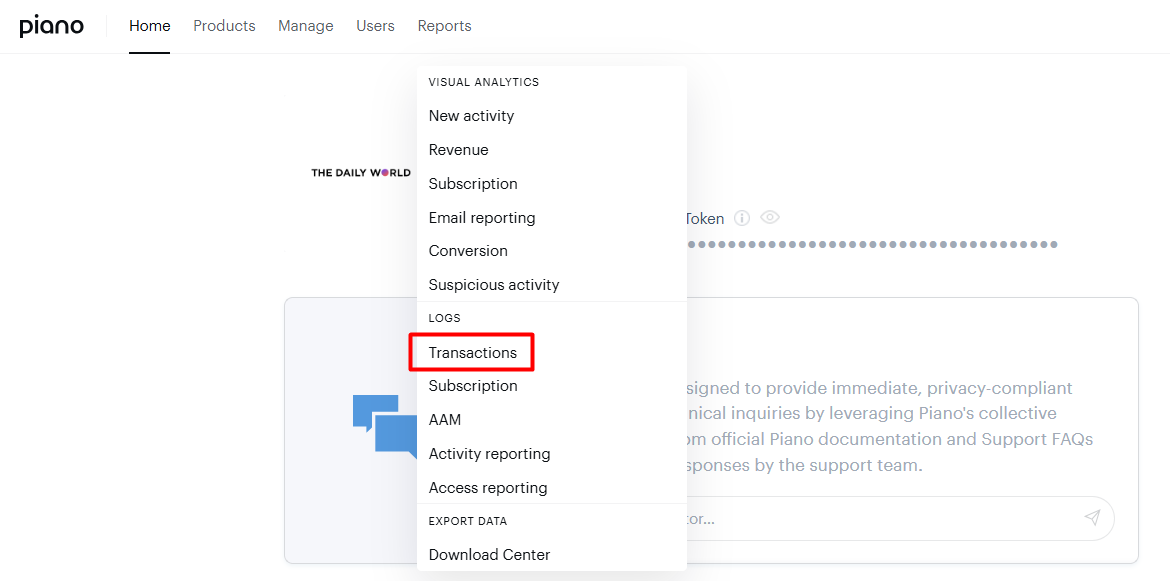
The Transactions report is the log of every purchase and refund in your Piano application, at Reports → Transactions in the publisher dashboard. You can filter it by date, transaction type, term, payment method, currency, price, and status.
Three exports are available from this screen: the Transaction Log as CSV, plus the Revenue Recognition Summary and the Revenue Recognition Transaction List, both behind the Revenue Recognition button. All three generate in the background and are collected from the Download Center. The field reference further down maps every column in the Transaction Log CSV.
Navigation
Publisher Dashboard → Reports →Transactions
Filter and date
The transaction log can be filtered on a date and specific filter fields. By clicking on the date picker or filter icon, you can select your own definition.

Filter options
|
Field |
Description |
Options |
|
Transaction type |
Type of the transaction event |
|
|
Term |
Type of the term which is associated with the transaction |
For filter by term type:
For filter by term any value of existing term created in Management + Billing which is either Dynamic, Payment or Gift term |
|
Payment method |
Payment method of the transaction |
PayPal, American Express, Visa, ApplePay, MasterCard, etc |
|
Currency |
Currency in which the transaction is being made |
USD, EUR, GBP, etc |
|
Price |
Value of the transaction |
$10.00, CHF9.90, etc |
|
Status |
Transaction status |
|
Download Options
To provide relevant transaction-related reporting, there are three options for the reports:
-
Revenue Recognition Summary Report
-
Revenue Recognition Transaction List
-
Transaction Log
The revenue recognition reports options appear after clicking on the Revenue Recognition button.
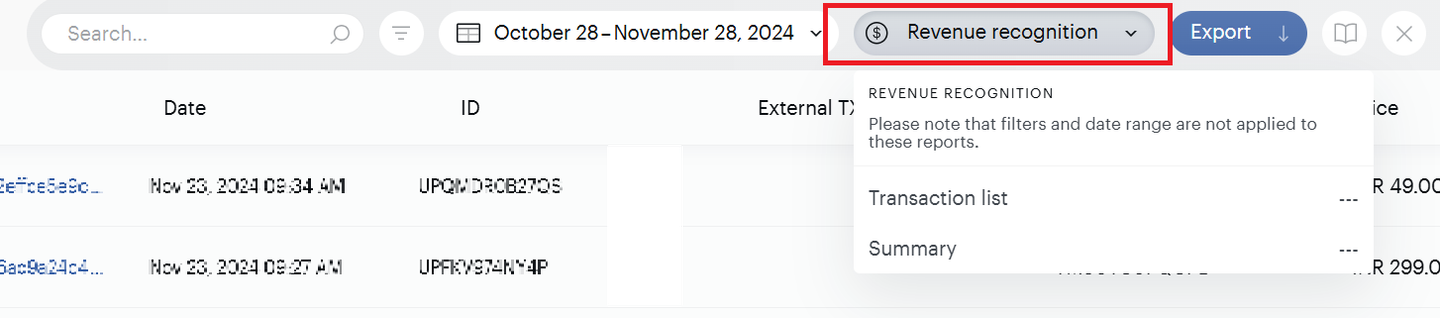
The Transaction Log CSV becomes available after clicking the Export button.
All reports will be generated and accessible from the Download Center.
For API details related to the Transaction Log, please refer to our API documentation.
Fields and Descriptions
System tracking fields
|
Field |
Column |
Sample Data |
Description |
|
ID |
C |
UP45H5U01LE1 |
The unique identifier of the particular transaction. |
|
Invoice number |
D* |
LL1200000001 |
Optional*. Enabled in Edit business. Piano generates it before sending the transaction to the payment provider. |
|
Tracking ID |
E* |
BT_ipVlIk1zyrvtw5s |
Optional*. Enabled by Piano Admin. The ID of the user's action in the external system. |
|
External Tx ID |
D |
6.23812362208604E+21 |
The unique external transaction ID that Piano receives from your payment provider. |
|
Tx Type |
E |
purchase or refund |
The type of transaction that occurred. |
|
Term Name |
G |
Monthly - $10 |
The name of the term that the user converted on as it was at the time of conversion. |
|
Term ID |
I |
TMJQA8HLY8CY |
The unique identifier of the term related to that of the transaction. |
|
Subscription ID |
J |
RCY6U1T3J13M |
The unique identifier assigned to the subscription the user converted on. |
|
Resource ID |
H |
R8U7P8Y |
The unique identifier of the resource accessed upon conversion of the term related to the transaction. |
User Information
|
Field |
Column |
Sample Data |
Description |
|
Customer |
A |
The email address of the user associated with the given transaction. Note that registration may have happened before the user converted on the term. |
|
|
User ID (UID) |
T |
db1c61eb-7bfe-4263-b3f4-48acd6d73se7 |
The unique identifier of the user associated with this transaction. |
|
Billing ZIP Code |
AD |
29445-3466 |
The ZIP or postal code that this transaction was billed to. |
|
Address 1* |
AE |
120 Qwin Ln |
The first billing address subject/street name related to the transaction. |
|
Address 2* |
AF |
Suite 21 |
If applicable, the second billing address subject/street name related to the transaction. |
|
Address 3* |
AG |
Attn: Joe Schmidt |
If applicable, the third billing address subject/street name related to the transaction. |
|
Address city* |
AH |
Goose Creek |
The city listed in the billing address. |
|
Address state* |
AI |
South Carolina |
The state listed in the billing address. |
|
Address country* |
AJ |
United States |
The country listed in the billing address. |
|
Postal code |
AK |
29445-3466 |
The postal code listed in the billing address, which can be different from Billing Zip Code. |
*These columns will only contain values in case you are using OneSource/Experian as your tax provider.
Transaction Information
|
Field |
Column |
Sample Data |
Description |
|
Date |
B |
6/15/2021 11:29:38 PM |
The date and time the transaction occurred. |
|
Status |
F |
completed or refunded |
Completed if the transaction was a payment to your site from a user.
|
|
Price |
K |
$10.00, ($10.00) |
If Tx Type = purchase, the amount of the transaction as a positive number.
|
|
Payment source |
L |
|
A summary of the payment method used to execute this transaction. |
|
Payment source type |
M |
Visa ending in 1111 |
The nickname of the payment method, or if there is no nickname, the type of payment method used to execute this transaction. |
|
Expires |
N |
7/30/2021 11:59:59 PM |
The date and time that the user's access to the purchased term will expire. If already expired, the field will read "Expired". |
|
Tax |
O |
$0.72 |
|
|
Tax base |
P |
$10.00 |
|
|
Tax rate |
Q |
7.20% |
The rate of tax associated with this transaction. |
|
Tax country |
R |
United States |
The country for which the tax was applied. Blank for transactions prior to August 2017, when collection for this field began. |
|
Tax state/province |
S |
South Carolina |
If the Tax country is the US or Canada, the state or province for which the tax was applied (if required). |
|
Tax amount |
U |
$0.70 |
The amount of tax charged on this transaction, in the currency the transaction was conducted in. |
|
HST amount |
V |
|
The amount of HST tax. |
|
HST rate |
W |
1.56% |
The rate of HST tax. |
|
QST amount |
X |
|
The amount of QST tax. |
|
QST rate |
Y |
5.55% |
The rate of QST tax. |
|
PST amount |
Z |
|
The amount of PST tax. |
|
PST rate |
AA |
8.40% |
The rate of PST tax. |
|
GST amount |
AB |
|
The amount of GST tax. |
|
GST rate |
AC |
3.45% |
The rate of GST tax. |
Optional CyberSource custom fields
If CyberSource is your payment provider, speak with your Account Representative to enable these columns in the Transaction log report export.
|
Field |
Column |
Sample Data |
Description |
|
firstName |
AL |
Steven |
The first name associated with the payment source used in the transaction. |
|
lastName |
AM |
Jobs |
The last name associated with the payment source used in the transaction. |