
Filtering
Date range
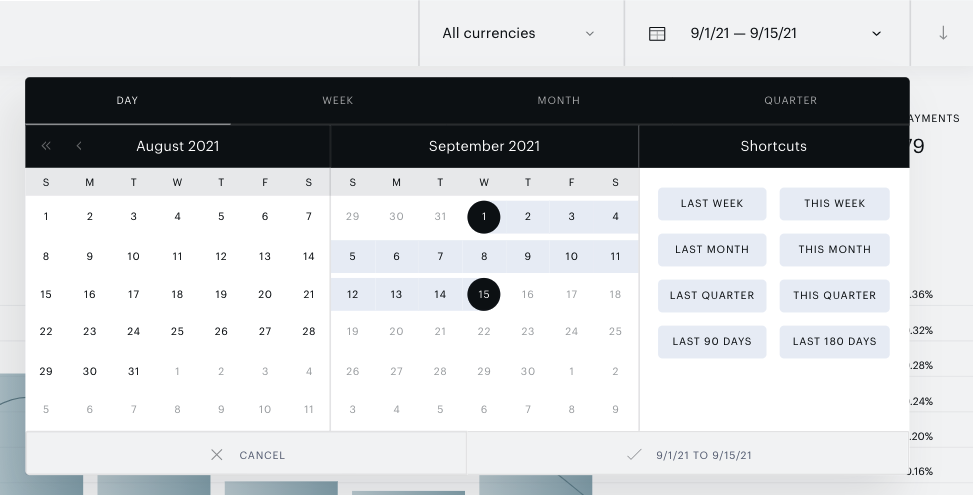
Obtain your site’s subscription data across a range of dates with the date picker in the top right corner of the screen. The range selected here will apply to the stacked bar chart, UI table, and exports.
Terms
Filtering out terms will update the main chart, data in the UI table, and all exports.
To filter out entire term types, click the funnel icon in the top left corner of the table. Available term type filters are Dynamic, Gift, Linked, Payment, Registration, and Site licensing (Specific email addresses contract, Email domain contract).
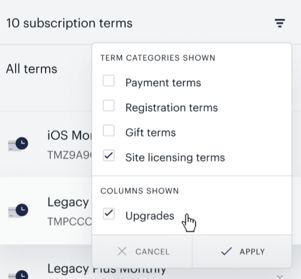
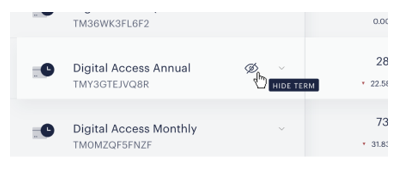
You can also filter out individual terms. Simply hover over the term in question and click the HIDE TERM eye icon to hide that term:
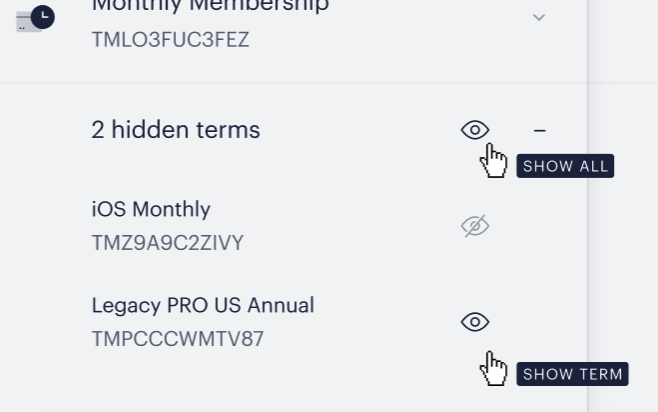
Terms that have been hidden are listed at the bottom of the report. You can selectively show terms by clicking on the SHOW TERM eye icon at each term or show all of them with the SHOW ALL eye icon at the top of the hidden terms section.
Upgrades
If your site has terms with upgrade options, four upgrade status columns are included in the UI table by default: New, Scheduled, Completed, and Failed. To remove these columns from the UI table, uncheck Upgrades in the filter at the top left of the UI table.
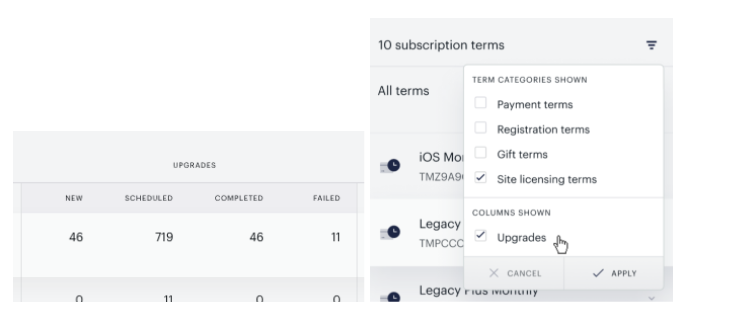
Note: upgrades are not calculated in Total lost. The old subscription is not active any longer, therefore it is not shown in Total active subscriptions.
Net new subs = New subs + New upgrades - Lost
UI Table

Broken down by term, the following metrics are available as columns in the UI table.
|
Column name |
Sample data |
Description |
|
New subs |
92 |
New subscriptions created in Subscription Management + Billing during the period, either because of an offer conversion or an upgrade from another term (New upgrades). |
|
New upgrades |
23 |
The number of new subscriptions that started access during the period as the result of an upgrade from another term to the current term. |
|
Scheduled upgrades |
14 |
The number of subscriptions that were planned to upgrade from the current term to another term, at a later time. They already did or will upgrade based on the Bill timing: end of current cycle setting in Manage → Terms or in the Upgrade/Downgrade checkout flow. |
|
Completed upgrades |
17 |
The number of subscriptions that successfully upgraded from the current term to another term. The current term will not renew. |
|
Failed upgrades |
5 |
The number of subscriptions that were supposed to upgrade from the current term to another term but failed due to a payment issue. The current term will have access to the end of its period but will not renew. |
|
Canceled |
34 |
The number of subscriptions that were canceled by the user (in My Account, if you have enabled this functionality for users, or by your site’s admins). The associated access was revoked immediately, it will not be renewed, and is usually tied with a refund of the last billing period. |
|
Payment failed |
55 |
The number of subscriptions whose most recent renewal was not processed because of a payment failure (insufficient funds, expired card, etc.). The report counts users only when the grace period has run out and the last attempt within that grace period was unsuccessful due to payment failure. When in grace period, the subscription still remains in an Active state. |
|
Expired |
127 |
The number of subscriptions that ended during the period because the auto-renew option was disabled before the last billing date, the subscription was labeled as expired with an external verification, or the manually renewed access ended. |
|
Validation failed |
15 |
The number of subscriptions that lost access because of PSC error. |
|
Lost |
23 |
The number of subscriptions that became not Active as of the last day in the period, regardless of being Active at the beginning of the period.Lost = Canceled + Expired + Payment failed + Validation failed + Failed upgrades |
|
Churn rate |
1.42% |
The percentage of subscriptions that had a Canceled, Expired, Payment failed, Validation failed, or Failed upgrades event during the period and were Active at the beginning of period. Churn rate = [Lost that were Active at the beginning of period] / [total Active at the beginning of period] |
|
Net new subs |
285 |
The net number of new and lost subscriptions at the end of the period.
|
|
Active subscriptions |
50,928 |
The number of subscriptions with current access at the end of the period.
|
|
First time payments |
470 |
The number of subscriptions that collected their first payment during the period, either due to expiration of a free trial or a new subscription without an associated free trial period. Please note, that the data for this field may be historically updated, and once a subscription is successfully renewed its payment is counted as a renewal payment. |
|
Renewal payments |
1,878 |
The number of subscriptions that were renewed beyond the base term length during the period. |
|
Total payments |
2348 |
The number of subscriptions with a payment during the period. |
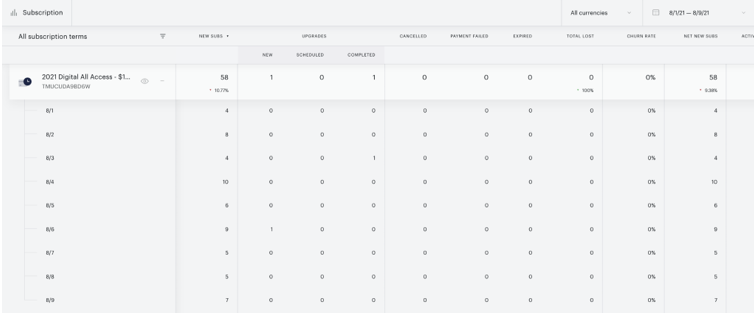
You can view time-specific data for each term – and for All terms – based on the date range configured.
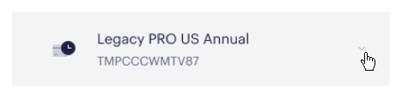
Click the downward arrow next to the term, which will expand the details for that term.
Graph views
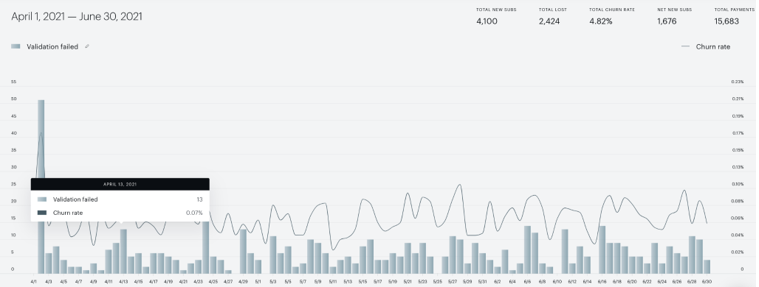
The stacked bar chart can be viewed across different subsets of your site’s subscription data within the date range configured in the top right corner of the screen.
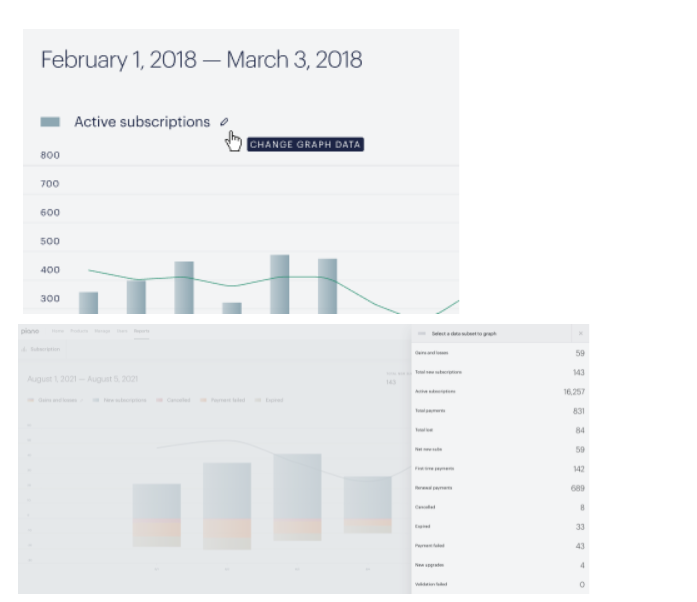
The views, listed below, are configured by clicking on the pencil icon above the stacked bar chart, which opens a right-hand drawer of view options.
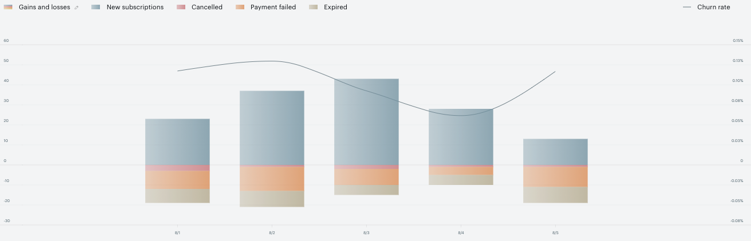
Gains and losses
The net value of subscription events that occurred within the date range, as a gain (positive) or loss (negative).
Gains and losses = New subscriptions - (Canceled + Expired + Payment failed + Validation failed + Failed upgrades)
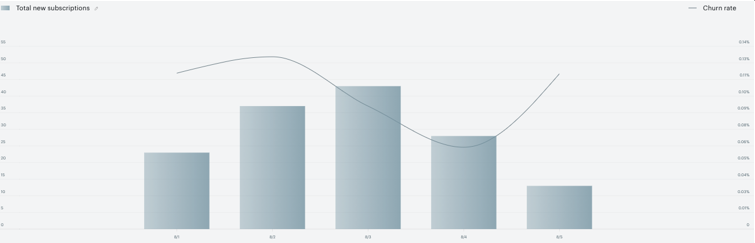
Total new subscriptions
New subscriptions created in Subscription Management + Billing, either because of an offer conversion or an upgrade from another term (New upgrades).
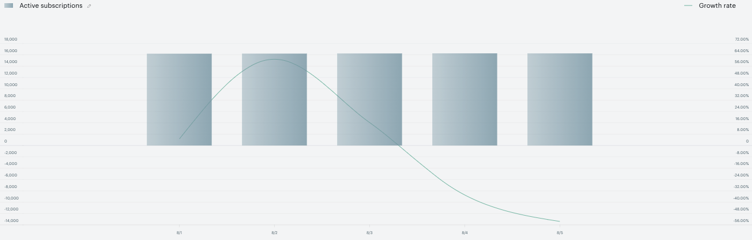
Active subscriptions
The number of subscriptions with active access. Note: this metric differs from the Subscription log report’s Subscription status definition of Active.
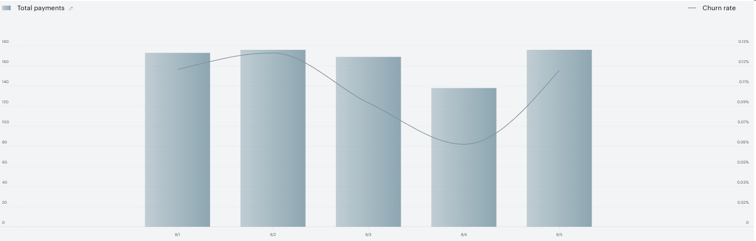
Total payments
The number of payments related to subscriptions.
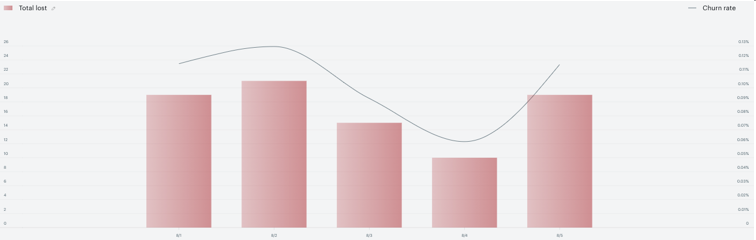
Total lost
The number of subscriptions that are no longer Active.
Lost = Canceled + Expired + Payment failed + Validation failed + Failed upgrades
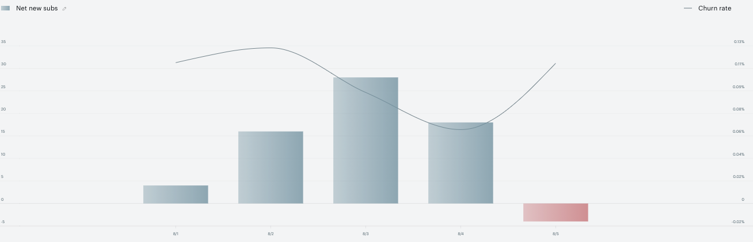
Net new subs
The net number of new and lost subscriptions.
Net new subs = New subs - Lost
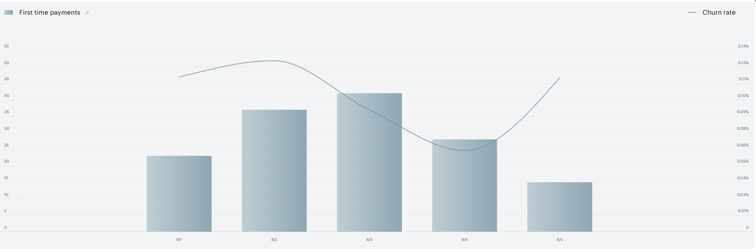
First time payments
The number of subscriptions that collected their first payment, either due to expiration of a free trial or a new subscription without an associated free trial period.
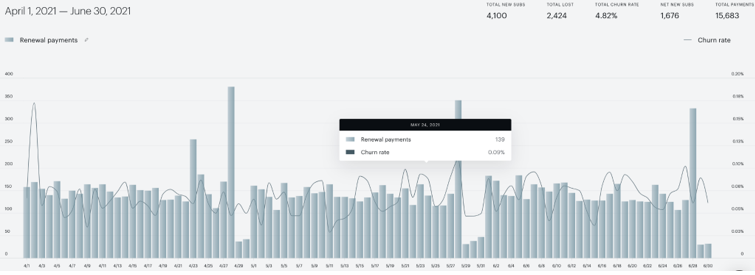
Renewal payments
The number of subscriptions that were renewed beyond the base term length.
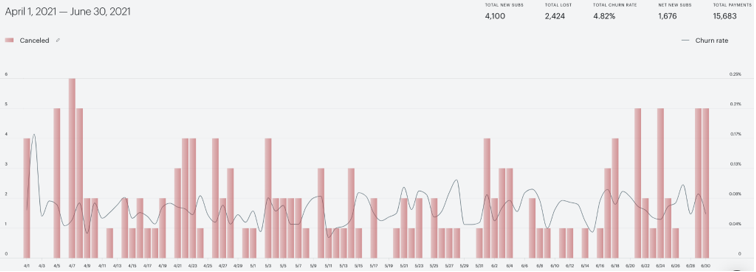
Canceled
The number of subscriptions that were canceled by the user (in My Account, if you have enabled this functionality) or by your site’s admins. The associated access was revoked immediately, it will not be renewed, and is usually tied with a refund of the last billing period.
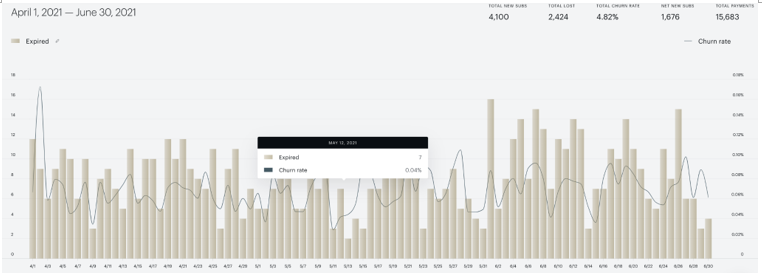
Expired
The number of subscriptions that ended because the auto-renew option was disabled before the last billing date, the subscription was labeled as expired with an external verification, or the manually renewed access ended.
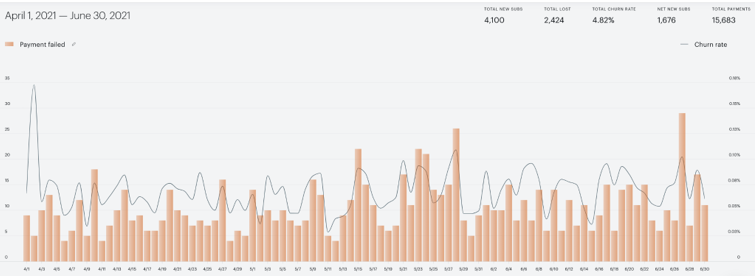
Payment failed
The number of subscriptions whose most recent subscription renewal was not processed because of a payment failure (insufficient funds, expired card, etc.). The report counts users only when the grace period has run out and the last attempt within that grace period was unsuccessful due to payment failure. When in grace period, the subscription still remains in an Active state.
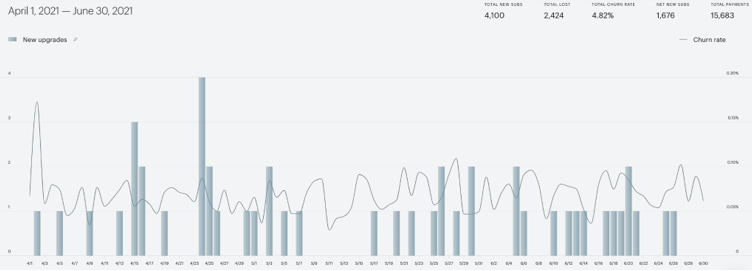
New upgrades
The number of new subscriptions that were created because of an upgrade from another term to this one.
Validation failed
The number of subscriptions that lost access because of PSC error.
Summary statistics
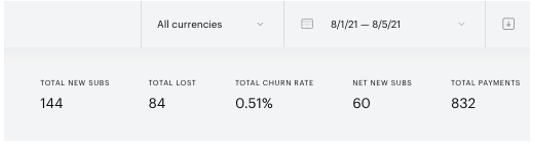
In the top right corner of the graph, there are some metrics that summarize totals across all of the terms shown in the report.
|
Metric name |
Sample data |
Description |
|
Total new subs |
54 |
The sum across all shown term new subscriptions created in Subscription Management + Billing, either because of an offer conversion or an upgrade from another term (New upgrades). |
|
Lost |
18 |
The sum across all shown term subscriptions that are no longer Active.
|
|
Trial churn rate |
3.67% |
The percentage of all shown term subscriptions that had a Canceled, Expired, Payment failed, Validation failed or Failed upgrades event within the relevant date range. |
|
Net new subs |
323 |
The net number of new and lost subscriptions for shown terms.
|
|
Total payments |
767 |
The number of shown term subscriptions with a payment. |
Exports
The date range and any term filtering configured in the UI will apply to the data in the Subscription report’s exports. There are three .csv files that can be downloaded for this report:
-
-
Table by time: shows a breakdown of subscriptions by term and day, for each term enabled in the Subscription UI table filter and for each day within the date range configured in the Subscription visual report UI.
-
Table by term: subscription data broken down by term, summarized across the entire date range.
-
Chart: subscription data broken down by day for each metric that is available in the UI table, and for each day within the date range configured in the UI.
-
To access the exports, simply click on the blue Export button in the top right corner of the screen.
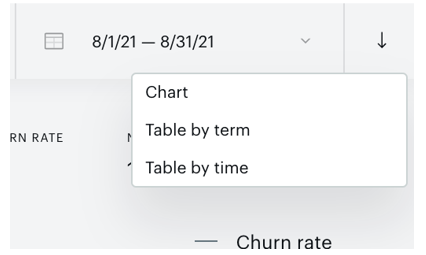
Chart export
Subscription data are broken down by day for each metric that is available in the UI table, as a sum across all shown terms.
File name: subscription-chart-2021-06-01_2021-06-18.csv
Metrics
|
Column name |
Sample data |
Description |
|
Period |
09/27/2021 |
The specific date (within the date range configured in the UI) on which the other columns’ data applies. For example, all data in the row where Period = "09/27/2021" is relevant to the events that occurred on November 8, 2021. All dates are based on your site’s timezone. |
|
New subs |
16 |
The number of new subscriptions that started as the result of an upgrade from another term to the current term on the day. |
|
Active |
3 |
The number of subscriptions with access at the beginning of the day.
|
|
New upgrades |
15 |
The number of new subscriptions that started as the result of an upgrade on the day. |
|
Scheduled upgrades |
2 |
The number of subscriptions that were planned, on the given day, to upgrade from the current term to another term at a later time. They did or will upgrade based on the Bill timing: end of current cycle setting in Manage → Terms or in the Upgrade/Downgrade checkout flow. |
|
Completed upgrades |
6 |
The number of subscriptions that started as another term on the day because of an upgrade. |
|
Failed upgrades |
1 |
The number of subscriptions that were supposed to upgrade to another term on the day but failed due to a payment issue. |
|
Canceled |
3 |
The number of subscriptions that were canceled by the user on the day (in My Account, if you have enabled this functionality for users, or by your site’s admins). The associated access was revoked immediately, it will not be renewed, and is usually tied with a refund of the last billing period. |
|
Payment failed |
2 |
The number of subscriptions whose renewal was not processed on the day because of a payment failure (insufficient funds, expired card, etc.). The report counts users only when the grace period has run out and the last attempt within that grace period was unsuccessful due to payment failure. When in grace period, the subscription still remains in an Active state. |
|
Validation failed |
15 |
The number of subscriptions that lost access because of PSC error. |
|
Expired |
2 |
The number of subscriptions that ended on the day because the auto-renew option was disabled before the last billing date, the subscription was labeled as expired with an external verification, or the manually renewed access ended. |
|
Lost |
18 |
The number of all subscriptions who are no longer Active on of the day, regardless of whether or not they were Active at the beginning of the day. Lost = Canceled + Expired + Payment failed + Validation failed + Failed upgrades |
|
Churn rate |
1.42% |
The percentage of subscriptions that had a Canceled, Expired, Payment failed, Validation failed or Failed upgrades event on the day but were Active the previous day. Churn rate = [Lost that Active at the beginning of day] / [total Active at the beginning of day] |
|
Net new subs |
3 |
The net number of new and lost subscriptions on the day. Net new subs = New subs - Lost |
|
First time payments |
16 |
The number of subscriptions that collected their first payment on the day, either due to expiration of a free trial or a new subscription without an associated free trial period. Please note, that the data for this field may be historically updated, and once a subscription is successfully renewed its payment is counted as a renewal payment. |
|
Renewal payments |
18 |
The number of subscriptions that were renewed beyond the base term length on the day. |
|
Total payments |
46 |
The number of subscriptions with a payment on the day. |
|
Growth rate |
-0.46354526 |
The percent change in new subscriptions since the day before. |
|
Lost, active at beginning of period |
43 |
The number of subscriptions who are no longer Active on the given day, but were at the beginning of the period. Lost = Canceled + Expired + Payment failed + Validation failed + Failed upgrades |
Table by term
The Table by term export shows a breakdown of subscriptions by term, for each term enabled in the Subscription UI table filter.
File name: subscription-table-by-term-2021-09-27_2021-10-27.csv
Metrics
|
Column name |
Sample data |
Description |
|
Term name |
AUS Annual - Spring Sale - A$108 |
The name of the term associated with the subscriptions in the given row. |
|
Term ID |
T2KG275GLJD6 |
The unique identifier of the term associated with the subscriptions in the given row. |
|
New upgrades |
15 |
The number of new subscriptions that started access during the period as the result of an upgrade from another term to the current term. |
|
Scheduled upgrades |
2 |
The number of subscriptions that were planned, throughout the data range and on the given term, to upgrade from the current term to another term at a later time. They already did or will upgrade based on the Bill timing: end of current cycle setting in Manage → Terms or in the Upgrade/Downgrade checkout flow. |
|
Completed upgrades |
6 |
The number of subscriptions that successfully upgraded from the current term to another term during the period. The current term will not renew. |
|
Failed upgrades |
1 |
The number of subscriptions that were supposed to upgrade from the current term to another term during the period but failed due to a payment issue. The current term will have access to the end of its period but will not renew. |
|
Active |
3 |
The number of subscriptions with access at the end of the period. Note: this metric differs from the Subscription log report’s Subscription status definition of Active. |
|
Canceled |
3 |
The number of subscriptions that were canceled by users during the period (in My Account, if you have enabled this functionality for users, or by your site’s admins). The associated access was revoked immediately, it will not be renewed, and is usually tied with a refund of the last billing period. |
|
Payment failed |
2 |
The number of subscriptions whose most recent renewal was not processed because of a payment failure during the period (insufficient funds, expired card, etc.). The report counts users only when the grace period has run out and the last attempt within that grace period was unsuccessful due to payment failure. When in grace period, the subscription still remains in an Active state. |
|
Validation failed |
15 |
The number of subscriptions that lost access because of PSC error. |
|
Expired |
2 |
The number of subscriptions that ended during the period because the auto-renew option was disabled before the last billing date, the subscription was labeled as expired with an external verification, or the manually renewed access ended. |
|
New subs |
16 |
The number of new subscriptions that started access during the period as the result of an upgrade from another term to the current term. |
|
Lost |
18 |
The number of subscriptions that became not Active as of the last day in the period, regardless of being Active at the beginning of the period.
|
|
Lost, active at beginning of period |
43 |
The number of subscriptions that became not Active as of the last day in the period, that were Active at the beginning of the period. Lost = Not Active = Canceled + Expired + Payment failed + Validation failed + Failed upgrades |
|
Churn rate |
1.42% |
The percentage of subscriptions that had a Canceled, Expired, Payment failed, Validation failed or Failed upgrades event during the period and were Active at the beginning of period. Churn rate= [Lost that were Active at the beginning of period] / [total Active at the beginning of period] |
|
New trial subs |
14 |
The number of new subscriptions that started with a trial. The metric is calculated only for Payment terms, not Dynamic terms. |
|
Net new subs |
14 |
The net number of new and lost subscriptions at the end of the period. Net new subscriptions = New subs - Lost |
|
First time payments |
16 |
The number of subscriptions that collected their first payment during the period, either due to expiration of a free trial or a new subscription without an associated free trial period. Please note, that the data for this field may be historically updated, and once a subscription is successfully renewed its payment is counted as a renewal payment. |
|
Renewal payments |
18 |
The number of subscriptions that were renewed beyond the base term length during the period. |
|
Total payments |
46 |
The number of subscriptions with a payment during the period. |
|
Total amount of subscriptions refunded |
59.99 |
Refunded revenue amount for a given time period and dedicated term. Represent cash out for a full or partial refund. |
|
Total amount of subscriptions renewed |
125.99 |
Renewal revenue for a given time period and dedicated amount. |
Table by time
The Table by time export shows a breakdown of subscriptions by term and day, for each term enabled in the Subscription UI table filter and for each day within the date range configured in the Subscription visual report.
The sum of events for all terms is broken down by currency. For example, the highlighted cell can be interpreted as "For all terms with USD currency and on June 1, 2021, the number of subscriptions that successfully completed upgrades to another term was three."

File name: subscription-table-by-time-2021-09-27_2021-10-27.csv
Metrics
|
Column name |
Sample data |
Description |
|
Term name |
AUS Annual - Spring Sale - A$108 |
The name of the term associated with the subscriptions. |
|
Term ID |
T2KG275GLJD6 |
The unique identifier of the term associated with the subscriptions. |
|
Period |
10/25/2021 |
The specific date (within the date range configured in the UI) on which the other columns’ data applies. For example, all data in the row where Period = "10/25/2021" is relevant to the events that occurred on October 25, 2021. |
|
New upgrades |
15 |
The number of new subscriptions that have started as this term, as the result of an upgrade from another term. |
|
Scheduled upgrades |
2 |
The number of subscriptions that were planned, on the given day and term, to upgrade from the current term to another term at a later time. They already did or will upgrade based on the Bill timing: end of current cycle setting in Manage → Terms or in the Upgrade/Downgrade checkout flow. |
|
Completed upgrades |
6 |
The number of subscriptions that successfully upgraded from the given term to another term. The given term will not renew. |
|
Failed upgrades |
1 |
The number of subscriptions that were supposed to upgrade from the given term to another term but failed due to a payment issue. The given term will have access to the end of its period but will not renew. |
|
Active |
3 |
The number of subscriptions with access.
|
|
Canceled |
3 |
The number of subscriptions that were canceled by the user (in My Account, if you have enabled this functionality for users, or by your site’s admins). The associated access was revoked immediately, it will not be renewed, and is usually tied with a refund of the last billing period |
|
Payment failed |
2 |
The number of subscriptions whose most recent renewal was not successful because of a payment failure (insufficient funds, expired card, etc). The report counts users only when the grace period has run out and the last attempt within that grace period was unsuccessful due to payment failure. When in grace period, the subscription still remains in an Active state. |
|
Validation failed |
15 |
The number of subscriptions that lost access because of PSC error. |
|
Expired |
2 |
The number of subscriptions that ended because the auto-renew option was disabled before the last billing date, the subscription was labeled as expired with an external verification, or the manually renewed access ended. |
|
New subs |
16 |
The number of new subscriptions created in Subscription Management + Billing, either because of an offer conversion or an upgrade from another term (New upgrades). |
|
Lost |
18 |
The number of all subscriptions who are no longer Active, regardless of whether or not they were Active at the beginning of the day. Lost = Canceled + Expired + Payment failed + Validation failed + Failed upgrades |
|
Lost, active at beginning of period |
43 |
The number of subscriptions who are no longer Active, but were at the beginning of the period. Lost = Canceled + Expired + Payment failed + Validation failed + Failed upgrades |
|
Churn rate |
1.42% |
The percentage of subscriptions that had a Canceled, Expired, Payment failed, Validation failed or Failed upgrade event within the relevant date range and were Active at the beginning of the day.
|
|
New trial subs |
14 |
The number of new subscriptions that started with a trial. The metric is calculated only for Payment terms, not Dynamic terms. |
|
Net new subs |
14 |
The net number of new and lost subscriptions.
|
|
First time payments |
16 |
The number of subscriptions that collected their first payment, either due to the expiration of a free trial or a new subscription without an associated free trial period. Please note, that the data for this field may be historically updated, and once a subscription is successfully renewed its payment is counted as a renewal payment. |
|
Renewal payments |
18 |
The number of subscriptions that were renewed beyond the base term length. |
|
Total payments |
46 |
The number of subscriptions with a payment. |
|
Total amount of subscriptions refunded |
59.99 |
Refunded revenue amount for a given time period and dedicated term. Represent cash out for a full or partial refund. |
|
Total amount of subscriptions renewed |
125.99 |
Renewal revenue for a given time period and dedicated amount. |
|
Currency |
USD |
The currency associated with the underlying term of the subscription. |