
UI table
Loaded upon navigation to the Subscription log report, a table in the UI gives some key metrics about your site’s subscriptions. The rows are unique subscriptions sorted by Start date, the most recent being first.
Clicking on a subscription’s User email in this list will bring up the user summary with an overlaid window that gives details on that particular subscription.
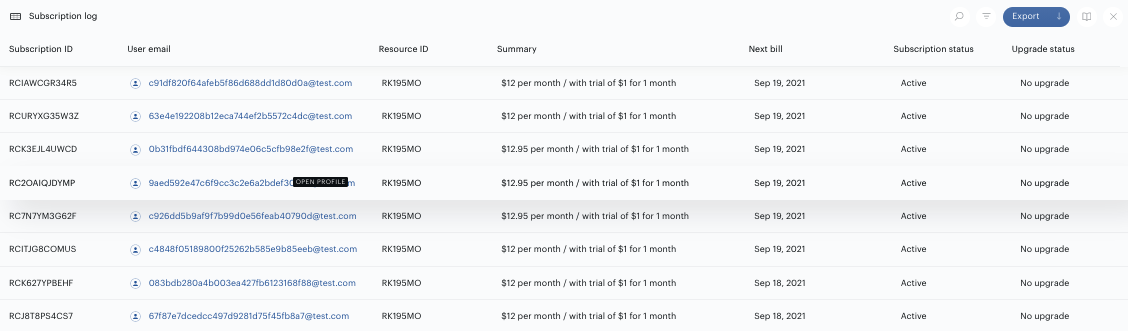
Columns surfaced in the UI table are:
-
Subscription ID
-
User email
-
Resource ID
-
Summary
-
Next bill
-
Subscription status
-
Upgrade status
Read more about the columns' descriptions in the Metrics section.
Export
For more details on all of your site’s subscriptions ever recorded in Management + Billing than what the UI table surfaces, the Subscription log report csv should be downloaded via the blue Export button in the top right corner of the screen.
From there, the export can be accessed through the Download center (Reports→Download center) You can then click Download on any previously generated file. If you do not see the .csv you just created, refresh the page in a few moments to allow sufficient time for generating the report.
File name: subscription-log.csv
Each row in the .csv file is a unique subscription. The following columns are available, in this order from left to right:
-
Subscription ID
-
Summary
-
Create date
-
Start date
-
End date
-
Days subscribed
-
Subscription status
-
Upgrade status
-
Trial status
-
Trial period end date
-
Trial price
-
Regular price
-
Auto-renew
-
Auto-renew disablement date
-
Last active date
-
Logins last 30 days
-
Sessions last 30 days
-
Pageviews last 30 days
-
Billing period
-
Total charged
-
Charge count
-
Total refunded
-
Payment source
-
Last billing date
-
Next billing date
-
Renewed
-
Currently in grace period
-
Grace period start date
-
Grace period extended to
-
User ID (UID)
-
User email
-
First name - The first name of the owner of the subscription.
-
Last name - The last name of the owner of the subscription.
-
Access expiration date
-
Resource ID (RID)
-
Resource name
-
Term ID
-
Term name
-
Term type
-
Template ID
-
Template name
-
Offer ID
-
Offer name
-
Experience ID
-
Experience name
-
Campaign codes
-
Promo code
-
Conversion city
-
Conversion state
-
Conversion country
-
Device
-
URL
-
Cleaned URL
-
UTM parameters
-
Company name - The company name of the print subscription recipient's address (if provided).
-
Name (first and last) - The first and last name of the user's Print Subscription Confirmation address.
-
Address 1 - The first line of the print subscription recipient's address.
-
Address 2
-
Address city - The city of residence of the print subscription recipient.
-
Address state - The state of residence of the print subscription recipient.
-
Address country - The postal code of the print subscription recipient.
-
Postal code
-
Phone
-
PSC subscriber number
-
Tax
-
Tax base
-
Tax rate
-
Tax country
-
Tax state/province
-
Billing postal code
-
Shared subscriptions
-
Migrated to Piano
-
Migrated date
-
Created via upgrade
-
Upgrade from - subscription ID
-
Period name
-
Access period
-
Period count
-
Renewable gift
-
Alias Login
-
Phone Number Login
-
External Verification ID
-
Stripe Subscription ID
-
Current payment method
-
Current payment provider
-
Last payment amount
-
Promotion ID
-
Promotion name
-
Promo code % discount
-
Promotion code value
-
Upgrade from - term ID
-
Upgrade from - term name
-
Upgrade from - billing plan
-
Upgrade to - term ID
-
Upgrade to - term name
-
Upgrade to - billing plan
-
Upgrade to - subscription ID
-
Auto-renew enablement date
Find the columns' descriptions in the Metrics section below.
Please note, that not necessarily all optional fields, such as Conversion URL, Device, UTM parameters, Address fields, etc. need to be filled in with values for subscriptions that were created as a result of an upgrade.
The Subscription log export via API has the ability to customize the set of columns in the export using the attribute_groups parameter in the API call with the following options:
-
RENEWABLE_GIFT
-
Renewable gift
-
-
USER
-
Alias Login
-
Phone Number Login
-
External Verification ID
-
Stripe Subscription ID
-
-
PAYMENT
-
Current payment method
-
Current payment provider
-
Last payment amount
-
Promotion name
-
Promotion ID
-
Promo code % discount
-
Promotion code value
-
-
UPGRADES
-
Upgrade from - term ID
-
Upgrade from - term name
-
Upgrade from - billing plan
-
Upgrade to - term ID
-
Upgrade to - term name
-
Upgrade to - billing plan
-
Upgrade to - subscription ID
-
-
AUTORENEW
-
Auto-renew enablement date
-
Filter
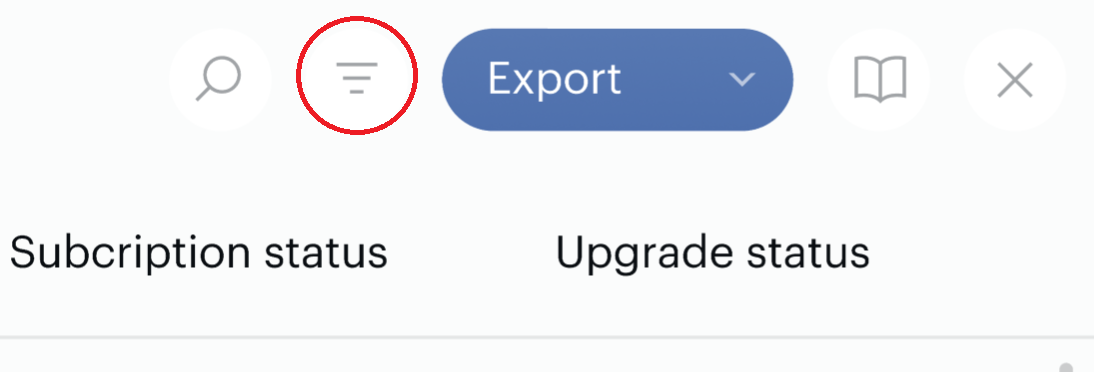
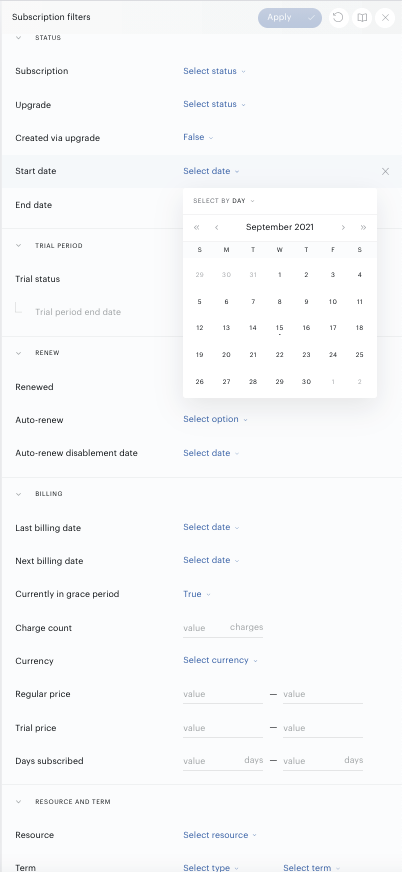
The Subscription log report filter is accessed at the icon in the top right corner of the screen.
Once the filter icon is clicked, a drawer will appear on the right side of the screen. The filters configured here will be applied to both the UI table and the export of the report.
Metrics
|
Column name |
Sample data |
Description |
|
Subscription ID |
RCASDPT9BJZT |
The unique identifier assigned to the subscription after confirmation. |
|
Summary |
$15 per month / with trial of $5 for 30 days |
Regular price per Billing period / with trial of Trial price for Trial period. |
|
Create date |
2021-09-01 01:24:38 -0400 |
The date and time that the subscription was created in the Piano database. Note that this is not necessarily the same as Start date; in case the subscription was migrated to Piano, Create date will denote the date and time on which this migration process happened, whereas Start date will denote the date and time the subscription access originally began in the previous subscription management system. |
|
Start date |
2021-06-01 08:24:38 -0400 |
The date and time that the subscription access began. Note that this is not necessarily the same as the Create date. |
|
End date |
2021-05-09 08:21:09 -0400 |
The last day of access for all churned subscriptions. Note: previously, this column was only filled with Canceled event dates. Now it also includes Payment failed, Validation failed, and Expired events. |
|
Days subscribed |
42 |
The number of days the subscription has had or had access, including trial periods and grace periods. |
|
Subscription status |
Active |
The status achieved by the subscription after the most recent renewal attempt: Active, Canceled, Expired, Upgraded, Won’t renew, or Payment failed.** |
|
Subscription status: Active |
Active |
The renewal job on the current term will be attempted at the end of the current billing period unless auto-renew option is toggled off. Or the subscription is in a temporary status which is set in-between several billing attempts on the same day.
|
|
Subscription status: Canceled |
Canceled |
The subscription was canceled by the user (in My Account, if you have enabled this functionality for users) or by your site’s admins. The associated access was revoked immediately, it will not be renewed, and is usually tied with a refund of the last billing period. |
|
Subscription status: Expired |
Expired |
The subscription ended because the auto-renew option was disabled before the last billing date, the subscription was labeled as expired with an external verification, or the manually renewed access ended. |
|
Subscription status: Upgraded |
Upgraded |
The subscription has successfully upgraded to another term, and the Upgrade status is Completed. There is no renewal job planned for the current term. Do not count this status as active, since a new line has already been created for the upgraded subscription. |
|
Subscription status: Won't renew |
Won't renew |
There is no renewal job planned. Either:
This status does not refer to subscriptions that have their auto-renewal turned off - see more information about this here. These subscriptions should still be considered active until the end date is reached, at which point they transition to Expired.
|
|
Subscription status: Payment failed |
Payment failed |
The most recent subscription renewal job did not succeed because of a payment failure (insufficient funds, expired card, etc.). Once marked as Payment failed, the subscription should not be considered active, as it did not successfully exit the grace period. A subscription in grace period will still have an Active status. |
|
Upgrade status |
Scheduled |
The status of the latest attempted upgrade: Scheduled, Completed, Failed, or No upgrade. |
|
Upgrade status: Scheduled |
Scheduled |
The subscription is set to upgrade from the current term to another term but hasn’t yet because of the Bill timing: end of current cycle setting in Manage > Terms or in the Upgrade/Downgrade checkout flow. |
|
Upgrade status: Completed |
Completed |
The subscription has successfully upgraded from the current term to another term. The current term will not renew. |
|
Upgrade status: Failed |
Failed |
The subscription was supposed to upgrade from the current term to another term but failed due to a payment issue. The current term will have access to the end of its period but will not renew. |
|
Upgrade status: No upgrade |
No upgrade |
The subscription has never attempted to upgrade to another term. |
|
Trial status |
Currently in trial |
The status of the subscription trial:
Our system does not support true trial periods for dynamic terms. While you can configure a period within a dynamic term and label it as a "trial," it functions as a regular billing period within the term structure, not as a separate trial mechanism. This distinction affects how the system reports on these periods. |
|
Trial status: Currently in trial |
Currently in trial |
The subscription is in trial at the moment of report generation. |
|
Trial status: Trial ended, converted |
Trial ended, converted |
Subscriptions whose trial ended and the user converted to pay the Regular price for the subscription. |
|
Trial status: Trial ended, did not convert |
Trial ended, did not convert |
Subscriptions whose trial ended and the user did not convert to pay the Regular price for the subscription. |
|
Trial status: No trial |
No trial |
There was no trial for the subscription. |
|
Trial period end date |
2021-06-01 08:24:38 -0400 |
If there was a trial, the date on which the trial ended or will end. |
|
Trial price |
$0.99 |
The price of the trial, if the subscription had one. |
|
Regular price |
$4.99 |
This price of the full subscription.
|
|
Auto-renew |
TRUE |
As configured by the user in account settings,
|
|
Auto-renew disablement date |
2021-03-01 23:59:59 -0400 |
The date auto-renew was disabled by the user in their account. |
|
Last active date |
2021-06-01 08:24:38 -0400 |
The datetime of the last pageview. |
|
Logins last 30 days |
20 |
The number of times the account has authenticated their credentials in the last 30 days. This field is currently being populated only for clients using Identity Management. For other User management systems, this field won't contain any data. |
|
Sessions last 30 days |
34 |
The number of times in the last 30 days that the account went online and consumed at least one pageview. Note that the current session ends and a new session starts if:
|
|
Pageviews last 30 days |
124 |
Number of pageviews (distinct URL + timestamp combinations) visited in the last 30 days. Note that the same URLs with different timestamps (either after refreshing the page or after coming back to site later) are counted as separate pageviews. |
|
Billing period |
1 month |
The billing period for the subscription. |
|
Total charged |
54.03 |
The amount that the account has paid to date on the given subscription and any renewals. |
|
Charge count |
2 |
The number of times the user has been charged relating to this subscription. |
|
Total refunded |
4.33 |
The sum of all refunds given to the user relating to this subscription. |
|
Payment source |
American Express ending in 1002 |
A summary of the payment method used for the transaction of this subscription. It is the same as the Payment source column in the Transaction log report. |
|
Last billing date |
2021-06-01 08:30:54 -0400 |
The most recent date that the user was charged for this subscription. |
|
Next billing date |
2021-07-01 08:30:54 -0400 |
The next date that the user is scheduled to be charged for this subscription. |
|
Renewed |
TRUE |
TRUE if the subscription was renewed at least once, FALSE otherwise. |
|
Currently in grace period |
TRUE |
TRUE if the subscription is currently in a grace period. FALSE if otherwise. |
|
Grace period start date |
2021-06-01 08:30:54 -0400 |
The date on which the current grace period started (if applicable). |
|
Grace period extended to |
2021-06-01 08:30:54 -0400 |
If applicable, the date to which the grace period was extended. Else, the column should be left empty. |
|
User ID (UID) |
ee193848-bc33-43c6-999f-d5e211230e32 |
The unique identifier associated with the user that owns the subscription. |
|
User email |
jameslu@gmail.com |
The email address of the owner of the subscription. |
|
First name |
James |
The first name of the owner of the subscription. |
|
Last name |
Lu |
The last name of the owner of the subscription. |
|
Access expiration date |
2021-07-01 23:59:59 -0400 |
The date on which the resource access for the subscription ended or will end. |
|
Resource ID (RID) |
BRZLE22R |
The unique identifier of the resource behind the term related to this subscription. |
|
Resource name |
Arts and Culture |
The resource behind the term related to this subscription. |
|
Term ID |
TMJQA8HLY8CX |
The unique identifier of the term associated with the subscription. |
|
Term name |
Monthly |
The name of the term associated with the subscription. |
|
Term type |
Payment |
The type of the term associated with the subscription. Possible values are Payment, External, Gift (docs), Specific email addresses contract, and Email domain contract (docs). |
|
Template ID |
OT9CWHO1NYO9 |
The unique identifier of the offer template that contained the term that the user converted on. |
|
Template name |
Full access - monthly |
The name of the offer template. This may be different from the current name if you edited the name between the time of conversion and the time of generating the report. |
|
Offer ID |
OF7LRJT8BB98 |
The unique identifier of the offer associated with the initial subscription conversion. |
|
Offer name |
Freemium Offer 3 Options |
The name of the offer associated with the initial subscription conversion. |
|
Experience ID |
EXLYZ9HETWDT |
The unique identifier belonging to the Composer experience associated with the initial subscription conversion. |
|
Experience name |
High LtC - monthly offers |
The Composer experience name associated with the initial subscription conversion. |
|
Campaign codes |
mktg-adblocker-go-ad-free:1617060713698 |
The campaign code (if applicable) that the user followed prior to converting on the term. The epoch time the campaign was viewed is also included in the value. If the transaction was refunded, then the campaign code of the conversion will not be shown in this report. |
|
Promo code |
QSSTRJ65JFCV |
The promotional code that the user redeemed (if applicable) at the time of purchasing the subscription. |
|
Conversion city |
Houston |
The city that the user was in upon converting on the term, collected using GeoIP. |
|
Conversion state |
Texas |
The state, province, or territory that the user was in upon converting on the term, collected using GeoIP. |
|
Conversion country |
United States |
The country that the user was in upon converting on the term, collected using GeoIP. |
|
Device |
Desktop |
The device type on which the term of the subscription was converted. |
|
URL |
https://www.bigtimenews.com/stock-market-day-trading-investing-strategy-millions-one-year-newell-2021-5?r=US&IR=T |
The URL that the user was on when he or she converted on the subscription term. |
|
Cleaned URL |
https://www.bigtimenews.com/stock-market-day-trading-investing-strategy-millions-one-year-newell-2021-5 |
The URL without its UTM parameters. |
|
UTM parameters |
?r=US&IR=T |
Just the UTM parameters associated with the URL. |
|
Company name |
Brown County Commissioner |
The name of the company that the user provided (if applicable) upon converting on the term. |
|
Name (first and last) |
Brent Morris |
For PSC or print address collection terms, the first and last name of the print subscription recipient. This information is retrieved from the address information the user entered during the PSC verification, so this data may be different from the columns "First name" and "Last name" or unavailable altogether, as these columns have different sources. |
|
Address 1 |
15629 Walden Ct |
For PSC or print address collection terms, the first line of the print subscription recipient's address. |
|
Address 2 |
Ph-4 |
For PSC or print address collection terms, the second line of the print subscription recipient's address. |
|
Address city |
Oak Forest |
For PSC or print address collection terms, the city of residence of the print subscription recipient. |
|
Address state |
Illinois |
For PSC or print address collection terms, the state of residence of the print subscription recipient. |
|
Address country |
United States |
For PSC or print address collection terms, the country of residence of the print subscription recipient. |
|
Postal code |
60451 |
For PSC or print address collection terms, the postal code of the print subscription recipient. |
|
Phone |
7087031023 |
For PSC or print address collection terms, the phone number of the print subscription recipient. |
|
PSC subscriber number |
3274607 |
The Print Subscription Confirmation subscriber number (if applicable) that uniquely identifies the user for a print subscription. |
|
Tax |
5.03 |
Tax = Tax base * Tax rate. The value is reflecting the latest payment of the subscription. |
|
Tax base |
49 |
The amount from which Tax was calculated during the latest payment, whether that was from a trial, as reflected in Trial price, or on the regular description, as reflected in Regular price. |
|
Tax rate |
10.25 |
The tax rate applied to the transactions based on the Tax state/province and Tax country of the latest payment of the subscription. |
|
Tax country |
United States |
The country in which tax is due for the transaction(s) on this subscription in the future based on the payment method details. |
|
Tax state/province |
IL |
The state in which tax is due for the transaction(s) on this subscription in the future based on the payment method details. |
|
Billing postal code |
60451 |
The postal code in the billing address of this subscription. |
|
Migrated to Piano |
TRUE |
TRUE if the subscription was migrated to Piano from another subscription management platform. FALSE if otherwise. |
|
Migrated date |
2021-07-01 23:59:59 -0400 |
The date on which the subscription was migrated to Piano. |
|
Shared subscriptions |
2 |
For Shared subscription terms, the number of active child accounts that access the subscription. |
|
Upgrade from - subscription ID |
Annual - All access |
If the subscription was Created via upgrade = TRUE, the subscription ID of the term from which it upgraded. |
|
Created via upgrade |
TRUE |
TRUE if the subscription was created because of an upgrade from another term.
|
|
Period name
|
Second paid period
|
Name of latest billing period name for dynamic term subscription.
|
|
Access period
|
2 months |
Name of latest access period name for dynamic term subscription. |
|
Period count
|
1 |
Order period number for dynamic term subscription. |
|
Renewable gift
|
FALSE |
Is subscription renewable gifting? |
|
Alias Login
|
test_alias_login_100 |
Alias Login. |
|
Phone Number Login
|
34600555888 |
Phone Number Login. |
|
External Verification ID
|
3a587fe06a646d04db7b6b5e943182adadf721c0
|
External Verification ID for subscribe with Google.
|
|
Stripe Subscription ID
|
sub_1TWY2BDGhiR5RthWUvun7YCh |
Stripe Subscription ID for subscriptions with migrated billing to Stripe. |
|
Current payment method
|
Visa |
Current subscription payment method defined by subscriber. |
|
Current payment provider
|
Stripe Credit Card |
Current subscription payment provider defined by subscriber. |
|
Last payment amount
|
10.5 |
Previous payment amount for subscription. |
|
Promotion ID
|
PN48OC808MUW |
ID of promotion. |
|
Promotion name
|
5 USD promo |
Name of promotion. |
|
Promo code % discount
|
50 |
Percentage value of promotion code discount. |
|
Promotion code value
|
5.0 USD |
Monetary value of promotion code. |
|
Upgrade from - term ID
|
TMEEYCXNL9I6 |
Previous term ID that subscription has been upgraded from. |
|
Upgrade from - term name
|
5 days daily subscription without trial, promo (Resource_20) |
Previous term name that subscription has been upgraded from. |
|
Upgrade from - billing plan
|
$8.99 every 5 days |
Previous term billing plan that subscription has been upgraded from. |
|
Upgrade to - term ID
|
TM56LWDG2ECZ |
New term ID that subscription has been upgraded to. |
|
Upgrade to - term name
|
Term with limit exceed price (BT) |
New term name that subscription has been upgraded to. |
|
Upgrade to - billing plan
|
$2,002.00 every 11 days |
New term billing plan that subscription has been upgraded to. |
|
Upgrade to - subscription ID
|
RCQWMYI56SH1 |
New subscription ID that subscription has been upgraded to. |
|
Auto-renew enablement date
|
7/2/25 1:32 AM |
Autorenewal turn on stamp (last date of autorenewal turned on or resume status for dynamic subs). |
**In the Subscription Log Report, the status of a subscription can vary while still being considered active from a business perspective, especially when the auto-renewal feature is toggled on or off by the end-user. Here’s how these statuses function:
-
Active: This is the most common status for ongoing subscriptions. When auto-renewal is turned off, the subscription status remains "Active," but the subscription will not renew after the current billing cycle ends. This means, that when a subscriber toggles auto-renewal off or on, the subscription status itself does not change from "Active"; only the "Auto-renew" value (TRUE or FALSE) is updated.
-
Won't Renew: This status applies when a subscription is in its final scheduled term billing period and auto-renewal has been disabled. It can also appear in other scenarios, such as when an upgrade is scheduled.
-
Pending: This status appears when a subscription is purchased using asynchronous payment methods. The status will remain "Pending" until the payment is confirmed.
-
Payment Failure: This status occurs when a renewal payment fails. The system makes several attempts to renew the subscription before it moves to a grace period or expires.
Subscription Linking Support
The Subscription log report supports Linked Terms, allowing entries to reference related terms directly within the log. This provides clearer context and improves traceability. The scope of Subscription linking data support in the Subscription Log depends on the scope of the Subscription linking implementation and the set of events and fields sent within the integration. The table below provides the relevant details.
|
Supported export fields |
Linked terms support |
|
Subscription ID |
Supported |
|
Summary |
Supported |
|
Create date |
Supported |
|
Start date |
Supported |
|
End date |
Supported |
|
Days subscribed |
Supported |
|
Subscription status |
Supported |
|
Upgrade status |
Supported |
|
Trial status |
Not supported |
|
Trial period end date |
Not supported |
|
Trial price |
Not supported |
|
Regular price |
Not supported |
|
Auto-renew |
Always FALSE |
|
Auto-renew disablement date |
Not supported |
|
Last active date |
Supported |
|
Logins last 30 days |
Not supported |
|
Sessions last 30 days |
Supported |
|
Pageviews last 30 days |
Supported |
|
Billing period |
Always "Non-recurring" |
|
Total charged |
Always set to "0" |
|
Charge count |
Always set to "1" |
|
Total refunded |
Always set to "0" |
|
Payment source |
Not supported |
|
Last billing date |
Supported |
|
Next billing date |
Supported |
|
Renewed |
Supported |
|
Currently in grace period |
Always FALSE |
|
Grace period start date |
Not supported |
|
Grace period extended to |
Not supported |
|
User ID (UID) |
Supported |
|
User email |
Supported |
|
First name - The first name of the owner of the subscription. |
Supported |
|
Last name - The last name of the owner of the subscription. |
Supported |
|
Access expiration date |
Supported |
|
Resource ID (RID) |
Supported |
|
Resource name |
Supported |
|
Term ID |
Supported |
|
Term name |
Supported |
|
Term type |
Supported |
|
Template ID |
Supported |
|
Template name |
Supported |
|
Offer ID |
Supported |
|
Offer name |
Supported |
|
Experience ID |
Supported |
|
Experience name |
Supported |
|
Campaign codes |
Supported |
|
Promo code |
Not supported |
|
Conversion city |
Supported |
|
Conversion state |
Supported |
|
Conversion country |
Supported |
|
Device |
Supported |
|
URL |
Not supported |
|
Cleaned URL |
Not supported |
|
UTM parameters |
Not supported |
|
Company name |
Not supported |
|
Name (first and last) - The first and last name of the user's Print Subscription Confirmation address. |
Not supported |
|
Address 1 - The first line of the print subscription recipient's address. |
Not supported |
|
Address 2 |
Not supported |
|
Address city - The city of residence of the print subscription recipient. |
Not supported |
|
Address state - The state of residence of the print subscription recipient. |
Not supported |
|
Address country - The postal code of the print subscription recipient. |
Not supported |
|
Postal code |
Not supported |
|
Phone |
Not supported |
|
PSC subscriber number |
Not supported |
|
Tax |
Not supported |
|
Tax base |
Not supported |
|
Tax rate |
Not supported |
|
Tax country |
Not supported |
|
Tax state/province |
Not supported |
|
Billing postal code |
Not supported |
|
Shared subscriptions |
Supported |
|
Migrated to Piano |
Not supported |
|
Migrated date |
Not supported |
|
Created via upgrade |
Supported |
|
Upgrade from - subscription ID |
Supported |