
In the previous guide, you learned how subscriptions, resources, terms, and offers work. In this guide, we will be putting these terms to use by walking through the different types of paywalls that can be leveraged with Piano. This module will introduce you to paywalls and walk through some of the different paywalls and simple ways to deploy them.
Paywall Overview
At Piano you can create several types of paywalls to fit your specific use case, that can be configured for different user experiences. Paywalls are configured with Composer, with the options available you can create freemium models, membership models, metered Paywalls, or more complex deployments. Paywalls, at their core, rely on the answers to the following questions:
-
What pages should the paywall be placed on?
-
Who will be targeted by the paywall?
-
Will you be metering specific pages?
-
What are the constraints of the meter?
-
What offer do you want to show your readers after the paywall is triggered?
-
Will users be able to bypass the offer?
You can model the implementation of a paywall like this:


The anatomy of a paywall
The conceptual example from above can be modeled within Composer like this:

This paywall is configured to:
-
Target every page on your website,
-
Target every single user on your website,
-
Trigger after a user has seen 6 page views,
-
Present the user with a subscription offer that cannot be closed.
These options can be configured to create different types of paywalls based on the use-case that you want to present to your users. Changing even one setting changes the entire dynamic of this paywall.
Freemium model
A freemium model uses a paywall on specific parts of your website but still allows your readers to access some parts for free. Piano clients have generally seen higher levels of success with freemium models. The advantage of the freemium model is that it offers quick transparent insight into your media product. Users have the ability to see some assets for free, and you can measure performance around that. To utilize the freemium model effectively you have to understand your audience, and what they are looking for in your content or media asset.
Metered model
The metered model monetizes consumption frequency. Metered model paywalls track pageviews before serving the offer. This approach makes sense for high output operations with a lot of viewers that access multiple pages and articles every day. Configuring a basic metered paywall requires thinking about the number of unique pages you will allow someone to see before serving them the paywall.
Dynamic Model
The dynamic paywall model combines Piano's Likelihood to Subscribe (LtS) algorithm with paywall strategies to optimize subscription conversions. LtS assesses non-subscribers based on a scale of 0 to 100 in terms of their likelihood to subscribe, leveraging over a hundred metrics for analysis. This real-time algorithm sorts visitors by conversion rate, with segments closer to 100 exhibiting significantly higher paid conversion rates.
Hard Paywall model
The membership model relies on the segmentation engine to serve paywalls to non-registered users. It’s more dynamic than the other two models because it works in conjunction with the metered or the freemium model for unregistered users.
Freemium vs Membership models
The distinct difference between the two models is how much content you are gating. In the freemium model, you gate only a portion of your content. In the membership model, you gate all of your content.
How to build a freemium paywall
To create a paywall, you have to first create a new experience. Once the new experience is created, you have to set the basic options. Every paywall needs an Effective Pages card, a user segment, a trigger, and an action. Every new experience, by default, contains an Effective Pages and a Segment card.
The Effective Pages Card
The Effective Pages card allows you to set the parameters for the location where an experience will run, in this case, the paywall. There are five options that you can set in this card, and regarding paywalls, the most common are URLs and tags.
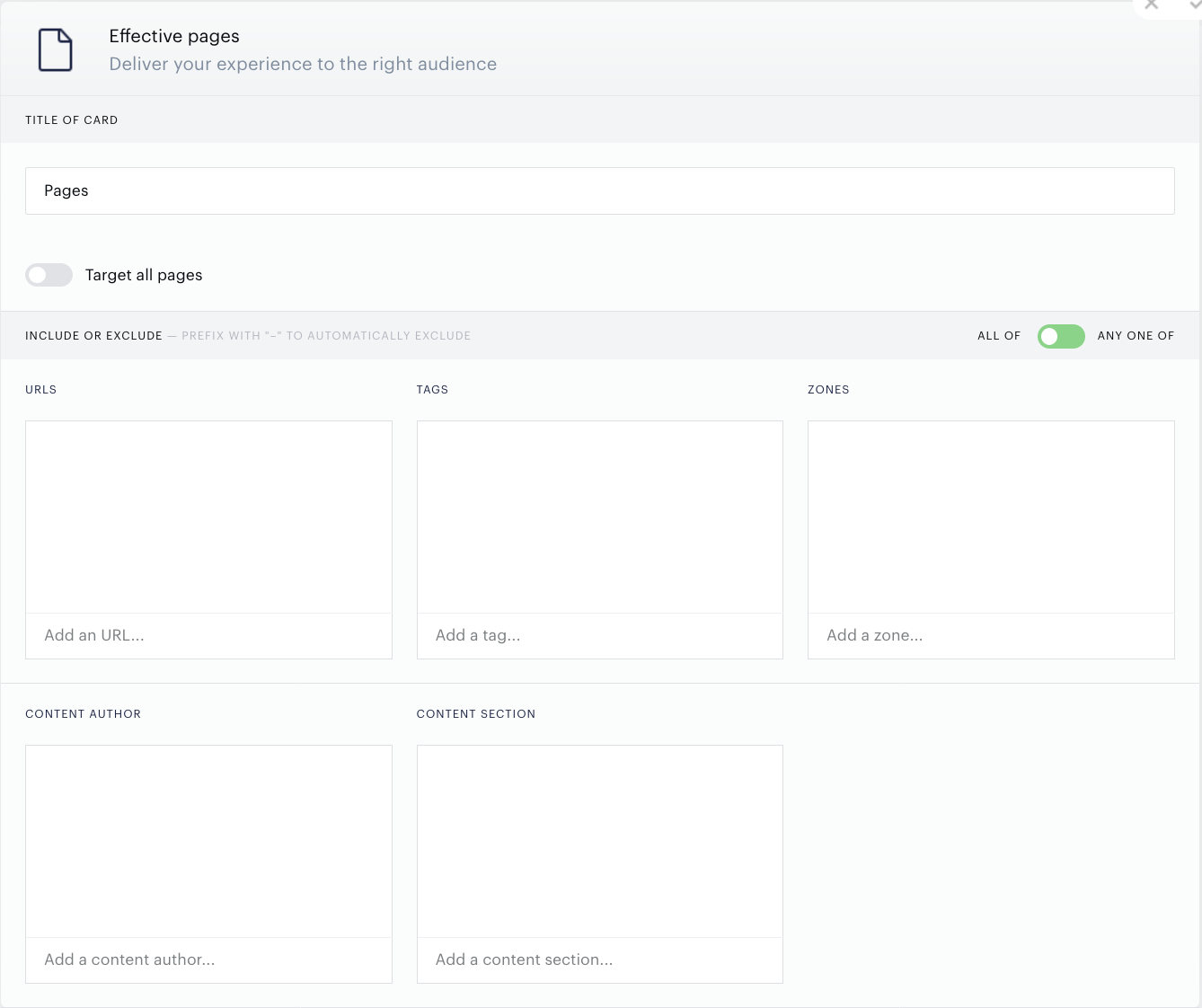
For a freemium model, you may want the paywall to only trigger on premium content at example.com/premium. Or on content that is tagged "premium". Or both:
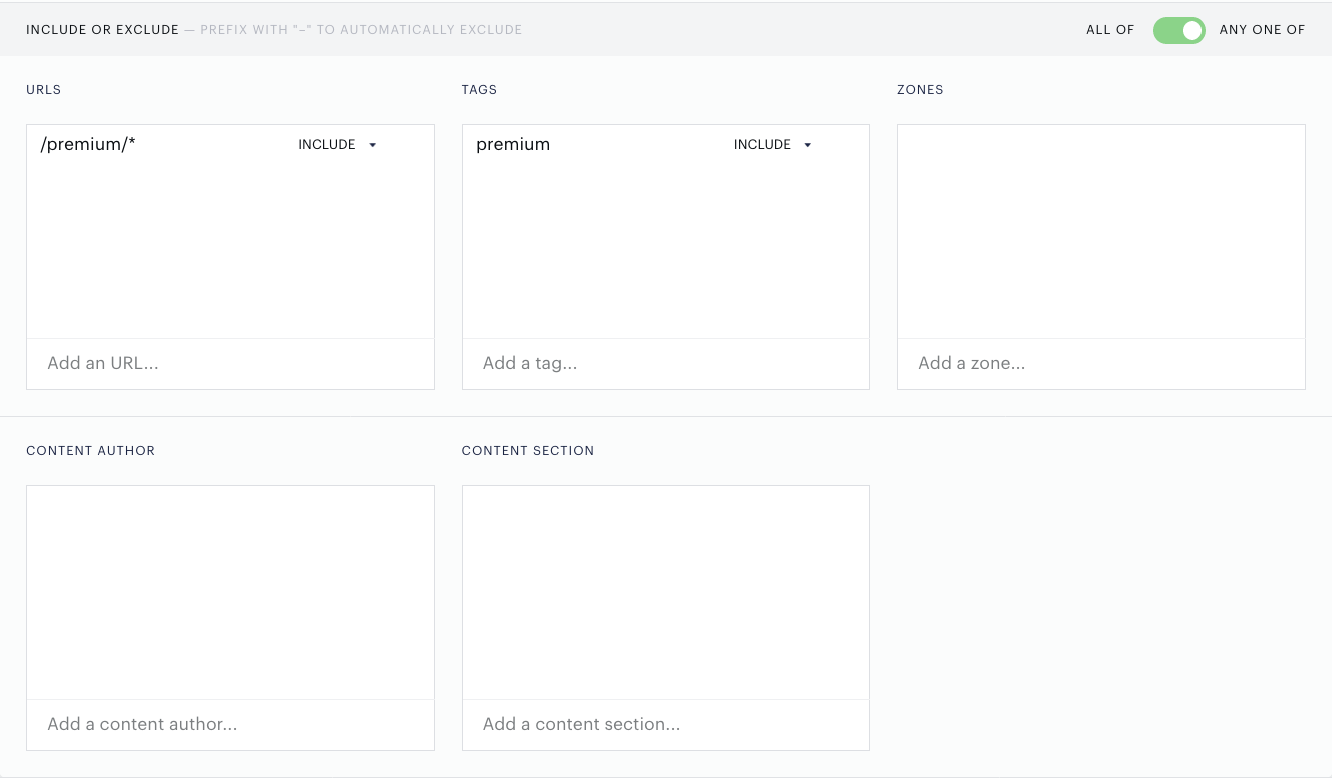
In this example configuration, the pages we are targeting are at example.com/premium, or utilize the "premium" tag, or both. With these configurations, the experience will trigger when any of those conditions are met.
Note: The ALL OF setting constrains the experience to only running on pages where every condition in the menus resolves true simultaneously. ANY ONE OF is an inclusive OR statement, it constrains the experience to run on pages where any condition resolves true independently of the others. Setting a pages card to “all of” creates a state that forces all conditions to resolve true, so the experience can run. When “any one of” is toggled, only one of the conditions needs to be met for the experience to run.
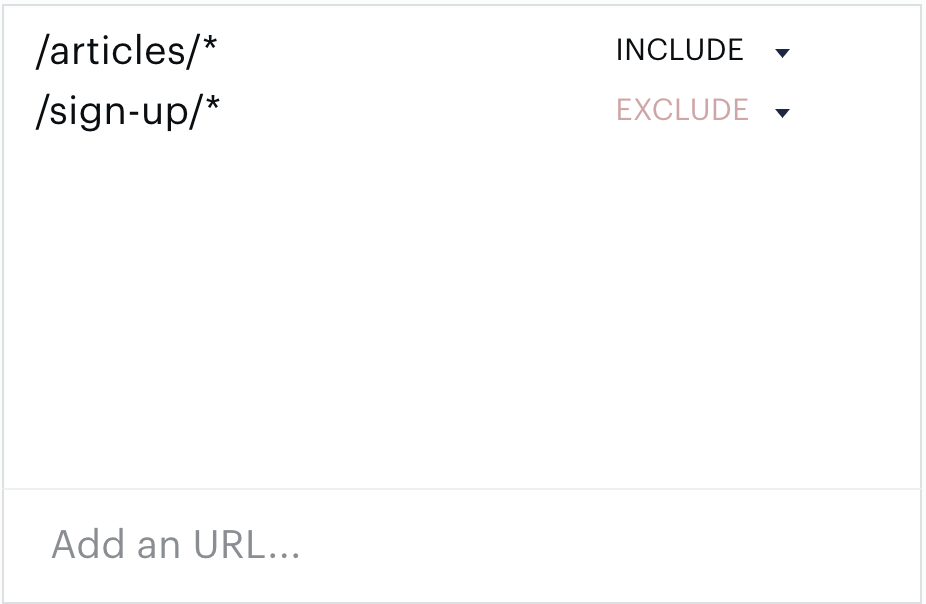
Within individual categories: URLs, tags, zones, content author, and content section, you have the ability to use include and exclude logic for the options that are set within the individual categories. You can learn more about this process within the Pages docs.
Tags are sent to Piano with Javascript. Sending your data to Piano is a straightforward process that is described in this documentation: How to Send Data to Piano
Note: Zones, within the Effective Pages card, is a Subscription Management + Billing-only feature. You can learn more about Zones here.
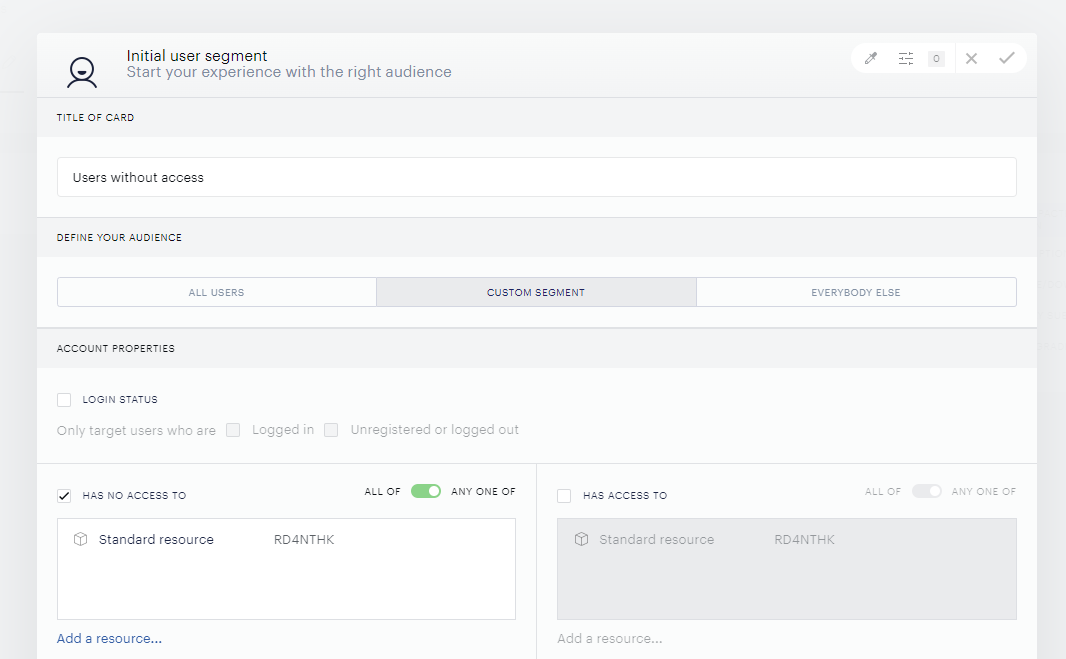
The User Segment card gives you the ability to drill down into your user base and target users with specific traits for this experience. In the case of a freemium paywall, users with access to a payment term resource should not be targeted by a paywall on premium content. This can be achieved by checking the box beside the Has no access to segment and selecting the relevant resource(s). See the picture below:
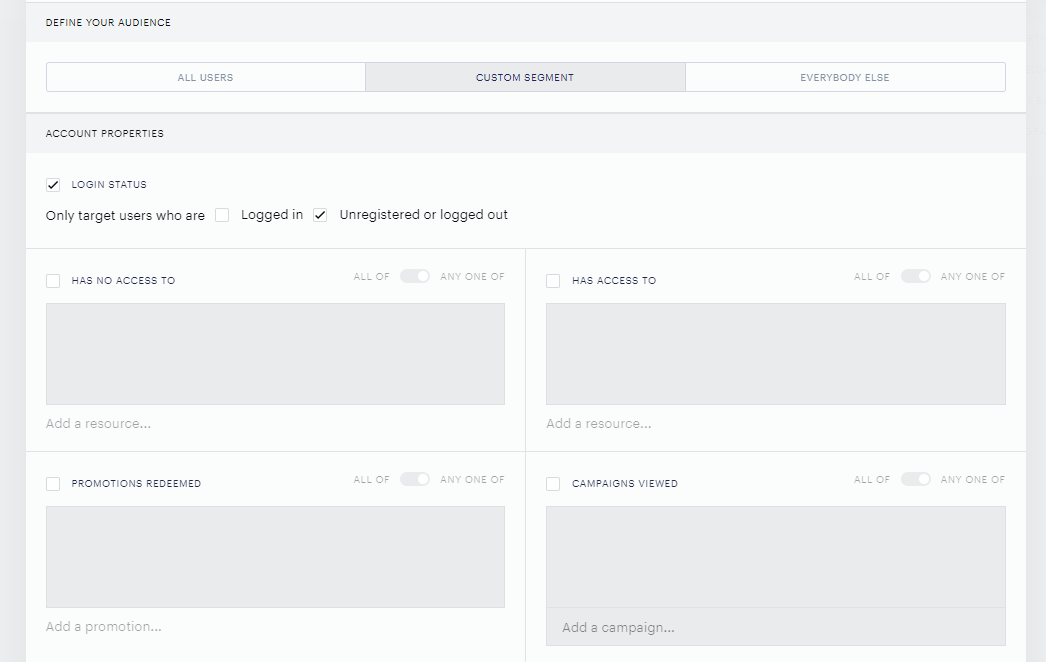
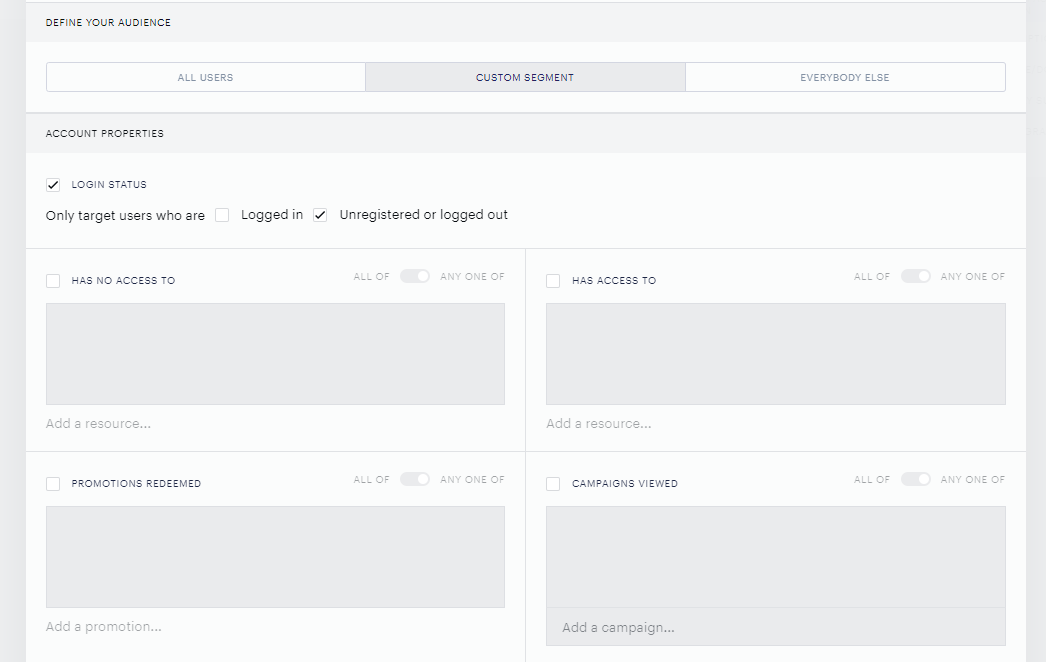
Under the Account properties menu, you have the ability to target users who are unregistered or logged out:

The Show Offer Card
For freemium paywalls, the offer card is how content will be gated. By adding the Show Offer card and using a registration template, your user will be prompted to register the moment they land on a page tagged premium, or a page at the URL example.com/premium/*. Registration modals are built with templates, to understand templates, please read our Templates Walkthrough.
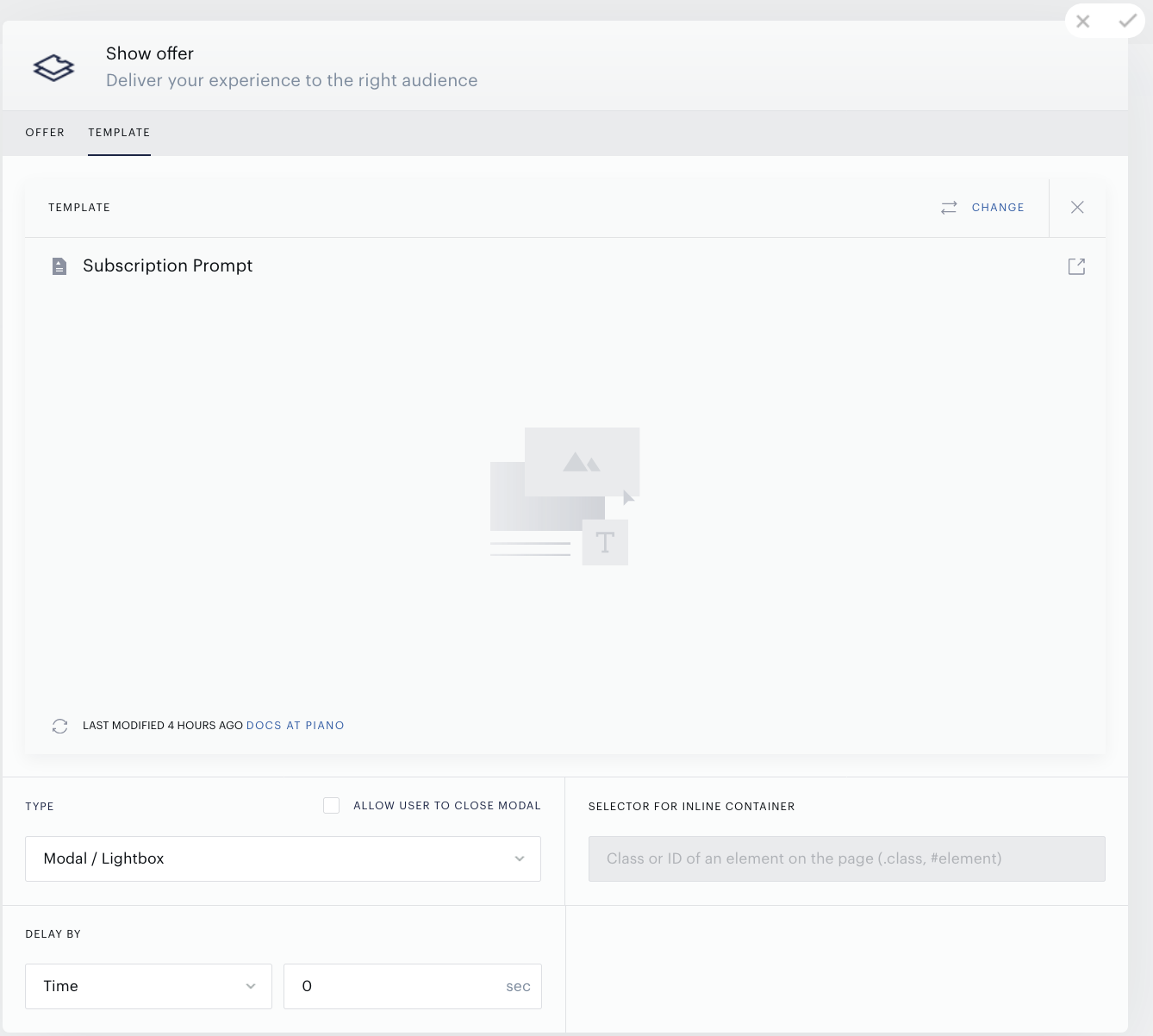
One of the most important parts of configuring the offer card is the checkbox titled "ALLOW USER TO CLOSE MODAL". If you check this box, the user will be able to close the registration modal and continue consuming the content.
The freemium paywall is complete, the entire experience will look like this:
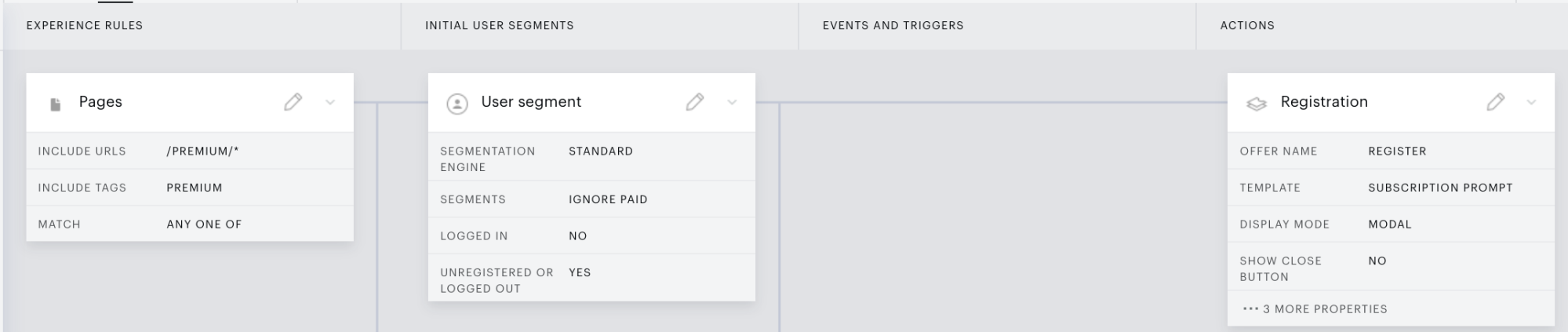
This paywall experience meets the following criteria:
-
Targets only unregistered or logged out users.
-
Triggers on pages that contain /premium/* within the URL.
-
Triggers on content tagged “premium”.
-
Serves a registration offer.
How to Build a Hard Paywall
The Hard Paywall is used in membership models where a user does not have access to any gated content unless they are subscribed. Similar to Freemium in configuration, but without access to free content.
The Effective Pages Card
For the hard paywall, the Effective Pages card should include the URL where all of your premium gated content is stored:
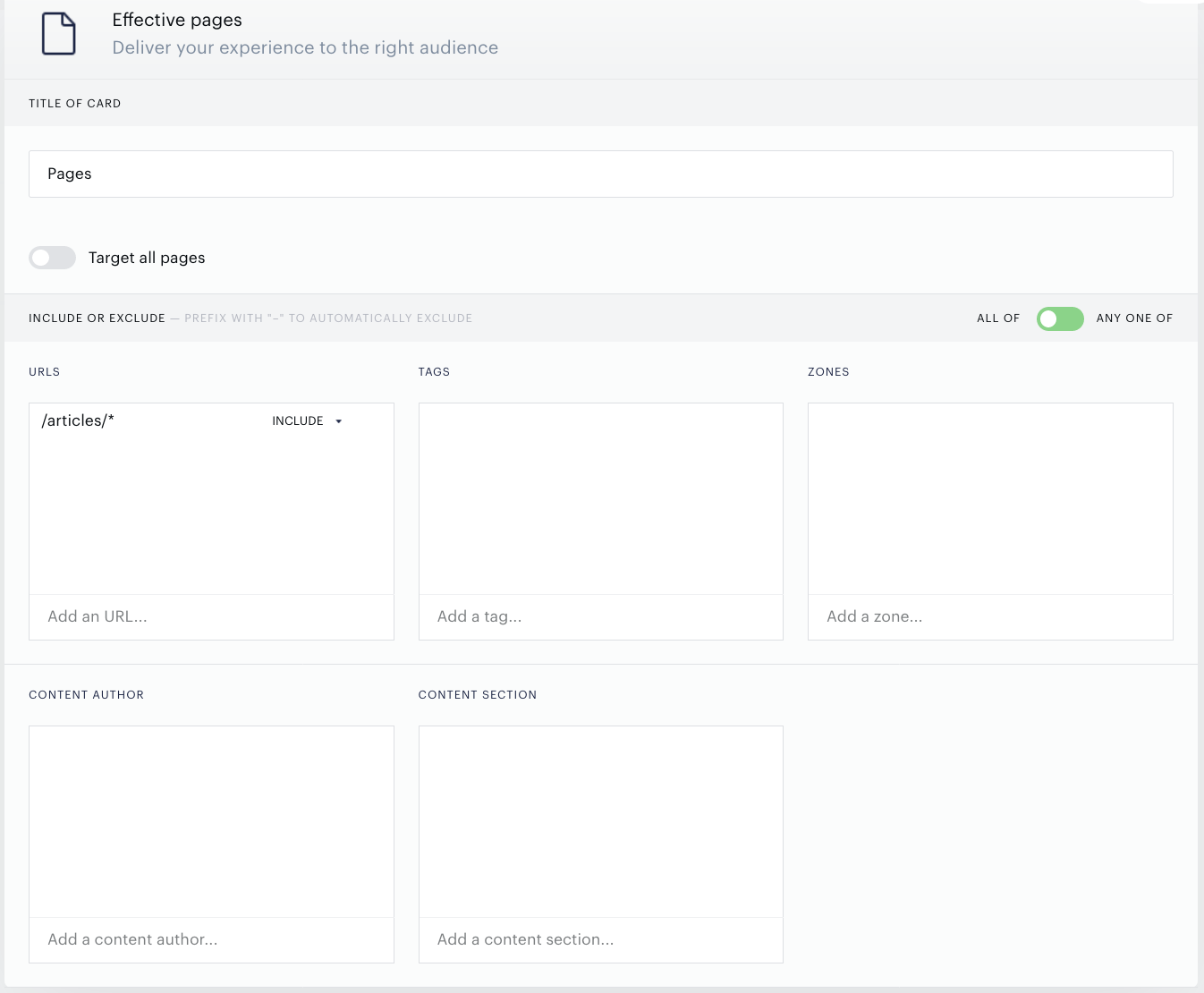
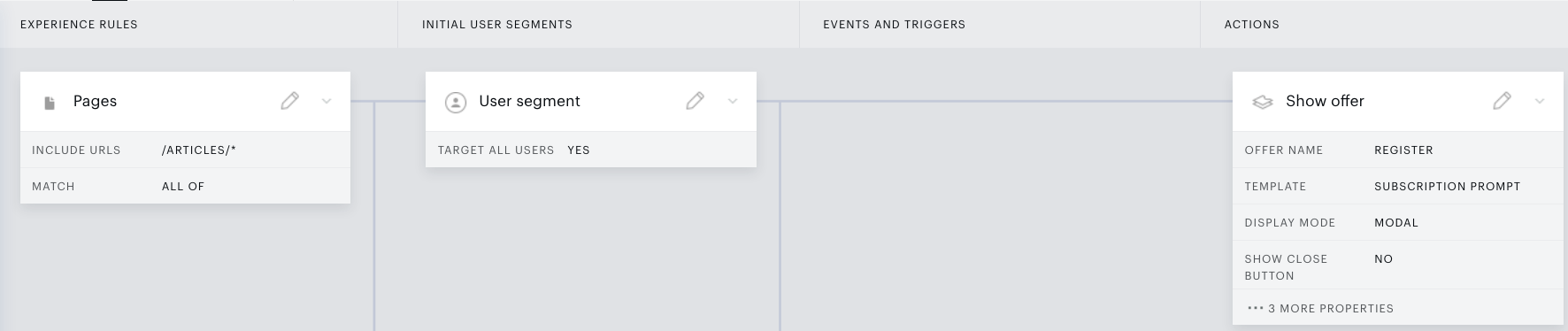
In the example above, we are allowing this experience to run on any directory that contains /articles/ in the URL.
User Segment
Hard Paywalls should target every user that is not registered:
The Show Offer Card
In this model, the offer card is how Piano will gate your content. By adding the Show Offer card, and using a registration template, a user will be prompted to register the moment they land on any gated page. In the case of the membership model, it’s any page that contains “/articles/” in the URL structure. Registration modals are built with templates. To understand templates, please read our Templates Walkthrough.
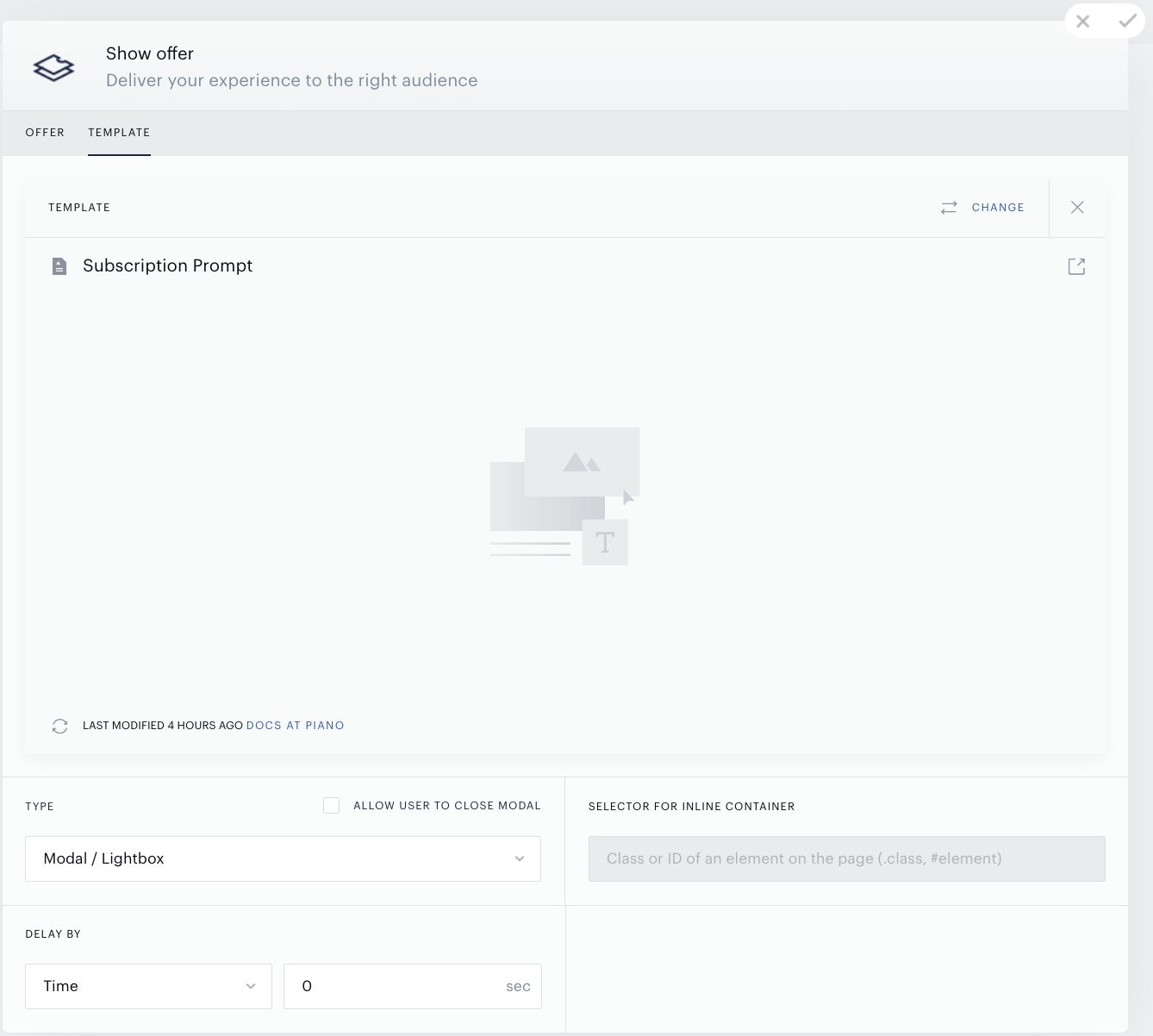
One of the most important parts of configuring the offer card is the checkbox titled ALLOW USER TO CLOSE MODAL, if you check this box, the user will be able to close the registration modal and continue consuming the content.
You can now save your hard paywall. It should look like this within the composer:
How to build a Metered Paywall
The metered paywall utilizes that Pageview Meter event within the composer to trigger the paywall after a set amount of pages are viewed. You can be very precise with the meter, targeting unique or non-unique pages. Combined with the pages card, and user segments, you could meter a very specific subsection of your pages or users.
The metered paywall is flexible. You can use a meter with any kind of paywall model. You can add a meter to a freemium experience to fine-tune the free experience. You could meter a membership experience to create tiers of access. The basic metering experience is similar to freemium or membership, but with the addition of the Pageview Meter event.
The Effective Pages Card
The pages card allows you to set the parameters for an experience to run, in this case, the paywall. There are five options that you can set in this card, and regarding paywalls, the most common are URLs and Tags. In this example, we will target every single page.
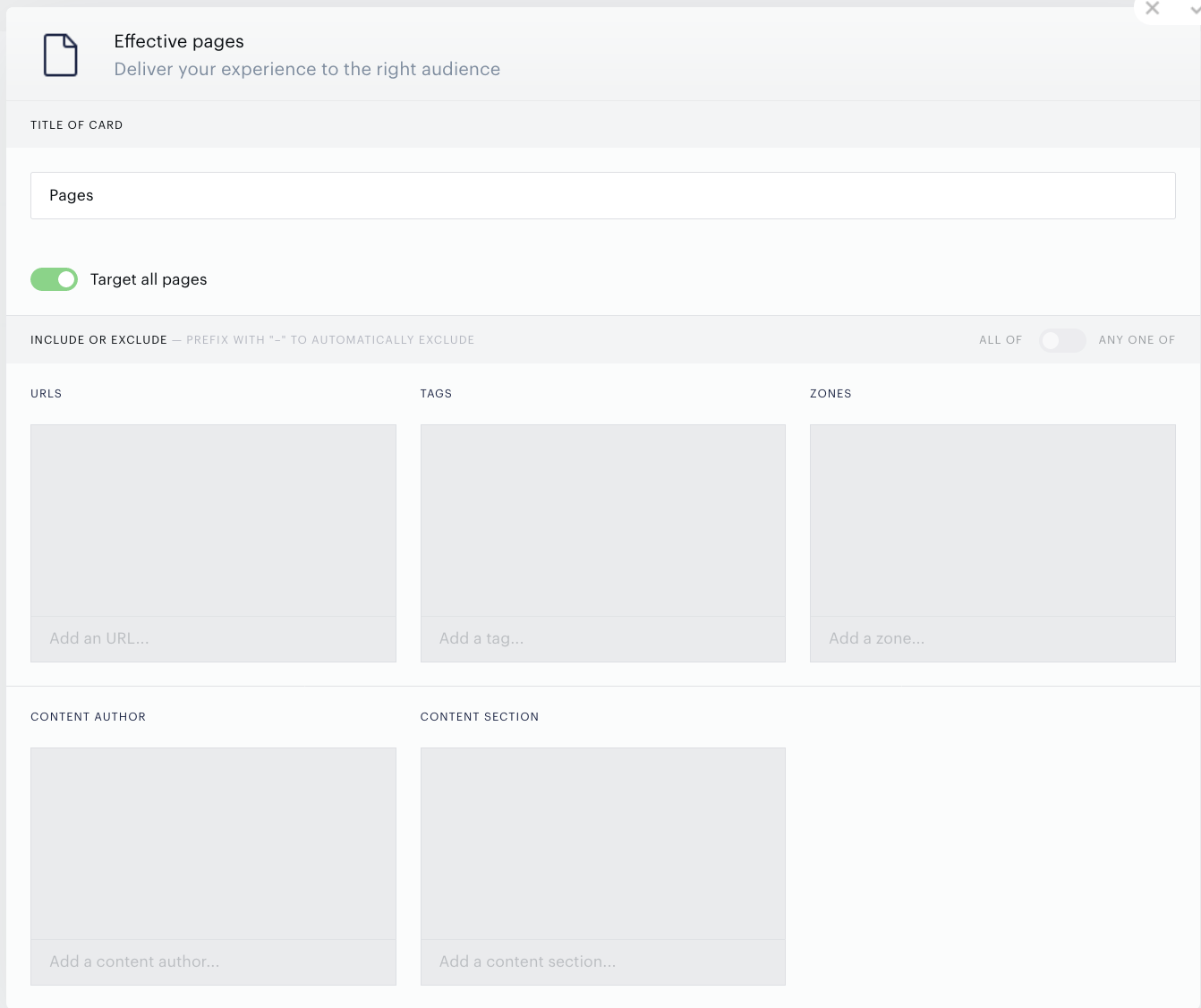
This experience will run on every single page of your application.
The User Segment Card
In the case of the metered paywall, if your goal is to convert your audience, you target only the audience that is not already registered. Similar to the previous models, we will target only unsubscribed users.
Events and Triggers - Pageview Meter
Pageview Meter is one of the fundamental tools you can use to persuade your users to subscribe. You can give them a glimpse of your content by allowing them a limited number of article views, sessions, or visit days per month. You can hit returning users with an offer at a given pageview frequency. Or you can entice dedicated but hesitant users with a special deal after their 10th visit day that month. Pageview Meter is a simple but powerful method of increasing interest in your site without giving all of your content away for free. You can learn more about the Pageview Meter, in our guide on Pageview Meter Settings.
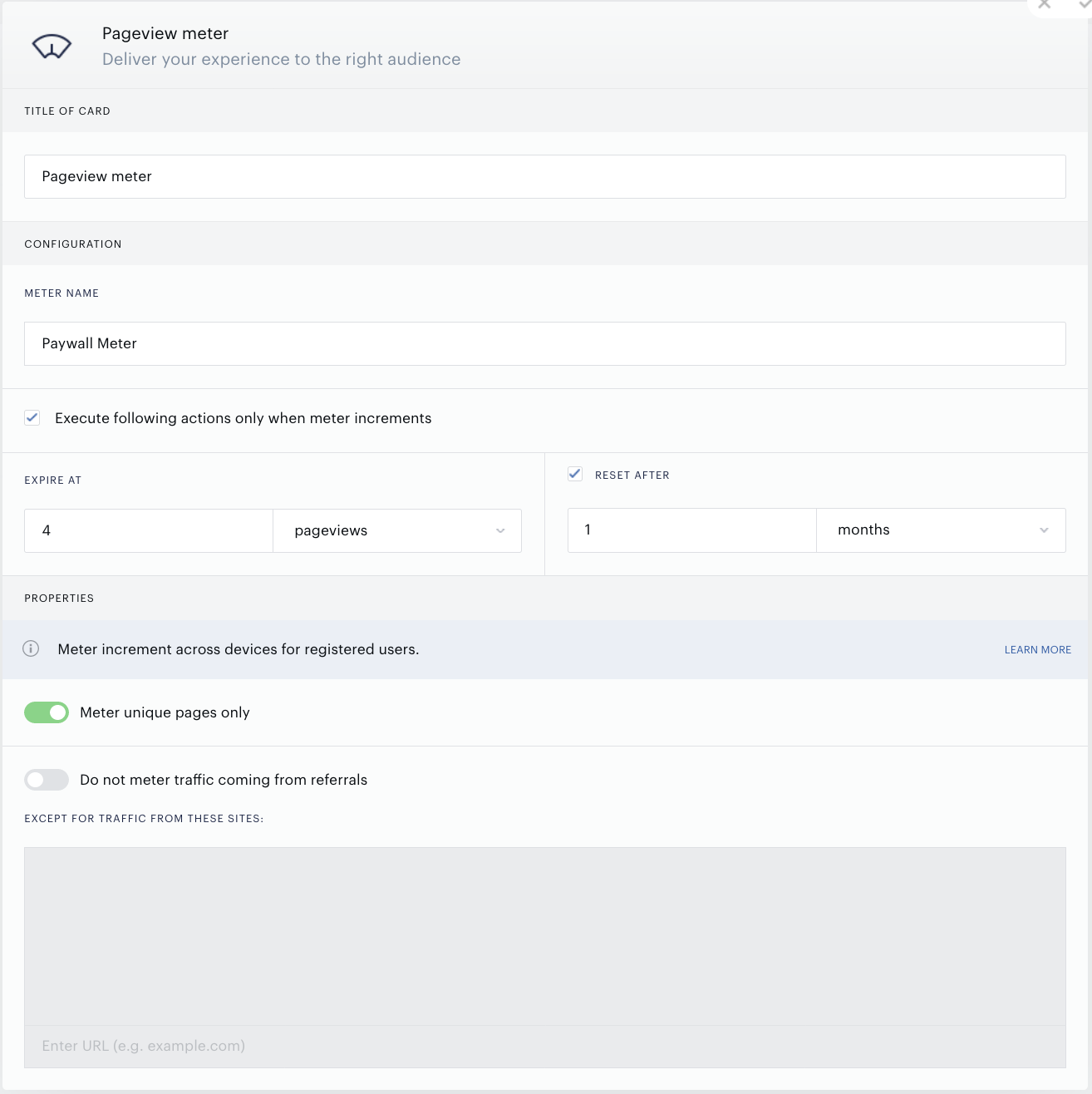
The Pageview meter triggers after a user has accumulated a defined number of page views, sessions, or visit days over a time interval. You can set the meter to trigger upon expiry, at specific meter unit values, or at select intervals. In this example, we’ve chosen to trigger on pageviews. So for a user that is targeted by this experience, once they open the fifth unique page, the meter will automatically expire or trigger. When you add the Pageview meter card, Composer automatically adds a Meter Value card. This card offers additional settings for your meter.
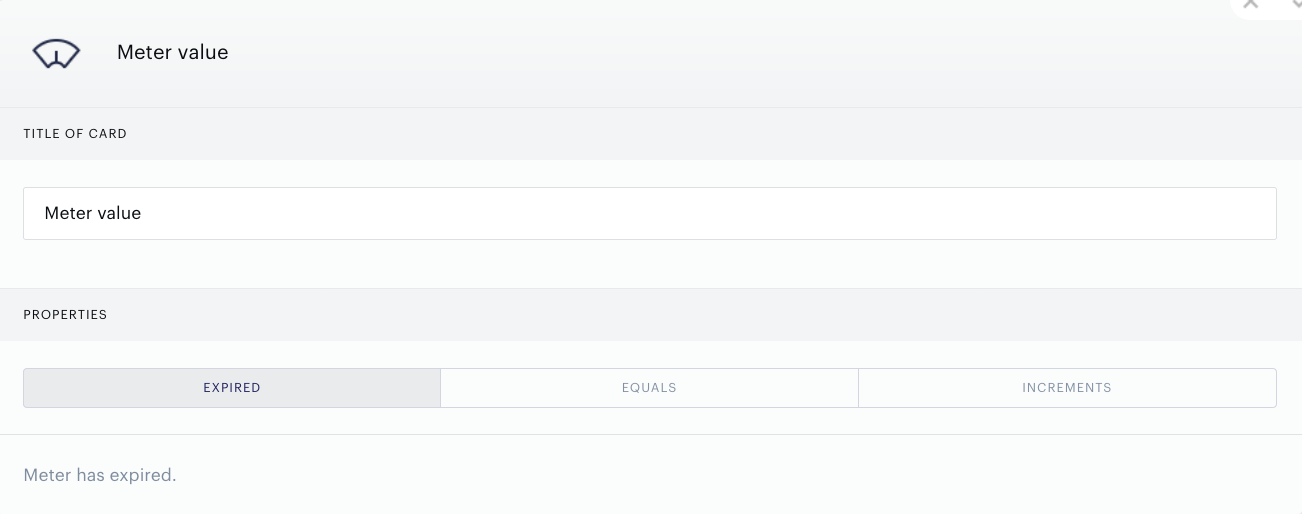
This card offers three different properties that modify your page view meter:
Expired: If you select Expired, the following Composer action will execute only when the given user has reached the limit you specified in the meter card.
Equals: With Equals selected, you can specify a meter value for which you would like the experience to execute. For example, you could run the experience on the 4th session, even if the meter has not expired. You can separate values with a comma if you would like the experience to execute on multiple meter values. For example, inputting 3, 5 will cause the experience to execute only on the third and fifth pageviews.
Increments: Here, you can specify that you would like the experience to execute at a given frequency of unit values. You must indicate the meter value for which the experience should first execute and the number of intermediate unit values that should elapse before the experience executes again. For instance, the configurations below will cause the experience to execute on the 5th, 8th, 11th, 14th, etc. pageviews.
The Offer Card
In this model, the offer card is how Piano will gate your content. By adding the Show Offer card, and using a registration template, a user will be prompted to register after the meter expires, instead of showing another page
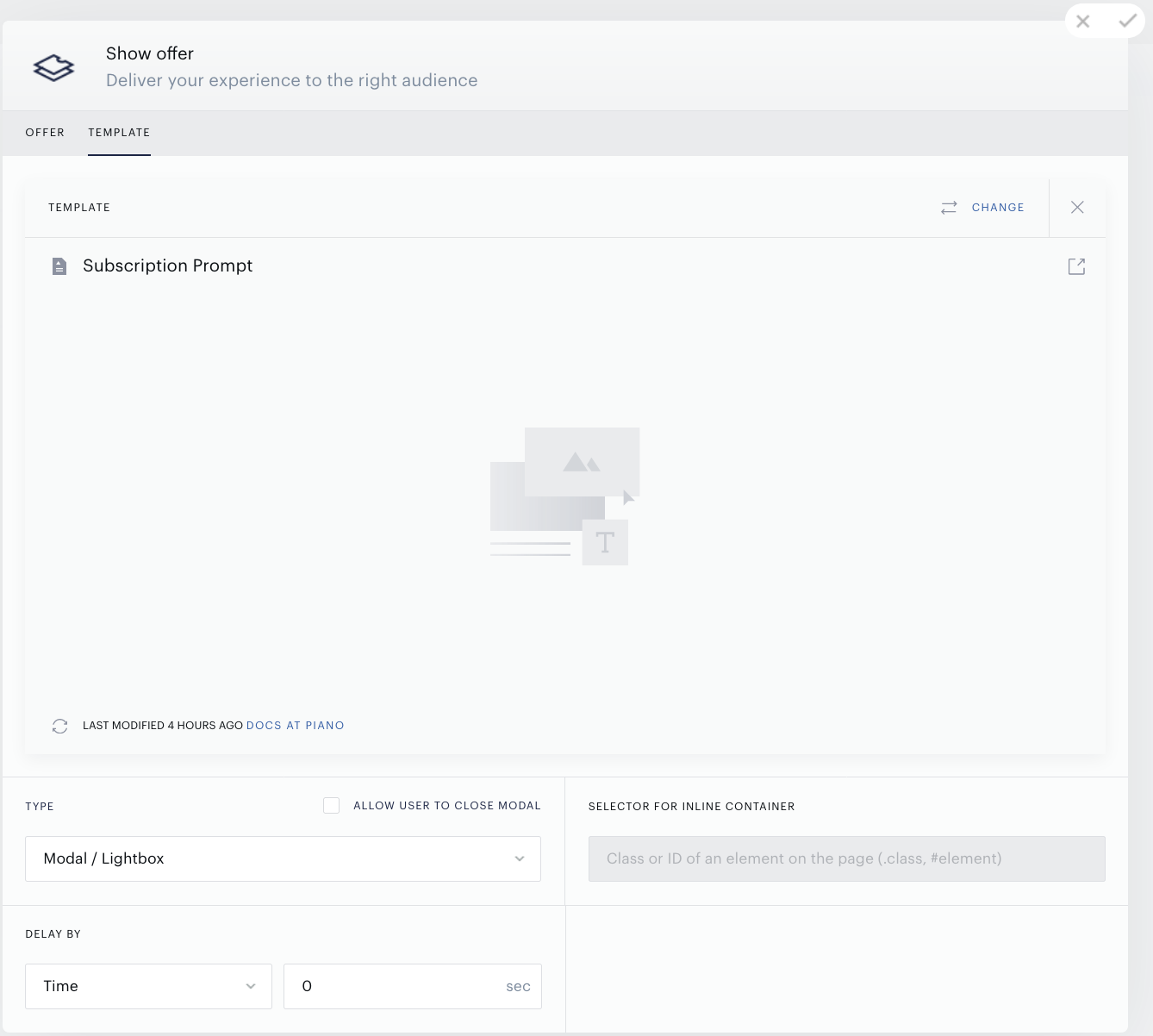
The paywall experience will look like this when you are done:

Dynamic Paywall
The dynamic paywall, leveraging Piano's Likelihood to Subscribe (LtS) algorithm, offers a flexible approach to monetizing content based on users' likelihood to subscribe. LtS assesses non-subscribers on a scale of 0 to 100, analyzing various metrics to predict their propensity to subscribe.
The dynamic paywall model offers several common use cases:
-
Combining propensity with a metered paywall enables adjusting the meter for high propensity visitors or immediately locking content for visitors above a particular propensity score, thus enhancing the paywall's effectiveness while maintaining conversion rates.
-
Integrating LtS with a freemium paywall involves offering some free content, locking content based on propensity score, or locking visitors above a certain threshold, providing flexibility and customization in content access.
-
Utilizing LtS alone allows for determining all paywall hits based on a propensity score threshold, particularly beneficial for maintaining pageviews and ad revenue while optimizing subscription conversions.
-
Allowing low LtS visitors to browse more freely encourages engagement and potential conversion into high LtS subscribers, thereby maximizing revenue potential.
-
Displaying registration offers for low propensity segments nurtures user engagement and subscription through effective email marketing campaigns, leveraging content access as an incentive for subscription.
-
Targeting trial offers and promotions by LtS score ensures optimal conversion rates by tailoring offers to visitors' likelihood to subscribe, enhancing the effectiveness of promotional campaigns.