
LIGHTWEIGHT TEMPLATES
You open the Template Manager by clicking Manage in the main menu and then clicking on Templates.
The Template Manager now consists of two nearly identical parts, one covering the Classic templates and the other covering the Lightweight templates. Use the dropdown menu in the top left corner of the Template Manager to switch between these two parts. Click on the respective template type to get to the one you need.
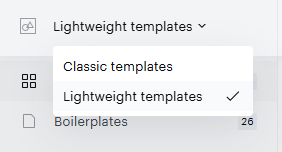
The Lightweight template part of the Template Manager has the same functionality as the Classic template part, which is described in the Templates 2.0 section of the documentation.
There is a set of boilerplates ready for you to include in your library and work with. Templates have their own IDs, similarly to Classic templates.
Lightweight templates support all functionality within the Template Manager, such as:
-
Managing templates
-
Versioning
-
Variants
-
Content fields
-
Archiving
-
Duplicating templates
-
Importing templates between applications
-
Making templates global
-
Tile and list view
-
Listing templates by various criteria
Additional functionality will be released at later stages after the initial release.