
Overview
Bulk upload feature is available in the Segment builder UI whether you work with User segments or Contextual segments.
While you are working in the basic mode, this feature allows you to upload filter items from a simple CSV file instead of selecting or creating them one by one manually.
You can find the bulk upload at the end of each criterion:
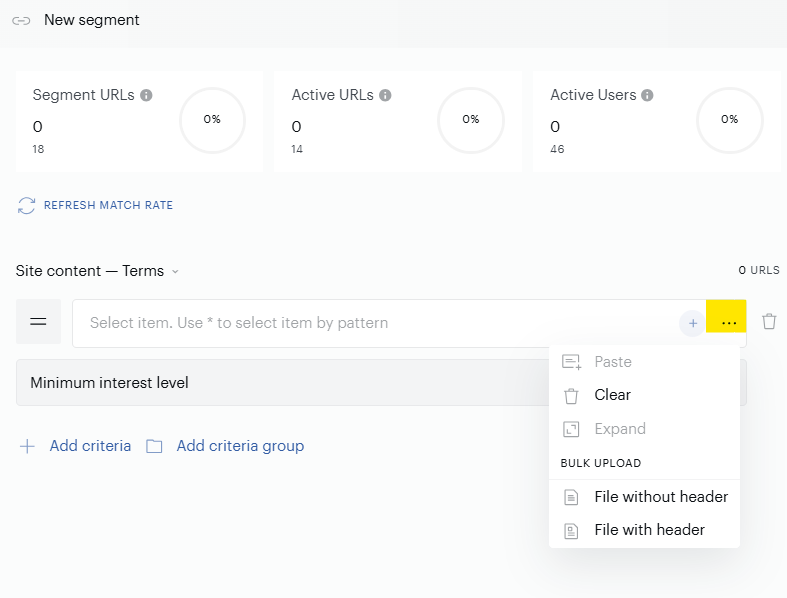
Filters
Now the Bulk upload feature is supported for the following filters available in the Criteria tab of the Segment builder:
-
Site Content:
-
Concept
-
Keyword
-
Location
-
Person
-
Terms
-
-
Location:
-
City
-
Country
-
Metro Code
-
Postal Codes
-
Province
-
Region
-
File format and file structure
Only simple CSV files can be used for data uploading. Below, you can see more requirements related to the CSV files:
-
Only CSV file format is supported.
-
Zipped files are not supported.
-
The file should include only the column with meaningful data. It is recommended not to use special symbols that can be recognised as delimiters.
-
Column name. Both options are supported whether the column has the name or not. If you are going to select a file for uploading, select one of the options:
-
File without header in case there is not a column name in the file.
-
File with header in case there is a column name in the file.
-
-
The maximum number of rows in the CSV file is 1,000. It is recommended not to use files with a huge amount of data, it can lead to UI crashing. If the CSV file includes more than 1000 rows, you will see a non-blocking notification. You can proceed with working.
-
It is possible to select only one file at a time.