With the Neustar integration, you are able to enrich Piano user profiles with data from Neustar. You can also use such data for creating segments.
Supported taxonomies
Neustar provides Piano Audience with data for the following taxonomies.
|
Parameter |
Link |
|
B2B |
|
|
AgeGender |
|
|
AgeGenderCombination |
|
|
Political |
Once a day, this integration enriches Piano user profiles with data from Neustar.
Prerequisites
-
Piano Insight setup completed (the siteGroupId(s) are needed for this integration)
-
User must have permissions for your siteGroup(s)
-
User must have read permissions for Neustar's siteGroup (in order to create segments using Neustar data)
Setting the CookieSync tag
Choose one of the following variants of the CookieSync tag to set it on your pages.
-
Synchronous tag
cX.sync('neu')
-
Asynchronous tag
<!-- Piano script begins -->
    <script type="text/javascript">
        // Async load of cx.js
        (function(d,s,e,t){e=d.createElement(s);e.type='text/java'+s;e.async='async';
        e.src='http'+('https:'===location.protocol?'s://s':'://')+'cdn.cxense.com/cx.js';
        t=d.getElementsByTagName(s)[0];t.parentNode.insertBefore(e,t);})(document,'script');

        var cX = cX || {}; cX.callQueue = cX.callQueue || [];
        cX.callQueue.push(['sync', 'neu']);
    </script>
    <!-- Piano script ends -->
Wait for the first integration.
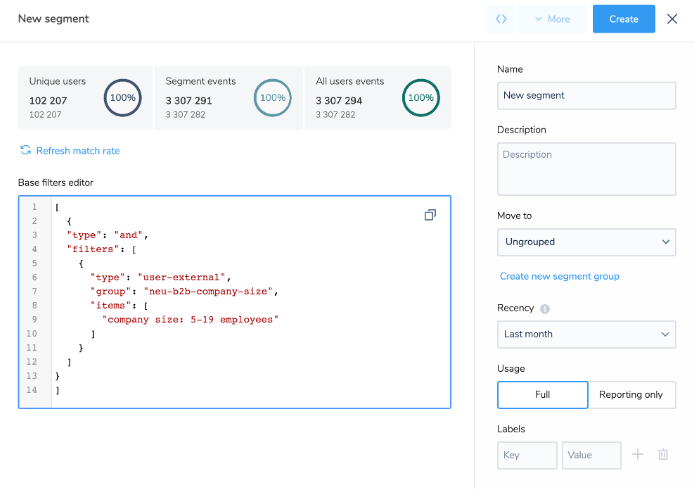
As soon as you are done with the previous requirements, you can use both (the Wizard and Advanced) modes for creating segments.
An example of the Advanced mode.