
In order to search for users that have purchased or redeemed a Gift, you can go to Users → Mine Users and select the filter Converted term type and pick the value Gift:
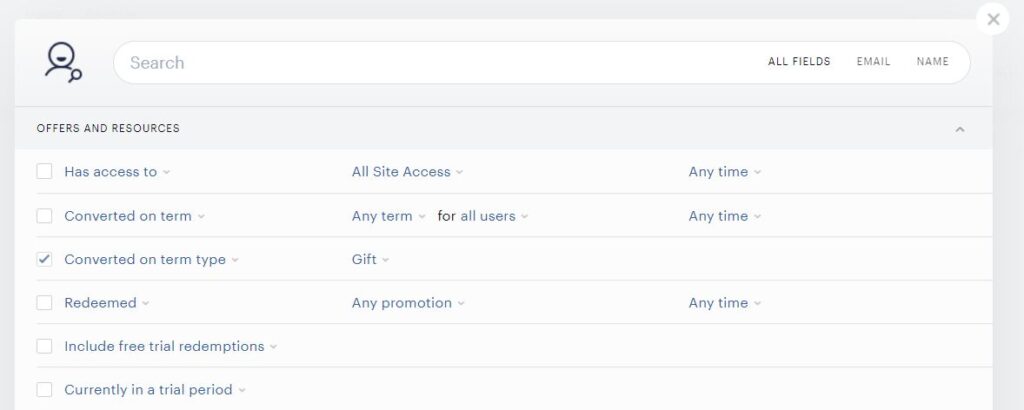
This way you can obtain a downloadable report of all subscribers who either purchased a Gift or redeemed a Gift. To differentiate between these 2 categories, you can filter based on the Money spent in column F. Users who have not spent any money will be considered gift redeemers, and users who have any positive value here are gift purchasers.
You can also go to the user's account and under the Voucher tab you can see the gift subscription with all the details (including the email address of the gift recipient):

Clicking on the available gift gives you the possibility to manage it. You can either revoke, revoke and refund or resend it to the gift recipient:
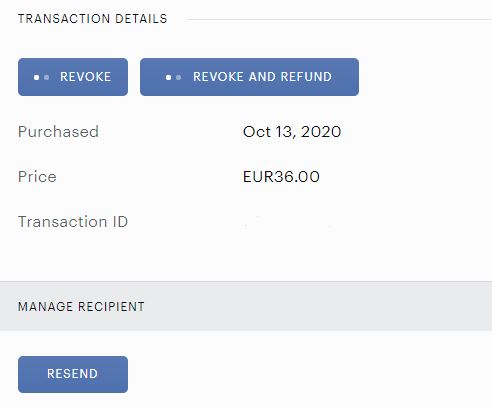
The list of users who redeemed a gift can be filtered out from the Subscription Details Report (column "Term type" with the value "Gift"). More information about this report is available here.
This filter surfaces only Gift terms purchased as one-time access vouchers. Renewable gift purchases appear as regular Payment or Dynamic subscriptions in standard subscription reports.
The Transaction report, on the other hand, should give you the list of customers who purchased the Gift term (columns G and I). More information about this report is available here.
Another way to check all gift-related interactions is via the Webhooks listed here.