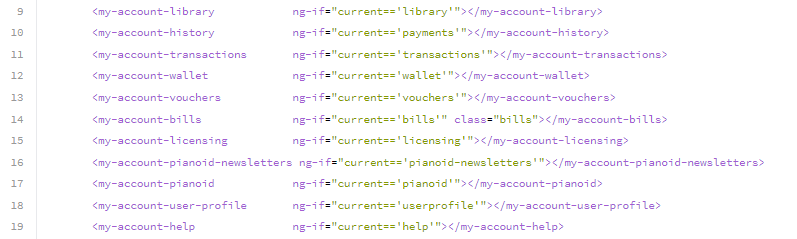
To be able to create a direct link to any of the My Account tabs, in the My Account Layout template you would need to add the below snippet to the end of the template's code:
HTML
<script type="text/javascript">
var url = decodeURIComponent(decodeURIComponent(document.location.href));
var params = url.match(new RegExp('tab' + '=([^&=]+)'));
var accountTab = params ? params[1] : false;
setTimeout(function() {
if (accountTab) {
var scope = angular.element("#ng-app").scope();
scope.current = accountTab;
scope.$apply();
}
}, 100);
</script>
Using the above script, the direct link to the My Account tab would include a ?tab=<tab-name> parameter in the URL, and can for example look like this:
https://www.website.com/my-account/?tab=pianoid (direct link to the User profile tab)
https://www.website.com/my-account/?tab=library (direct link to the Library tab)
Where the tab names (e.g. pianoid or library) can be taken from the My Account layout template under current=='<tab name>' for the respective My Account tab, you'd like to link to: