
When 3D Secure is enabled, an upgrade may need the user to authenticate with their bank before it takes effect. This page covers what that looks like on each upgrade path: performed by a representative in the Piano dashboard, by the user in My Account, in the on-site upgrade flow, and through the API.
One rule governs all of them. If the user will be charged within 90 days, they authenticate immediately on a 3DS screen at the point of upgrade. If the charge is more than 90 days away, the upgrade completes without authentication, and the reader receives the 3DS 2.0 Authentication of a term change email 90 days before the billing date, with a magic link that takes them through 3DS then.
Upgrades via Piano dashboard
Immediate upgrades
A customer service representative with access to the Piano dashboard is able to perform an upgrade on the user's behalf as described here.
If you're using Braintree as the payment provider and have 3DS 2.0 enabled, you will see an additional modal window pop-up after clicking Apply.
Important: Please make sure, that your Braintree account is enrolled in 3D-Secure transaction processing. More information about this is available under the following link.
A code will be sent to the user either via text message or their online banking app, and the representative will need to request this code from the customer and enter it into the respective field in the window shown. Only afterward the transactions will be successfully authorized and the user upgraded onto the new term.
A mock Sandbox design of this screen can be found below:
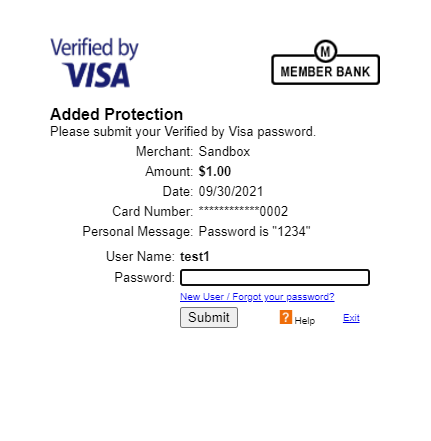
Please note, that this screen's design may change depending on the user's credit card institute or bank, as each provider is responsible for working with banks to present the appropriate SCA screens, and to determine how they should look.
Pending upgrades
A customer service representative with access to the Piano dashboard is able to perform an upgrade on the user's behalf as described here.
If you're using Braintree as the payment provider and have 3DS 2.0 enabled, the scenario (after your clicking Apply and defining Address collection and/or Shared access (if enabled)) depends on how many days are left until the "date of sale” for the upgrade option.
Not more than 90 days to date of sale
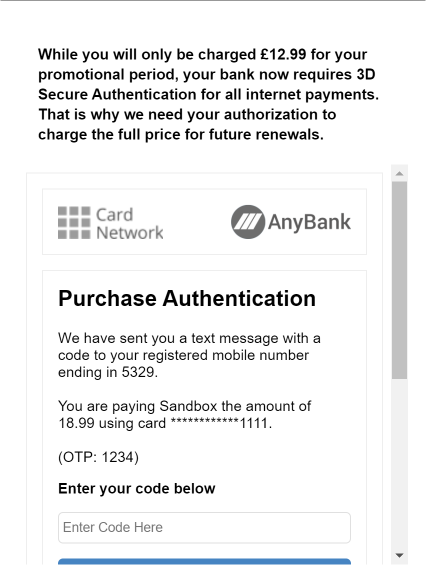
If the bank confirms that 3DS validation is required, a code will be sent to the user either via text message or their online banking app, and the representative will need to request this code from the customer and enter it into the respective field in the window shown. Only afterward the transactions will be successfully authorized and the user upgraded onto the new term.
A mock design of this screen can be found below.
Please note that the text differs from that for an immediate upgrade.
More than 90 days to date of sale
In this case, the upgrade flow in the Piano dashboard is complete without immediate 3DS verification. However, on the day "-90" the user will receive an email with the upgrade details and a magic link to the Login page (if the user is not being logged in) → Upgrade confirmation page → 3DS authentication page where they can enter a code and complete the procedure.
The link itself leads to a verification URL (configured as described here) that includes the subscription ID in the upgrade_sub parameter. For this URL, a dedicated Composer experience must be configured, available to all users, and set to trigger a Show Offer action containing an upgrade-related offer. Once the user lands on the page, checkout should automatically initiate and present the 3DS authentication page. Here, the user enters the authentication code provided by their bank to complete the verification process. After successful 3DS authentication, the upgrade is confirmed and will take effect on its scheduled date.
If the upgrade option is not available by that day, the user will see a relevant message.
Upgrades via My Account
Immediate upgrades
When a user clicks on the Upgrade button in My Account and selects an upgrade option, that will be billed immediately, a 3DS authentication screen will be shown to the user to confirm their payment method for any future payments.
Pending upgrades
In case the upgrade settings are set to Bill timing: End of the current cycle, the user will be asked to confirm the transaction for the pending upgrade in advance. If there are 90 days or less between the current date of upgrade and the date when they will be charged for the selected upgrade option, the end user has to confirm the transaction through the 3DS authentication screen.
If there are more than 90 days, a 3DS authentication is needed from the user via a link received in the 3DS 2.0 Authentication of a term change email that can be configured and enabled via Email Manager. This notification will be sent to the end user 90 days before the billing date of the upgrade.
You are able to customize the template shown to the user after they click on the magic link via the system template Upgrade authentication components.
On-Site upgrades
Immediate upgrades
After clicking Complete in the on-site upgrade flow (step 6 described here) with an upgrade option with the setting Bill timing: Immediately, a 3DS authentication screen will be shown to the user to confirm their payment method for any future payments.
Pending upgrades
In case the upgrade settings are set to Bill timing: End of the current cycle, the user will be asked to confirm the transaction for the pending upgrade in advance. If there are 90 days or less between the current date of upgrade and the date when they will be charged for the selected upgrade option, the end user has to confirm the transaction through the 3DS authentication screen.
If there are more than 90 days, a 3DS authentication is needed from the user via a link received in the 3DS 2.0 Authentication of a term change email that can be configured and enabled via Email Manager. This notification will be sent to the end user 90 days before the billing date of the upgrade.
You are able to customize the template shown to the user after they click on the magic link via the system template Upgrade authentication components.
Upgrades via API
You are also able to utilize our API to upgrade users' subscriptions as described here.
Since there is no UI when executing an API call, upgrades, that require a 3DS authentication, will fail when initiated via API.
We recommend using any of the abovementioned alternate upgrade paths, as our Upgrade API doesn't support 3DS.