
Invoice Payments
The invoice payments integration developed by Piano serves as a platform for enabling invoice billing of customers.
The scheme of this integration can be displayed as follows:
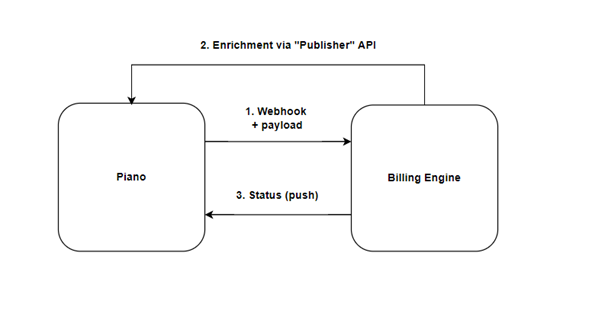
Piano handles the Webhook sending and receiving of IPN messages, while the publisher needs to configure their Billing engine to receive (and decrypt) webhooks from Piano and send IPN messages back to Piano. If needed, a Middleware can be used to facilitate the process.
Piano expects 2 possible IPNs:
-
invoice is paid (positive):
{
"status": "close-paid",
"user_payment_id": "..."
}
Upon receipt of this notification, Piano marks the payment as completed.
-
invoice is unpaid (negative):
{
"status": "close-unpaid",
"user_payment_id": "..."
}
Upon receipt of this notification, Piano revokes access, cancels the subscription, and marks the payment as canceled.
To transfer the notification JSON we use https://jwt.io/. That means that the client needs to encode the notification JSON using BASE64 and append it with a sign. We use the IPN secret key from the Piano dashboard’s payment provider configuration to check the sign.
The default JWT uses HMAC-SHA256 for signing but the algorithm might be changed. Please reach out to Piano Support for more information about the available algorithms.
Merchant Requirements
This payment provider is only available for Merchants that have a billing engine to issue invoices to their customers.
Your Piano templates will need to be updated as per the below.
Please check that the Payment Components template contains the following code:
<script type="text/ng-template" id="/frontend/providers/components/volga/checkout/component.shtml">
<div class="volga-wrapper new-card-form">
<div class="row">
<div desktop class="cc_stored_cards" ng-show="!data.payWithNew && data.initiated">
<div class="add-credit-card-wrapper">
<h4>
<t>Your invoices</t>
</h4>
</div>
<table class="payment-method-card" ng-show="data.stored.length > 0">
<tr class="payment-method-card-row" ng-repeat="method in data.stored"
ng-class="{'selected' : $parent.data.selectedUpiId == method.id}">
<td class="volga-table-cell volga-table-cell--radio">
<input type="radio" id="radio-{{method.id}}" name="stored_method" value="{{method.id}}"
ng-model="$parent.data.selectedUpiId"/>
</td>
<td class="volga-table-cell">
<label for="radio-{{method.id}}" class="volga-table-cell-label">
<t context="checkout.platform">{{method.description}}</t>
</label>
</td>
</tr>
</table>
</div>
<div mobile class="cc_stored_cards" ng-show="data.initiated">
<table class="payment-method-card" ng-show="data.stored.length > 0">
<tr class="payment-method-card-row" ng-repeat="method in data.stored"
ng-class="{'selected' : $parent.data.selectedUpiId == method.id && $parent.data.payWithNew != true}">
<td class="volga-table-cell volga-table-cell--radio">
<input type="radio" id="m-radio-{{method.id}}" name="stored_method" value="{{method.id}}"
ng-model="$parent.data.selectedUpiId"/>
</td>
<td class="volga-table-cell">
<label for="m-radio-{{method.id}}" class="volga-table-cell-label">
<t context="checkout.platform">{{method.description}}</t>
</label>
</td>
</tr>
</table>
</div>
<div consents-list></div>
<div class="footer-modal">
<div class="auto-renew-purchase" ng-show="isSelectedTermAutoRenewChoiceAvailable()">
<input class="auto-renew-purchase-checkbox" type="checkbox" ng-model="input.autoRenew"
id="auto_renew"/>
<label class="auto-renew-purchase-label" for="auto_renew">
<t>Automatically renew my subscription when the time comes.</t>
</label>
</div>
<div ng-show="isConfirmStepEnabled()" class="complete-purchase-button" goto-confirmation-button
title="{{'Complete Purchase' | t}}"></div>
<div ng-show="!isConfirmStepEnabled()" class="complete-purchase-button" complete-purchase-button
title="{{'Complete Purchase' | t}}"></div>
</div>
</div>
</div>
Please check that the Checkout Components template contains the following code:
<script type="text/ng-template" id="/widget/checkout/component/partials/volga-receipt-component.html">
  <h1 class="you-already-have-access">
    <t>Thank you for subscribing!<br/>You now have access to {{selectedTerm.resource.name}}.</t><br/><br/>
    <t>The invoice will be sent to <strong>{{input.receipt.invoiceEmail}}</strong></t>
  </h1><br/>
  <t>You will have to manually pay for that invoice before next renewal date. Keep in mind that processing the payment usually takes a
    couple of days. Consider paying few days ahead in order to not interrupt your access.
  </t>
</script>
Please check that the Receipt template contains the following code:
</div>
            <div ng-switch-when="Volga">
              <div volga-receipt></div>
            </div>
Please check that the My Account Wallet Components template contains the following code:
<script type="text/ng-template" id="/frontend/providers/components/volga/common/baseTemplate.shtml">
<div class="cc-fields-layout">
  <div class="cc-fields-layout__flex-row">
    <div class="cc-fields-layout__field cc-fields-layout__email">
      <cc-email-component ng-model="credit_card.email.value"
                          on-change="credit_card.email.onChangeCallback"
                          ng-disabled="credit_card.email.disabled"
                          ng-required="credit_card.email.required"
                          ng-readonly="credit_card.email.readonly"
                          maxlength="credit_card.email.maxlength"
                          valid="credit_card.email.valid"
                          name="'email'">
      </cc-email-component>
    </div>
  </div>
</div>
</script>
Limitations
Requires a billing engine that can issue invoices and receive/send requests.
If the invoice is not paid within the subscription period (i.e. until the next renewal date), Piano cancels the subscription and revokes the access, and cancels the payment on Piano’s end.
Supported Countries
For this payment provider, Piano supports the following countries:
|
Supported Countries |
||
|---|---|---|
|
Any |
Please reach out to your Piano Account representative in case a country supported by this payment provider is not listed in the table above.
Supported Currency
For this payment provider, Piano supports the following currencies:
|
Supported Currencies |
||
|---|---|---|
|
EUR |
USD |
CHF |
Please reach out to your Piano Account representative in case you would like to use other currencies.
Supported Payment Methods
Piano supports the following payment methods for this payment provider:
|
Payment method name |
Are renewals supported? |
||||||||||||
|---|---|---|---|---|---|---|---|---|---|---|---|---|---|
|
Invoice |
Yes |
Supported Features and Functionality
|
Feature/Functionality |
Supported? |
|
Refunds |
Full / Partial |
|
Apply Terms Wizard |
Yes |
|
My Account - Add payment method |
No |
|
My Account - Edit payment method |
No |
|
My Account - Delete payment method |
Yes |
|
Publisher dashboard - Add payment method |
No |
|
Publisher dashboard - Edit payment method |
No |
|
Publisher dashboard - Delete payment method |
Yes |
|
Tax Providers and Types |
TaxJar, Avalara, Custom VAT logic |
|
Transaction descriptors |
None |
|
Frictionless |
No |
|
3DS / SCA |
No |
|
Fraud prevention |
No |
|
Payment token import support |
Yes* |
*For more information about the payment token import please visit this link.
How to integrate Invoice Payments with Piano
You can input your Billing platform's account information into the Piano dashboard by clicking Edit Business→Payment Provider→Invoice payments (Add New).
To integrate Invoice payments with Piano, have the following information ready to enter into the form fields and then click Save:
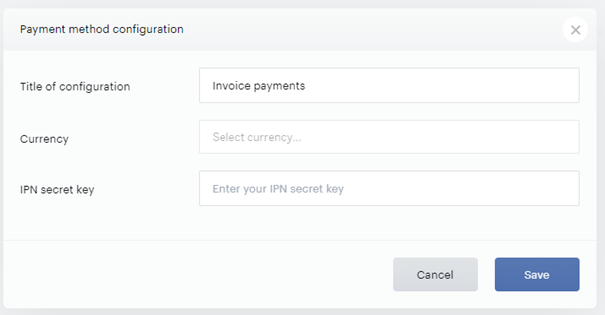
-
Title: Pick a title for your configuration
-
Currency: We support CHF, USD, and EUR.
-
IPN secret key: Configure a valid IPN secret key that Piano will be using to verify IPN (Instant payment notification) messages.
After all the information is entered, click Save.
Once this is done, please proceed with these steps:
-
Proceed to the Manage → Webhooks section of the Piano dashboard and configure webhooks (if not done previously). Please review our documentation about Webhooks
here
.
-
Setup the webhook URL and select the webhooks that Piano will be sending to the Invoice provider.
For a proper integration you will need to select at least the following webhooks:
-
Access granted webhook with New purchase event type
-
Access modified webhook with Subscription was automatically renewed event type
-
Access revoked webhook with Subscription expired and Subscription was cancelled by user event types
Once you start receiving the webhooks events on your end, Piano is expecting to receive IPN message responses on the following URL for applications on the Production US dashboard:
https://api.piano.io/ipn/volga?aid=*your_aid*
EU dashboard:
https://api-eu.piano.io/ipn/volga?aid=*your_aid*
AP dashboard:
https://api-ap.piano.io/ipn/volga?aid=*your_aid*
AU dashboard:
https://api-au.piano.io/ipn/volga?aid=*your_aid*
If needed, the billing country code and tax rate are accessible in the response of the /publisher/conversion/get API endpoint.