

Piano supports PayU Latam for credit card payments, with renewals. Before you start, you need the account ID, merchant ID, API login, and API key from your PayU Latam account. Argentina, Brazil, Chile, Colombia, and Peru each have their own page with country-specific detail.
Merchant Requirements
PayU Latam requires your business to be located in one of the countries of Latin America.
Supported Countries
Supported Currency
Piano supports the following PayU Latam supported currencies:
|
Supported Currencies |
|||||
|---|---|---|---|---|---|
|
USD |
COP |
MXN |
PEN |
BRL |
CLP |
Supported Payment Methods
Piano supports the following payment methods for this payment provider:
|
Payment method name |
Are renewals supported? |
||||||||||||
|---|---|---|---|---|---|---|---|---|---|---|---|---|---|
|
Credit card (Mastercard, Visa, American Express, Discover, JCB, Diner's Club) |
Yes |
Supported Features and Functionality
|
Feature/Functionality |
Supported? |
|---|---|
|
Refunds |
Full / Partial |
|
Apply Terms Wizard |
No |
|
My Account - Add payment method |
Yes |
|
My Account - Edit payment method |
No |
|
My Account - Delete payment method |
Yes |
|
Publisher dashboard - Add payment method |
No |
|
Publisher dashboard - Edit payment method |
No |
|
Publisher dashboard - Delete payment method |
Yes |
|
Tax Providers and Types |
No tax support |
|
Transaction descriptors |
None |
|
Frictionless |
No |
|
3DS / SCA |
No |
|
Fraud prevention |
No |
|
Payment token import support |
Yes |
How to integrate PayU Latam with Piano
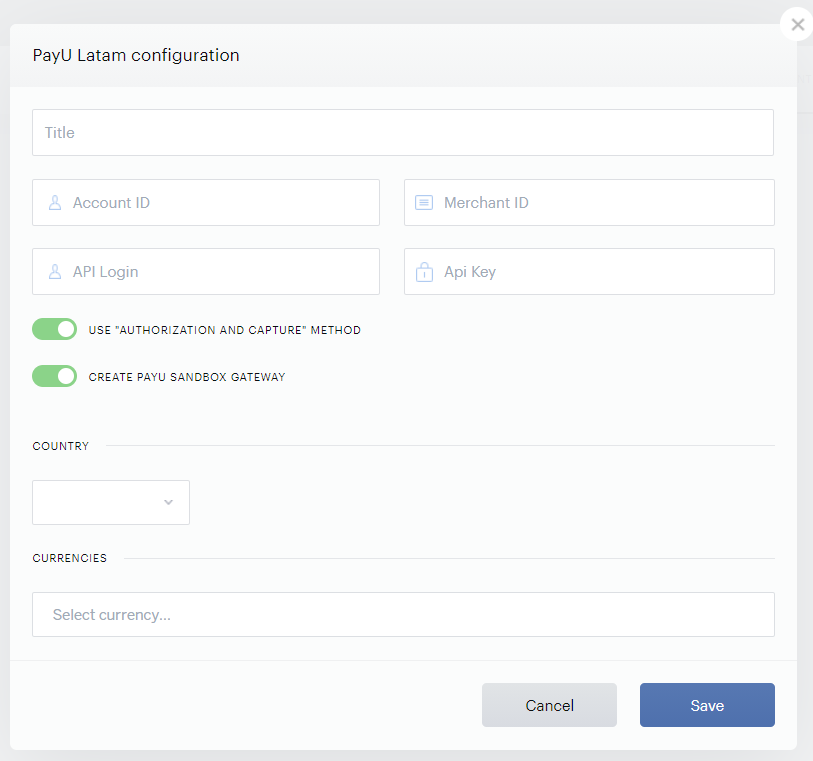
Our PayU Latam integration can be configured under Edit Business → Payment Provider → PayU Latam (Add New). Enter your payment provider credentials in the available fields and pick a title for your configuration.
-
Title: The name of your configuration. This name will not be exposed to your users.
-
Account ID: The Account ID from your PayU Latam account.
-
Merchant ID: The Merchant ID from your PayU Latam account.
-
API Login: The API Login from your PayU Latam account.
-
API Key: The API key from your PayU Latam account.
-
Use "Authorization and Capture" Method: This setting is enabled by default. Please check if your PayU Latam account supports this method.
-
Create PayU Sandbox Gateway: Only available in Sandbox. Enable this option in case you'd like to create a PayU Sandbox gateway.
-
Currencies: Enter all the Country* and Currency options you would like to be available to customers and click Save.
*For more information and an introduction to a PayU representative, please reach out to your Piano Account Manager.
If you need to retrieve additional transaction details that are passed to PayU during checkout, you can do so using the PaymentsOS API. For more details, see this FAQ.