Datatrans is a Swiss payment service provider available to merchants in Austria, Germany, and Switzerland. This page covers the payment methods, currencies, and features Piano supports with Datatrans, the template changes Datatrans requires, and how to connect your Datatrans account.
Before you start, you need a Datatrans account and the Merchant ID, password, and signature from your Datatrans dashboard. If you accept credit card or PostFinance payments, you also need to enable HMAC signing to meet the Datatrans API security requirements.
Merchant Requirements
Datatrans is available for merchants in the DACH region.
More information about the required transaction volume and pricing is available under the following link.
Limitations
Following the announcement from Datatrans about security and API changes, we’ve prepared the following instructions for your compliance. There are a few changes required in your Datatrans and Piano dashboards. For more details please see this guide.
This only impacts your Credit card and Postfinance methods - as these are using XML API and the security change requires you to enable HMAC signage. If you need more time to enable HMAC, you can reach out to your Datatrans rep to whitelist your app.
The Twint payment method requires a Twint voucher, which must be linked to a Swiss bank account and therefore supports only payments in CHF.
You cannot remove the postal code field from checkout for credit card payments as it's required by the payment provider itself.
Datatrans currently does not support Apple Pay in third-party browsers. To complete a purchase using Apple Pay, the user must be on a device with Apple Pay properly configured and must use Safari. When testing in other browsers, the Apple Pay button may not appear. For more details, see the Datatrans documentation.
Template Changes
Datatrans 3DS Billing Address Fields
Three new optional fields can be added to the Datatrans Credit Card checkout form to improve 3DS authentication data quality and increase the likelihood of frictionless authentication for your subscribers
New toggles in Datatrans Credit Card settings (Edit Business → Payment providers → Datatrans Credit Card):
-
Billing address (street) →
billAddrLine1 -
Billing city →
billAddrCity -
Billing country →
billAddrCountry
All default to disabled. ZIP code is a separate existing field and is not part of this update.
These fields apply to Checkout, My Account Wallet, and ATW / Subscribe User (initial transactions only; recurring renewals are not affected).
Important — template update required first
If you are using customized Payment Components templates, you must update your templates before enabling the toggles. Enabling the toggles without updating the template will cause validation errors that block purchases.
Step 1 — Update templates (required for customized templates)
-
Checkout: Add the below code for the billing address field rows inside
<table class="table-form-inline">after the existing card fields in the Payment Components template.HTML<tr ng-show="cc.collectBillingAddress && !input.billingAddressEnabled"> <td colspan="4" class="field-card-billing-address"> <div class="field-wrapper"> <label class="icon road"></label> <div class="input"> <input class="flat" type="text" name="billAddrLine1" required placeholder="{{'Billing address' | tc:'checkout.platform'}}" ng-model="credit_card.billAddrLine1"/> </div> </div> <span class="error-message" ng-if="ccForm.billAddrLine1.$dirty && ccForm.billAddrLine1.$invalid"> <t>Billing address is required.</t> </span> </td> </tr> <tr ng-show="cc.collectBillingCity && !input.billingAddressEnabled"> <td colspan="4" class="field-card-billing-city"> <div class="field-wrapper"> <label class="icon city"></label> <div class="input"> <input class="flat" type="text" name="billAddrCity" required placeholder="{{'Billing city' | tc:'checkout.platform'}}" ng-model="credit_card.billAddrCity"/> </div> </div> <span class="error-message" ng-if="ccForm.billAddrCity.$dirty && ccForm.billAddrCity.$invalid"> <t>Billing city is required.</t> </span> </td> </tr> <tr ng-if="cc.showBillingCountryDropdown"> <td colspan="4" class="field-card-billing-country"> <div class="field-wrapper"> <label class="icon country"></label> <div class="input"> <div class="tp-dropdown__select billing-country-drop-down" ng-class="{'placeholder-shown': !credit_card.billAddrCountry}" tp-country-selector selector-options="datatransBillingCountrySelectorOptions" default-country="datatransDefaultBillingCountry" click-on-select="selectDatatransBillingCountry" side="'bottom'" country-type="'datatransBillingCountry'" selector-label="{{'Billing country' | tc:'checkout.platform'}}" dropdown-styles="{width: 230, zIndex: 1004, margin: 0}" tabindex="0" role="combobox" aria-label="{{'Billing country' | tc:'checkout.platform'}}"> </div> </div> </div> </td> </tr> -
My Account Wallet: Update the My Account Components template as follows; locate the Datatrans card table and find the Cardholder name row (the
<tr>whose input hasaria-label="Cardholder name"). Immediately after, insert the following:HTML<tr class="table-row" ng-if="datatransCollectBillingAddress && !fullBillingAddressEnabled"> <td class="table-cell" colspan="4"> <label class="icon billing-address" aria-hidden="true"></label> <input type="text" ng-model="cardset.billAddrLine1" placeholder="{{'Billing address' | tc:'checkout.platform'}}" name="billAddrLine1" ng-required="datatransCollectBillingAddress && !fullBillingAddressEnabled" ng-readonly="readonly === true" aria-label="{{'Billing address' | tc:'checkout.platform'}}" /> </td> </tr> <tr class="table-row" ng-if="datatransCollectBillingCity && !fullBillingAddressEnabled"> <td class="table-cell" colspan="4"> <label class="icon city" aria-hidden="true"></label> <input type="text" ng-model="cardset.billAddrCity" placeholder="{{'Billing city' | tc:'checkout.platform'}}" name="billAddrCity" ng-required="datatransCollectBillingCity && !fullBillingAddressEnabled" ng-readonly="readonly === true" aria-label="{{'Billing city' | tc:'checkout.platform'}}" /> </td> </tr> <tr class="table-row" ng-if="datatransCollectBillingCountry && !fullBillingAddressEnabled && !isTaxBillingCountryEnabled"> <td class="table-cell" colspan="4"> <label class="icon country" aria-hidden="true"></label> <div class="tp-dropdown__select billing-country-drop-down datatrans-billing-country" ng-class="{'placeholder-shown': !cardset.billAddrCountry}" tp-country-selector selector-options="datatransBillingCountrySelectorOptions" default-country="datatransDefaultBillingCountry" click-on-select="selectDatatransBillingCountry" side="'bottom'" country-type="'datatransBillingCountry'" selector-label="{{'Billing country' | tc:'checkout.platform'}}" dropdown-styles="{width: 230, zIndex: 1004, margin: 0}" tabindex="0" role="combobox" aria-label="{{'Billing country' | tc:'checkout.platform'}}"> </div> </td> </tr>
Step 2 — Enable toggles in Edit Business → Payment providers → Datatrans Credit Card settings
Country selector note: The billing country field uses Piano's standard country selector component (tp-country-selector). To pre-select a country (e.g. Switzerland or Germany), customize the component in your template. Localization is supported via standard Piano localization strings.
Postal code note: The postal code field is already shown and required by default, in case you previously disabled it in your customized template, re-enabling it alongside these new fields will provide the most complete billing address signal for 3DS.
Cardholder name
Before enabling the collection of the cardholder's name for card payments in the configuration, ensure that your system templates are updated accordingly.
There are numerous ways to update your system template to fetch the latest functionality:
-
Reset to default (easiest, but depending on your level of customization,n you may need to decide if feasible)
-
Use the Compare to default feature in the System template editor, and carry new lines of code over to your version
-
Follow the instructions below to implement the new lines of code in your system template
Go to Manage → Templates → System → Payment Components, and find the component <script type="text/ng-template" id="/widget/checkout/component/partials/datatrans-form-component.html">. Inside this component find <table class="table-form-inline" cellpadding="0" cellspacing="0"> and add after the last</tr>:
<tr ng-show="cc.collectCardholderName">
  <td class="field-card-cardholder-name" colspan="4">
    <div class="field-wrapper">
      <label class="icon cardholder"></label>
      <div class="input">
        <input class="flat" type="text" name="cardCardholderName" required
                maxlength="50"
                alphanumeric
                placeholder="{{'Cardholder name' | tc:'checkout.platform'}}" ng-model="credit_card.cardholderName"/>
      </div>
    </div>
  </td>
</tr>
Full piece of code after changing:
<table class="table-form-inline" cellpadding="0" cellspacing="0">
    <tr>
        <td class="field-card-number">
            <div class="field-wrapper">
                <label class="icon card"></label>
                <div id="datatrans-card-number" class="datatrans-card-number input" placeholder="{{'Credit card' | t}}"></div>
            </div>
        </td>
        <td class="field-card-expiry-month">
            <div class="field-wrapper">
                <label class="icon expiry"></label>
                <div class="input whitespace-nowrap">
                    <input class="flat inline input-date" type="text" name="expire_month" placeholder="{{'MM' | t}}"
                            maxlength="2" ng-model="credit_card.expire_month" required/>
                    <div class="date-slash">/</div>
                    <input class="flat inline input-date" type="text" name="expire_year" placeholder="{{'YY' | t}}"
                            maxlength="2" ng-model="credit_card.expire_year" required/>
                </div>
            </div>
        </td>
        <td class="field-card-cvv">
            <div class="field-wrapper">
                <label class="icon password"></label>
                <div id="datatrans-cvv" class="datatrans-cvv input" placeholder="{{'CVV' | t}}"></div>
            </div>
        </td>
        <td class="field-card-postal-code">
            <div class="field-wrapper">
                <div class="input ml10">
                    <input class="flat" type="text" name="cardZipCode" required
                            placeholder="{{'ZIP / Postal code' | tc:'checkout.platform'}}" ng-model="credit_card.cardZipCode"/>
                </div>
            </div>
        </td>
    </tr>
    <tr ng-show="cc.collectCardholderName">
      <td class="field-card-cardholder-name" colspan="4">
        <div class="field-wrapper">
          <label class="icon cardholder"></label>
          <div class="input">
            <input class="flat" type="text" name="cardCardholderName" required
                    maxlength="50"
                    alphanumeric
                    placeholder="{{'Cardholder name' | tc:'checkout.platform'}}" ng-model="credit_card.cardholderName"/>
          </div>
        </div>
      </td>
    </tr>
</table>
Controlling Alias Creation for Datatrans Payments
By default, Datatrans always creates an alias when a user completes a payment. If you'd prefer that an alias is only created when the user actively chooses to save their payment details, contact Piano Support to adjust this behavior. Once that's been set up, you'll also need to update the Payment Components template — with a separate change for Datatrans PayPal and Datatrans Twint.
Datatrans PayPal
Go to Manage → Templates → Payment Components and find the component <script type="text/ng-template" id="/frontend/providers/components/datatranspaypal/checkout/component.shtml">.
Inside find:
    <div class="manage-payment-method-wrapper" ng-show="state.payWithNew">
      <div ng-if="!isSubscription()">
        <div class="custom-checkbox">
          <input type="checkbox" name="store_in_vault" ng-model="data.store_in_vault"
                 id="remember-my-account-datatrans-paypal"/>
          <label for="remember-my-account-datatrans-paypal">
            <t>Remember my account for future payments</t>
          </label>
        </div>
      </div>
      <div ng-if="isSubscription()">
        <input type="hidden" name="store_in_vault" ng-model="data.store_in_vault"/>
      </div>
      <div class="custom-checkbox" ng-if="data.store_in_vault">
        <input type="checkbox" name="defaultPaymentMethodId" ng-model="data.defaultPaymentMethodId"
               id="default-payment-method-datatrans-paypal"/>
        <label for="default-payment-method-datatrans-paypal">
          <t>Apply this payment method to all active subscriptions</t>
        </label>
      </div>
    </div>
And replace with the following:
    <div class="manage-payment-method-wrapper" ng-show="state.payWithNew">
      <div ng-if="!isSubscription()">
        <div class="custom-checkbox">
          <input type="checkbox" name="store_in_vault" ng-model="data.store_in_vault"
                 ng-disabled="state.storeInVaultLocked"
                 id="remember-my-account-datatrans-paypal"/>
          <label for="remember-my-account-datatrans-paypal">
            <t>Remember my account for future payments</t>
          </label>
        </div>
      </div>
      <div ng-if="isSubscription()">
        <input type="hidden" name="store_in_vault" ng-model="data.store_in_vault"/>
      </div>
      <div class="custom-checkbox" ng-if="data.store_in_vault">
        <input type="checkbox" name="defaultPaymentMethodId" ng-model="data.defaultPaymentMethodId"
               ng-disabled="state.storeInVaultLocked"
               id="default-payment-method-datatrans-paypal"/>
        <label for="default-payment-method-datatrans-paypal">
          <t>Apply this payment method to all active subscriptions</t>
        </label>
      </div>
    </div>
Datatrans Twint
Go to Manage → Templates → Payment Components and find the component <script type="text/ng-template" id="/frontend/providers/components/datatranstwint/checkout/component.shtml">.
Inside find:
<div class="manage-payment-method-wrapper" ng-show="isNewPaymentScreenShown()">
    <div ng-if="!isSubscription()">
        <div class="custom-checkbox">
            <input type="checkbox" name="store_in_vault" ng-model="data.store_in_vault"
                   id="remember-my-card-twint"/>
            <label for="remember-my-card-twint">
                <t>Remember my card for future payments</t>
            </label>
        </div>
    </div>
    <div ng-if="isSubscription()">
      <input type="hidden" name="store_in_vault" ng-model="data.store_in_vault"/>
    </div>
    <div class="custom-checkbox" ng-if="data.store_in_vault">
      <input type="checkbox" name="isDefaultPaymentMethodApplied" ng-model="data.isDefaultPaymentMethodApplied"
             id="default-payment-method-twint"/>
      <label for="default-payment-method-twint">
        <t>Apply this payment method to all active subscriptions</t>
      </label>
    </div>
</div>
And replace with the following:
<div class="manage-payment-method-wrapper" ng-show="isNewPaymentScreenShown()">
    <div ng-if="!isSubscription()">
        <div class="custom-checkbox">
            <input type="checkbox" name="store_in_vault" ng-model="data.store_in_vault"
                   ng-disabled="state.storeInVaultLocked"
                   id="remember-my-card-twint"/>
            <label for="remember-my-card-twint">
                <t>Remember my card for future payments</t>
            </label>
        </div>
    </div>
    <div ng-if="isSubscription()">
      <input type="hidden" name="store_in_vault" ng-model="data.store_in_vault"/>
    </div>
    <div class="custom-checkbox" ng-if="data.store_in_vault">
      <input type="checkbox" name="isDefaultPaymentMethodApplied" ng-model="data.isDefaultPaymentMethodApplied"
             ng-disabled="state.storeInVaultLocked"
             id="default-payment-method-twint"/>
      <label for="default-payment-method-twint">
        <t>Apply this payment method to all active subscriptions</t>
      </label>
    </div>
</div>
Payment Components
If you plan to offer Datatrans-supported payment methods beyond credit card, you must add the code below to the Payment Components template, found under Manage → Templates in the Piano dashboard.
The exact code differs by payment method and applies to:
Apple Pay
<script type="text/ng-template" id="/frontend/providers/components/datatransapplepay/checkout/component.shtml">
<div class="datatransapplepay-wrapper new-card-form">
<div class="row">
<div class="applepay-checkout-payment-form" ng-class="{'applepay-checkout-payment-form--custom-indent': isIndentRequired}">
<div ng-show="!state.addingNewCard">
<div class="add-credit-card-wrapper">
<h4>
<t>Your Apple Pay cards</t>
</h4>
<a href="javascript:void(0)"
class="add-credit-card"
data-e2e="gotoNewCardScreen"
ng-click="gotoNewCardScreen()"
ng-show="stored.length > 0 && !data.newUpi">
+
<t>Add a card</t>
</a>
</div>
<table class="applepay-table">
<tr ng-if="stored.length" class="applepay-table-row" ng-repeat="upi in stored">
<td class="applepay-table-cell applepay-table-cell--radio">
<input type="radio"
id="radio-{{upi.id}}"
name="stored_method"
ng-model="$parent.data.selectedUpi"
ng-value="upi"
radio-track-by="id"
class="applepay-radio"/>
</td>
<td class="applepay-table-cell applepay-table-cell--logo">
<div class="applepay-short-logo"></div>
</td>
<td class="applepay-table-cell" >
<label for="radio-{{upi.id}}">
<t context="checkout.platform">{{upi.display_name}}</t>
</label>
</td>
<td class="applepay-table-cell payment-method-card-cell-expiration">
<t>Expires in</t>
{{upi.expire_month}}/{{upi.expire_year}}
</td>
<td class="payment-method-card-cell payment-method-card-cell--default-payment">
<div class="payment-method-card-default-payment"
ng-show="upi.id === data.defaultPaymentMethodId">
<t>Default</t>
</div>
<button ng-hide="upi.id === data.defaultPaymentMethodId"
ng-click="setAsDefault(upi)"
type="button"
class="set-as-default-button"
>
<t>Set as default</t>
</button>
</td>
</tr>
</table>
</div>
<div class="applepay-add-new-account" ng-show="state.addingNewCard">
<div desktop class="go-back-to-cards-wrapper">
<a href="javascript:void(0)" ng-show="canGoToStored()"
data-e2e="gotoStoredCardsScreen"
class="go-back-to-cards"
ng-click="gotoStoredCardsScreen()">
<t>Return to saved cards</t>
</a>
<h4>
<t>Add a new Apple Pay card</t>
</h4>
</div>
<div ng-if="!data.newUpi" class="datatrans-applepay-new-card-wrapper">
<table class="applepay-table">
<tr class="applepay-table-row">
<td class="applepay-table-cell" >
<div class="hint">
<div class="appleplay-hint-container">
<t>Add Apple Pay as a payment account to pay for your purchases and take the protection of Datatrans with you</t>
</div>
</div>
</td>
<td class="applepay-table-cell">
<div class="applepay-new-card-button-container">
<button id="applepay-pay-button"
ng-show="isDatatransApplePayEnabled"
class="pm-login-button applepay-new-card-button"
data-e2e="applepay-new-card-button"
ng-click="onApplePayButtonClicked()">
</button>
</div>
</td>
</tr>
</table>
</div>
<table ng-if="data.newUpi" class="applepay-table">
<tr class="applepay-table-row">
<td class="applepay-table-cell applepay-table-cell--radio">
<input type="radio"
id="radio-datatrans-applepay-new"
name="new_method"
ng-model="data.selectedUpi"
ng-value="data.newUpi"
class="applepay-radio"/>
</td>
<td class="applepay-table-cell applepay-table-cell--logo">
<div class="applepay-short-logo"></div>
</td>
<td class="applepay-table-cell" >
<label for="radio-{{upi.id}}">
<t context="checkout.platform">{{data.newUpi.display_name}}</t>
</label>
</td>
<td class="applepay-table-cell">
<div class="applepay-new-card">
<div ng-click="cancelNewCard()" class="applepay-cancel-button">
<t>Cancel</t>
</div>
</div>
</td>
</tr>
</table>
<div class="hint" ng-if="data.newUpi">
<div class="appleplay-hint-container">
<t>Your payment verified. Click on the button below to proceed.</t>
</div>
</div>
</div>
</div>
<div class="manage-payment-method-wrapper" ng-show="state.addingNewCard">
<div class="payment-system-condition">
<div ng-if="!isSubscription() && isPaymentTerm()">
<div class="custom-checkbox">
<input type="checkbox" name="store_in_vault" ng-model="data.store_in_vault"
id="datatrans-applepay-remember-my-card"/>
<label for="datatrans-applepay-remember-my-card">
<t>Remember my card for future payments</t>
</label>
</div>
</div>
<div ng-if="isSubscription()">
<input type="hidden" name="store_in_vault" ng-model="data.store_in_vault"/>
</div>
<div class="custom-checkbox" ng-if="data.store_in_vault">
<input type="checkbox" name="defaultPaymentMethodId" ng-model="data.shouldMakeDefaultPaymentMethod"
id="datatrans-apple-pay-default-payment-method"/>
<label for="datatrans-apple-pay-default-payment-method">
<t>Apply this payment method to all active subscriptions</t>
</label>
</div>
</div>
</div>
<div consents-list></div>
<div class="footer-modal" ng-show="canContinue()">
<div class="auto-renew-purchase" ng-show="isSelectedTermAutoRenewChoiceAvailable()">
<input class="auto-renew-purchase-checkbox" type="checkbox" ng-model="input.autoRenew"
id="auto_renew"/>
<label class="auto-renew-purchase-label" for="auto_renew">
<t>Automatically renew my subscription when the time comes.</t>
</label>
</div>
<div ng-show="isConfirmStepEnabled()" class="complete-purchase-button"
data-e2e="applepay-complete-purchase-button" goto-confirmation-button
title="{{'Complete Purchase' | t}}"></div>
<div ng-show="!isConfirmStepEnabled()" class="complete-purchase-button"
data-e2e="applepay-complete-purchase-button" complete-purchase-button
title="{{'Complete Purchase' | t}}"></div>
</div>
</div>
</div>
</script>
Google Pay
<script type="text/ng-template" id="/frontend/providers/components/datatransgooglepay/checkout/component.shtml">
<div id="datatrans-google-pay-options" class="hidden"></div>
<div class="datatransgooglepay-wrapper new-card-form">
<div class="row">
<div class="googlepay-checkout-payment-form" ng-class="{'googlepay-checkout-payment-form--custom-indent': isIndentRequired}">
<div ng-show="isStoredPaymentsScreenShown()">
<div class="add-credit-card-wrapper">
<h4><t>Your Google Pay cards</t></h4>
<a href="javascript:void(0)" class="add-credit-card" ng-click="gotoNewPaymentScreen()" ng-show="stored.length > 0">
+ <t>Add a new card</t>
</a>
</div>
<table ng-if="stored.length > 0" class="googlepay-table">
<tr class="googlepay-table-row" ng-repeat="upi in stored">
<td class="googlepay-table-cell googlepay-table-cell--radio">
<input
type="radio"
id="radio-{{upi.id}}"
name="stored_method"
ng-model="data.selectedUpi"
ng-change="onUpiChange(upi)"
ng-value="upi"
class="googlepay-radio"
/>
</td>
<td class="googlepay-table-cell googlepay-table-cell--short-logo">
<div class="datatrans-gpay-short-logo"></div>
</td>
<td class="googlepay-table-cell">
<label for="radio-{{upi.id}}">
<t context="checkout.platform">{{upi.display_name}}</t>
</label>
</td>
<td class="googlepay-table-cell payment-method-card-cell-expiration">
<t>Expires in</t> {{upi.expire_month}}/{{upi.expire_year}}
</td>
<td class="payment-method-card-cell payment-method-card-cell--default-payment">
<div class="payment-method-card-default-payment" ng-show="upi.id === data.defaultPaymentMethodId">
<t>Default</t>
</div>
<button
ng-hide="upi.id === data.defaultPaymentMethodId"
ng-click="setAsDefault(upi)"
type="button"
class="set-as-default-button"
>
<t>Set as default</t>
</button>
</td>
</tr>
</table>
</div>
<div ng-show="isNewPaymentScreenShown()" class="googlepay-add-new-account">
<div desktop class="go-back-to-cards-wrapper">
<a href="javascript:void(0)" class="go-back-to-cards" ng-click="gotoStoredPaymentsScreen()" ng-show="isReturnToStoredPaymentsShown()">
<t>Return to saved cards</t>
</a>
<h4><t>Add a new Google Pay card</t></h4>
</div>
<div ng-if="!data.newUpi" class="datatrans-gpay-account-wrapper">
<div class="hint">
<div class="googleplay-hint-container">
<t>
Add Google Pay as a payment account to pay for your purchases and take the protection of Datatrans with you
</t>
</div>
</div>
<div class="gpay-container-wrapper">
<div ng-show="isDtGpayLoading" id="dt-gpay-spinner-wrapper" class="spinner-wrapper">
<div pn-spinner size="small"></div>
</div>
<div
ng-show="!isDtGpayLoading"
id="googlepay-pay-button"
class="pm-login-button googlepay-login-button-wrapper"
data-e2e="googlepay-login-button">
</div>
</div>
</div>
<table ng-if="data.newUpi" class="googlepay-table">
<tr class="googlepay-table-row">
<td class="googlepay-table-cell googlepay-table-cell--radio">
<input
type="radio"
id="gpay-new-payment-method"
class="googlepay-radio"
name="stored_method"
ng-model="data.selectedUpi"
ng-value="data.newUpi"
/>
</td>
<td class="googlepay-table-cell googlepay-table-cell--short-logo">
<div class="datatrans-gpay-short-logo"></div>
</td>
<td class="googlepay-table-cell">
<label for="gpay-new-payment-method">
<t context="checkout.platform">{{data.newUpi.display_name}}</t>
</label>
</td>
<td class="googlepay-table-cell">
<div class="googlepay-logged-in">
<div ng-click="cancelAndInitNewAccount()" class="googlepay-cancel-button">
<t>Cancel</t>
</div>
</div>
</td>
</tr>
</table>
</div>
</div>
<div class="manage-payment-method-wrapper" ng-show="state.payWithNew">
<div ng-if="!isSubscription() && isPaymentTerm()">
<div class="custom-checkbox">
<input type="checkbox" name="store_in_vault" ng-model="data.store_in_vault" id="remember-my-card-datatrans-gpay" />
<label for="remember-my-card-datatrans-gpay">
<t>Remember my card for future payments</t>
</label>
</div>
</div>
<div ng-if="isSubscription()">
<input type="hidden" name="store_in_vault" ng-model="data.store_in_vault" />
</div>
<div class="custom-checkbox" ng-if="data.store_in_vault">
<input type="checkbox" name="defaultPaymentMethodId" ng-model="data.defaultPaymentMethodId" id="default-payment-method-cybersource" />
<label for="default-payment-method-cybersource">
<t>Apply this payment method to all active subscriptions</t>
</label>
</div>
</div>
<div consents-list></div>
<div class="footer-modal" ng-show="canContinue()">
<div class="auto-renew-purchase" ng-show="isSelectedTermAutoRenewChoiceAvailable()">
<input class="auto-renew-purchase-checkbox" type="checkbox" ng-model="input.autoRenew" id="auto_renew" />
<label class="auto-renew-purchase-label" for="auto_renew">
<t>Automatically renew my subscription when the time comes.</t>
</label>
</div>
<div ng-show="isConfirmStepEnabled()" class="complete-purchase-button" data-e2e="googlepay-complete-purchase-button" goto-confirmation-button title="{{'Complete Purchase' | t}}"></div>
<div ng-show="!isConfirmStepEnabled()" class="complete-purchase-button" data-e2e="googlepay-complete-purchase-button" complete-purchase-button title="{{'Complete Purchase' | t}}"></div>
</div>
</div>
</div>
</script>
PayPal
<script type="text/ng-template" id="/frontend/providers/components/datatranspaypal/checkout/component.shtml">
<div class="datatranspaypal-wrapper new-card-form">
<div class="row">
<div ng-show="isStoredPaymentsScreenShown()" class="paypal-checkout-payment-form">
<div class="add-credit-card-wrapper">
<h4>
<t context="checkout.platform">Your PayPal accounts</t>
</h4>
<a href="javascript:void(0)" class="add-credit-card" ng-click="gotoNewPaymentScreen()"
ng-show="stored.length > 0">
+
<t>Add a new account</t>
</a>
</div>
<table ng-if="stored.length" class="paypal-table">
<tr class="paypal-table-row" ng-repeat="upi in stored">
<td class="paypal-table-cell--radio">
<input type="radio"
id="radio-{{upi.id}}"
name="stored_method"
ng-model="data.selectedUpi"
ng-value="upi"
ng-change="onUpiChange(upi)"
radio-track-by="id"
class="paypal-radio"/>
</td>
<td class="paypal-table-cell-logo">
<div class="datatrans-paypal-short-logo"></div>
</td>
<td class="paypal-table-cell-email">
<label for="radio-{{upi.id}}">
{{upi.email}}
</label>
</td>
<td class="payment-method-card-cell payment-method-card-cell--default-payment">
<div class="payment-method-card-default-payment"
ng-show="upi.id === data.defaultPaymentMethodId">
<t>Default</t>
</div>
<button ng-hide="upi.id === data.defaultPaymentMethodId"
ng-click="setAsDefault(upi)"
type="button"
class="set-as-default-button"
>
<t>Set as default</t>
</button>
</td>
</tr>
</table>
</div>
<div ng-show="isNewPaymentScreenShown()" class="paypal-checkout-payment-form">
<div class="go-back-to-cards-wrapper">
<h4>
<t>Add a new PayPal account</t>
</h4>
<a href="javascript:void(0)" class="go-back-to-cards" ng-click="gotoStoredPaymentsScreen()"
ng-show="isReturnToStoredPaymentsShown()">
<t>Return to saved accounts</t>
</a>
</div>
<div ng-if="!data.newUpi" class="datatrans-paypal-account-wrapper">
<div class="hint">
<t>Please, log in first.</t>
</div>
<div id="paypal-pay-button"
class="pm-login-button paypal-login-button"
ng-click="startWithNewAccount()"
data-e2e="paypal-login-button">
</div>
</div>
<table ng-if="data.newUpi" class="paypal-table">
<tr class="paypal-table-row">
<td class="paypal-table-cell--radio">
<input type="radio"
id="paypal-new-payment-method"
name="stored_method"
ng-model="data.selectedUpi"
ng-value="data.newUpi"
radio-track-by="id"
class="paypal-radio"/>
</td>
<td class="paypal-table-cell-logo">
<div class="datatrans-paypal-short-logo"></div>
</td>
<td class="paypal-table-cell-email">
<label for="paypal-new-payment-method">
{{data.newUpi.email}}
</label>
</td>
<td class="paypal-table-cell-cancel">
<div class="paypal-logged-in">
<div ng-click="cancelNewAccount()" class="paypal-cancel-button">
<t>Cancel</t>
</div>
</div>
</td>
</tr>
</table>
</div>
<div class="manage-payment-method-wrapper" ng-show="state.payWithNew">
<div ng-if="!isSubscription() && isPaymentTerm()">
<div class="custom-checkbox">
<input type="checkbox" name="store_in_vault" ng-model="data.store_in_vault"
id="remember-my-account-datatrans-paypal"/>
<label for="remember-my-account-datatrans-paypal">
<t>Remember my account for future payments</t>
</label>
</div>
</div>
<div ng-if="isSubscription()">
<input type="hidden" name="store_in_vault" ng-model="data.store_in_vault"/>
</div>
<div class="custom-checkbox" ng-if="data.store_in_vault">
<input type="checkbox" name="defaultPaymentMethodId" ng-model="data.defaultPaymentMethodId"
id="default-payment-method-datatrans-paypal"/>
<label for="default-payment-method-datatrans-paypal">
<t>Apply this payment method to all active subscriptions</t>
</label>
</div>
</div>
<div consents-list></div>
<div class="footer-modal" ng-show="canContinue()">
<div class="auto-renew-purchase" ng-show="isSelectedTermAutoRenewChoiceAvailable()">
<input class="auto-renew-purchase-checkbox" type="checkbox" ng-model="input.autoRenew"
id="auto_renew"/>
<label class="auto-renew-purchase-label" for="auto_renew">
<t>Automatically renew my subscription when the time comes.</t>
</label>
</div>
<div ng-show="isConfirmStepEnabled()" class="complete-purchase-button"
data-e2e="paypal-complete-purchase-button" goto-confirmation-button
title="{{'Complete Purchase' | t}}"></div>
<div ng-show="!isConfirmStepEnabled()" class="complete-purchase-button"
data-e2e="paypal-complete-purchase-button" complete-purchase-button
title="{{'Complete Purchase' | t}}"></div>
</div>
</div>
</div>
</script>
Twint
Go to Manage → Templates → System → Payment Components, find <script type="text/ng-template" id="/frontend/providers/components/datatranstwint/checkout/component.shtml">, and inside this component find the string <div class="footer-modal" ng-show="stored.length > 0"> and replace its content with the following code:
<div class="footer-modal" ng-show="stored.length > 0">
  <div class="auto-renew-purchase" ng-show="isSelectedTermAutoRenewChoiceAvailable()">
    <input class="auto-renew-purchase-checkbox" type="checkbox" ng-model="input.autoRenew"
            id="auto_renew"/>
    <label class="auto-renew-purchase-label" for="auto_renew">
      <t>Automatically renew my subscription when the time comes.</t>
    </label>
  </div>
  <div>
    <div ng-show="(isConfirmAndCompletePurchaseButtonShown())" class="complete-purchase-button"
          data-e2e="twint-complete-purchase-button" goto-confirmation-button
          title="{{'Complete Purchase' | t}}"></div>
    <div ng-show="(isCompletePurchaseButtonShown())" class="complete-purchase-button"
          data-e2e="twint-complete-purchase-button" complete-purchase-button
          title="{{'Complete Purchase' | t}}"></div>
  </div>
</div>
My Account Wallet Components
Go to Manage → Templates → My account → My Account Wallet Components, and find the component <script type="text/ng-template" id="/widget/myaccount/partials/wallet/wallet_form_datatrans.shtml">. Inside this component find <table class="table-view datatrans-table"> and replace it to the following:
<table class="table-view datatrans-table">
                <tr class="table-row">
                    <td class="table-cell">
                        <input type="text"
                               ng-model="cardset.number"
                               placeholder="{{'Card number' | tc:'checkout.platform'}}"
                               name="number"
                               class="card-number"
                               ng-readonly="readonly"
                               ng-required="true"
                               ng-if="readonly === true"/>
                        <div id="datatrans-card-number" class="datatrans-card-number" placeholder="{{'Card number' | t}}" ng-show="readonly === false"></div>
                    </td>
                    <td class="table-cell">
                        <label class="icon expiry"></label>
                        <input
                                type="text"
                                ng-model="cardset.expiration"
                                name="expiration"
                                placeholder="{{'MM/YY' | tc:'checkout.platform'}}"
                                format-expiry-date
                                format-year="2"
                                ng-required="true"/>
                    </td>
                    <td class="table-cell" ng-show="readonly === false">
                        <div id="datatrans-cvv" class="datatrans-cvv" placeholder="{{'CVV' | t}}"></div>
                    </td>
                    <td class="table-cell">
                        <label class="icon postal-code"></label>
                        <input type="text"
                               ng-model="cardset.zipcode"
                               placeholder="{{'ZIP code' | tc:'checkout.platform'}}"
                               name="cardZipCode"
                               ng-required="true"/>
                    </td>
                </tr>
                <tr class="table-row" ng-show="cardset.datatransCollectCardholderName">
                  <td class="table-cell" colspan="4">
                    <label class="icon cardholder"></label>
                    <input type="text"
                           ng-model="cardset.cardholder"
                           placeholder="{{'Cardholder name' | tc:'checkout.platform'}}"
                           name="cardholderName"
                           class="cardholder-name"
                           maxlength="50"
                           alphanumeric
                           ng-readonly="readonly === true"
                           ng-required="true"/>
                  </td>
                </tr>
            </table>
Additionally, for Datatrans Google Pay, go to Manage → Templates → My account → My Account Wallet Components, find the string <script type="text/ng-template" id="/frontend/providers/components/datatransgooglepay/my_account/component.shtml"> and after this string insert the following code:
<div id="datatrans-google-pay-options" class="hidden"></div>
Next, locate:
<div class="google-pay-login-button-wrapper" id="googlepay-pay-button">
</div>
And replace with the following:
<div class="gpay-container-wrapper">
  <div ng-show="isDtGpayLoading"
       id="dt-gpay-spinner-wrapper"
       class="spinner-wrapper">
    <div pn-spinner size="small"></div>
  </div>
  <div ng-show="!isDtGpayLoading"
       id="googlepay-pay-button"
       class="pm-login-button googlepay-login-button-wrapper"
       data-e2e="googlepay-login-button">
  </div>
</div>
To apply a different Google Pay button style than the default, pass a value, as shown below:
<div id="datatrans-google-pay-options" class="hidden">
  {
    "buttonStyle": "black"
  }
</div>
Supported Countries
For this payment provider, Piano supports the following countries:
|
Supported Countries |
||
|---|---|---|
|
Austria |
Germany |
Switzerland |
Please reach out to your Piano Account representative in case a country supported by this payment provider is not listed in the table above.
Supported Currency
For this payment provider, Piano supports the following currencies:
|
Supported Currencies |
||
|---|---|---|
|
EUR |
USD |
CHF* |
Note, that Piano may support only selected currencies available in the payment providers dashboard.
*Twint only supports CHF.
Supported Payment Methods
Piano supports the following payment methods for this payment provider:
|
Payment method name |
Are renewals supported? |
||||||||||||
|---|---|---|---|---|---|---|---|---|---|---|---|---|---|
|
Credit card (Mastercard, Visa, American Express, Discover, JCB, Diner's Club) |
Yes |
||||||||||||
|
Twint |
Yes |
||||||||||||
|
Apple Pay |
No* |
||||||||||||
|
Google Play |
Yes |
||||||||||||
|
PayPal |
Yes |
*Datatrans is currently not able to support tokenized payments for this payment method.
For DataTrans credit card payments, we show these specific error messages based on the error code:
|
Error code |
Translation context |
Translatable text |
Note |
|
-50 |
payment.provider |
Operation declined. Check card data. |
|
|
1006 |
payment.provider |
Card expired |
|
|
1009 |
payment.provider |
Currency is not supported by card acquirer |
In case the error text from Datatrans contains the text "payment acquirer does not exist" |
For Twint, we show the error messages received from Datatrans directly to the user.
Other checkout messages are generic (i.e. Couldn't initiate transaction, Payment could not be processed, etc.), where we don't have a specific list based on the payment provider used, but you can reach out to Piano Support at support@piano.io to get a list of all strings that are related to the service errors.
Supported Features and Functionality
|
Feature/Functionality |
Supported? |
|---|---|
|
Refunds |
Full / Partial |
|
Apply Terms Wizard |
Yes* |
|
My Account - Add payment method |
Yes |
|
My Account - Edit payment method |
Yes |
|
My Account - Delete payment method |
Yes |
|
Publisher dashboard - Add payment method |
Yes* |
|
Publisher dashboard - Edit payment method |
Yes* |
|
Publisher dashboard - Delete payment method |
Yes |
|
Tax Providers and Types |
TaxJar |
|
Transaction descriptors |
None |
|
Frictionless |
No |
|
3DS / SCA |
Yes |
|
Fraud prevention |
Yes (Limited number of transactions per card) |
|
Passive churn prevention |
Yes - Advanced support (for Apple Pay, Credit Cards, Google Pay and PayPal) |
|
Payment token import support |
Yes** |
*Not supported for Twint, Apple Pay, and Google Pay.
**For more information about the payment token import please visit this link.
Custom Datatrans country checkout rules: 2-of-3 country match
This logic is currently available for the Datatrans Credit Card integration only. When processing a purchase, Piano considers three values:
-
Country according to the user’s GeoIP (where the user’s device is located).
-
Billing country or country of residence (if different from the billing country) stated by a user; similar to the default rules above.
-
Country of the payment method (e.g. the country of the credit card provided by the Datatrans payment provider)
Piano compares these three values and, if at least two of them match, recognizes it as the billing country. Otherwise, a user is requested to reselect the billing country.
Passive Churn Prevention
It's crucial to understand how the various error codes that may arise during a payment failure are handled by the Passive Churn Prevention feature. These error codes provide insights into why a renewal attempt may have failed, enabling you to take appropriate actions to prevent churn. This section details the specific error codes encountered during a payment failure and their mapping to a decline reason.
|
Decline reason |
Error codes |
|
|
Datatrans Credit Card |
Datatrans Apple Pay, Google Pay and PayPal |
|
|
Suspected fraud |
3003 (CC number declined by global fraud mgmt) 3004 (CC number declined by merchant fraud mgmt.) 3006 (CC number declined by group fraud mgmt.) |
- |
|
Insufficient funds |
1403 (transaction declined without any further reason) ISO-specific response: 51 INSUFFICIENT_FUNDS |
- |
|
Expired card |
1402 (expired card) ISO-specific response: 33 CARD_EXPIRED |
EXPIRED_CARD |
|
Card is stolen or lost |
49 (Declined - do not retry card) ISO-specific response: 04 CARD_LOST_OR_STOLEN 43 CARD_LOST_OR_STOLEN |
- |
|
Limit exceeded |
52 (Declined) ISO-specific response: 65 CARD_ACTIVITY_EXCEEDS_COUNT_LIMIT |
- |
|
Network failure |
1201 (Connect timed out) |
SERVER_ERROR |
|
3DS failure |
1407 (soft decline (retry with 3D Secure)) ISO-specific response: 65 CARD_ACTIVITY_EXCEEDS_COUNT_LIMIT |
SOFT_DECLINED |
|
Call issuer |
1403 (transaction declined without any further reason) ISO-specific response: 02 ISSUER_DECLINED |
BLOCKED_CARD |
|
Do not honor |
1403 (transaction declined without any further reason) 50 (Declined) ISO-specific response: 05 DO_NOT_HONOR 1403 (transaction declined without any further reason) ISO-specific response: 62 TRANSACTION_NOT_ALLOWED |
DECLINED |
|
Everything else |
All error codes not listed above |
All error codes not listed above |
How to integrate Datatrans with Piano
Credit Cards
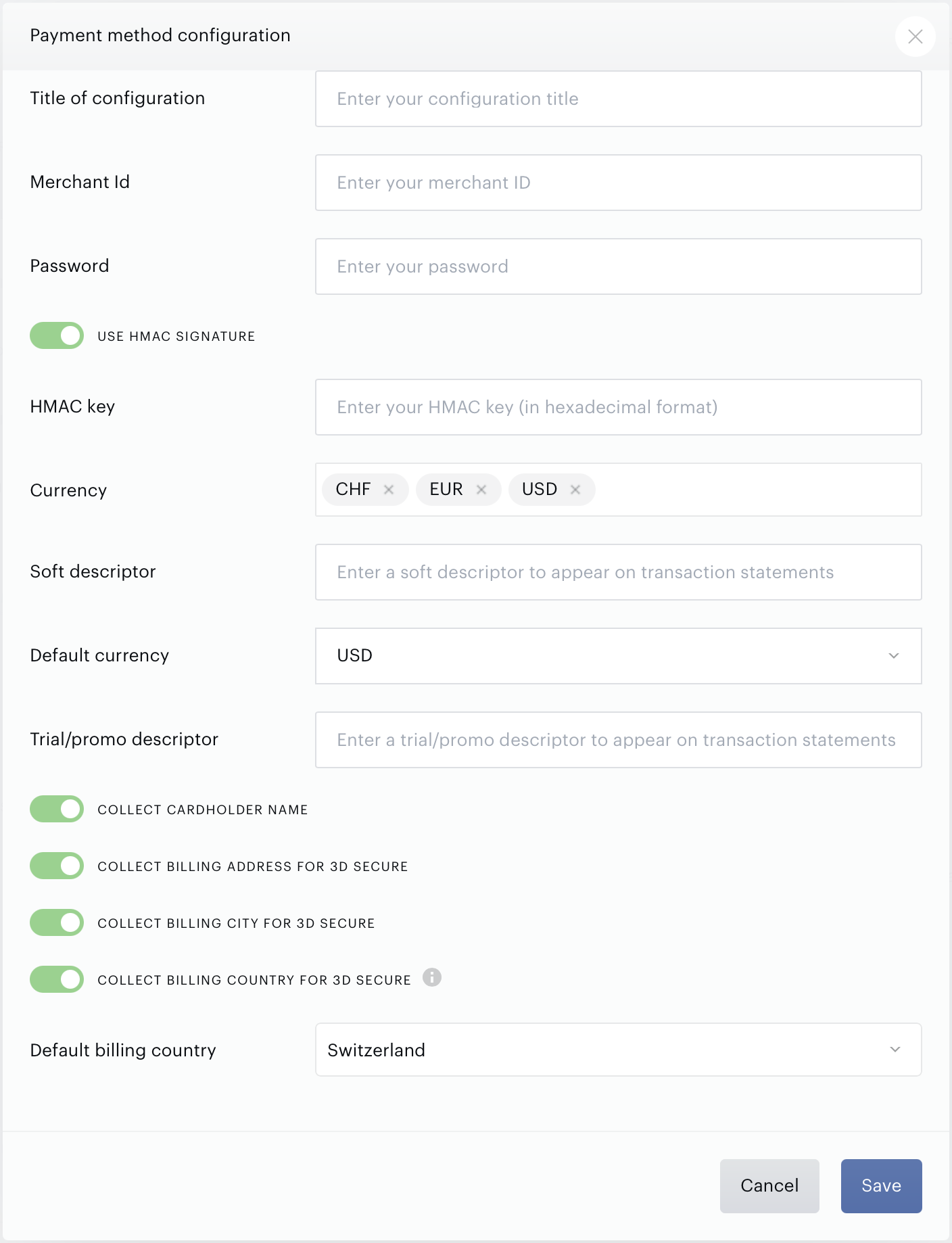
To integrate your Datatrans account with Piano for credit card payments, simply click Edit Business→Payment Provider→Datatrans Credit Card (Add) and enter your credentials.
-
Title: Pick a title for your configuration
-
Merchant ID: Enter your Datatrans Merchant ID available in your Datatrans dashboard. This should be a 10-digit code.
-
Password: Enter the Password available in your Datatrans dashboard. In addition, there is an additional checkbox Protect server-to-server services with a password available here, which needs to be selected.

-
Sign: Contains your Datatrans signature. More information about this is available here.
Due to the recent security updates by Datatrans, you need to provide a HMAC signature which can be entered after enabling the toggle "Use HMAC Signature" so that you comply with the new security standards. More information can be found in this section.
-
HMAC key: This field is shown when the toggle "Use HMAC Signature" is enabled. The HMAC signature key can be retrieved from your Datatrans account as described here.
-
Soft descriptor: An optional field that allows you to define a dynamic label that will appear on your customers’ statements for transactions and helps identify specific transactions, reducing the likelihood of disputes and chargebacks.
-
Character Limit: Up to 26 characters.
-
Allowed Characters: Letters and numbers only. No spaces or special characters such as
<, >, \, ' " *.)(. -
Applies to all transactions including purchases, renewals, and upgrades across various payment flows.
-
-
Trial/promo descriptor: An optional field specifically designed for transactions related to trials or promotional offers. It allows you to label such transactions distinctly on bank statements, ensuring customers can easily differentiate between promotional and full-price transactions.
-
Character Limit: Up to 14 characters.
-
Allowed Characters: Letters and numbers only. No spaces or special characters such as
<, >, \, ' " *.)(.
-
-
Collect cardholder name: Allows you to optionally collect the cardholder's name during payment processing for enhanced 3DS authentication and compliance with Visa’s updated mandatory data requirements. When enabled, a text input field will appear on the payment interface, requiring users to provide their cardholder name (up to 50 alphanumeric characters). Ensure that your system templates are updated before enabling the Cardholder name option in the configuration as described here.
-
Collect Billing address for 3D Secure: Prior to enabling this setting, please review the section here.
-
Collect Billing city for 3D Secure: Prior to enabling this setting, please review the section here.
-
Collect Billing country for 3D Secure: Prior to enabling this setting, please review the section here. Once enabled, you can select a default billing country.
Enter all the currency options (for example EUR, CHF, or USD) you would like to be available to customers, and click Save.
Twint
To integrate your Datatrans account with Piano for Twint payments, simply click Edit Business→Payment Provider→Datatrans: Twint (Add) and enter your credentials as explained above.
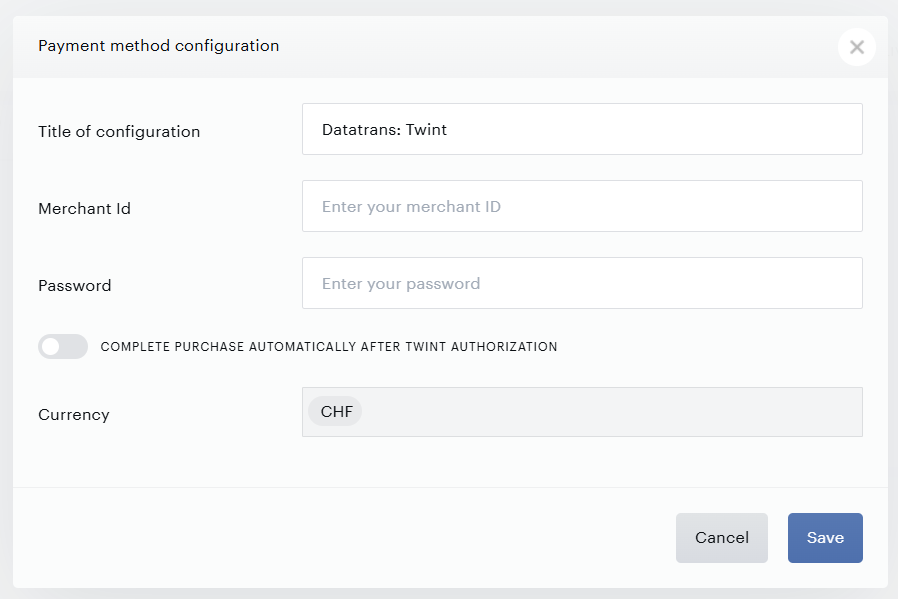
An optional setting Complete purchase automatically after Twint authorization can be toggled on. When enabled, this setting allows the purchase to complete automatically after the user authorizes the payment in the Twint app, eliminating an additional step where the user needs to complete the purchase manually and streamlining the checkout process.
Please note, that Twint currently supports only payments in CHF.
We don’t store any certificates on Piano's side related to Twint. In case your merchant certificate is about to expire, please reach out to Datatrans Support for assistance with updating the certificate.
Apple Pay
To integrate your Datatrans account with Piano for Apple Pay payments, simply click Edit Business→Payment Provider→Datatrans: Apple Pay (Add) and enter your credentials as explained above.
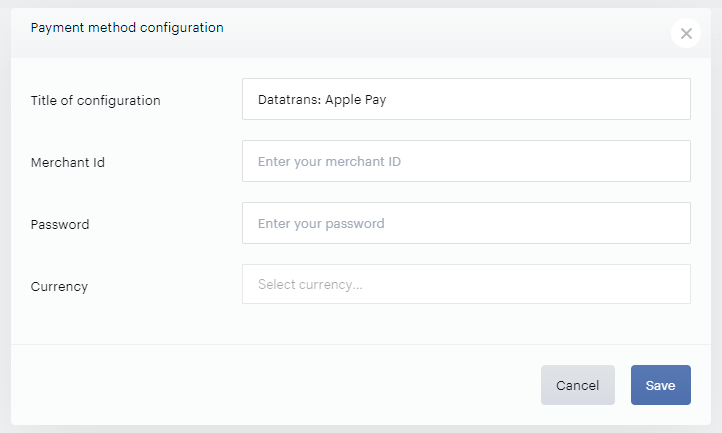
More information about how to set up Apple Pay for your domain is available here.
Google Pay
To integrate your Datatrans account with Piano for Google Pay payments, simply click Edit Business→Payment Provider→Datatrans: Google Pay (Add) and enter your credentials as explained above.
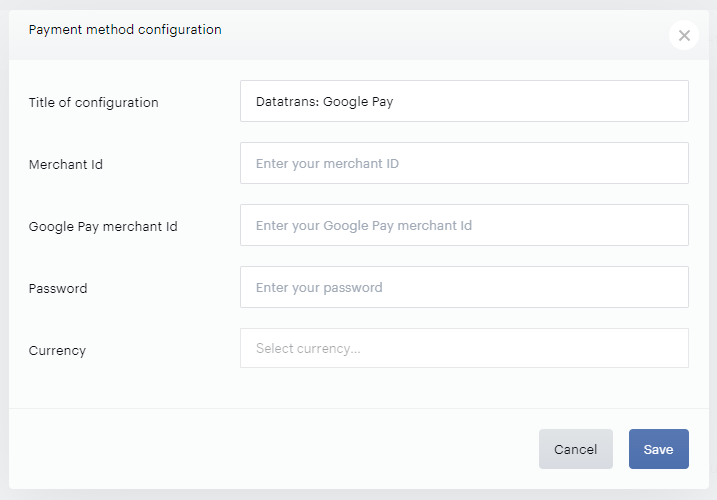
Please note, that the list of qualified domains from which you intend to call the Google Pay API (that should be provided to Google during the Google Pay setup) needs to include also the URL https://buy.tinypass.com/ respectively https://buy.piano.io/ (utilized by the Piano checkout iframe for the US dashboard). For other dashboard locales, the URL would look like this:
EU dashboard - https://buy-eu.piano.io
AP dashboard - https://buy-ap.piano.io
AU dashboard - https://buy-au.piano.io
PayPal
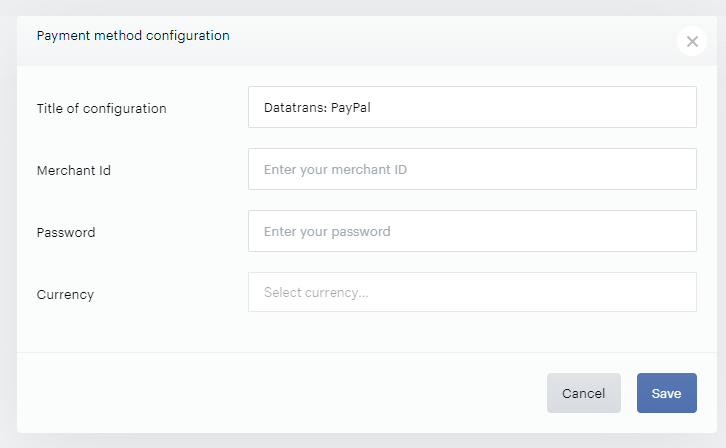
To integrate your Datatrans account with Piano for PayPal payments, simply click Edit Business→Payment Provider→Datatrans: PayPal (Add) and enter your credentials as explained above.