
Payway is a payment provider for businesses in the United States and Canada. Piano supports it for credit card and Apple Pay payments in US and Canadian dollars, and renewals are supported for both.
Credit card and Apple Pay are two separate configurations in Piano. Apple Pay also requires system template changes and works only on pages served over HTTPS. Before you start, you need your Payway credentials and your customer name.
Merchant Requirements
Payway bills based on transaction volume; you can read more about it on their pricing page.
Limitations
Please note that Apple Pay is available only on secure pages (https://***).
Supported Countries
Payway is currently supporting the following countries from North America:
|
Supported Countries |
|
|---|---|
|
Canada |
USA |
Please reach out to your Piano Account representative in case a country supported by this payment provider is not listed in the table above.
Supported Currency
Piano supports the following Payway supported currencies:
|
Supported Currencies |
|
|---|---|
|
USD |
CAD |
Note, that Piano may support only selected currencies available in the payment providers dashboard.
Supported Payment Methods
Piano supports the following payment methods for this payment provider:
|
Payment method name |
Are renewals supported? |
||||||||||||
|---|---|---|---|---|---|---|---|---|---|---|---|---|---|
|
Credit card (Mastercard, Visa, American Express, Discover, JCB, Diner's Club) |
Yes |
||||||||||||
|
Apple Pay |
Yes |
Supported Features and Functionality
|
Feature/Functionality |
Supported? |
|
Refunds |
Full / Partial |
|
Apply Terms Wizard |
Yes* |
|
My Account - Add payment method |
Yes* |
|
My Account - Edit payment method |
No |
|
My Account - Delete payment method |
Yes |
|
Publisher dashboard - Add payment method |
Yes* |
|
Publisher dashboard - Edit payment method |
No |
|
Publisher dashboard - Delete payment method |
Yes |
|
Tax Providers and Types |
TaxJar / Avalara |
|
Transaction descriptors |
None |
|
Frictionless |
Yes*** |
|
3DS / SCA |
No |
|
Passive churn prevention |
Yes - Advanced support |
|
Payment token import support |
Yes** |
*Not supported for Payway Apple Pay.
**For more information about the payment token import please visit this link.
***Apple Pay as a payment method is currently not supported for frictionless checkout with Dynamic terms that have a first free period.
Passive Churn Prevention
It's crucial to understand how the various error codes that may arise during a payment failure are handled by the Passive Churn Prevention feature. These error codes provide insights into why a renewal attempt may have failed, enabling you to take appropriate actions to prevent churn. This section details the specific error codes encountered during a payment failure and their mapping to a decline reason.
|
Decline reason |
Error codes |
|
|
Payway Credit Card |
Payway Apple Pay |
|
|
Suspected fraud |
500 (Do not retry. A fraud may have happened with the transaction). 607 (Issuer has declined auth request because CVV2 or VAK failed ResultCode) 500 (Suspected fraud). 500 (Issuer has flagged account as suspected fraud). |
07 - Hold-call (Pick up card, special conditions (Fraud account)) 596 - Suspected Fraud (Issuer has flagged this account as fraudulent.) |
|
Insufficient funds |
500 (Insufficient funds). |
51 - Decline (Insufficient funds) 302 - Credit floor (Insufficient funds.) 521 - Insufficient funds (Insufficient funds or over credit limit) |
|
Expired card |
606 (Card is expired). 640 (Closed account). 22 (Bank account has been closed) |
54 - Expired card (Expired card—different than invalid expiration date) 522 - Card is expired (Card has expired—not the same as invalid expiry date.) |
|
Card is stolen or lost |
500 (Card reported as lost/stolen Note: Does not apply to American Express). |
41 - Hold-call (Lost card, pick up card (fraud account)) 43 - Hold-call (Pick up card, stolen card, pick up (fraud account)) 501 - Pickup (Card stolen) 502 - Lost/Stolen (Card reported as lost or stolen) |
|
Limit exceeded |
- |
61 - Declined (Exceeds withdrawal limit) 509 - Over the limit (Exceed withdrawal or activity limit.) |
|
Network failure |
35 (No processor connection). |
- |
|
3DS failure |
- |
- |
|
Call issuer |
500 (Issuer wants voice contact with accountholder). 500 (Generic Decline No information provided by the issuer. Have the cardholder contact Issuer for additional information) |
01 - Call (Refer to issuer.) 02 - Call (Refer to issuer—Special condition) 303 - Processor decline (Generic decline, no other reason given provided by the card issuer.) |
|
Do not honor |
500 (Decline do not honor). |
05 - Decline (Do not honor) 57 - Service not allowed (Transaction not permitted on card.). 530 - Do not honor (Generic decline—no reason given by card issuer.) |
|
Everything else |
All error codes not listed above |
All error codes not listed above |
How to integrate Payway with Piano
To integrate your Payway account with Piano, simply click Edit Business→Payment Provider→Payway Complete (Edgil)→Add New.
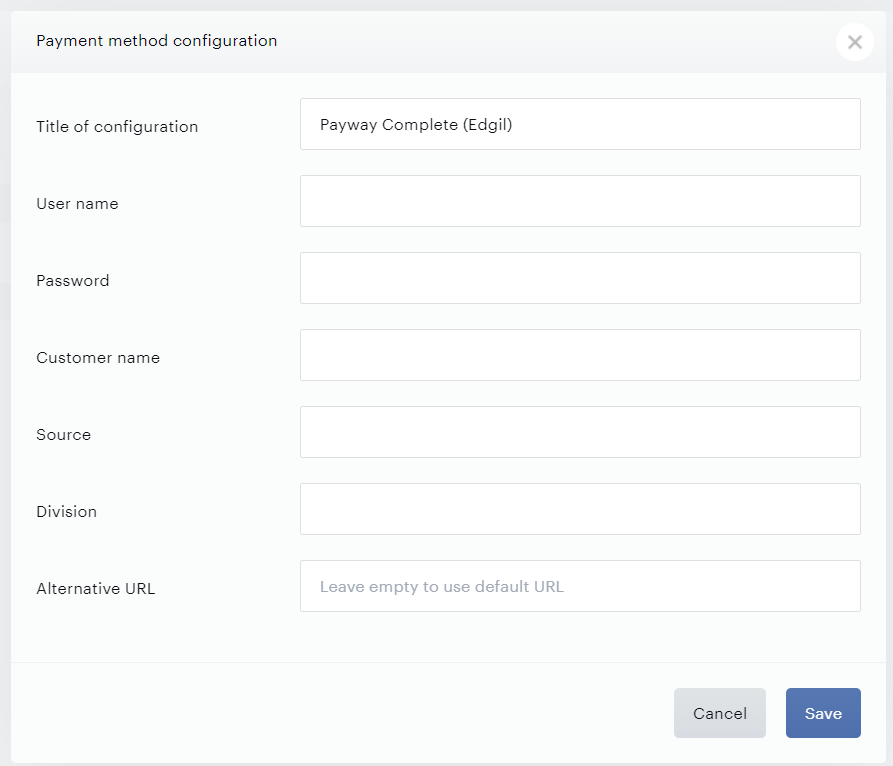
Enter your payment provider credentials from your Payway account in the available fields, pick a title for your configuration, enter your customer name, and click Save.
If the Alternative URL remains empty, the system will automatically apply the default payment processor URL https://paywayws.net. If you'd like to use a custom failover link, please insert your URL here, but exercise caution when populating this link, as any inadvertent inclusion of additional slashes may potentially disrupt the Payway checkout process.
For Piano clients using Payway, Piano supports Apple Pay as a payment option.
This needs to be configured separately via Edit Business→Payment Provider→Payway Apple Pay→Add New.
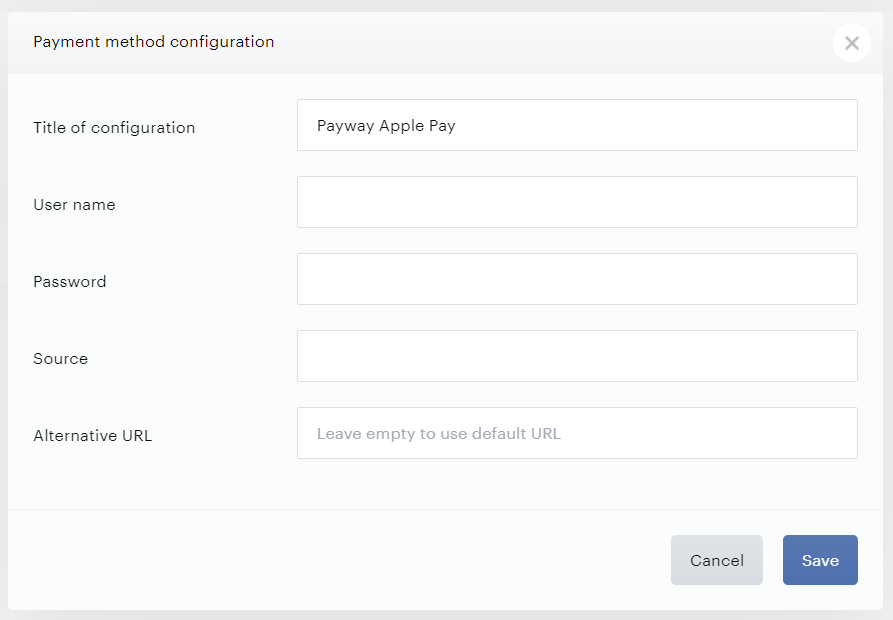
If the Alternative URL remains empty, the system will automatically apply the default payment processor URL https://paywayws.net/PaywayWS/. If you'd like to use a custom failover link, please insert your URL here, but exercise caution when populating this link, as any inadvertent inclusion of additional slashes may potentially disrupt the Payway Apple Pay checkout process.
For more information on how to enable Apple Pay, please see this article. This documentation here explains what template changes are required to support Apple Pay payments via Payway.