
Sony Payments is a Japanese payment platform. Piano supports it for credit card payments only, in Japanese yen, for businesses located in Japan. Renewals are supported.
Before you start, you need the merchant ID, merchant password, and token payment certification code from Sony.
Merchant Requirements
Sony Payments requires your business to be located in Japan.
Template Changes
In order to include the cardholder's name (first and last name) in Checkout and My Account, the following template changes are required.
System templates
Go to Manage → Templates → System → Payment Components and find the component <script type="text/ng-template" id="/frontend/providers/components/sony/checkout/component.shtml">. Inside this component, find:
<dynamic-base-inputs-component name="providerName" credit-card="credit_card"></dynamic-base-inputs-component>
And replace with the following:
<dynamic-base-inputs-component name="providerName"
  credit-card="credit_card"
  data="data"></dynamic-base-inputs-component>
Find the component <script type="text/ng-template" id="/frontend/providers/components/sony/common/baseTemplate.shtml"> and inside this component replace the whole content with the following:
<div class="cc-fields-layout sony-cc-fields-layout" ng-class="{'cc-fields-layout__cardholder-option': data.collectCardholderName}">
  <div ng-show="data.collectCardholderName" class="cc-fields-layout__credentials">
    <div class="cc-fields-layout__field cc-fields-layout__first-name">
      <cc-text-input placeholder="'First name' | t"
                     ng-model="credit_card.first_name.value"
                     on-change="credit_card.first_name.onChangeCallback"
                     ng-disabled="credit_card.first_name.disabled"
                     icon="'client'"
                     ng-required="credit_card.first_name.required"
                     ng-readonly="credit_card.first_name.readonly"
                     maxlength="22"
                     valid="credit_card.first_name.valid"
                     name="'first_name'"
                     format-type="'latin'"
                     data-e2e="cc_first_name">
      </cc-text-input>
    </div>
    <div class="cc-fields-layout__field cc-fields-layout__last-name">
      <cc-text-input placeholder="'Last name' | t"
                     ng-model="credit_card.last_name.value"
                     on-change="credit_card.last_name.onChangeCallback"
                     ng-disabled="credit_card.last_name.disabled"
                     icon="'client'"
                     ng-required="credit_card.last_name.required"
                     ng-readonly="credit_card.last_name.readonly"
                     maxlength="22"
                     valid="credit_card.last_name.valid"
                     name="'last_name'"
                     format-type="'latin'"
                     data-e2e="cc_last_name">
      </cc-text-input>
    </div>
  </div>
  <div class="cc-fields-layout__field cc-fields-layout__card-number">
    <credit-card-number-formatted
      credit_card="credit_card"
      on-keyup="credit_card.num.onKeyupCallback"
      readonly="credit_card.num.readonly"
      maxlength="credit_card.num.maxlength"
      minlength="credit_card.num.minlength"
      ng-required="credit_card.num.required"
      valid="credit_card.num.valid"
      icon="'card'"
      name="'num'"
    >
    </credit-card-number-formatted>
  </div>
  <div class="cc-fields-layout__field cc-fields-layout__expire">
    <cc-expire-component ng-model="credit_card.expire.value"
                         on-change="credit_card.expire.onChangeCallback"
                         ng-disabled="credit_card.expire.disabled"
                         ng-required="credit_card.expire.required"
                         ng-readonly="credit_card.expire.readonly"
                         maxlength="credit_card.expire.maxlength"
                         valid="credit_card.expire.valid"
                         name="'expire'">
    </cc-expire-component>
  </div>
  <div class="cc-fields-layout__field cc-fields-layout__cvv">
    <credit-card-cvv ng-model="credit_card.cvv.value"
                     on-change="credit_card.cvv.onChangeCallback"
                     ng-disabled="credit_card.cvv.disabled"
                     ng-required="credit_card.cvv.required"
                     ng-readonly="credit_card.cvv.readonly"
                     maxlength="credit_card.cvv.maxlength"
                     valid="credit_card.cvv.valid"
                     name="'cvv'">
    </credit-card-cvv>
  </div>
</div>
In addition, the Payment Components template needs to contain the following code:
<script type="text/ng-template" id="/frontend/providers/components/sony/checkout/component.shtml">
<div class="sony-wrapper new-card-form">
<div class="row">
<div desktop class="cc_stored_cards" ng-show="!cc.payWithNew && cc.initiated">
<div class="add-credit-card-wrapper">
<h4>
<t>Your credit and debit cards</t>
</h4>
<a href="javascript:void(0)" class="add-credit-card" ng-click="cc.payWithNew = true"
ng-show="cc.stored.length > 0">
+
<t>Add a card</t>
</a>
</div>
<table class="payment-method-card" ng-show="cc.stored.length > 0">
<tr class="payment-method-card-row" ng-repeat="method in cc.stored"
ng-class="{'selected' : $parent.cc.selectedUpiId == method.id}">
<td class="payment-method-card-cell">
<input type="radio" name="stored_method" value="{{method.id}}"
ng-model="$parent.cc.selectedUpiId"/>
</td>
<td class="payment-method-card-cell">
<div class="credit-card-{{method.identifier}}"></div>
</td>
<td class="payment-method-card-cell">
<div>{{method.type | tc:"checkout.platform"}} *{{method.ending_in}}</div>
</td>
<td class="payment-method-card-cell payment-method-card-cell-expiration">
<t>Expires in</t>
{{method.expire_month}}/{{method.expire_year}}
</td>
<td class="payment-method-card-cell payment-method-card-cell-default-payment">
<div class="payment-method-card-default-payment" ng-show="method.id === cc.defaultPaymentMethodId"><t>Default</t></div>
<button ng-hide="method.id === cc.defaultPaymentMethodId"
ng-click="setAsDefaultPaymentMethod(method)"
type="button"
class="set-as-default-button"
>
<t>Set as default</t>
</button>
</td>
</tr>
</table>
</div>
<div mobile class="cc_stored_cards" ng-show="cc.initiated">
<table class="payment-method-card" ng-show="cc.stored.length > 0">
<tr class="payment-method-card-row" ng-repeat="method in cc.stored"
ng-class="{'selected' : $parent.cc.selectedUpiId == method.id && $parent.cc.payWithNew != true}">
<td class="payment-method-card-cell">
<input type="radio" name="stored_method" value="{{method.id}}"
ng-model="$parent.cc.selectedUpiId"
ng-click="$parent.cc.payWithNew = false"/>
</td>
<td class="payment-method-card-cell">
<div class="credit-card-{{method.identifier}}"></div>
</td>
<td class="payment-method-card-cell">
<div>*{{method.ending_in}}</div>
</td>
<td class="payment-method-card-cell payment-method-card-cell-default-payment">
<div class="payment-method-card-default-payment" ng-show="method.id === cc.defaultPaymentMethodId"><t>Default</t></div>
<button ng-hide="method.id === cc.defaultPaymentMethodId"
ng-click="setAsDefaultPaymentMethod(method)"
type="button"
class="set-as-default-button"
>
<t>Set as default</t>
</button>
</td>
</tr>
<tr class="payment-method-card-row" ng-class="{'selected' : $parent.cc.payWithNew == true}">
<td class="payment-method-card-cell">
<input type="radio" name="stored_method" ng-model="$parent.cc.payWithNew" ng-value="true"/>
</td>
<td class="payment-method-card-cell" colspan="2">
<t>Add a new card</t>
</td>
</tr>
</table>
</div>
<div class="cc_new_card" ng-show="cc.payWithNew && cc.initiated">
<div desktop class="go-back-to-cards-wrapper">
<a href="javascript:void(0)" class="go-back-to-cards" ng-click="cc.payWithNew = false"
ng-show="cc.stored.length > 0">
<t>Return to saved cards</t>
</a>
<h4>
<t>Add a new credit or debit card</t>
</h4>
</div>
<form class="new-card-form" name="ccForm" role="form">
<dynamic-base-inputs-component name="providerName" credit-card="credit_card"></dynamic-base-inputs-component>
<div class="payment-system-condition">
<span ng-if="!isSubscription()">
<div class="custom-checkbox">
<input type="checkbox" name="store_in_vault" ng-model="credit_card.store_in_vault"
id="remember-my-card-sony"/>
<label for="remember-my-card-sony">
<t>Remember my card for future payments</t>
</label>
</div>
</span>
<span ng-if="isSubscription()">
<input type="hidden" name="store_in_vault" ng-model="credit_card.store_in_vault"/>
</span>
<div class="custom-checkbox" ng-if="credit_card.store_in_vault">
<input type="checkbox" name="defaultPaymentMethodId" ng-model="cc.defaultPaymentMethodId" id="default-payment-method-sony" />
<label for="default-payment-method-sony"><t>Apply this payment method to all active subscriptions</t></label>
</div>
</div>
</form>
</div>
<div consents-list></div>
<div class="footer-modal">
<div class="auto-renew-purchase" ng-show="isSelectedTermAutoRenewChoiceAvailable()">
<input class="auto-renew-purchase-checkbox" type="checkbox" ng-model="input.autoRenew"
id="auto_renew"/>
<label class="auto-renew-purchase-label" for="auto_renew">
<t>Automatically renew my subscription when the time comes.</t>
</label>
</div>
<div ng-show="isConfirmStepEnabled()" class="complete-purchase-button" goto-confirmation-button
title="{{'Complete Purchase' | t}}"></div>
<div ng-show="!isConfirmStepEnabled()" class="complete-purchase-button" complete-purchase-button
title="{{'Complete Purchase' | t}}"></div>
</div>
</div>
</div>
</script>
<script type="text/ng-template" id="/frontend/providers/components/sony/common/baseTemplate.shtml">
<div class="cc-fields-layout">
<div class="cc-fields-layout__field cc-fields-layout__card-number">
<credit-card-number ng-model="credit_card.num.value"
on-change="credit_card.num.onChangeCallback"
ng-disabled="credit_card.num.disabled"
ng-required="credit_card.num.required"
ng-readonly="credit_card.num.readonly"
valid="credit_card.num.valid"
credit-card-auto-space
name="'num'">
</credit-card-number>
</div>
<div class="cc-fields-layout__field cc-fields-layout__expire">
<cc-expire-component ng-model="credit_card.expire.value"
on-change="credit_card.expire.onChangeCallback"
ng-disabled="credit_card.expire.disabled"
ng-required="credit_card.expire.required"
ng-readonly="credit_card.expire.readonly"
maxlength="credit_card.expire.maxlength"
valid="credit_card.expire.valid"
name="'expire'">
</cc-expire-component>
</div>
<div class="cc-fields-layout__field cc-fields-layout__cvv">
<credit-card-cvv ng-model="credit_card.cvv.value"
on-change="credit_card.cvv.onChangeCallback"
ng-disabled="credit_card.cvv.disabled"
ng-required="credit_card.cvv.required"
ng-readonly="credit_card.cvv.readonly"
maxlength="credit_card.cvv.maxlength"
valid="credit_card.cvv.valid"
name="'cvv'">
</credit-card-cvv>
</div>
</div>
</script>
My Account templates
Go to Manage → Templates → My Account → My Account Wallet Components and find the component <script type="text/ng-template" id="/frontend/providers/components/sony/my_account/component.shtml">.
Inside this component, find:
<dynamic-base-inputs-component name="providerName" credit-card="credit_card"></dynamic-base-inputs-component>
And replace with the following:
<dynamic-base-inputs-component name="providerName"
  credit-card="credit_card"
  data="data"></dynamic-base-inputs-component>
Find the component <script type="text/ng-template" id="/frontend/providers/components/sony/common/baseTemplate.shtml"> and replace the whole content with the following:
<div class="cc-fields-layout sony-cc-fields-layout" ng-class="{'cc-fields-layout__cardholder-option': data.collectCardholderName}">
  <div ng-show="data.collectCardholderName" class="cc-fields-layout__credentials">
    <div class="cc-fields-layout__field cc-fields-layout__first-name">
      <cc-text-input placeholder="'First name' | t"
                     ng-model="credit_card.first_name.value"
                     on-change="credit_card.first_name.onChangeCallback"
                     ng-disabled="credit_card.first_name.disabled"
                     icon="'client'"
                     ng-required="credit_card.first_name.required"
                     ng-readonly="credit_card.first_name.readonly"
                     maxlength="22"
                     valid="credit_card.first_name.valid"
                     name="'first_name'"
                     format-type="'latin'"
                     data-e2e="cc_first_name">
      </cc-text-input>
    </div>
    <div class="cc-fields-layout__field cc-fields-layout__last-name">
      <cc-text-input placeholder="'Last name' | t"
                     ng-model="credit_card.last_name.value"
                     on-change="credit_card.last_name.onChangeCallback"
                     ng-disabled="credit_card.last_name.disabled"
                     icon="'client'"
                     ng-required="credit_card.last_name.required"
                     ng-readonly="credit_card.last_name.readonly"
                     maxlength="22"
                     valid="credit_card.last_name.valid"
                     name="'last_name'"
                     format-type="'latin'"
                     data-e2e="cc_last_name">
      </cc-text-input>
    </div>
  </div>
  <div class="cc-fields-layout__field cc-fields-layout__card-number">
    <credit-card-number-formatted
      credit_card="credit_card"
      on-keyup="credit_card.num.onKeyupCallback"
      readonly="credit_card.num.readonly"
      maxlength="credit_card.num.maxlength"
      minlength="credit_card.num.minlength"
      ng-required="credit_card.num.required"
      valid="credit_card.num.valid"
      icon="'card'"
      name="'num'"
    >
    </credit-card-number-formatted>
  </div>
  <div class="cc-fields-layout__field cc-fields-layout__expire">
    <cc-expire-component ng-model="credit_card.expire.value"
                         on-change="credit_card.expire.onChangeCallback"
                         ng-disabled="credit_card.expire.disabled"
                         ng-required="credit_card.expire.required"
                         ng-readonly="credit_card.expire.readonly"
                         maxlength="credit_card.expire.maxlength"
                         valid="credit_card.expire.valid"
                         name="'expire'">
    </cc-expire-component>
  </div>
  <div class="cc-fields-layout__field cc-fields-layout__cvv">
    <credit-card-cvv ng-model="credit_card.cvv.value"
                     on-change="credit_card.cvv.onChangeCallback"
                     ng-disabled="credit_card.cvv.disabled"
                     ng-required="credit_card.cvv.required"
                     ng-readonly="credit_card.cvv.readonly"
                     maxlength="credit_card.cvv.maxlength"
                     valid="credit_card.cvv.valid"
                     name="'cvv'">
    </credit-card-cvv>
  </div>
</div>
In addition, the My Account Wallet Components template needs to contain the following code:
<script type="text/ng-template" id="/frontend/providers/components/sony/common/baseTemplate.shtml">
<div class="cc-fields-layout">
  <div class="cc-fields-layout__field cc-fields-layout__card-number">
    <credit-card-number ng-model="credit_card.num.value"
                        on-change="credit_card.num.onChangeCallback"
                        ng-disabled="credit_card.num.disabled"
                        ng-required="credit_card.num.required"
                        ng-readonly="credit_card.num.readonly"
                        valid="credit_card.num.valid"
                        credit-card-auto-space
                        name="'num'">
    </credit-card-number>
  </div>
  <div class="cc-fields-layout__field cc-fields-layout__expire">
    <cc-expire-component ng-model="credit_card.expire.value"
                         on-change="credit_card.expire.onChangeCallback"
                         ng-disabled="credit_card.expire.disabled"
                         ng-required="credit_card.expire.required"
                         ng-readonly="credit_card.expire.readonly"
                         maxlength="credit_card.expire.maxlength"
                         valid="credit_card.expire.valid"
                         name="'expire'">
    </cc-expire-component>
  </div>
  <div class="cc-fields-layout__field cc-fields-layout__cvv">
    <credit-card-cvv ng-model="credit_card.cvv.value"
                     on-change="credit_card.cvv.onChangeCallback"
                     ng-disabled="credit_card.cvv.disabled"
                     ng-required="credit_card.cvv.required"
                     ng-readonly="credit_card.cvv.readonly"
                     maxlength="credit_card.cvv.maxlength"
                     valid="credit_card.cvv.valid"
                     name="'cvv'">
    </credit-card-cvv>
  </div>
</div>

</script>

<script type="text/ng-template" id="/frontend/providers/components/sony/my_account/component.shtml">
<div>
    <my-account-billing-country></my-account-billing-country>

    <table class="supporting" ng-if="!readonly">
        <tr>
            <td class="support-caption"><t context="checkout.platform">We support</t></td>
            <td class="support-images">
                <img src="/images2/Visa.png" style="width: 30px;">
                <img src="/images2/Discover.png" style="width: 49px;">
                <img src="/images2/MasterCard.png" style="width: 29px;">
                <img src="/images2/AmericanExpress.png" style="width: 36px;">
                <img src="/images2/DinCl.png" style="width: 53px;">
                <img src="/images2/JapaneseCreditBank.png" style="width: 25px;">
            </td>
        </tr>
    </table>
    <div class="form">
        <dynamic-base-inputs-component name="providerName" credit-card="credit_card"></dynamic-base-inputs-component>
        <div error-section
             errors="formErrors"
             heading="{{'Couldn\'t submit issue' | t}}"></div>
    </div>
</div>
</script>
Supported Countries
For this payment provider, Piano supports the following countries:
|
Supported Countries |
|---|
|
Japan |
Supported Currency
Piano supports the following Sony Payments supported currencies:
|
Supported Currencies |
|---|
|
JPY |
Supported Payment Methods
Piano supports the following payment methods for this payment provider:
|
Payment method name |
Are renewals supported? |
||||||||||||
|---|---|---|---|---|---|---|---|---|---|---|---|---|---|
|
Credit card (Mastercard, Visa, American Express, JCB, Diner's Club) |
Yes |
Supported Features and Functionality
|
Feature/Functionality |
Supported? |
|---|---|
|
Refunds |
Full and Partial |
|
Apply Terms Wizard |
Yes |
|
My Account - Add payment method |
Yes |
|
My Account - Edit payment method |
Yes |
|
My Account - Delete payment method |
Yes |
|
Publisher dashboard - Add payment method |
Yes |
|
Publisher dashboard - Edit payment method |
Yes |
|
Publisher dashboard - Delete payment method |
Yes |
|
Tax Providers and Types |
TaxJar |
|
Transaction descriptors |
None |
|
Frictionless |
No |
|
3DS / SCA |
Yes |
|
Fraud prevention |
No |
|
Passive churn prevention |
Yes - Advanced support |
|
Payment token import support |
Yes* |
*For more information about the payment token import please visit this link.
Passive Churn Prevention
It's crucial to understand how the various error codes that may arise during a payment failure are handled by the Passive Churn Prevention feature. These error codes provide insights into why a renewal attempt may have failed, enabling you to take appropriate actions to prevent churn. This section details the specific error codes encountered during a payment failure and their mapping to a decline reason.
|
Decline reason |
Error codes |
|---|---|
|
Suspected fraud |
G30 - Transaction judgment reserved |
|
Insufficient funds |
- |
|
Expired card |
C13 - Expiry error |
|
Card is stolen or lost |
G12 - Card usage prohibited G56 - Invalid card G60 - Accident error G96 - Accident card input error |
|
Limit exceeded |
G54 - Usage frequency error G55 - Limit amount exceeded |
|
Network failure |
U03 - Error of the network |
|
3DS failure |
U04 - 3D Secure identification NG U05 - 3D Secure falsification Check NG |
|
Call issuer |
G92 - Card company arbitrary error |
|
Do not honor |
G97 - Request rejected |
|
Everything else |
All error codes not listed above |
How to integrate Sony Payments with Piano
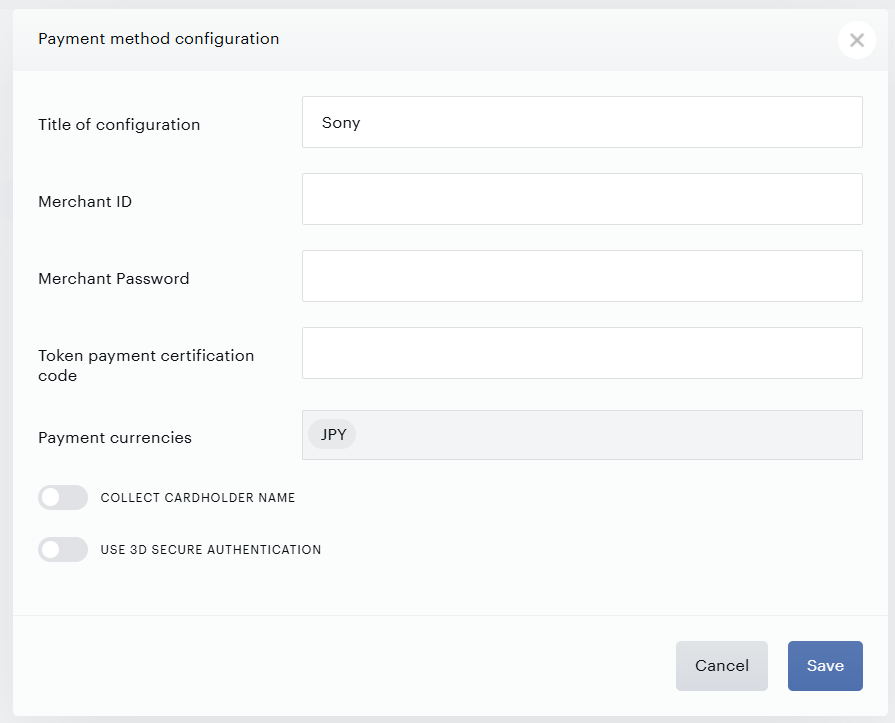
To integrate your Sony Payments account for credit cards with Piano, simply click Edit Business→Payment Provider→Sony (Add). Enter your payment provider credentials in the available fields, and all the currency options you would like to be available to customers.
-
Title: Enter the title of your configuration.
-
Merchant ID: Enter the Merchant ID provided by Sony. For example: 17654323
-
Merchant Password: Supply the Merchant Password.
-
Token payment certification code: Enter the code provided by Sony.
-
Payment currencies: Only JPY is available.
-
Collect cardholder name: Enables the collection of the first and last name. Please see the required template changes here.
-
Use 3D Secure authentication: Enables 3DS authentication in checkout and My Account. Please see the section below for more information about the setup.
Enabling 3DS for Sony Payments
This documentation explains how to set up 3D Secure (3DS) for integration with the Sony Payments provider. 3D Secure is an additional layer of authentication that enhances the security of online payments. All online merchants in Japan are required to implement 3D Secure, according to updated credit card security guidelines.
Benefits of Using 3D Secure
-
Enhanced Security: 3D Secure adds an extra layer of authentication, reducing the risk of unauthorized credit card use.
-
Reduced Liability for Fraud: With successful authentication, the responsibility for fraudulent transactions shifts from the merchant to the card issuer, which reduces financial risks for the business.
-
Compliance with Regulatory Requirements: Implementing 3D Secure ensures compliance with security regulations in Japan, which helps build trust with customers and partners.
Steps to Activate 3D Secure with Sony Payments
Important! The settings must be followed in the exact sequence.
Please note the following:
-
Settings must be followed in the exact sequence. If step 2 is skipped and step 3 is done first, some transactions may be declined.
-
It is mandatory to enable Full 3DS redirect. This is required for the proper functionality of 3DS 2.0 within this Sony Payments integration.
Piano Subscriptions Steps:
-
Request activation of Full 3DS Redirect
Please submit a request to Piano Support at support@piano.io to activate the Full 3DS Redirect setting on your application(s). It is highly recommended to obtain confirmation from support that this setting has been successfully activated. -
Update Templates
Ensure that you are using updated templates that support 3D Secure as described here. -
Activate 3D Secure on the provider side
It is required to activate 3D Secure support on the provider's side. -
Enable 3D Secure in Your Application Settings
Under the Edit Business → Payment provider settings, enable the Use 3D Secure Authentication setting for SONY and fill out the key and vector.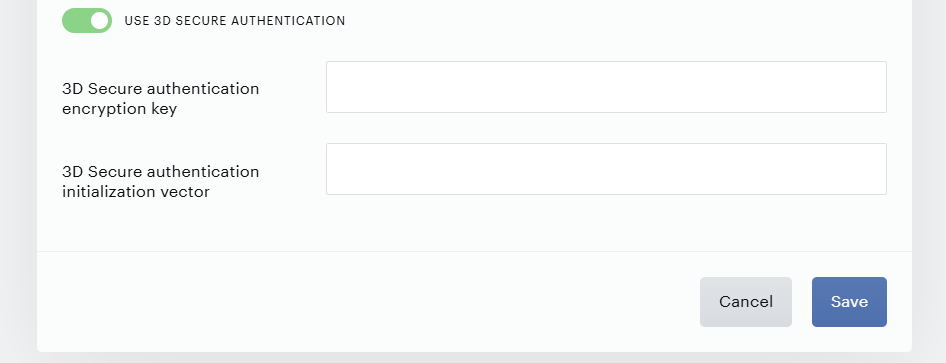
For further information and technical support, we recommend consulting the official Sony Payments documentation or contacting their support team.
Implementing 3D Secure not only improves transaction security but also strengthens customer trust, contributing to the growth of your business in the digital environment.
Frequently Asked Questions (FAQ)
-
How does the 3DS Subscription Reactivation Process work?
-
This process is designed for re-authenticating users when subscription renewal fails due to a 3D Secure error.
-
-
In which cases does the 3DS 2.0 authorization process start, and in which does it not?
-
The 3DS 2.0 authorization process starts in the following cases:
-
When making a payment at checkout with a new or saved card that supports 3DS.
-
When adding a card to the "My Account" section.
-
In the case of suspicious activity from the bank (for example, if the user rarely uses the card or makes a payment from a new device).
-
If the user manually performs a Renewal with a new card at checkout or in My Account.
-
When a user upgrades their subscription with immediate billing via My Account.
-
-
The 3DS 2.0 authorization process does not start in the following cases:
-
In the case of a Scheduled Upgrade/Downgrade.
-
For Renewal subscriptions, as these are MIT (Merchant Initiated Transactions).
-
-