

PostFinance Payments
PostFinance Card is an online card payment method in Switzerland. It allows shoppers to pay for their purchased goods and services by means of a PostFinance debit card.
Merchant Requirements
PostFinance requires your business to be located in Switzerland.
More information about the required transaction volume and pricing is available under the following link.
Limitations
Only supports payments via PostFinance credit cards for merchants from Switzerland.
Supported Countries
For this payment provider, Piano supports the following countries:
|
Supported Countries |
|---|
|
Switzerland |
Supported Currency
For this payment provider, Piano supports the following currencies:
|
Supported Currencies |
||
|---|---|---|
|
EUR |
USD |
CHF |
Note, that Piano may support only selected currencies available in the payment providers dashboard.
Supported Payment Methods
Piano supports the following payment methods for this payment provider:
|
Payment method name |
Are renewals supported? |
||||||||||||
|---|---|---|---|---|---|---|---|---|---|---|---|---|---|
|
Credit card (PostFinance) |
Yes |
Supported Features and Functionality
|
Feature/Functionality |
Supported? |
|
Refunds |
Full / Partial |
|
Apply Terms Wizard |
No |
|
My Account - Add payment method |
Yes |
|
My Account - Edit payment method |
No |
|
My Account - Delete payment method |
Yes |
|
Publisher dashboard - Add payment method |
No |
|
Publisher dashboard - Edit payment method |
No |
|
Publisher dashboard - Delete payment method |
Yes |
|
Tax Providers and Types |
TaxJar / Avalara |
|
Transaction descriptors |
None |
|
Frictionless |
No |
|
3DS / SCA |
No |
|
Fraud prevention |
No |
|
Passive churn prevention |
Yes - Standard support |
|
Payment token import support |
Yes* |
*For more information about the payment token import please visit this link.
How to integrate PostFinance with Piano
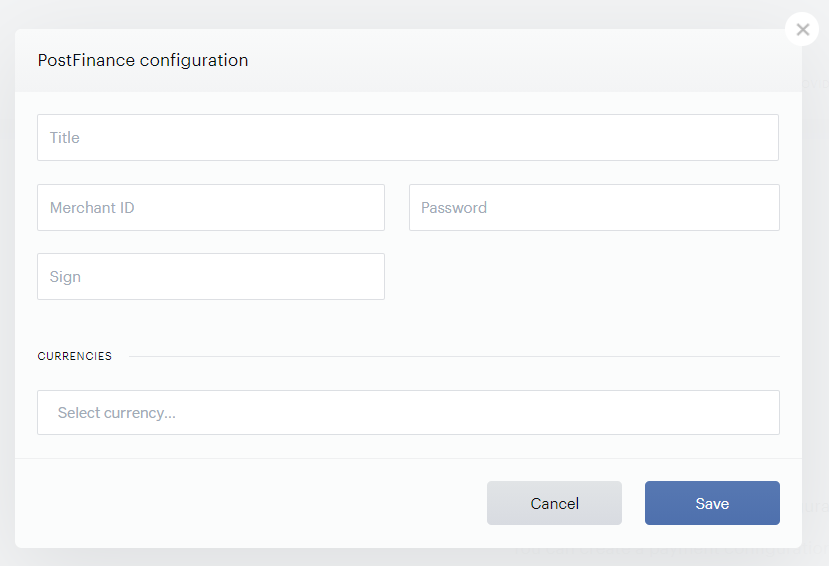
To integrate your PostFinance account with Piano, simply click Edit Business→Payment Provider→PostFinance (Add) and enter your payment provider credentials in the available fields. Since Piano's integration for PostFinance support is done via DataTrans, you'll need to enter the information from your DataTrans account.
-
Title: Pick a title for your configuration
-
Merchant ID: Enter your DataTrans Merchant ID available in your DataTrans dashboard.
-
Password: Enter the Password available in your DataTrans dashboard.
-
Sign: Enter your DataTrans signature. More information about this is available here.
Enter all the currency options you would like to be available to customers and click Save.