
Keyword Forecasting provides insight into the effects of changes to keyword bids without having to do a live test.
Forecasting some keywords
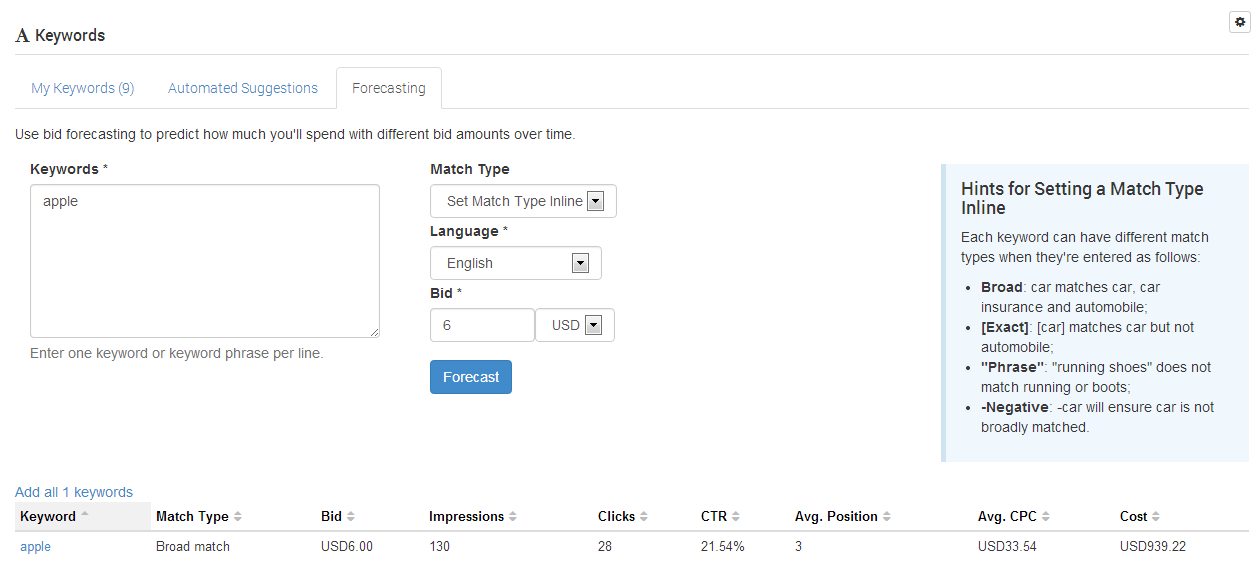
To forecast some keywords, enter them into the keywords field, and configure required match type, language and bid, then click 'forecast'.
The system then performs a 'mock auction' from the AdServer to establish forecasted results for your Keywords.
Applying forecast setting to your current Keywords

If you wish to proceed with a new bid for a keyword, simply select it within the list. Alternatively, you can use the 'Add all Keywords' option if you wish to add/apply the forecast keywords & settings to your Ad or Campaign. If you already have that keyword configured, the bid will be updated to the forecasted bid amount. If you do not have the keyword, the new keyword will be added with the bid amount shown.
If you forecast a keyword with a bid amount too low, you will see the message "Not enough data to give estimates (try increasing your bid amount)." You will need to increase the bid to see forecast data in this case. If increasing the bid, and still seeing no results, it may be due to the lack of usage of that keyword in the system (hence no way to forecast the outcome of the keyword at all).
Notes when using forecasting
-
Actual results will vary from the Forecast results, as other advertisers continue to modify their bid values.
-
The 'Cost' column is a forecast cost per day if you were to use that keyword with the forecast bid price.