The Force all new subscriptions to be auto-renewing subscriptions setting controls the visibility of the Automatically renew my subscription when the time comes checkbox during checkout. If visible, the checkbox is always checked by default, but its state can be changed with the instructions below.
Clients using multiple payment providers
You can achieve the desired behavior by editing the Payment Components template's code in the payment-method-selector-component.html component and replacing this section:
<a ng-click="selectPaymentMethod(pm)"
   ng-class="{'payment-method-selected': pm.selected}"
   class="button pay select-payment {{pm.identifier}}"
   ng-checked="isPaymentMethod(pm.id)"
</a>
With:
<a ng-click="selectPaymentMethod(pm)"
   ng-class="{'payment-method-selected': pm.selected}"
   class="button pay select-payment {{pm.identifier}}"
   ng-checked="isPaymentMethod(pm.id)"
   onclick="setTimeout(function(){ var auto_renew = document.getElementById('auto_renew'); if(auto_renew.checked) {auto_renew.click();} }, 1000);">
</a>
Please note, that these settings apply to all payment terms. If you'd like to have the option Automatically renew my subscription when the time comes checked for Term 1 and unchecked for Term 2, you'd need to do the following:
-
Add this code to your Checkout template:
HTML<div id="term-id" style="display: none;"> {{selectedTerm.termId}} </div> -
Then you need to change the code of the Payments Components template provided above to:
HTML<a ng-click="selectPaymentMethod(pm)" ng-class="{'payment-method-selected': pm.selected}" class="button pay select-payment {{pm.identifier}}" ng-checked="isPaymentMethod(pm.id)" onclick="setTimeout(function(){ if(document.getElementById('term-id').innerHTML.trim() == 'TMDDPCGSC381') {var auto_renew = document.getElementById('auto_renew'); if(auto_renew.checked) {auto_renew.click();}} }, 1000);" </a>Where
TMDDPCGSC381is the term ID of the term, for which the option will not be checked.
Clients using a single payment provider
If you have only one payment provider configured, add this code to the end of your Payment Components template:
<custom-script>
  var selectedTerm;
  var timer2 = setInterval(function() {
  	if(document.getElementById('angular-field')) {
  		clearInterval(timer2);
  		var dom_el = document.getElementById('angular-field');
  		var ng_el = angular.element(dom_el);
  		selectedTerm = ng_el.scope().selectedTerm.termId;
  	}
  }, 100);

  var timer = setInterval(function() {
  	if(document.querySelector(".auto-renew-purchase-checkbox")) {
  		clearInterval(timer);
  		if(selectedTerm == "TM123456789")
  			document.querySelector(".auto-renew-purchase-checkbox").checked = false;
  	}
  }, 100);
</custom-script>
The auto-renew checkbox will be unchecked only for the term ID TM123456789.
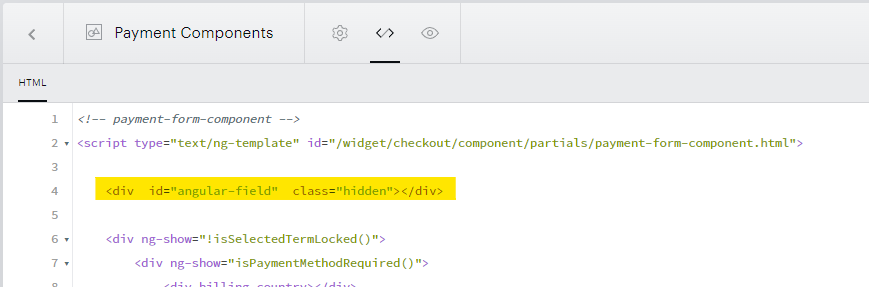
And for accessing Angular elements, you need to create a new <div>. Please add the following code somewhere in the Payment Components template.
<div id="angular-field" class="hidden"></div>
For example, in the screenshot below: