In certain cases, it may be more convenient to have the auto-renew toggle accessible from the drop-down menu in your My Account section. Follow these steps to make this adjustment.
Creating the Toggle in the Drop-Down Menu
-
Open the My Account Library Components template
-
Find the line of code containing:
HTML<script type="text/ng-template" id="/widget/myaccount/partials/library/_library_list_item.shtml"> -
In the element, find
<table class="vanilla-table"> -
In the element, find
<td class="actions"> -
In the element, find
<tp-menu> -
Under the
<tp-menu>, add the following code:HTML<tp-menu-item ng-if="libraryItem.autoRenewChangeEnabled"> <div tp-toggle class="small" ng-model="libraryItem.autoRenew" ng-change="toggleRenew(libraryItem)" style="display: inline-block; float: left;"></div> <div class="" ng-class="{'on':libraryItem.autoRenew}" ng-click="toggleRenew(libraryItem);" style="display: inline-block;"><t context="checkout.platform">Auto-renew</t></div> </tp-menu-item>
Deleting the Original Toggle
-
Open the My Account Library Components template
-
Find the following line of code:
HTML<script type="text/ng-template" id="/widget/myaccount/partials/library/_library_list_item.shtml"> -
In the element, find
<table class="vanilla-table"> -
Delete the following code:
HTML<td class="toggler-container"> <div class="tp-toggler-group w130 mobile-hide" ng-show="libraryItem.autoRenewChangeEnabled"> <div tp-toggle class="small" ng-model="libraryItem.autoRenew" ng-change="toggleRenew(libraryItem)"></div> <div class="tp-toggler-label small" ng-class="{'on':libraryItem.autoRenew}"><t context="checkout.platform">Auto-renew</t></div> </div> </td>
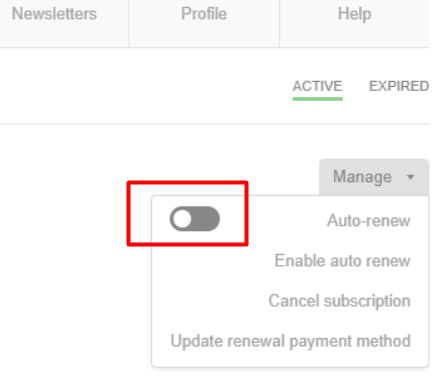
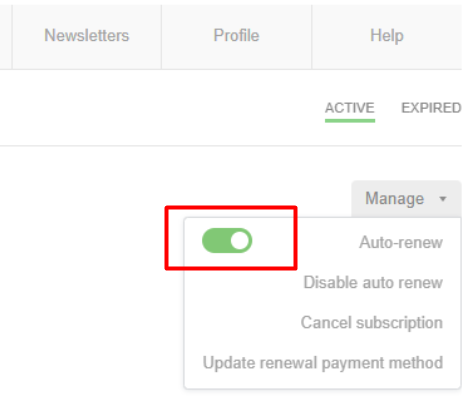
Resulting in the toggle for the "Auto-renew" menu item to appear as shown below.
Active auto-renew:
Disabled auto-renew: