
There are two ways of replacing the auto-renew toggle in My Account - you can either create a separate on-click button or include the button in the drop-down menu.
The first option would look like this:
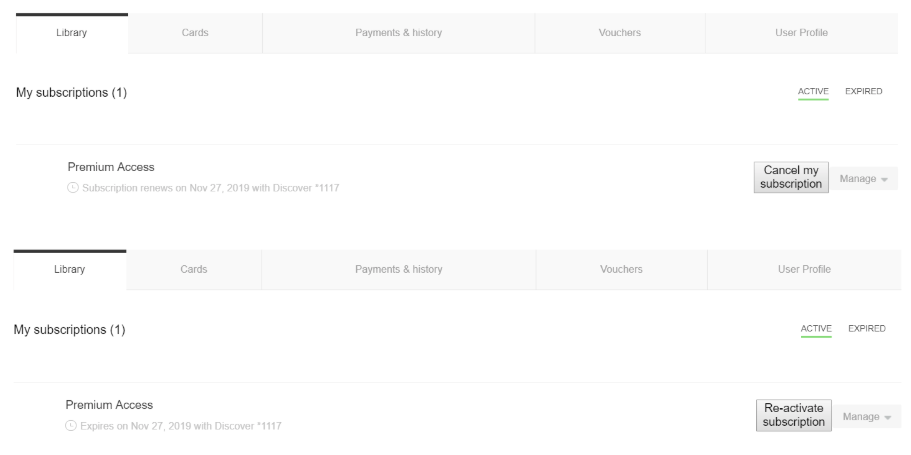
To add such a button edit the My Account Library Components template by replacing the following code:
<td class="toggler-container">
                   <div class="tp-toggler-group w130 mobile-hide"
                         ng-show="libraryItem.autoRenewChangeEnabled">
                        <div tp-toggle
                             class="small"
                             ng-model="libraryItem.autoRenew"
                             ng-change="toggleRenew(libraryItem)"></div>
                        <div class="tp-toggler-label small"
                             ng-class="{'on':libraryItem.autoRenew}"><t context="checkout.platform">Auto-renew</t></div>
                    </div>
                </td>
With this:
<td class="toggler-container">
    <button ng-if="libraryItem.autoRenew" ng-click="toggleRenew(libraryItem)" >Cancel my subscription</button>
    <button ng-if="!libraryItem.autoRenew" ng-click="toggleRenew(libraryItem)" >Re-activate subscription</button>
</td>
The button can be styled by adding a style tag. And the options Cancel my subscription and Re-activate subscription can be renamed as needed.
The drop-down menu button would look like this:
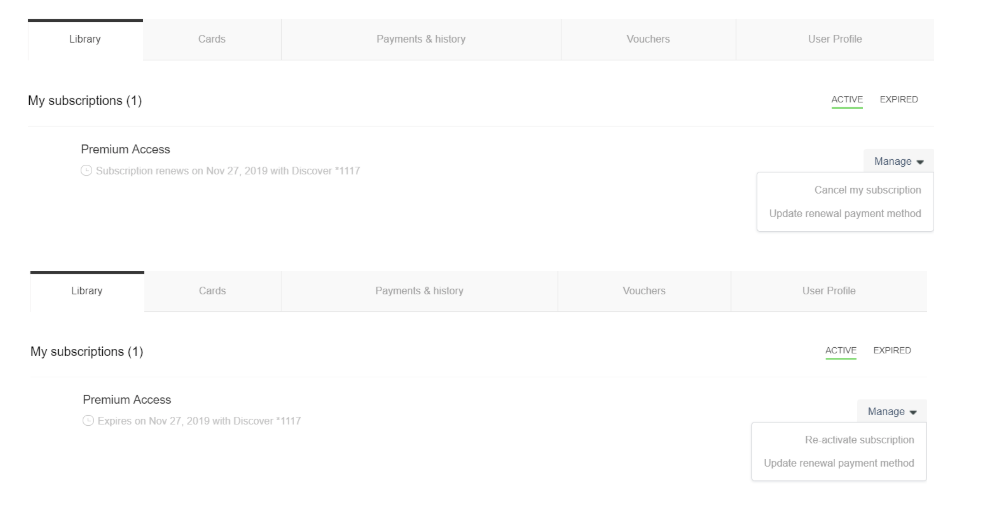
To include the button in the drop-down menu, you need to place the following code into the tp-menu elements of the My Account Library Components template (and delete the code for the auto-renew toggler, as described above):
<tp-menu-item ng-click="toggleRenew(libraryItem);"
                                      ng-show="libraryItem.autoRenewChangeEnabled">
                            <span ng-if="libraryItem.autoRenew === true">
                                <t context="checkout.platform">Don't bill me again</t>
                            </span>
                            <span ng-if="libraryItem.autoRenew === false">
                                <t context="checkout.platform">Re-activate subscription</t>
                            </span>
</tp-menu-item>