

This feature is deprecated and should not be used.
PayU India Overview
Following PayU India and PayU Hub (formerly Zooz) dissolution at the end of 2025, PayU India integration has been deprecated and can no longer be used by any new clients or existing clients.
Merchant Requirements
Please review this guide on how to set up a PayU Hub account needed for this PayU India payment provider integration.
To ensure the latest code, system template changes are required in your Payment Components system template, if your app has been created before Oct 2022. There are a few ways to update your templates;
-
The easiest is to reset to default if you haven’t stylized the templates.
-
If you did, then you can use the Compare code feature and compare the code between the default version and your current version, and carry over any new code line by line.
In case you're also offering payments via UPI, please check that the code of the template under Manage→Templates→Payment Components contains:
<script type="text/ng-template" id="/frontend/providers/components/payuindiaupi/checkout/component.shtml">
<div class="payu-india-upi-wrapper new-card-form">
    <div class="row">
        <div class="cc_new_card" ng-show="cc.payWithNew && cc.initiated">
            <div desktop class="go-back-to-cards-wrapper">
                <h4>
                    <t>Enter your VPA</t>
                </h4>
            </div>
            <form class="new-card-form" name="ccForm" role="form">
                <dynamic-base-inputs-component name="providerName"
                                               credit-card="credit_card"></dynamic-base-inputs-component>
                <div class="payment-system-condition"/>
            </form>
        </div>
        <div consents-list></div>
        <div class="footer-modal">
            <div ng-show="isConfirmStepEnabled()" class="complete-purchase-button" goto-confirmation-button
                 title="{{'Complete Purchase' | t}}"></div>
            <div ng-show="!isConfirmStepEnabled()" class="complete-purchase-button" complete-purchase-button
                 title="{{'Complete Purchase' | t}}"></div>
        </div>
    </div>
</div>
</script>

<script type="text/ng-template" id="/frontend/providers/components/payuindiaupi/common/baseTemplate.shtml">
<div class="cc-fields-layout">
  <div class="cc-fields-layout__field cc-fields-layout__vpa">
    <cc-text-input id="payu-upi-new-vpa"
                   i18n-placeholder="{{'VPA' | t}}"
                   ng-model="credit_card.vpa.value"
                   on-change="credit_card.vpa.onChangeCallback"
                   ng-disabled="credit_card.vpa.disabled"
                   icon="'bank'"
                   ng-required="credit_card.vpa.required"
                   ng-readonly="credit_card.vpa.readonly"
                   maxlength="credit_card.vpa.maxlength"
                   valid="credit_card.vpa.valid"
                   name="'vpa'"
                   data-e2e="cc_vpa">
    </cc-text-input>
  </div>
  <div class="cc-fields-layout__flex-row">
    <div class="cc-fields-layout__field cc-fields-layout__first-name">
      <cc-text-input id="payu-upi-first-name"
                     i18n-placeholder="{{'First name' | t}}"
                     ng-model="credit_card.firstName.value"
                     on-change="credit_card.firstName.onChangeCallback"
                     ng-disabled="credit_card.firstName.disabled"
                     icon="'client'"
                     ng-required="credit_card.firstName.required"
                     ng-readonly="credit_card.firstName.readonly"
                     maxlength="credit_card.firstName.maxlength"
                     valid="credit_card.firstName.valid"
                     name="'firstName'"
                     data-e2e="cc_first_name">
      </cc-text-input>
    </div>
    <div class="cc-fields-layout__field cc-fields-layout__last-name">
      <cc-text-input id="payu-upi-last-name"
                     i18n-placeholder="{{'Last name' | t}}"
                     ng-model="credit_card.lastName.value"
                     on-change="credit_card.lastName.onChangeCallback"
                     ng-disabled="credit_card.lastName.disabled"
                     icon="'client'"
                     ng-required="credit_card.lastName.required"
                     ng-readonly="credit_card.lastName.readonly"
                     maxlength="credit_card.lastName.maxlength"
                     valid="credit_card.lastName.valid"
                     name="'lastName'"
                     data-e2e="cc_last_name">
      </cc-text-input>
    </div>
  </div>
  <div class="cc-fields-layout__flex-row">
    <div class="cc-fields-layout__field cc-fields-layout__phone-number">
      <cc-phone-number-component id="payu-upi-phone-number"
                                 i18n-placeholder="{{'Phone number' | t}}"
                                 ng-model="credit_card.phone.value"
                                 on-change="credit_card.phone.onChangeCallback"
                                 ng-disabled="credit_card.phone.disabled"
                                 ng-required="credit_card.phone.required"
                                 ng-readonly="credit_card.phone.readonly"
                                 maxlength="credit_card.phone.maxlength"
                                 valid="credit_card.phone.valid"
                                 validation-rule="'numeric'"
                                 name="'phone'"
                                 data-e2e="cc_phone">
      </cc-phone-number-component>
    </div>
    <div class="cc-fields-layout__field"></div>
  </div>
</div>

</script>
In case you're offering also payments via NetBanking, please check if the template under Manage→Templates→Payment Components contains the following code:
<script type="text/ng-template" id="/frontend/providers/components/payuindianb/checkout/component.shtml">
<div class="payu-india-netbanking-wrapper new-card-form">
    <div class="row">
        <div desktop class="cc_stored_cards" ng-show="!cc.payWithNew && cc.initiated">
            <div class="add-credit-card-wrapper">
                <h4>
                    <t>Your bank accounts</t>
                </h4>
                <a href="javascript:void(0)" class="add-credit-card" ng-click="cc.payWithNew = true"
                   ng-show="cc.stored.length > 0">
                    +
                    <t>Add a bank account</t>
                </a>
            </div>
            <table class="payment-method-card" ng-show="cc.stored.length > 0">
                <tr class="payment-method-card-row" ng-repeat="method in cc.stored"
                    ng-class="{'selected' : $parent.cc.selectedUpiId == method.id}">
                    <td class="payment-method-card-cell">
                        <input type="radio" name="stored_method" value="{{method.id}}"
                               ng-model="$parent.cc.selectedUpiId"/>
                    </td>
                    <td class="payment-method-card-cell">
                        <div>{{method.type | tc:"checkout.platform"}}</div>
                    </td>
                    <td class="payment-method-card-cell">
                        <div>*{{method.ending_in}} - <t>transaction max amount</t> {{method.txMaxAmount}}</div>
                    </td>
                </tr>
            </table>
        </div>

        <div mobile class="cc_stored_cards" ng-show="cc.initiated">
            <table class="payment-method-card" ng-show="cc.stored.length > 0">
                <tr class="payment-method-card-row" ng-repeat="method in cc.stored"
                    ng-class="{'selected' : $parent.cc.selectedUpiId == method.id && $parent.cc.payWithNew != true}">
                    <td class="payment-method-card-cell">
                        <input type="radio" name="stored_method" value="{{method.id}}"
                               ng-model="$parent.cc.selectedUpiId"
                               ng-click="$parent.cc.payWithNew = false"/>
                    </td>
                    <td class="payment-method-card-cell">
                        <div class="credit-card-{{method.identifier}}"></div>
                    </td>
                </tr>
                <tr class="payment-method-card-row" ng-class="{'selected' : $parent.cc.payWithNew == true}">
                    <td class="payment-method-card-cell">
                        <input type="radio" name="stored_method" ng-model="$parent.cc.payWithNew" ng-value="true"/>
                    </td>
                    <td class="payment-method-card-cell" colspan="2">
                        <t>Add a new bank account</t>
                    </td>
                </tr>
            </table>
        </div>

        <div class="cc_new_card" ng-show="cc.payWithNew && cc.initiated">
            <div desktop class="go-back-to-cards-wrapper">
                <a href="javascript:void(0)" class="go-back-to-cards" ng-click="cc.payWithNew = false"
                   ng-show="cc.stored.length > 0">
                    <t>Return to saved bank accounts</t>
                </a>
                <h4>
                    <t>Payment details</t>
                </h4>
            </div>
            <form class="new-card-form" name="ccForm" role="form">
                <div class="controls">
                    <div class="cc-field-outer-wrap netbanking-field">
                        <div class="cc-field-outer-wrap__field cc-field">
                            <label class="cc-field__icon cc-field__icon--bank"></label>
                            <select id="payu-nb-code"
                                    class="cc-fields-layout__select-field"
                                    ng-model="cc.bankCode"
                                    ng-options="o.name for o in bankCodes track by o.code"
                                    required>
                                <option value="" disabled selected style="display: none;">{{'Bank' | t}}</option>
                            </select>
                        </div>
                    </div>
                    <div class="cc-field-outer-wrap netbanking-field">
                        <div class="cc-field-outer-wrap__field cc-field">
                            <label class="cc-field__icon cc-field__icon--identification-type"></label>
                            <select id="payu-nb-type"
                                    ng-model="cc.accType"
                                    class="cc-fields-layout__select-field"
                                    required>
                                <option value="" disabled selected>{{'Account type' | t}}</option>
                                <option value="SAVINGS">{{'Savings' | t}}</option>
                                <option value="CURRENT">{{'Current' | t}}</option>
                        </select>
                        </div>
                    </div>
                    <div class="cc-field-outer-wrap netbanking-field">
                        <div class="cc-field-outer-wrap__field cc-field">
                            <label class="cc-field__icon cc-field__icon--client"></label>
                            <input id="payu-nb-acc-name" type="text"
                                   class="custom-input-style cc-field__input flat fs-block"
                                   ng-model="cc.accName"
                                   placeholder="Account name"/>
                        </div>
                    </div>
                    <div class="cc-field-outer-wrap netbanking-field">
                        <div class="cc-field-outer-wrap__field cc-field">
                            <label class="cc-field__icon cc-field__icon--national-id"></label>
                            <input id="payu-nb-acc-number" type="text"
                                   class="custom-input-style cc-field__input flat fs-block"
                                   ng-model="cc.accNumber"
                                   placeholder="Account number"/>
                        </div>
                    </div>
                    <div class="cc-field-outer-wrap netbanking-field">
                      <div class="cc-fields-layout__field cc-field cc-fields-layout__phone-number">
                        <label class="cc-field__icon cc-field__icon--phone-number"></label>
                        <input id="payu-nb-phone-number" type="text"
                               class="netbanking-phone-number-input cc-field__input flat fs-block"
                               ng-model="cc.phone"
                               placeholder="Phone number"/>
                      </div>
                    </div>
                </div>
                <div class="payment-system-condition">
                    <span ng-if="!isSubscription()">
                        <div class="custom-checkbox">
                            <input type="checkbox" name="store_in_vault" ng-model="credit_card.store_in_vault"
                                   id="rermber-my-card1-payu-india-nb"/>
                            <label for="rermber-my-card1-payu-india-nb">
                                <t>Remember my bank account for future payments</t>
                            </label>
                        </div>
                    </span>
                    <span ng-if="isSubscription()">
                        <input type="hidden" name="store_in_vault" ng-model="credit_card.store_in_vault"/>
                    </span>
                    <div class="custom-checkbox" ng-if="credit_card.store_in_vault">
                        <input type="checkbox" name="defaultPaymentMethodId" ng-model="cc.defaultPaymentMethodId"
                               id="default-payment-method-payu-india-nb"/>
                        <label for="default-payment-method-payu-india-nb">
                            <t>Apply this payment method to all active subscriptions</t>
                        </label>
                    </div>
                </div>
            </form>
        </div>
        <div consents-list></div>
        <div class="footer-modal">
            <div class="auto-renew-purchase" ng-show="isSelectedTermAutoRenewChoiceAvailable()">
                <input class="auto-renew-purchase-checkbox" type="checkbox" ng-model="input.autoRenew"
                       id="auto_renew"/>
                <label class="auto-renew-purchase-label" for="auto_renew">
                    <t>Automatically renew my subscription when the time comes.</t>
                </label>
            </div>
            <div ng-show="isConfirmStepEnabled()" class="complete-purchase-button" goto-confirmation-button
                 title="{{'Complete Purchase' | t}}"></div>
            <div ng-show="!isConfirmStepEnabled()" class="complete-purchase-button" complete-purchase-button
                 title="{{'Complete Purchase' | t}}"></div>
        </div>
    </div>
</div>

</script>
Important notes
In order for the 3DS screen to be shown on a full page instead of only an iframe (smaller) window, please reach out to our Support Team at support@piano.io for further assistance.
Once this is done, we are going to show the 3DS page on a separate page and after the user enters the VPA code they will be redirected to checkout.
Below you can find more information about the various payment-related IDs found on the PayU Hub Control Center:
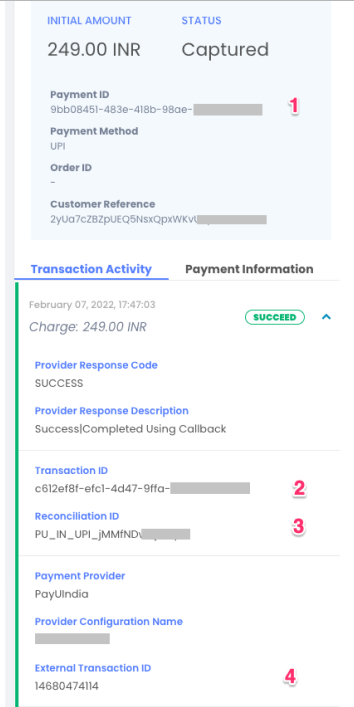
1. Payment ID - This ID is created by PayU Hub and sent to both Piano and PayU India. This represents the entire payment object on PayU Hub.
2. Transaction ID - This ID is created by PayU Hub and sent to both Piano and PayU India. This represents a specific transaction (e.g Charge/Refund) on PayU Hub.
3. Reconciliation ID - Sent by Piano to PayU Hub and then to PayU India.
4. External Transaction ID - The transaction ID on PayU India.
Supported Countries
The following countries are supported by this payment provider:
|
Supported Countries |
|---|
|
India |
Please note that this is not an exhaustive list and that customers from other countries still can make purchases with a supported payment method, although potential restrictions from the payment provider's end might apply.
Supported Currency
Piano supports the following PayU India supported currency:
|
Supported Currencies |
|
|---|---|
|
INR |
USD |
If you'd like to have multiple currency support and have different PayU India accounts, please review the section here.
Supported Payment Methods
Piano supports the following payment methods for this payment provider:
|
Payment method name |
Are renewals supported? |
||||||||||||
|---|---|---|---|---|---|---|---|---|---|---|---|---|---|
|
Credit card (Mastercard, Visa, American Express, Discover, JCB, Diner's Club) |
Yes |
||||||||||||
|
NetBanking |
Yes |
||||||||||||
|
UPI |
No* |
*Recurring payments are currently not supported via PayU Hub.
How do pre-debit notifications work?
A subscription auto-renewal requires notification at least 24 hours prior to the user being charged. Piano calls PayU’s Pre-Debit API and runs the PayU India Pre-Debit Notification job every day. It is running a few times per day (00:00, 12:00). This job is looking for active subscriptions that match the following conditions:
-
autorenewal = true
-
today + 3 days <
next_billing_date< today + 1 day
If the response fails, the request will be sent again on the next run. But if we do not receive a successful status, we will not renew the subscription.
Supported Features and Functionality
|
Feature/Functionality |
Supported? |
|
Refunds |
Full / Partial |
|
Apply Terms Wizard |
No |
|
My Account - Add payment method |
No |
|
My Account - Edit payment method |
No |
|
My Account - Delete payment method |
Yes |
|
Publisher dashboard - Add payment method |
No |
|
Publisher dashboard - Edit payment method |
No |
|
Publisher dashboard - Delete payment method |
Yes |
|
Tax Providers and Types |
NA |
|
Transaction descriptors |
No |
|
Frictionless |
No |
|
3DS / SCA |
Yes (cards only) |
|
Fraud prevention |
Yes (3D Secure) |
|
Passive churn prevention |
Yes - standard support |
|
Payment token import support |
Yes* |
*For credit card payment tokens. For more information about the payment token import please visit this link.
How to integrate PayU India with Piano
Credit Cards (V2)
This integration version supports pre-debit notifications and replaces the previous credit card integration.
-
Add the payment provider configuration PayU India (credit cards) V2 under Edit Business → Payment Provider:
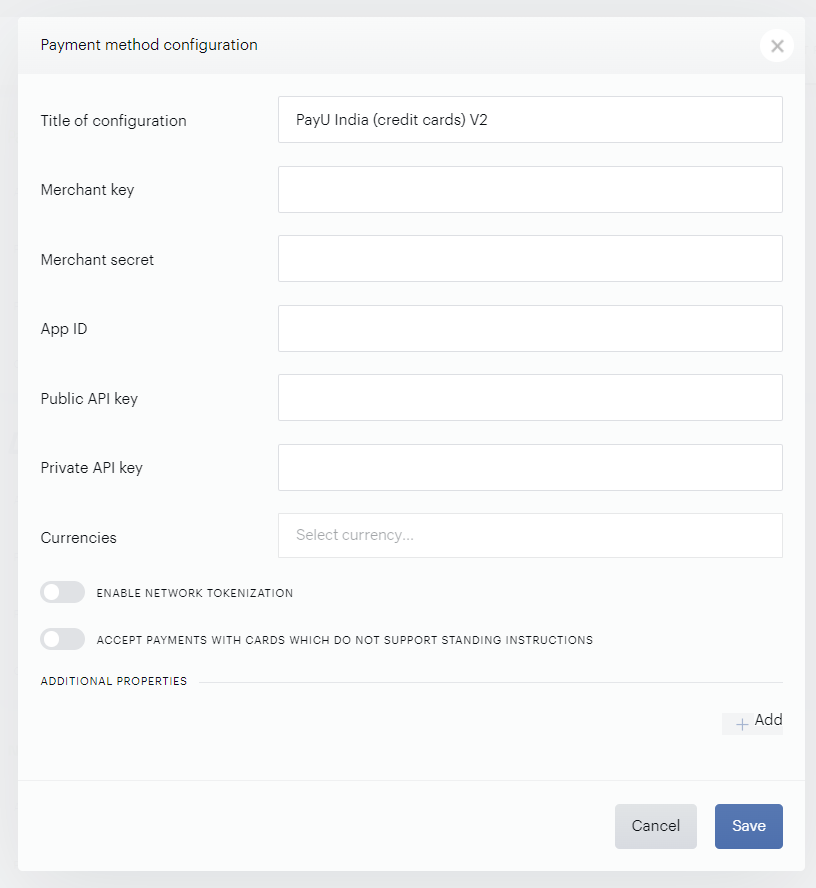
Now enter the following fields:
-
Title: Give your configuration a relevant name. This name won't be exposed to customers.
-
App ID: Enter the Merchant/App ID from your Payu India account's dashboard
-
Public API key: Enter your Public API key found in your PayU India account
-
Private API key: Enter your Private API key found in your PayU India account
-
Currencies: Select INR from the list of all currencies
Important: Please note that there are 2 additional configuration fields: Merchant key and Merchant secret. These fields are used to create the provider configuration in the PaymentsOs account. Credentials for any currencies other than “INR” should be in the ADDITIONAL PROPERTIES section because the recurring flow only supports Indian Rupees.
-
-
The Full 3DS redirect feature needs to be enabled. If you're not sure if this is enabled for your Piano application, please reach out to Piano Support at support@piano.io.
-
In your Piano dashboard, go to Manage → Templates → Payment components and update the template with the below code:
HTML<script type="text/ng-template" id="/frontend/providers/components/payuindiaccv2/checkout/component.shtml"> <div class="payu-india-cc-v2-wrapper new-card-form"> <div class="row"> <div class="cc_new_card" ng-show="cc.payWithNew && cc.initiated"> <div desktop class="go-back-to-cards-wrapper"> <h4> <t>Add a new credit or debit card</t> </h4> </div> <form class="new-card-form" name="ccForm" role="form"> <dynamic-base-inputs-component name="providerName" credit-card="credit_card"></dynamic-base-inputs-component> <div class="payment-system-condition"> <span ng-if="!isSubscription()"> <div class="custom-checkbox"> <input type="checkbox" name="store_in_vault" ng-model="credit_card.store_in_vault" id="rermber-my-card-india-cc-v2"/> <label for="rermber-my-card-india-cc-v2"> <t>Remember my card for future payments</t> </label> </div> </span> <span ng-if="isSubscription()"> <input type="hidden" name="store_in_vault" ng-model="credit_card.store_in_vault"/> </span> </div> </form> </div> <div consents-list></div> <div class="footer-modal"> <div class="auto-renew-purchase" ng-show="isSelectedTermAutoRenewChoiceAvailable()"> <input class="auto-renew-purchase-checkbox" type="checkbox" ng-model="input.autoRenew" id="auto_renew"/> <label class="auto-renew-purchase-label" for="auto_renew"> <t>Automatically renew my subscription when the time comes.</t> </label> </div> <div ng-show="isConfirmStepEnabled()" class="complete-purchase-button" goto-confirmation-button title="{{'Complete Purchase' | t}}"></div> <div ng-show="!isConfirmStepEnabled()" class="complete-purchase-button" complete-purchase-button title="{{'Complete Purchase' | t}}"></div> </div> </div> </div> </script> <script type="text/ng-template" id="/frontend/providers/components/payuindiaccv2/common/baseTemplate.shtml"> <div class="cc-fields-layout"> <div class="cc-fields-layout__field cc-fields-layout__card-holder"> <credit-card-holder ng-model="credit_card.holder.value" on-change="credit_card.holder.onChangeCallback" ng-disabled="credit_card.holder.disabled" ng-required="credit_card.holder.required" ng-readonly="credit_card.holder.readonly" maxlength="credit_card.holder.maxlength" valid="credit_card.holder.valid" name="'holder'"> </credit-card-holder> </div> <div class="cc-fields-layout__field cc-fields-layout__card-number"> <credit-card-number ng-model="credit_card.num.value" on-change="credit_card.num.onChangeCallback" ng-disabled="credit_card.num.disabled" ng-required="credit_card.num.required" ng-readonly="credit_card.num.readonly" maxlength="credit_card.num.maxlength" valid="credit_card.num.valid" name="'num'"> </credit-card-number> </div> <div class="cc-fields-layout__field cc-fields-layout__expire"> <cc-expire-component ng-model="credit_card.expire.value" on-change="credit_card.expire.onChangeCallback" ng-disabled="credit_card.expire.disabled" ng-required="credit_card.expire.required" ng-readonly="credit_card.expire.readonly" maxlength="credit_card.expire.maxlength" valid="credit_card.expire.valid" name="'expire'" on-change="onChangeCallback"> </cc-expire-component> </div> <div class="cc-fields-layout__field cc-fields-layout__cvv"> <credit-card-cvv ng-model="credit_card.cvv.value" on-change="credit_card.cvv.onChangeCallback" ng-disabled="credit_card.cvv.disabled" ng-required="credit_card.cvv.required" ng-readonly="credit_card.cvv.readonly" maxlength="credit_card.cvv.maxlength" valid="credit_card.cvv.valid" name="'cvv'"> </credit-card-cvv> </div> <div class="cc-fields-layout__custom-field"> <div class="cc-fields-layout__field cc-fields-layout__phone-number"> <cc-phone-number-component placeholder="'Phone number' | t" ng-model="credit_card.phone.value" on-change="credit_card.phone.onChangeCallback" ng-disabled="credit_card.phone.disabled" ng-required="credit_card.phone.required" ng-readonly="credit_card.phone.readonly" maxlength="credit_card.phone.maxlength" valid="credit_card.phone.valid" validation-rule="'numeric'" name="'phone'"> </cc-phone-number-component> </div> </div> </div> </script> -
Contact Piano Support at support@piano.io to hide the old credit card integration version from checkout. Note, that this step is only needed if you already had the previous PayU India Credit Card integration version active.
Note: To comply with the latest RBI regulation, network tokenization is required, in order to do so, you will need to contact your PayU representative to ensure all necessary documents are signed, and then ensure you have enabled the settings both in your PayU Hub and Piano dashboard. Please make sure you are registered for the Network Token Service.
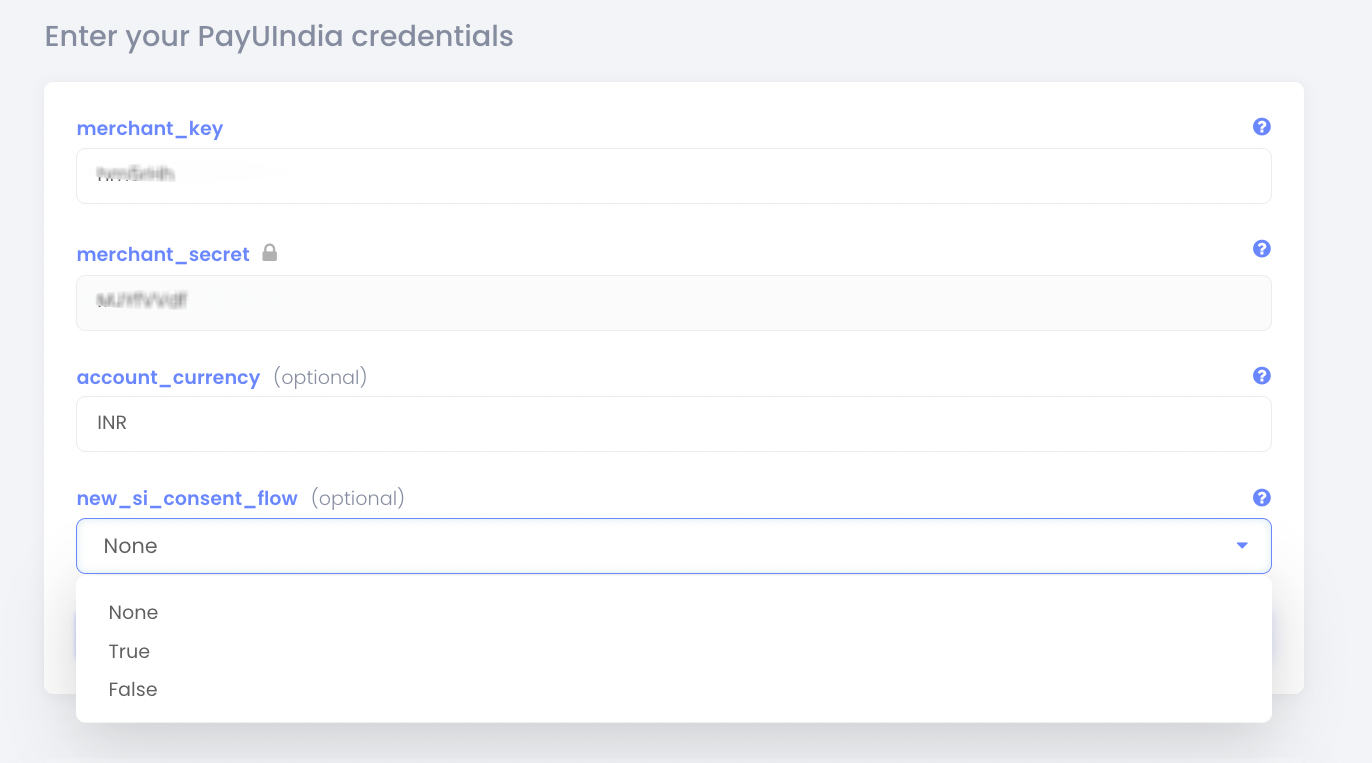
In the PayU Hub dashboard, set the New_SI_Consent_flow to True:
Afterwards, in your Piano dashboard, turn the toggle Enable Network Tokenization on:
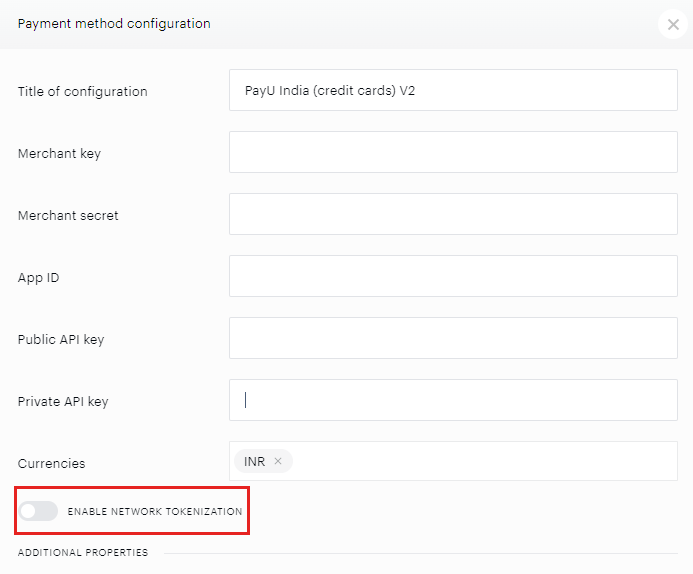
Piano has added a new setting called "Accept payments with cards which do not support standing instructions" to limit the ability to use cards which do not support Standing Instructions according to RBI regulations. The default state of the setting is disabled, and cards which are not listed in the documentation here are not going to be accepted during checkout.
It is up to the client to decide if they would still like to accept payments with cards even if the renewals will fail.
NetBanking and UPI
If in addition to credit cards you're also supporting other payment methods, such as NetBanking and UPI, please add the respective configurations for PayU India NetBanking and PayU India UPI with the credentials from your PayU India account.
For Netbanking, a connection to the e-NACH (Electronic National Automated Clearing House) system is needed which can be arranged by the provider.
The list of supported banks for NetBanking can be found under the following link.
If you'd like to enable recurring payments for NetBanking, please contact your provider to activate the necessary settings for the recurring payments via NetBanking and then reach out to Piano support at support@piano.io to enable this flow in your Piano application.
Multi-currency support
PayU India has released multi-currency support for single applications that use multiple business units.
If you want to add another currency under a different PayU India account, you can add another configuration in the Additional Properties section. Simply select the +Add button, fill in the configuration fields mentioned above, and select the additional currency.

This will allow you to connect multiple business units for PayU India and configure a currency for each.
Testing
See this article for testing credentials. While cards can be tested in Sandbox, for Netbanking and UPI, production testing is required.